Fundamental
Prepare and test your skills

Fundamental
Prepare and test your skills
Managing Cloud Storage and Database Operations
Cloud Storage (opens in a new tab) is the object storage service that holds data as objects inside containers called buckets (opens in a new tab). Every bucket belongs to a project that belongs to an organization, and every object has one storage class, location, and access setting. Managing a bucket means controlling who can read or write objects, how long objects live, and how data stays correct and recoverable.
Identity and Access Management Roles and Access Control Lists
Access control for Cloud Storage decides which principals can reach a bucket and the objects inside it. Identity and Access Management (IAM) is the primary system, where an administrator grants a role such as Storage Admin to a principal and the role carries permissions to read, write, or administer data. Bucket resources are named as projects/_/buckets/BUCKET_NAME and object resources as projects/_/buckets/BUCKET_NAME/objects/OBJECT_NAME, so policies can target a whole bucket or a single object.
Access Control Lists (ACLs) are per-object entries that grant access to one object at a time, plus a default object ACL that new objects inherit. Because ACLs attach to individual objects, different objects in the same bucket can have different readers. This flexibility adds work because permissions must be checked object by object, and the metric storage.googleapis.com/authz/acl_operations_count shows whether workflows still depend on ACLs.
Uniform Bucket-Level Access Versus Fine-Grained Access
Uniform bucket-level access is a bucket setting that places all access under bucket-level IAM roles and disables object ACLs. Fine-grained access is the alternative where both bucket-level IAM roles and per-object ACLs grant access. Changing to uniform access requires storage.buckets.get, storage.buckets.list, and storage.buckets.update, which can come from the Storage Admin role or a custom role.
| Access model | How access is granted | Management tradeoff |
|---|---|---|
| Uniform bucket-level access | Only bucket-level IAM roles grant access to bucket and objects | Simpler and consistent, and required for managed folders |
| Fine-grained access | Bucket IAM roles plus individual and default object ACLs | Allows per-object control, but requires tracking many objects |
Choose uniform access when all objects should share the same rules. Choose fine-grained access only when different objects must have different permissions. Blocking public access prevents data from becoming reachable by allUsers on the internet.
Exam tip: Enabling uniform bucket-level access disables object ACLs, and uniform bucket-level access is required to use managed folders.
Managed Folders for Group-Based Access
Managed folders are Cloud Storage resources that add access control for groups of objects without creating a true directory tree. A request flows from the principal to the bucket IAM policy and then to any managed folder policy that applies, so the folder policy expands what the bucket policy allows. Managed folders depend on the bucket using uniform bucket-level access, because the bucket must have one IAM-based system for the overlay to extend.
Object Lifecycle Management and Storage Class Transitions
Object Lifecycle Management is a bucket configuration that automatically moves or deletes objects when conditions such as age or storage class are met. A rule pairs conditions with one action: SetStorageClass to rewrite an object into a colder class such as Archive, or Delete to expire it. The rules run continuously, so new objects that age into a condition are handled like older objects without scripts or manual deletes.
An object is live while it is the current version, becomes noncurrent when Object Versioning keeps an older generation after a rewrite, and becomes soft-deleted for seven days by default after deletion before permanent removal. Changing storage class rewrites data as a Class A operation, and at very large scale Storage batch operations can move millions of Standard objects to Archive or bulk delete objects. Holds, retention policies, and Bucket Lock can block deletion, so lifecycle expiration depends on those protections being cleared first.
Object Version States: Live to Deleted
State / Lifecycle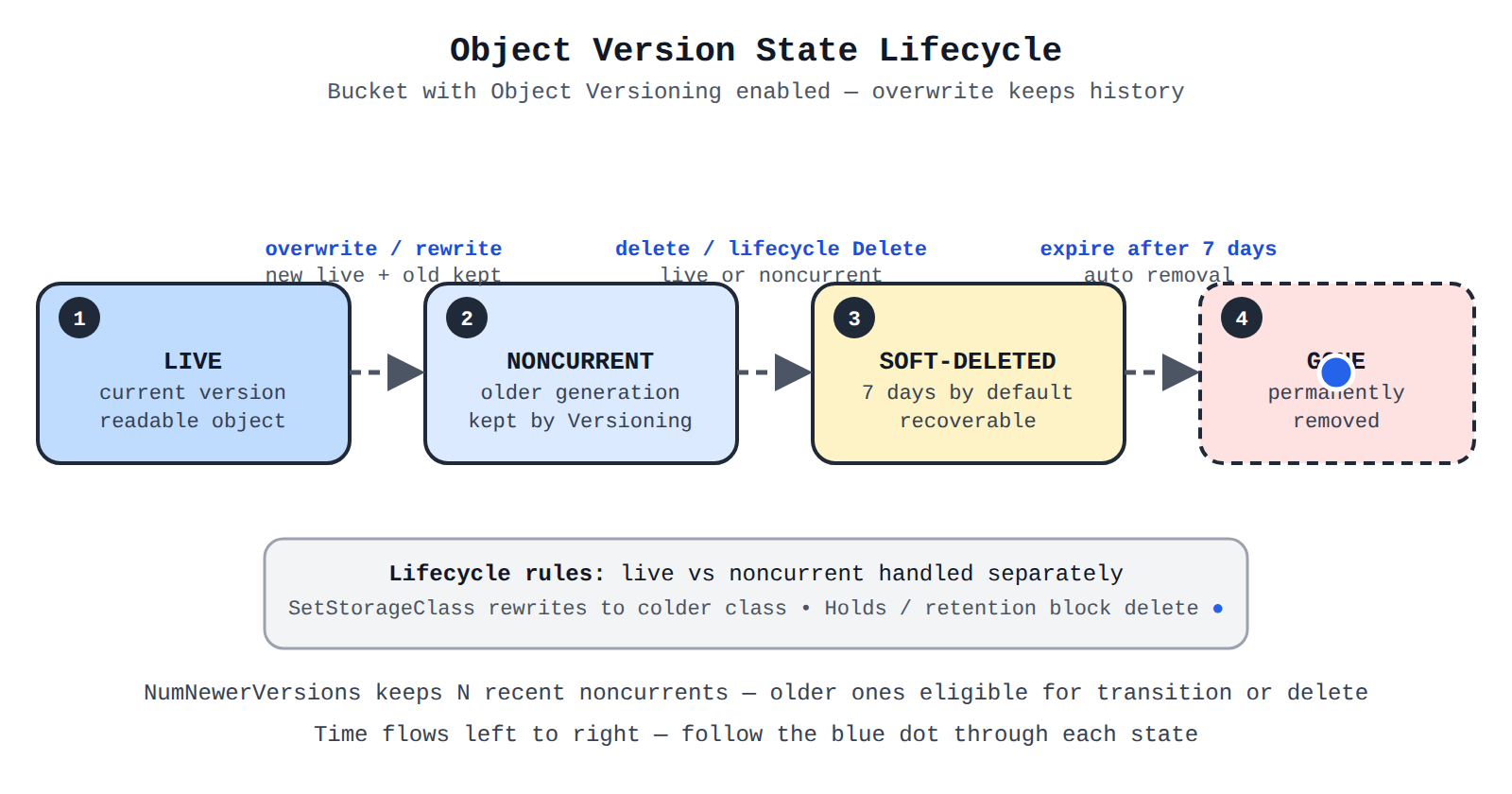
Four states in order: Live current version becomes Noncurrent older generation on overwrite, then Soft-deleted for 7 days on delete, then Permanently deleted. A moving dot shows the forward flow.
Choosing a Deletion Method
Choosing a deletion method depends on object count, selection by name or condition, and whether the work is one-time or automatic. Single-object deletion sends one DELETE request per object for precise fixes. Bulk deletion processes many objects together for higher throughput.
| Method | Best for | How it works |
|---|---|---|
| Single-object deletion | One or a few specific objects | Console, gcloud storage rm, client libraries, or REST APIs send one request per object |
| Bulk object deletion | Many objects or automatic expiration | Prefix deletes, multi-object requests, background console jobs, batch operations, or lifecycle rules |
The Google Cloud console deletes up to one million objects in a background job, gcloud storage rm --recursive deletes by common prefix for small to medium jobs, and the multi-object XML API deletes up to 1,000 objects in one POST and works with Amazon S3 tools such as Boto3. Storage batch operations deletes millions or billions asynchronously with tracking, but a job lasts at most 14 days, spans at most 1,000 buckets, allows at most 1,000 prefixes, and degrades if more than 10 jobs run on the same bucket.
Object Versioning, Encryption Keys, and Signed URLs
Object Versioning is a bucket setting that keeps version history by storing the live version with older noncurrent versions. The configuration sets the maximum versions kept and the days after which noncurrent versions expire, so an overwrite does not immediately remove prior data.
Encryption protects object data by requiring the correct key to decrypt it. Different objects in one bucket can use different methods, but one object uses one method at a time. Cloud Key Management Service (Cloud KMS) keys have versions, and after rotation new uploads, copies, and rewrites use the new primary version while old versions still decrypt existing objects. Replacing a key follows an order: first replace the bucket default, then update code that specifies the key, then re-encrypt existing objects with Rewrite Object, then disable old versions and watch logs for failures.
| Action | Effect on encrypted objects | Recovery |
|---|---|---|
| Disable key version | Downloads, copies, and rewrites fail | Re-enable the version to restore access |
| Destroy key version | Downloads are never possible again | No recovery; data loss is permanent |
A Signed URL is a time-limited URL that grants access to a private object to anyone who holds it. A service account with signing permission creates the URL for a specific bucket, object, HTTP method, and expiration, and the external user presents that URL directly to Cloud Storage with any agent such as curl. Cloud Storage checks the signature and expiration, so the user needs no Google account and bucket IAM does not change. A GET URL allows temporary download such as cat.jpeg for 10 minutes, while a PUT URL allows temporary upload such as cat.png with a required content type.
Continue with this study guide: Managing and securing objects in Cloud Storage buckets
Object Lifecycle Management automates how objects move to lower-cost storage and when they are removed. A lifecycle rule pairs a set of conditions with a single action, and Cloud Storage applies the action only when an object satisfies all conditions in that rule. Data flows from active use to colder placement and then to deletion without manual work.
Lifecycle Actions
A lifecycle action defines the change that happens to matching objects. The rule uses lifecycle.rule[].action.type to select the action, and a transition rule also uses lifecycle.rule[].action.storageClass to name the destination class.
| Action | What happens to the object | Choose when |
|---|---|---|
| Delete | Cloud Storage permanently removes the matching object or version | Data has a defined retention end for cost and compliance |
| SetStorageClass | Cloud Storage rewrites the matching object into the specified class | Data is read less often but must be kept |
A SetStorageClass rule keeps data readable while moving it down the cost curve, while a Delete rule ends the object lifecycle.
Age and Date Conditions
Age and date conditions select objects based on time, supporting both rolling aging and calendar cutoffs.
- Age: matches live objects alive at least the specified days since creation.
- CreatedBefore: matches objects created before a fixed calendar date.
- CustomTimeBefore: matches objects whose custom time metadata is before a date.
- DaysSinceCustomTime: matches objects a set days after custom time is set.
- DaysSinceNoncurrentTime: matches noncurrent versions a set days after they became noncurrent.
- NoncurrentTimeBefore: matches noncurrent versions that became noncurrent before a date.
Age fits rolling policies such as transition after 30 days and delete after 365 days. CreatedBefore fits one-time cleanup such as removing everything created before a migration.
Object Matching Conditions
Object matching conditions narrow which objects or versions a rule can affect so time conditions do not apply too broadly.
- MatchesStorageClass: matches only objects currently in listed classes.
- MatchesPrefix: matches only names beginning with prefixes such as
logs/. - MatchesSuffix: matches only names ending with suffixes such as
.log. - NumNewerVersions: matches versions when a newer-version count exists, to keep only recent versions.
- WithState: selects live objects, noncurrent versions, or both.
Combining Age with MatchesStorageClass moves objects to a colder class only after they age and prevents the same rule from acting again after the transition.
Exam tip: Use Age for objects that should age out on a rolling basis, while CreatedBefore applies to objects created before one fixed date.
How Overwrites, Versioning, and Retention Interact
An overwrite in a bucket with versioning or object locking enabled adds a new version instead of replacing data in place. The bucket keeps one live version and one or more noncurrent versions, and both can be retrieved. Lifecycle rules can then apply separately to live and noncurrent versions so old versions do not accumulate forever.
The NumNewerVersions condition controls retention by counting how many newer versions exist. Data flows from live to noncurrent on overwrite or delete, then the rule evaluates each noncurrent version against the count and makes older copies eligible for transition or deletion. A default retention period adds write-once, read-many (WORM) protection by requiring objects created after a policy change to be kept for a set days, without changing protection on older objects.
Rule Structure, Enforcement Timing, and Precedence
A lifecycle configuration is a list of rules attached to a bucket, where each rule contains an action and its conditions. Conditions include age, createdBefore, matchesStorageClass, matchesPrefix and matchesSuffix, numNewerVersions, customTimeBefore and daysSinceCustomTime, and daysSinceNoncurrentTime and noncurrentTimeBefore. An object must satisfy the stated conditions for the rule to affect it.
Enforcement is asynchronous through a background job, not instant. New, edited, or removed rules take effect within approximately one day, and expired data typically disappears within 24 hours while still appearing in listings until the worker deletes it. Applying a new policy can trigger bulk deletion of everything already expired.
When delete and keep intents overlap, keep wins. IAM roles for Cloud Storage (opens in a new tab) include delete and keep concepts used in cleanup policies, where delete policies remove versions by age or filters and keep policies retain matches or the most recent N versions. An artifact matching both is kept, so teams add a conditional keep alongside a broad delete to protect releases. A dry run with validateOnly set to true previews effects before deleting.
Executing queries to retrieve data from data instances (e.g., Cloud SQL, BigQuery, Bigtable, Spanner, Firestore, AlloyDB)
Query execution means knowing where a query is typed, how it reaches the database, and what language the database understands. Google Cloud routes requests from consoles, command-line tools, APIs, and drivers to the right instance, cluster, or dataset, and each service processes the request with its own storage and execution design.
Query Tools and Interfaces
Query tools and interfaces send a query to a data service and return results. A request flows from the tool to the service endpoint, the service runs the query against storage and compute, and results flow back to the tool. BigQuery (opens in a new tab) handles its own connection management with no server setup, while relational services route a query to a specific instance and database.
Common interfaces include the Google Cloud console for interactive querying, the bq tool for BigQuery queries and loads, REST APIs and client libraries for applications, JDBC and ODBC drivers for third-party tools and sheets, DBeaver for SQL exploration, and the Data Agent Kit IDE extension that queries BigQuery, Spanner, Bigtable, AlloyDB, and Cloud SQL from VS Code. In that editor a BigQuery query only needs BigQuery selected, while AlloyDB, Cloud SQL, and Bigtable queries must select a cluster or instance, and relational queries must also select a database. Cloud SQL can use IAM database authentication or built-in authentication with passwords in Secret Manager.
Relational, Analytical, and Global-Scale Models
Cloud SQL is a fully managed relational service with MySQL, PostgreSQL, and SQL Server engines that uses row-based tables, rows, and joins. AlloyDB for PostgreSQL is a fully managed PostgreSQL-compatible service for demanding transactional workloads. Both target a specific instance and then a database inside it, keeping transactional reads and writes isolated.
BigQuery is a fully managed warehouse for large-scale analysis using GoogleSQL, which supports SQL:2011 with extensions for nested data, geospatial, search, graph queries with Graph Query Language (GQL), and BigQuery ML. BigQuery decouples storage and compute by storing compressed columnar data in Colossus using the Capacitor format and executing queries with the Dremel engine. Datasets are the highest-level containers that organize access to tables, with schemas, labels, and partitioning for organization, performance, and cost control. Compute is measured in slots of CPU and memory, and per-user cached results last approximately 24 hours when data does not change.
Spanner is a mission-critical global-scale database that uses ANSI-compliant GoogleSQL for query (DQL), definition (DDL), manipulation (DML), access-control, and transaction-control statements. Bigtable is a NoSQL source queried through the same SQL editor by selecting an instance and optionally an app profile other than the default.
| Service | Query model | Query targets |
|---|---|---|
| Cloud SQL | Engine SQL for MySQL, PostgreSQL, or SQL Server | Instance, then database |
| AlloyDB for PostgreSQL | PostgreSQL-compatible transactional SQL | Cluster, then instance, then database |
| Spanner | GoogleSQL with query, DDL, DML, access, and transaction statements | Database with global consistency |
| BigQuery | GoogleSQL for analytics, geospatial, search, graph, and ML | Dataset and tables, including snapshots |
| Bigtable | NoSQL access through SQL editor | Instance with optional app profile |
Exam tip: A repeated query costs nothing when BigQuery serves it from cache, but only when the underlying data has not changed within approximately 24 hours.
Performance, Cost, and Optimization for Retrieval
Separated storage and compute in BigQuery means data lives in Colossus while queries run on Dremel. Capacitor stores data by column in compressed form and gathers statistics on load, so queries that select fewer columns and filter precisely touch less data. Partitioning divides large tables so queries read only relevant partitions, improving speed, lowering cost, and helping lifecycle management.
Execution uses in-memory processing, a multilevel tree, automatic optimization, and high bandwidth across workers. Diagnostic query plan and timing information shows where time was spent. Practical strategies are to organize tables into datasets with schemas and labels, use partitioning and selective filters, review plans before production runs, separate projects and slot quotas for execution versus dataset hosting, and reuse cached results and time travel instead of rescanning unchanged tables.
Federated Queries, External Tables, and API Retrieval
Federated queries let BigQuery send a query to AlloyDB, Spanner, or Cloud SQL and receive results as a temporary table. The federated query depends on the BigQuery Connection API, and the EXTERNAL_QUERY function carries the inner query in that database's own dialect before results convert to GoogleSQL types. Performance may be lower than reading data stored in BigQuery.
A federated query follows an ordered workflow:
- Identify source project: Locate the project that contains the AlloyDB, Spanner, or Cloud SQL source.
- Create connection: A
bigquery.adminuser creates a connection resource in BigQuery. - Share connection: The admin grants use permission to user B, unless admin and user B are the same.
- Run EXTERNAL_QUERY: User B runs BigQuery SQL that calls
EXTERNAL_QUERYwith the connection name and external SQL.
External tables expose Bigtable, Spanner, Cloud Storage, Google Drive, and Salesforce Data Cloud directly in BigQuery using BigQuery GoogleSQL with no EXTERNAL_QUERY and no copy. Bigtable and Firestore also support native API retrieval where the application sends table or collection, row key or document path, and filters through a client library and receives only matching cells or documents. That path keeps single-digit millisecond lookups efficient but does not provide cross-table joins.
Estimating storage cost means adding provisioned capacity, performance, redundancy, data movement, and storage-class choice. Cloud Storage (opens in a new tab) costs depend on class, location, operations, and lifecycle, while disks and databases add charges for reserved size and replication.
Persistent Disk and Database Provisioning Costs
Provisioned block storage is disk space reserved and billed whether fully used or not. Zonal Persistent Disk keeps data in one zone for virtual machines, and costs grow with volume size and volume count across tiers. Matching size to workload and avoiding over-provisioning controls cost.
Performance tier costs come from input/output operations per second (IOPS) and throughput. Google Cloud Hyperdisk offers more tuning than Persistent Disk, and Hyperdisk Balanced lets IOPS and throughput be provisioned separately and changed dynamically. A database needing high IOPS but modest throughput pays for each dimension independently instead of buying a larger fixed tier.
Regional redundancy stores extra copies to survive outage. Regional Persistent Disk synchronously replicates across two zones, while Filestore regional instances replicate across three zones and mount on multiple virtual machines, with optional replication to another region.
| Storage option | Scope | Replication behavior |
|---|---|---|
| Zonal Persistent Disk | Single zone | Data stays in one zone with lowest redundancy |
| Regional Persistent Disk | Two zones in one region | Data replicates synchronously across two zones |
| Filestore regional instance | Three zones in one region | Data replicates synchronously across three zones |
| Cloud Storage dual-region or multi-region bucket | At least two locations | Metadata writes synchronously, data replicates asynchronously |
Region choice also affects latency, resource prices, transfer costs, compliance, and sustainability. For dual-region buckets, turbo replication provides a recovery point objective (RPO) of 15 minutes.
Exam tip: Choose zonal Persistent Disk for lower-cost single-zone storage, and choose regional Persistent Disk when the workload needs synchronous replication across two zones to survive a zone outage.
Managed database cost includes instance capacity plus avoided operational work. Self-hosted databases carry hidden costs for patching, scaling, hardening, and disaster recovery. Cloud SQL for SQL Server is the managed option for SQL Server unless the configuration is unsupported or operating-system access is required. Committed use discounts lower steady capacity rates for one or three years, with resource-based commitments tied to a region and spend-based commitments at the billing account.
Data Transfer and Operational Charges in NetApp Volumes
Hot tier and cold tier billing in NetApp Volumes charges each tier at its own rate in the same pool. Total cold tier size is charged at cold pricing, which is much lower than hot pricing. For Premium and Extreme levels, hot tier size equals total pool capacity minus cold tier size, with a 2 TiB minimum charged at hot rate. For Flex, allocated hot capacity is charged at hot rate.
The cooling threshold is the age setting that moves inactive data from hot to cold. A shorter threshold moves data sooner and can reduce storage cost, but too short a threshold can limit savings, slow access, reduce throughput, and add transfer charges. Traffic flows from hot to cold when data cools and from cold back to hot when cold data becomes active, with network charges in both directions. Auto-tiering does not change throughput and IOPS of Flex Unified and Flex File custom pools, but cold reads still have higher latency.
Cloud Storage Classes, Lifecycle, and Autoclass
Storage classes (opens in a new tab) trade lower monthly storage cost for higher access cost as data gets colder. Standard suits frequent access, Nearline suits frequent but less active data at lower storage cost than Standard, and Coldline and Archive suit infrequent and rare access at the lowest storage cost. Reading Coldline or Archive often makes operations and retrieval charges exceed savings, signaled by spikes in Class A or B operations.
Object Lifecycle Management applies bucket rules that move objects to colder classes or delete them without manual action. Data flows from the current class to the colder class or to deletion when age and version conditions match. Deleting noncurrent versions that accumulate after uploads controls growth, since indefinite retention raises stored bytes above trend.
Autoclass automatically transitions each object based on its own access pattern. All objects begin in Standard even if a request specifies another class, and most unaccessed objects move to progressively colder classes. Any read of object data moves the object back to Standard, while metadata-only reads do not. Objects smaller than 128 KiB never leave Standard, soft-deleted objects keep their class until retention ends, and restored objects restart in Standard. By default the terminal class is Nearline, optionally configurable to Archive. Autoclass adds a management and enablement charge, charges all operations at Standard rates, charges no move to colder classes, and charges Class A moves from Coldline or Archive back to Standard or Nearline.
Storage Intelligence advisor tracks object count and volume over time by location and class to find savings, such as frequent operations on Coldline or Archive, growth above the 30-day trend, or cross-region egress between a bucket and compute in another region.
Continue with this study guide: Estimating costs of data storage resources
Backing up and restoring database instances (e.g., Cloud SQL, Firestore, Spanner, AlloyDB, Bigtable)
Backup and restore keeps database data durable and available after deletion, corruption, or outage. Firestore uses export and import through Cloud Storage plus scheduled backups, while Cloud SQL and AlloyDB use backup plans, backup vaults, and point-in-time recovery.
Export and Import Through Cloud Storage
Managed export and import copies Firestore data through Cloud Storage for recovery, migration, and offline use. Data flows from the source database to export files in a bucket, then from those files into the same or a different database during import. Exports support full or filtered copies by collection, kind, or namespace, and imports can load all data or only specific collections or kinds.
Prerequisites must be ready before data moves. The project needs billing enabled with Blaze plan for Firebase, a bucket in the same or near location that is not Requester Pays or Rapid, and user roles such as Owner, Cloud Datastore Owner, or Cloud Datastore Import Export Admin plus Storage Admin. The Firestore service agent service-PROJECT_NUMBER@gcp-sa-firestore.iam.gserviceaccount.com must have bucket access, and gcloud must target the correct project.
Exports have specific behaviors. Datastore mode exports use eventually consistent reads and do not represent a single point in time. Exports do not contain indexes, so imports rebuild indexes using destination definitions. Imports reuse export-time IDs, overwrite same-ID entities, and reserve IDs to avoid collisions. Unaffected documents remain after import. Limits allow 50 concurrent operations, 20 requests per minute per project, and 100 entity-filter combinations per request. Datastore mode output uses LevelDB log format with metadata files, and the .overall_export_metadata filename must match its parent folder or import cannot find files.
Moving data between projects follows an order:
- Create bucket: Create a Cloud Storage bucket near the source database location.
- Export: Begin export from the source project to the bucket.
- Share access: Grant the destination project read access to the bucket.
- Import: Begin import from the bucket into the destination database.
Both projects need billing and roles, and composite indexes should exist in the destination first. Long-running operations can be listed, checked, cancelled, and deleted, with estimated completion for Datastore mode.
Automated and Manual Backups for Cloud SQL and AlloyDB
Automated and manual backups protect Cloud SQL (opens in a new tab) instances and AlloyDB clusters by saving recovery points to protected vault storage. Automated backups run on a schedule in a backup plan, while on-demand backups are triggered by a person at any time. Both use the same vault storage and retention controls.
A backup plan assigned to an instance or cluster defines frequency of hourly, daily, weekly, monthly, or yearly, retention with Delete backups after, target backup vault, and a backup window of at least six hours on a 24-hour clock. Cloud SQL supports hourly frequency of 6 to 23 hours, while AlloyDB supports 1 to 23 hours. The first backup triggers automatically when current time falls inside the window.
| Backup type | How it starts | Choose when |
|---|---|---|
| Automated backup | Starts per backup plan during the window | For regular ongoing protection |
| On-demand backup | Starts manually from Vaulted backups | Before risky changes or when waiting is not possible |
A Cloud SQL on-demand backup can trigger an existing rule immediately or use a custom retention period, and exists even when automatic backups are disabled. An AlloyDB on-demand backup triggers the rule immediately. Standard on-demand backups are kept indefinitely until deleted, while enhanced backups use custom retention up to 10 years. Every backup expires per its plan, but vault backups are immutable during the vault minimum enforced retention and an optional Prevent deletion period can extend protection. Retention cannot be shorter than the vault minimum.
A backup vault is the centralized container that provides immutability and enforced retention in one region or multiple regions. The vault and plan must be in the same project and compatible locations. Standard backups are managed in the same project as the instance, while enhanced backups are managed in a centralized backup management project with enforced retention, granular scheduling, and monitoring.
Exam tip: Standard on-demand backups are kept indefinitely until deleted, while enhanced on-demand backups follow the retention rule in the backup plan up to 10 years.
Point-in-Time Recovery Strategies
Point-in-time recovery (PITR) restores a database to a specific timestamp, not just the last backup time. A backup provides the base copy, and transaction logs record every write after that backup. Recovery restores the base and replays logs forward to the requested time, reducing loss from errors such as accidental deletion.
Cloud SQL PITR applies transaction logs, also called binary logs, on top of a backup and always creates a new instance, never recovering into the existing instance. The original instance stays unchanged while the copy is verified. Cloud SQL backups are incremental and encrypted by default, with only changed data after the first backup. High write activity creates many logs that consume disk and can trigger storage growth, so storage must account for log retention.
| Option | Recovery point | Restore behavior |
|---|---|---|
| Cloud SQL backup | State at backup time | Restores entire disk; cannot back up single table and cannot restore if source region is unavailable |
| Point-in-time recovery | Specific timestamp before error | Always creates a new instance |
| Export | State in external Cloud Storage file | Takes longer but survives instance deletion and can export single database or table |
Backup and restore cannot upgrade database versions and works only to the same version. Replicas have no separate backups because backups belong to the primary, so a promoted replica needs its own configuration.
Firestore scheduled backups provide consistent copies containing all data and index configurations at a point in time, without time-to-live policies, stored in the same location as the source. Each database can have up to one daily and up to one weekly schedule, with no configurable time of day and weekly day selectable. Backups have configurable retention, deleting the source does not delete backups, and creating backups does not affect live read or write performance.
Reviewing job status means checking whether a BigQuery (opens in a new tab) job or Dataflow (opens in a new tab) job completed, is running or queued, or failed, and then using stages, slots, and logs to explain speed, cost, and errors.
How BigQuery Runs a Query
BigQuery query execution turns SQL text into parallel work and stored results. BigQuery first builds an execution tree that breaks the query into stages with steps that run in parallel. Stages exchange intermediate data through a fast distributed shuffle tier using a petabit network and RAM, while monitoring workers direct progress and can adjust the plan as results arrive. When finished, BigQuery writes results to persistent storage, letting the next identical run use cached results.
The query plan records stages, steps, and performance and appears in the console as the execution graph for running or completed queries, or through INFORMATION_SCHEMA.JOBS and the jobs.get API. A stage that writes much more output than others often means filtering should happen earlier. Because BigQuery can change the plan mid-run, repeats on the same data can vary.
Slot Usage, Bytes Processed, and Completion Status
Slots are BigQuery compute capacity of CPU and memory, allocated per billing account with reservations shared across projects. Bytes processed and billed measure data scanned and control on-demand cost.
- Slots used by project: slots allocated for query jobs at any time.
- Total slots: slots available to the project, excluding other projects sharing the reservation.
- Slots by reservation and job type: breakdown where load and extract jobs run free in a public pool.
- Bytes processed and billed: data scanned, flagging large queries.
- Queries in flight and execution count: concurrent load when the job ran.
- Query execution times: non-cached times at 5th, 50th, 95th, and 99th percentiles.
| Model | What you pay for | Capacity behavior |
|---|---|---|
| On-demand pricing | Bytes scanned | Fixed processing capacity per project |
| Capacity-based pricing | Reserved dedicated capacity | Projects share reserved slots by assignment |
Review bytes for on-demand work and reservation use for capacity work, since the same slow query can be a scanning problem in one model and contention in the other. BigQuery Studio shows per-user or per-project job history, Cloud Monitoring shows in-flight queries, execution counts, and percentile times, and Cloud Logging audit logs record lifecycle events with JobService.InsertJob or JobService.Query on bigquery_project.
Exam tip: The query execution times metric covers only non-cached queries, so a fast repeat run served from cached results will not appear in those percentiles.
Locating and Reading a Dataflow Job
A Dataflow job is monitored through the Dataflow monitoring interface with a job summary, job log, and job graph. Data flows from source transforms through intermediate steps to the destination, and each step reports status and timing. Job names combine pipeline name with a unique ID after a hyphen to distinguish runs.
To open the detailed view:
- Go to Jobs: In the console, go to Dataflow > Jobs.
- Select a job: Click the job name to open details.
- Open the graph: Click the Job graph tab to see execution graph, summary, and logs.
When a batch job completes, Job status updates to Succeeded. If it fails, check job and worker logs before retrying.
Graph view shows each transform as a box in execution order, best for small pipelines and tracing flow. Table view shows the same steps as sortable rows, best for many stages or sorting by wall time to find slow steps. A composite transform box can be expanded with the Expand node arrow to reveal nested transforms.
Step status in each box is Running, Queued for FlexRS delayed scheduling, Succeeded, Stopped because the job stopped, Unknown when status was not reported, or Failed. Because the graph preserves order, an early failure prevents downstream transforms from receiving data. Each box also shows data lag, wall time, maximum operation latency, and stage count, with wall time most useful for slow steps. Clicking a step opens Step Info with timing and bottleneck cause, and a warning symbol marks detected bottlenecks. After Succeeded, health can be confirmed by querying the destination such as SELECT against the output BigQuery table.
Diagnose Errors and Troubleshoot Failures
Dataflow diagnostics combine job structure showing where data stops, job logs from each stage, and per-stage progress counters. Dataflow allocates worker VMs to run the pipeline and deletes them when the job completes or is cancelled, so workers that keep running point to stalled processing. Because Dataflow autoscales and rebalances, a single-stage failure often points to code, data, or destination access for that stage rather than lack of workers.
BigQuery diagnostics follow planning, execution, and result writing for jobs submitted via console, bq query, jobs.query or jobs.insert, or client libraries. The plan, execution graph, and job metadata show whether a job is queued behind concurrent work under fair sharing or failed with an error stage. A rise in queries in flight or percentile times points to contention, billed bytes above 1,073,741,824 points to scanning, and status code 8 points to quota limits controlled by custom quotas and billing alerts.
| Check | What it isolates | Filter pattern |
|---|---|---|
| Dataflow worker errors | Pipeline worker errors and warnings | resource.type="dataflow_step" with log_id("dataflow.googleapis.com/worker") and severity>=WARNING |
| BigQuery jobs completed | Finished query and insert jobs | resource.type="bigquery_project" with log_id("cloudaudit.googleapis.com/data_access") and JobService.InsertJob or JobService.Query |
| BigQuery quota exceeded | Jobs blocked by quota | bigquery_dataset or bigquery_project with protoPayload.status.code=8 and severity>=WARNING |
| BigQuery large queries | High-cost queries over 1073741824 billed bytes | resource.type="bigquery_project" with totalBilledBytes > 1073741824 |
A Dataflow failure traces from failed stage to worker error to a fix in code, source access, or sink permissions. A BigQuery failure traces from failed job to plan stage, quota, or billed bytes to rewriting the query, waiting for resources, or requesting quota.
Continue with this study guide: Reviewing job status (e.g., Dataflow, BigQuery)
Database Center (opens in a new tab) is the centralized, AI-assisted dashboard for the Google Cloud database fleet. A fleet consists of all provisioned clusters, instances, and virtual machines across projects, regions, and products. Data flows from Google Cloud projects and Security Command Center into Database Center, which shows issue counts by health category and advises which projects or instances to investigate.
Health and Performance Monitoring
Health and performance monitoring spots databases at risk of downtime or slow performance across many products at once. Fleet health signals (opens in a new tab) show whether critical databases are optimized for availability, protected by regular backups against disasters and corruption, following security best practices, and meeting industry standards. When a database is not optimized, traffic can still flow to it but it lacks configuration to handle failure or load.
Data freshness is recent history, not the current second. Data usually updates within minutes but can take up to 24 hours, and fleet inventory refreshes approximately every 24 hours. Health monitoring covers AlloyDB for PostgreSQL, Bigtable, Cloud SQL for MySQL, PostgreSQL, and SQL Server, Firestore, Memorystore for Redis, Spanner, Oracle Database@Google Cloud, and MySQL, PostgreSQL, and SQL Server on Compute Engine. BigQuery supports inventory only, while Memorystore for Valkey supports inventory and metrics only.
Prioritized issues rank what to fix first, with priority varying by environment such as production versus test:
| Priority | What it means |
|---|---|
| Critical | High risk of immediate disruption or major vulnerability; act now |
| High | High risk that could lead to downtime, slowdown, or data loss |
| Medium | Not recommended configuration needing investigation |
| Low | Informational low-risk item |
Selecting an issue shows description, next steps, and compliance violations, with options to open the resource or edit configuration.
Exam tip: Database Center data can lag by up to 24 hours, so a newly fixed configuration may still appear as an issue until the next refresh.
Gemini Cloud Assist adds fleet-level performance and cost insights. For Cloud SQL and AlloyDB it flags inefficient queries, provides an index advisor, and supports system and query insights for granular metrics. It flags over-provisioned resources with low CPU and memory over 30 days and idle resources with low activity over 30 days. Operators can ask natural language such as which Cloud SQL instances have performance issues or which AlloyDB instances spiked above 80% CPU and 85% memory in 7 days.
Security Posture and Configuration Compliance
Security posture in Database Center shows whether every database follows security best practices and industry standards from one view, avoiding checks of each instance separately. Security signals answer whether resources are configured safely, while data protection signals answer whether critical databases are backed up. Common fleet issues include public IP enabled, missing backups, ownership chaining that can bypass checks, and not logging only DDL statements.
Industry compliance shows which databases are out of compliance such as NIST 800-53, with violations, descriptions, and next steps. Gemini chat gives customized recommendations and answers plain-language questions such as why public IP matters or how many PostgreSQL instances have security issues. Database governance, the practices that protect sensitive data from acquisition through disposal, improves because risks are visible centrally.
To turn a fleet count into a fix, follow the dashboard workflow in order:
- Define scope: Select project, folder, or organization and apply product, version, region, and label filters.
- Open resource list: Click All Resources to show metadata and issues per resource.
- Read issue detail: Click a health issue to see description, next steps, and violations.
- Go to resource: Click Go to Resource to open the affected database.
- Fix and share: Click Edit Configuration to change the setting, and use Copy Link to share details.
Centralized Fleet Inventory and Visibility
Centralized inventory maintains one view of all database resources across projects and regions. The unified dashboard displays issue counts and a visual overview of database groups and resources, helping platform teams enforce best practices and reliability engineers protect against downtime.
The Fleet inventory (opens in a new tab) view groups resources with two configurable segments, where Segment 1 groups at the top level and Segment 2 groups inside each expanded row. Each segment can be Project, Region, Product and version such as Cloud SQL for PostgreSQL 14, or Resource type for provisioned compute. Segments answer questions such as where PostgreSQL 14 runs, which projects use Asia and America, or which regions and engines are largest. Product, version, region, and label filters narrow analysis, and All Resources shows metadata and issues per match. Customizations apply only to the current view.
Continue with this study guide: Using Database Center to manage the Google Cloud database fleet
Key Facts
- Uniform bucket-level access grants access only through bucket-level IAM roles and disables object ACLs, while managed folders require uniform access to add group-based permissions.
- A Cloud Storage lifecycle rule pairs conditions such as age, date, prefix, storage class, and version state with Delete or SetStorageClass to automatically remove or transition objects.
- BigQuery stores compressed columnar data in Colossus with Capacitor and executes with Dremel using slots, with per-user cached results for approximately 24 hours when data is unchanged.
- Standard on-demand backups for Cloud SQL are kept indefinitely until deleted, while Cloud SQL point-in-time recovery replays transaction logs and always creates a new instance.
- Database Center aggregates project and Security Command Center signals into one dashboard where inventory refreshes approximately every 24 hours and BigQuery appears for inventory only.
Frequently Asked Questions
What is the difference between uniform bucket-level access and fine-grained access in Cloud Storage?
Uniform bucket-level access grants access only through bucket-level Identity and Access Management (IAM) roles and disables object Access Control Lists (ACLs), while fine-grained access grants access through both bucket-level IAM roles and per-object ACLs. Choose uniform access when all objects should share the same rules and choose fine-grained access only when different objects must have different permissions, since uniform access is required to use managed folders.
When should I use Age versus CreatedBefore in Cloud Storage Object Lifecycle Management conditions?
Age is for rolling aging and matches live objects alive at least the specified days since creation, while CreatedBefore is for calendar cutoffs and matches objects created before a fixed calendar date. Use Age for rolling policies such as transition after 30 days and delete after 365 days and use CreatedBefore for one-time cleanup such as removing everything created before a migration.
How does point-in-time recovery (PITR) work for Cloud SQL instances?
Point-in-time recovery (PITR) for Cloud SQL restores to a specific timestamp by restoring a base backup and replaying transaction logs forward to the requested time. It always creates a new instance and never recovers into the existing instance, while the original instance stays unchanged while the copy is verified.
What happens to Cloud Storage objects when a Cloud Key Management Service (Cloud KMS) key version is disabled versus destroyed?
Disabling a Cloud Key Management Service (Cloud KMS) key version causes downloads, copies, and rewrites to fail, but re-enabling the version restores access. Destroying the version makes downloads never possible again with no recovery and permanent data loss.
Subdomains
Managed export and import is a way to copy Firestore data through Cloud Storage for recovery, migration, and offline use. Data flows from the source database to export files in a Cloud Storage buc…
Persistent Disk and database provisioning costs are the ongoing charges for reserved capacity, performance, and redundancy. In Google Cloud, Persistent Disk costs depend on how much capacity is pr…
Interpretation of query tools, interfaces, and service-specific query models means knowing where a query is typed, how it reaches the database, and what language the database understands. Google Cloud…
Health and Performance Monitoring in Database Center is the practice of using one centralized, AI-assisted dashboard to spot databases at risk of downtime or slow performance. Database Center aggr…
Implementing access control and security policies in Cloud Storage means deciding which principals can access a bucket and the objects inside it. Cloud Storage stores data as objects inside contai…
Object Lifecycle Management in Cloud Storage automates how objects move through storage and when they are removed. A lifecycle rule pairs a set of conditions with a single action, and Cloud Storage ap…
Evaluating a BigQuery job means checking its completion status, execution stages, slot usage, and bytes processed to judge speed, cost, and errors. A BigQuery job moves from submission to distribu…
How learners score on this domain
Last updated