Fundamental
Prepare and test your skills

Fundamental
Prepare and test your skills
Operating Cloud Solutions in Production
Remotely Connecting to Compute Engine Instances
Remotely connecting to a Compute Engine instance means using Secure Shell (SSH) for Linux virtual machines (VMs) and Remote Desktop Protocol (RDP) for Windows VMs through allowed network paths. Linux SSH access uses either metadata-based keys or OS Login, while Windows RDP access depends on credentials and firewall rules for TCP port 3389. Traffic flows from the client to the Identity-Aware Proxy (IAP) proxy and then from the proxy to the primary internal address of nic0, so VMs need no external IP address when the firewall allows ingress only from 35.235.240.0/20. Metadata keys live in project metadata for all VMs or instance metadata for one VM and stay valid until removed, while OS Login stores keys in the user's profile and checks Identity and Access Management (IAM) on every login. Windows access follows three routes: direct RDP to the external IP over the internet or internal IP over Cloud VPN or Interconnect, IAP Desktop through IAP to the private address, and Chrome Remote Desktop through a browser host service linked to a Google Account.
Exam tip: Instance-level enable-oslogin=FALSE disables OS Login even when project metadata sets it to TRUE, and OS Login-enabled VMs ignore metadata-based SSH keys.
Viewing Running Compute Engine Instances
Viewing running Compute Engine instances means listing VMs and checking zone, status, machine type, and network addresses. Command-line discovery uses gcloud compute instances list for all VMs in a project and gcloud compute instances describe VM_NAME for full details on one VM after its name is known. Each interface attaches to a subnet of a Virtual Private Cloud (VPC) network, which separates the internal address used inside the VPC from the external address used from the internet. Visual health uses the console VM instances page and the Observability tab for CPU, memory, throughput, and logs, plus the GCE VM Instance Monitoring dashboard for project-wide comparison. Automatically created Google Services dashboards cannot be edited directly, so the operator must copy the dashboard before adding widgets.
Working with Snapshots, Schedules, and Custom Images
Working with snapshots and images means backing up Persistent Disk data with incremental snapshots and reusing configured disks with custom images. Data flows from the source zonal or regional disk to the snapshot during backup, and later from the snapshot to new disks during restore without overwriting the source or deleting the snapshot. A snapshot schedule is a resource policy created in the same region as the disk that automatically creates standard snapshots, where frequency controls unprotected change and retention controls automatic deletion. A custom image captures a configured boot disk, snapshot, or image as an immutable reference that flows from the source to boot disks of new VMs in any region. An image family groups versions under one constant name so new VMs receive the newest non-deprecated image, while stopping the VM or pausing writers plus sudo sync keeps capture consistent.
Viewing GKE Inventory and Accessing Artifact Registry
Viewing Google Kubernetes Engine (GKE) inventory means identifying fleet, cluster, and team scope and then listing nodes, Pods, and Services. A fleet groups clusters across projects, while team scopes partition clusters by application team for access and observability. Command inspection flows from kubectl on the workstation to the GKE control plane after gcloud container clusters get-credentials CLUSTER_NAME --location=LOCATION, where kubectl get nodes should show Ready and kubectl get pods --all-namespaces should show Running. Configuring GKE to access Artifact Registry means storing images in a Docker repository with URI LOCATION-docker.pkg.dev/PROJECT-ID/REPOSITORY/IMAGE:TAG and letting the kubelet pull the image listed in the Pod manifest. Node-level access uses the node's service account for same-project pulls, Workload Identity Federation links Kubernetes and IAM service accounts for least privilege, and imagePullSecret supplies a stored credential for cross-project or external registries.
Managing GKE Node Pools and Workload Placement
A GKE node pool is a set of Compute Engine VMs with the same machine type, disk, and pricing model that supply cluster capacity for Pods. Standard pools mix lower-cost Spot VMs for fault-tolerant batch work with stable standard VMs for critical work, and node auto-provisioning (opens in a new tab) can create Spot pools automatically with the cloud.google.com/gke-spot=true:NoSchedule taint. The cluster autoscaler resizes each pool between minimum and maximum based on Pod resource requests, not live utilization, by adding nodes through the Managed Instance Group (MIG) when Pods are unschedulable and removing underutilized nodes when Pods could fit on fewer nodes. Placement uses node labels to attract Pods and taints with tolerations to repel them, both updatable without recreating the pool. Safe migration follows cordon to mark nodes unschedulable, then drain to evict Pods gracefully, then rescheduling by Deployments or StatefulSets, while standalone Pods are not rescheduled.
Managing Kubernetes Workloads, Services, and Autoscaling
Kubernetes workloads in GKE separate replaceable compute from persistent data and stable networking. A Deployment maintains desired state for stateless Pods where replicas are interchangeable, while a StatefulSet preserves per-Pod identity and storage for databases. A Kubernetes Service provides a stable IP over changing Pods, where traffic flows from clients to the load balancer frontend through routing rules to backends, and the GKE Ingress and Service controllers create load balancers and firewall rules as endpoints change. Persistent data uses a PersistentVolume (PV) independent of Pods bound to a PersistentVolumeClaim (PVC) that requests size, access mode, and StorageClass. Horizontal Pod Autoscaler (HPA) changes replica count between minReplicas and maxReplicas from CPU, memory, custom, or external metrics, while Vertical Pod Autoscaling (VPA) adjusts requests in Off, Initial, or Auto modes. Autopilot provisions nodes automatically from Pod requests and bills for requested CPU, memory, and accelerators, so accurate requests control cost, scheduling, and scaling.
Deploying Cloud Run Revisions, Traffic Splits, and Autoscaling
Deploying a Cloud Run service means creating immutable revisions and mapping traffic percentages that must total 100. A revision snapshots container image plus environment, memory, CPU, concurrency, networking, and scaling settings, and any change creates a new revision that cannot be edited. Traffic flows from the service URL to the splitter to the assigned revisions, where gradual rollout grows a canary from 0% to 100%, split traffic runs versions side by side, rollback returns 100% to a prior revision, and --to-latest resumes single-version operation. Revision tags such as green create test URLs like https://green---myservice-abcdef.a.run.app with --no-traffic so testers validate without production impact. Autoscaling adds instances before requests queue based on concurrency defaulting to 80 per instance with targets near 60% CPU and 60% concurrency, where request-based billing provides CPU only during requests and instance-based billing keeps CPU for background work. Minimum instances keep warm capacity to avoid cold starts with a default of 0 for scale-to-zero, while maximum instances default to 100 to cap cost and protect dependencies.
Cloud Run Traffic Split in Motion
Process Flow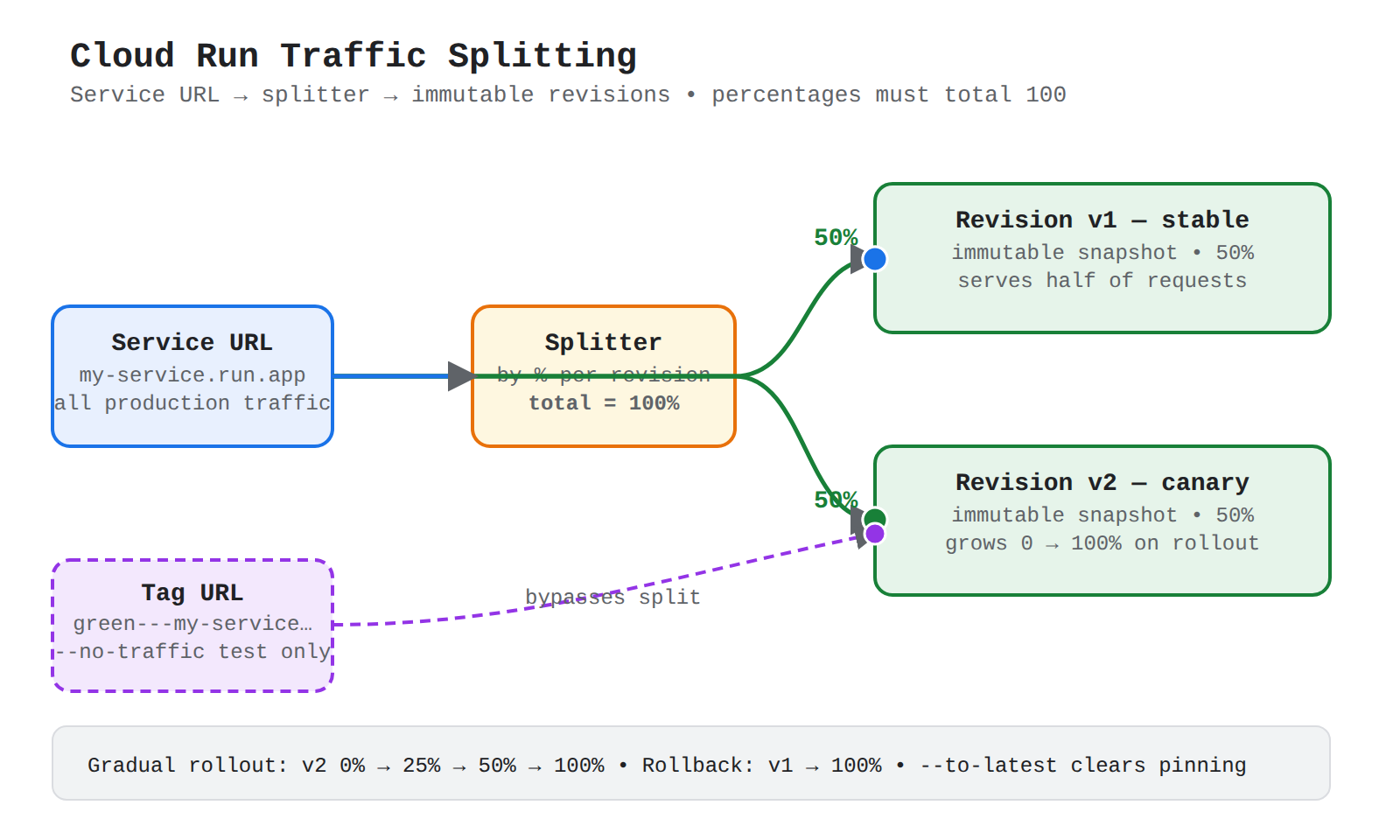
A process flow showing requests entering the Cloud Run service URL, splitting by percentage to two immutable revisions, with a tagged test URL bypassing the split directly to the canary revision.
Continue with this study guide: 3.1 Managing compute resources
Managing and Securing Objects in Cloud Storage Buckets
Cloud Storage (opens in a new tab) buckets hold data as objects where each object has one storage class, location, and access setting. Identity and Access Management (IAM) grants roles such as Storage Admin on bucket resources projects/_/buckets/BUCKET_NAME or object resources with /objects/OBJECT_NAME, while Access Control Lists (ACLs) grant per-object entries that allow different objects to have different readers. Uniform bucket-level access places all control under bucket IAM and disables object ACLs, while fine-grained access combines bucket IAM with per-object ACLs at higher management cost. Managed folders overlay group-based access on uniform buckets without creating a true directory tree, where requests flow from the principal to the bucket policy then to the folder policy. Protection combines Object Versioning that keeps live and noncurrent versions, encryption with Cloud Key Management Service (Cloud KMS) keys where disabling blocks access and destroying causes permanent loss, and Signed URLs that grant time-limited access without changing IAM.
| Access model | How access is granted | Management tradeoff |
|---|---|---|
| Uniform bucket-level access | Only bucket-level IAM roles | Simpler and required for managed folders |
| Fine-grained access | Bucket IAM plus per-object ACLs | Per-object control with object-by-object tracking |
Setting Object Lifecycle Management Policies
Object Lifecycle Management automatically moves or deletes objects when all conditions in a rule are met. Each rule pairs conditions with one action: Delete permanently removes matching objects, while SetStorageClass rewrites them into a colder class such as Archive. Age conditions include Age for rolling days since creation, CreatedBefore for a fixed date, and custom-time and noncurrent-time variants for metadata and versioned data. Matching conditions narrow scope with MatchesStorageClass, MatchesPrefix such as logs/, MatchesSuffix such as .log, NumNewerVersions to keep recent versions, and WithState for live versus noncurrent. Enforcement is asynchronous within about one day, and when delete and keep intents overlap, keep wins so a conditional keep protects releases from a broad delete.
Exam tip: Use Age for objects that should age out on a rolling basis, while CreatedBefore applies to objects created before one fixed date.
Querying Data Across Relational and Analytical Services
Query execution routes requests from consoles, bq tools, APIs, drivers, and editors to the instance, cluster, or dataset that owns the data. Cloud SQL provides managed MySQL, PostgreSQL, and SQL Server with row-based tables, while AlloyDB for PostgreSQL provides PostgreSQL-compatible transactional service targeting cluster, then instance, then database. BigQuery is a warehouse that stores compressed columnar data in Colossus with Capacitor format and executes with the Dremel engine using slots of CPU and memory, where datasets organize tables with schemas, labels, and partitioning. Spanner provides global-scale consistency with GoogleSQL for query, definition, manipulation, and transaction statements, while Bigtable provides NoSQL access through instance and optional app profile. Federated queries use EXTERNAL_QUERY through a BigQuery connection to read AlloyDB, Spanner, or Cloud SQL as a temporary table, while external tables expose Bigtable, Spanner, Cloud Storage, and other sources directly in BigQuery GoogleSQL.
- Identify source project: Locate the project with the AlloyDB, Spanner, or Cloud SQL source.
- Create connection: A
bigquery.adminuser creates a BigQuery connection resource. - Share connection: Grant use permission to the querying user.
- Run EXTERNAL_QUERY: Run BigQuery SQL that calls the external database dialect.
Estimating Storage Costs and Choosing Storage Classes
Estimating storage cost adds provisioned capacity, performance, redundancy, movement, and class choice. Zonal Persistent Disk keeps data in one zone at lowest redundancy, regional Persistent Disk replicates synchronously across two zones, and Filestore regional instances replicate across three zones. Google Cloud Hyperdisk tunes input/output operations per second (IOPS) and throughput separately, where Hyperdisk Balanced suits high IOPS with modest throughput. Cloud Storage classes trade storage cost for access cost from Standard for frequent access through Nearline and Coldline to Archive for rare access, where frequent reads from cold classes raise Class A or B charges. Object Lifecycle Management moves objects colder or deletes them automatically, while Autoclass transitions each object by its own access pattern starting in Standard and returning to Standard on data read. NetApp Volumes bills hot and cold tiers separately where the cooling threshold moves inactive data sooner but too-short thresholds add transfer charges and latency.
Backing Up and Restoring Database Instances
Backup and restore keeps database data recoverable after deletion, corruption, or outage through exports, scheduled backups, and point-in-time recovery. Firestore export and import moves data through Cloud Storage where data flows from the source database to export files then into the same or different database, with filtered copies by collection or namespace and index rebuilds on import. Cloud SQL and AlloyDB use backup plans that define hourly, daily, weekly, monthly, or yearly frequency, retention, vault, and a window of at least six hours, plus on-demand backups for immediate protection. A backup vault centralizes immutability and enforced retention, where standard backups stay in the instance project and enhanced backups use a central management project. Point-in-time recovery (PITR) restores the base backup and replays transaction logs to a timestamp, where Cloud SQL PITR always creates a new instance and Firestore scheduled backups store consistent copies with index configurations without affecting live performance.
- Create bucket: Create a Cloud Storage bucket near the source Firestore database.
- Export: Export from the source project to the bucket.
- Share access: Grant the destination project read access to the bucket.
- Import: Import from the bucket into the destination database.
Reviewing Job Status for BigQuery and Dataflow
Reviewing job status checks whether a BigQuery or Dataflow job completed, is running or queued, or failed. BigQuery builds an execution tree that splits SQL into parallel stages exchanging data through a shuffle tier, then writes results to persistent storage for caching. Slots provide CPU and memory capacity where on-demand pricing pays for bytes scanned and capacity pricing pays for reserved slots, while bytes processed, in-flight queries, and percentile times explain cost and contention. A Dataflow job flows from source transforms through intermediate steps to the destination, viewed in console Dataflow > Jobs > job name > Job graph tab. Graph view shows ordered transform boxes best for small pipelines, while table view shows sortable rows best for many stages, where Job status becomes Succeeded on completion and early failure blocks downstream data.
Using Database Center for Fleet Health
Database Center is the centralized dashboard for the database fleet of clusters, instances, and VMs across projects and regions. Data flows from Google Cloud projects and Security Command Center into Database Center, which ranks issues as Critical, High, Medium, and Low and links each issue to description, next steps, and the affected resource. Health signals cover availability, backup protection, security posture, and industry compliance for AlloyDB, Bigtable, Cloud SQL, Firestore, Memorystore, Spanner, and others, while BigQuery appears for inventory only. Fleet inventory refreshes approximately every 24 hours and groups by project, region, product and version, or resource type. Gemini Cloud Assist adds natural-language insights for inefficient queries, index advice, and over-provisioned or idle resources over 30 days.
Continue with this study guide: 3.2 Managing storage and data solutions
Adding a Subnet to an Existing VPC
Adding a subnet to an existing Virtual Private Cloud (VPC) (opens in a new tab) network reserves a new regional address block for future resources. A VPC network is global and holds routes and firewall rules, while each subnet is regional and holds IP addresses for VMs in the same region. Auto mode networks create one subnet per region automatically for simplicity, while custom mode networks create none automatically so each name, region, and CIDR such as 10.0.1.0/24 is defined manually. Conversion from auto to custom is one-way and preserves existing subnets, after which tools must reference the subnet explicitly with --subnet. Creation requires a unique name, region, non-overlapping primary IPv4 range, and optional secondary ranges for pods and services, plus the Compute Network Admin role.
- Open the existing network: Go to the VPC networks page and select the network.
- Start subnet creation: Open the Subnets tab and click Add subnet.
- Set identity and location: Enter Name and Region with Purpose None and IPv4 single-stack.
- Set address ranges: Enter a valid non-overlapping primary range and optional secondary range.
- Save and validate: Click Add, then create a VM in the same region with
--subnet=SUBNET_NAME.
Expanding a Subnet to Have More IP Addresses
Expanding a subnet increases usable addresses in the same region by growing its primary IPv4 range to a smaller prefix length. A smaller prefix number means a larger block, so the subnet keeps existing VM addresses without renumbering and traffic within the subnet is not interrupted. The new range must contain the original range and must not overlap any other primary or secondary range in the same VPC. Auto-created subnets cannot expand broader than /16 because broader ranges would conflict with 10.128.0.0/9, proxy-only subnets for load balancer proxies cannot be expanded, and every range reserves four unusable addresses. Primary expansion uses subnets update or PATCH to subnetworks.patch, while secondary ranges are added with --add-secondary-ranges and removed only after no resources use them.
Exam tip: A smaller prefix number means a larger subnet — expansion makes the prefix smaller, auto-created subnets stop at /16, proxy-only subnets cannot be expanded, and in-subnet traffic is not interrupted.
Reserving Static External or Internal IP Addresses
Reserving a static IP address holds a public or private address for a project until explicitly released. An ephemeral address is released when its resource is stopped or deleted, while a static address persists and can move between resources with only one resource using it at a time. Static internal addresses are regional resources from a subnet range that keep private addressing stable, reserved either before assignment or by promoting an attached ephemeral address. Regional external addresses serve zonal or regional resources such as VMs, regional load balancers, Cloud NAT, and VPN gateways, while global anycast addresses front global load balancers across regions. Lifecycle moves from RESERVED to IN_USE and back to RESERVED, deleting a VM does not release its static address, and an unassigned static external address costs more than an in-use address.
| Address type | Scope | Serves |
|---|---|---|
| Regional external IPv4 /32 | One region, Premium or Standard Tier | VM interfaces, regional load balancers, NAT, VPN |
| Global external IPv4 /32 | Global, Premium Tier only | Global load balancer forwarding rule |
Adding Custom Static Routes in a VPC
Adding a custom static route creates a manual rule in one VPC network that matches one destination CIDR and forwards to a next hop. The route name is unique in the project, destination is a single IPv4 or IPv6 CIDR such as 0.0.0.0/0, and priority runs from 0 highest to 65,535 lowest. Next hops include internet gateway, VM instance or instance IP, Classic VPN tunnel, and internal passthrough Network Load Balancer forwarding rule, each of which must exist and be reachable. Selection compares destination specificity first with longest prefix match winning, and only ties on the same destination use numerical priority, while subnet routes for primary ranges cannot be overridden. Routes without network tags apply to all VMs, while tagged routes apply only to VMs carrying the tag, which isolates paths such as egress-inet VMs to the internet or through an appliance.
Working with Cloud DNS and Cloud NAT
Working with Cloud DNS and Cloud NAT combines name resolution with controlled outbound connectivity for private workloads. A Cloud NAT gateway in the same region as its subnets shares external addresses and ports so VMs without external IPs can initiate outbound connections, where traffic flows from the VM internal address through the gateway to the internet. A Cloud Router provides the control plane while Andromeda software implements data-plane translation, performing source NAT outbound and destination NAT only for established responses so unsolicited inbound sessions are blocked. Public NAT connects private resources to the internet, while Private NAT translates overlapping private sources to unique addresses for other VPCs or on-premises. Cloud DNS publishes names through managed zones where public zones answer the internet and private zones answer only authorized VPC networks, with record types A, AAAA, CNAME, MX, TXT, and PTR and TTL controlling cache time.
| NAT type | What it connects | How it translates |
|---|---|---|
| Public NAT | Resources without external IPs to internet IPv4 | Private internal to shared external IP and port |
| Private NAT | Overlapping private ranges to other VPCs or on-premises | Overlapping source to unique Private NAT subnet range |
Continue with this study guide: 3.3 Managing networking resources
Creating Monitoring Alerts and Custom Metrics
Cloud Logging (opens in a new tab) and Cloud Monitoring turn resource measurements into notifications and application telemetry into charts. An alerting policy watches time-series data, compares it to a threshold for a duration, creates an alert record, and delivers through a notification channel such as email or Slack. Selection starts with resource type and metric such as VM CPU Utilization or Spanner CPU by priority, plus threshold position, retest and rolling windows, alignment with mean or maximum, and grouping that controls how many series are evaluated. Custom metrics flow from instrumented code to the Monitoring API to stored series using prefixes custom.googleapis.com/, workload.googleapis.com/, and external.googleapis.com/, with descriptors defining kind such as GAUGE or DELTA, value type, unit, and labels. Log-based counter metrics count matching entries while distribution metrics record count, mean, and histogram buckets for latencies, and both collect only entries received after creation.
| Condition type | When met | Example use |
|---|---|---|
| Metric-threshold | Value beyond static threshold for retest window | Latency at 500ms over 10 minutes |
| Metric-absence | No data for retest window up to 24 hours | No HTTP requests over five minutes |
| Forecasted value | Forecast predicts violation in 1 hour to 7 days | Disk likely to reach 80% in 24 hours |
Exporting Logs and Configuring Buckets and Routers
Log export and routing sends copies of incoming entries from Cloud Logging to storage and analysis destinations. Each sink in the Log Router pairs an inclusion filter with a destination and optional exclusion filters, so data flows from ingestion to each matching sink to Cloud Storage, BigQuery dataset, Pub/Sub topic, or Logging bucket. One entry can match multiple sinks, and centralized designs forward many projects to buckets in one central project. A log bucket is a regional container with one retention rule, where _Required keeps 400 days fixed, folder or organization _Default keeps 30 days fixed, and project _Default and user-defined buckets configure 1 to 3650 days. Buckets upgraded for analytics link to BigQuery datasets for SQL queries and cannot be deleted until the link is deleted, while locking with --locked is irreversible and deletion enters DELETE_REQUESTED for 7 days. Secure export depends on user identity authorizing the request and service account carrying data, where the job inherits the starter's visibility.
Exam tip: An export job inherits the visibility of the user who starts it, so a user cannot export logs they are not already allowed to read.
Viewing Logs and Reading Log Entry Details
Logs Explorer views and filters log entries stored in Cloud Logging within a selected project, folder, or organization scope. Filtering narrows by resource type, log name such as activity, data_access, system_event, or policy, and time window around a failure in timestamp order. The Logging Query Language (LQL) selects entries with field filters such as resource.type="cloudsql_database", where = requires exact match, : matches name or text, != excludes, and AND and OR combine with OR grouped first. Each LogEntry holds timestamp, receiveTimestamp, severity, resource fields, labels, trace linkage, and one payload: textPayload for string messages, jsonPayload for structured fields, and protoPayload with an AuditLog object for audit logs. Trace integration links entries through trace and traceSampled, while Error Reporting groups by stack_trace, then exception, then message in jsonPayload.
- Open Logs Explorer: Confirm correct project, folder, or organization scope.
- Show all audit logs: Enter
logName:"cloudaudit.googleapis.com"and run. - Narrow by resource and type: Select Resource type and Log name.
- Refine and review: Add indexed fields, run, and expand entries for method and status.
Diagnosing Performance with Trace, Profiler, and Query Insights
Cloud diagnostics follows requests and queries to find delays and expensive code. Cloud Trace collects latency as traces where each timed span shows which frontend, backend, or database step added delay, working with Logging event records and Monitoring utilization data. Scope checking compares 50th, 95th, and 99th percentile latency to decide whether slowness affects half of requests or about 1%, then opens the slow trace to fix cold starts with minimum instances or protect backing services. Query Insights for Cloud SQL and AlloyDB finds inefficient queries through load charts and top queries over 1 hour to 30 days, where the index advisor recommends CREATE INDEX with high, medium, or low impact. Cloud Profiler samples production CPU and memory for Go, Java, Python, and Node.js and attributes use to source lines with flame graphs. The Ops Agent collects logs, metrics, and traces from Compute Engine and Bare Metal servers via Fluent Bit and OpenTelemetry Collector, while Google Cloud Managed Service for Prometheus scrapes exporters to Monarch storage for 24 months with PodMonitoring for one namespace and ClusterPodMonitoring across namespaces.
Monitoring Service Health, Audit Logs, and Optimization Tools
Service health, audit control, and optimization tools connect platform status to governance and cost action. Personalized Service Health (PSH) filters disruptions to active projects with relevance RELATED, IMPACTED, and PARTIALLY_RELATED, while the public Cloud Service Health (CSH) dashboard shows broad Severe outages without login. Alerts flow from health events in Logging to Monitoring policies to channels such as mobile or PagerDuty, but Unknown relevance sends no notification. Cloud Audit Logs records Admin Activity always enabled, Data Access disabled by default except BigQuery, System Event always written and unconfigurable, and Policy Denied generated by default but excludable from storage. Gemini Cloud Assist correlates health metrics, logs, traces, and alert events in project and application views to explain issues, while Active Assist pairs a Recommender insight describing what was observed with a recommendation describing what to do for idle VMs, partitioning, and near-limit quotas.
Continue with this study guide: 3.4 Monitoring and logging
Key Facts
- OS Login checks IAM on every SSH login while metadata keys persist until removed, and IAP TCP forwarding reaches the internal address of
nic0when firewalls allow TCP to port 22 or 3389 from35.235.240.0/20. - Persistent Disk snapshots are incremental and independent of source disks, snapshot schedules must be created in the same region as the disk, and Cloud Run revisions are immutable with traffic percentages that must total 100.
- Uniform bucket-level access uses only bucket IAM and disables object ACLs, while a lifecycle rule pairs conditions such as Age and MatchesPrefix with Delete or SetStorageClass.
- VPC route selection uses longest prefix match first and priority 0 to 65,535 only for ties, and Cloud NAT allows destination NAT only for established outbound responses.
- The Log Router evaluates every entry against sinks with inclusion and exclusion filters, and Personalized Service Health filters disruptions to specific projects while audit Data Access logs are disabled by default except BigQuery.
Frequently Asked Questions
What is the difference between OS Login and metadata-based SSH keys for Compute Engine Linux virtual machines (VMs)?
OS Login stores keys in the user's profile and checks Identity and Access Management (IAM) on every login, while metadata keys live in project metadata for all VMs or instance metadata for one VM and stay valid until removed. OS Login-enabled VMs ignore metadata-based SSH keys, and instance-level enable-oslogin=FALSE disables OS Login even when project metadata sets it to TRUE.
When should I use Age versus CreatedBefore conditions in Cloud Storage Object Lifecycle Management?
Use Age for objects that should age out on a rolling basis, while CreatedBefore applies to objects created before one fixed date. Each lifecycle rule pairs conditions with one action of Delete or SetStorageClass, and enforcement is asynchronous within about one day.
How does route selection work for custom static routes in a Virtual Private Cloud (VPC) network?
Selection compares destination specificity first with longest prefix match winning, and only ties on the same destination use numerical priority. Priority runs from 0 highest to 65,535 lowest, while subnet routes for primary ranges cannot be overridden.
How does traffic splitting work between revisions in Cloud Run services?
Deploying a Cloud Run service means creating immutable revisions and mapping traffic percentages that must total 100. Traffic flows from the service URL to the splitter to the assigned revisions, where gradual rollout grows a canary from 0% to 100%, split traffic runs versions side by side, rollback returns 100% to a prior revision, and --to-latest resumes single-version operation.
Subdomains
Remotely connecting to a Compute Engine instance means using Secure Shell (SSH) for Linux virtual machines (VMs) and Remote Desktop Protocol (RDP) for Windows VMs through allowed network paths. Linux …
Cloud Storage is the object storage service that holds data as objects inside containers called buckets. Every bucket belongs to a project that belongs to an organization, and every object has one sto…
Adding a subnet to an existing VPC is the act of reserving a new regional address block inside that network for future resources. A Virtual Private Cloud (VPC) network is a global virtual network that…
Cloud Monitoring alerts based on resource metrics turn utilization measurements into notifications and corrective action. An alerting policy watches time-series data, compares it to a threshold for a …
How learners score on this domain
Last updated