Fundamental
Prepare and test your skills

Fundamental
Prepare and test your skills
Querying BigQuery, Spanner, Cloud SQL and Firestore
Interpretation of query tools, interfaces, and service-specific query models means knowing where a query is typed, how it reaches the database, and what language the database understands. Google Cloud exposes data services through visual consoles, command-line tools, APIs, and standard drivers, but each service uses a different model for relational, analytical, and NoSQL work. The interface routes the request to the right instance, cluster, or dataset, and the service then processes it with its own storage and execution design.
Query Tools and Interfaces
Query tools and interfaces are the consoles, command-line tools, libraries, and drivers that send a query to a Google Cloud data service and return results. A request flows from the tool to the service endpoint, the service runs the query against storage and compute, and results flow back to the tool. BigQuery (opens in a new tab) handles its own connection management with no server-side setup, while relational services route a query to a specific instance and database.
Common interfaces supported across the services include:
- Google Cloud console for interactive querying and schema preview
bqcommand-line tool for BigQuery interactive queries and loads- REST APIs and client libraries for programmatic access from applications
- JDBC and ODBC drivers for third-party tools, Excel, and Google Sheets
- Desktop clients such as DBeaver for SQL exploration
- Data Agent Kit (opens in a new tab) IDE extension with a unified SQL editor that can query BigQuery, Spanner, Bigtable, AlloyDB, and Cloud SQL from VS Code
The Data Agent Kit SQL editor uses query settings to choose the destination before running. A BigQuery query only needs BigQuery selected, while AlloyDB, Cloud SQL, and Bigtable queries must select a cluster or instance, and relational queries must also select a database. For Cloud SQL, authentication can use Identity and Access Management (IAM) database authentication or built-in database authentication with passwords stored as regional secrets in Secret Manager.
Relational Models for Cloud SQL and AlloyDB
Relational query models in Cloud SQL and AlloyDB for PostgreSQL use table-based SQL with rows, joins, and engine-specific dialects. Cloud SQL is a fully managed relational service that offers MySQL, PostgreSQL, and SQL Server engines, and AlloyDB is a fully managed PostgreSQL-compatible service for demanding transactional workloads. Both use a row-based table structure that connects related data across tables without storing the same data many times. Queries target a specific instance and then a specific database inside that instance, which keeps transactional reads and writes isolated to that database.
Analytical Model for BigQuery
The analytical query model in BigQuery is designed for large-scale analysis using GoogleSQL, the SQL dialect in BigQuery. GoogleSQL supports SQL:2011 with extensions for nested and repeated data, geospatial analysis, search over text and JSON, graph queries with Graph Query Language (GQL), and machine learning with BigQuery ML. BigQuery decouples storage and compute by storing compressed columnar data in Colossus using the Capacitor format and executing queries with the Dremel engine. Datasets are the highest-level container that organizes access to tables, with schemas, labels, and partitioning used for further organization, performance, and cost control.
BigQuery allocates compute in units called slots, which include CPU and memory, based on query type and complexity. Queries can access data stored in BigQuery tables, modify data with data manipulation language (DML) statements, write results to tables, and read historical snapshots within the time-travel window. Per-user cached results are kept for approximately 24 hours when data does not change, and a query served from cache costs nothing.
Global-Scale and NoSQL Models for Spanner and Bigtable
Global-scale and NoSQL query models in Spanner and Bigtable serve different needs from standard relational or warehouse queries. Spanner is a mission-critical, global-scale database service that uses GoogleSQL, formerly called Google Standard SQL, as an ANSI-compliant language. Its supported statements include query statements for reading data, Data Definition Language (DDL) for creating tables and views, Data Manipulation Language (DML) for inserting and updating rows, access-control statements for table- and column-level grants, and transaction-control statements for managing modifications. Bigtable is queried as a NoSQL data source through the same SQL editor by selecting an instance and optionally selecting an app profile other than the default.
Exam tip: BigQuery results served from the per-user cache cost nothing only when the underlying data has not changed within approximately 24 hours.
Comparison of Query Targets Across Services
Comparison of query targets shows how language and destination change by service. Each service requires a different object to be selected before the query can run, from database to dataset to instance.
| Service | Query model | Query targets |
|---|---|---|
| Cloud SQL | Engine SQL for MySQL, PostgreSQL, or SQL Server with row-based joins | Instance, then database, with IAM or built-in authentication |
| AlloyDB for PostgreSQL | PostgreSQL-compatible transactional SQL | Cluster, then instance, then database |
| Spanner | GoogleSQL with query, DDL, DML, access-control, and transaction statements | Database with global-scale transactional consistency |
| BigQuery | GoogleSQL for analytics, geospatial, search, graph, and ML | Dataset and tables, including historical snapshots |
| Bigtable | NoSQL access exposed through the unified SQL editor | Instance with optional app profile |
Assessment of performance, cost, and optimization when retrieving data means analyzing how storage layout, query shape, and compute assignment affect speed and price. In BigQuery, storage and compute are separated, so storage grows and shrinks with the data kept while compute scales for each query. Query structure, filters, partitioning, and schema organization control how much work each query creates and therefore how fast it runs and how much it costs.
Separated Storage and Compute in BigQuery
Separated storage and compute in BigQuery means data lives in Colossus storage while queries run on a separate execution layer based on Dremel. Data is compressed and stored in a columnar format called Capacitor, and BigQuery can operate directly on that compressed data without fully decompressing it. Storage resources are allocated as data is added and released when data or tables are removed, so there is no need to pre-provision capacity for storage. Compute for a query is measured in slots, which are units of computation that include CPU and memory, and BigQuery assigns slots according to query type and complexity with autoscaling for fast queries at petabyte scale.
Schema, Partition, and Columnar Storage Effects
Partitioning, schemas, and organization in BigQuery determine how easily a query can skip unneeded data. Datasets are the highest-level containers that organize access to tables, while schemas and labels provide further organization inside those databases (opens in a new tab) and datasets. Partitioning divides large tables so queries can read only relevant partitions, which improves query performance and lowers cost and also helps manage data lifecycle. Because Capacitor stores data by column in compressed form and gathers column statistics during load, queries that select fewer columns and filter precisely touch less stored data than queries that scan whole tables.
Execution Resources, Diagnostics, and Caching
Execution resources in BigQuery scale at the query level to balance speed and cost. Execution uses in-memory processing, a multilevel tree architecture, automatic storage optimization, and high network bandwidth to distribute work across many workers. BigQuery provides diagnostic query plan and timing information that shows how a query was executed and where time was spent. BigQuery also offers per-user cached results for approximately 24 hours when the underlying data has not changed, and retrieving results from that cache costs nothing.
Exam tip: A repeated query costs nothing when BigQuery serves it from cache, but only when the underlying data has not changed within approximately 24 hours.
Strategies for Production Data Retrieval
Practical optimization strategies for data retrieval focus on reading less data, reusing work, and isolating workloads. Reading less data keeps slot usage lower and returns results faster, while isolation prevents one team or workload from affecting another.
- Organize tables into datasets and use schemas and labels so teams can find relevant tables and avoid scanning unrelated data.
- Use partitioning and selective filters so each query reads only the partitions, rows, and columns it needs.
- Maintain useful statistics and indexes where the engine uses them, because statistics guide the optimizer toward an efficient execution plan and indexes support fast row lookups and join operations.
- Review the query plan and timing information to identify expensive stages before running the same pattern in production.
- Separate projects, slot quotas, and billing for query execution from the projects that host datasets so autonomous teams can work without affecting each other.
- Reuse cached results for repeated reads and use time travel and exports for history and backup needs instead of rescanning or frequently re-exporting unchanged tables and partitions.
Application of query syntax and execution patterns across data services means matching the service, its dialect, and the tool that sends the query to where the data lives. Cloud SQL, AlloyDB, Spanner, and BigQuery all accept SQL for reading and changing data, while Bigtable and Firestore retrieve data through key-based lookups, filters, and application APIs. Choosing the correct pattern means using relational SQL for transactional tables, analytical SQL for warehouse tables, and structured API calls for NoSQL lookups.
SQL Execution in Cloud SQL and AlloyDB
SQL execution in Cloud SQL and AlloyDB targets live relational tables on a specific instance or cluster. Cloud SQL is a fully managed relational database service that offers MySQL, PostgreSQL, and SQL Server engines. Applications connect with the native dialect of the chosen engine and use standard relational tables where related data in different tables can be joined without storing the same data twice. Queries are typically sent from application code, database clients, or migration tools through direct database connections, JDBC and ODBC drivers, or the Data API with IAM database authentication or built-in users.
AlloyDB for PostgreSQL is a fully managed, PostgreSQL-compatible database for demanding transactional workloads. Because AlloyDB speaks PostgreSQL, the same SQL statements, drivers, and tools used for Cloud SQL for PostgreSQL generally apply to AlloyDB. Use Cloud SQL and AlloyDB when the workload is transactional, relational, and needs row-level inserts, updates, deletes, and joins on live operational data.
SQL Execution in Spanner
SQL execution in Spanner uses GoogleSQL, the new name for Google Standard SQL, with strong consistency across regions. GoogleSQL in Spanner is ANSI-compliant and supports distinct statement types for different jobs:
- Query statements, also called Data Query Language (DQL), scan one or more tables or expressions and return result rows.
- Data Definition Language (DDL) statements create and modify tables, views, and database roles.
- Data Manipulation Language (DML) statements insert, update, and delete data in Spanner tables.
- Data Access Control statements grant and revoke privileges at the table and column level.
- Transaction Control statements manage transactions for data modifications.
Spanner queries flow from the client or BigQuery to Spanner tables and return computed rows with strong consistency. Use Spanner SQL when a relational model must scale across regions while keeping transactional guarantees.
SQL Execution in BigQuery
SQL execution in BigQuery targets warehouse tables for large-scale analysis rather than single-row updates. BigQuery is a fully managed data warehouse for analytics that uses GoogleSQL with compliance with the SQL 2011 standard plus extensions for nested and repeated data. BigQuery decouples storage and compute: data is compressed and stored in columnar format in Colossus using the Capacitor format, while queries are executed by the Dremel engine with autoscaling slots of CPU and RAM. Because the engine operates directly on compressed columnar data and gathers column statistics on load, it can scan petabyte-scale datasets without pre-provisioned servers or indexes.
Results can be retrieved through the Google Cloud console, the bq command-line tool, REST APIs and client libraries, JDBC and ODBC drivers, connected sheets, and the unified SQL editor in the Data Agent Kit IDE extension. BigQuery provides per-user cached results for approximately 24 hours, and queries served from cache cost nothing if the underlying data has not changed. Use BigQuery SQL when the goal is large-scale analysis, aggregation, and reporting rather than single-row transactional updates.
Federated Queries and External Tables
federated queries (opens in a new tab) let BigQuery send a query to AlloyDB, Spanner, or Cloud SQL and receive the result back as a temporary table. The federated query depends on the BigQuery Connection API (opens in a new tab) to establish a connection, and the EXTERNAL_QUERY function carries the inner query to the external database in that database's own SQL dialect before results are converted to GoogleSQL types. Performance of federated queries might be lower than queries that read data residing in BigQuery storage.
A federated query follows an ordered workflow:
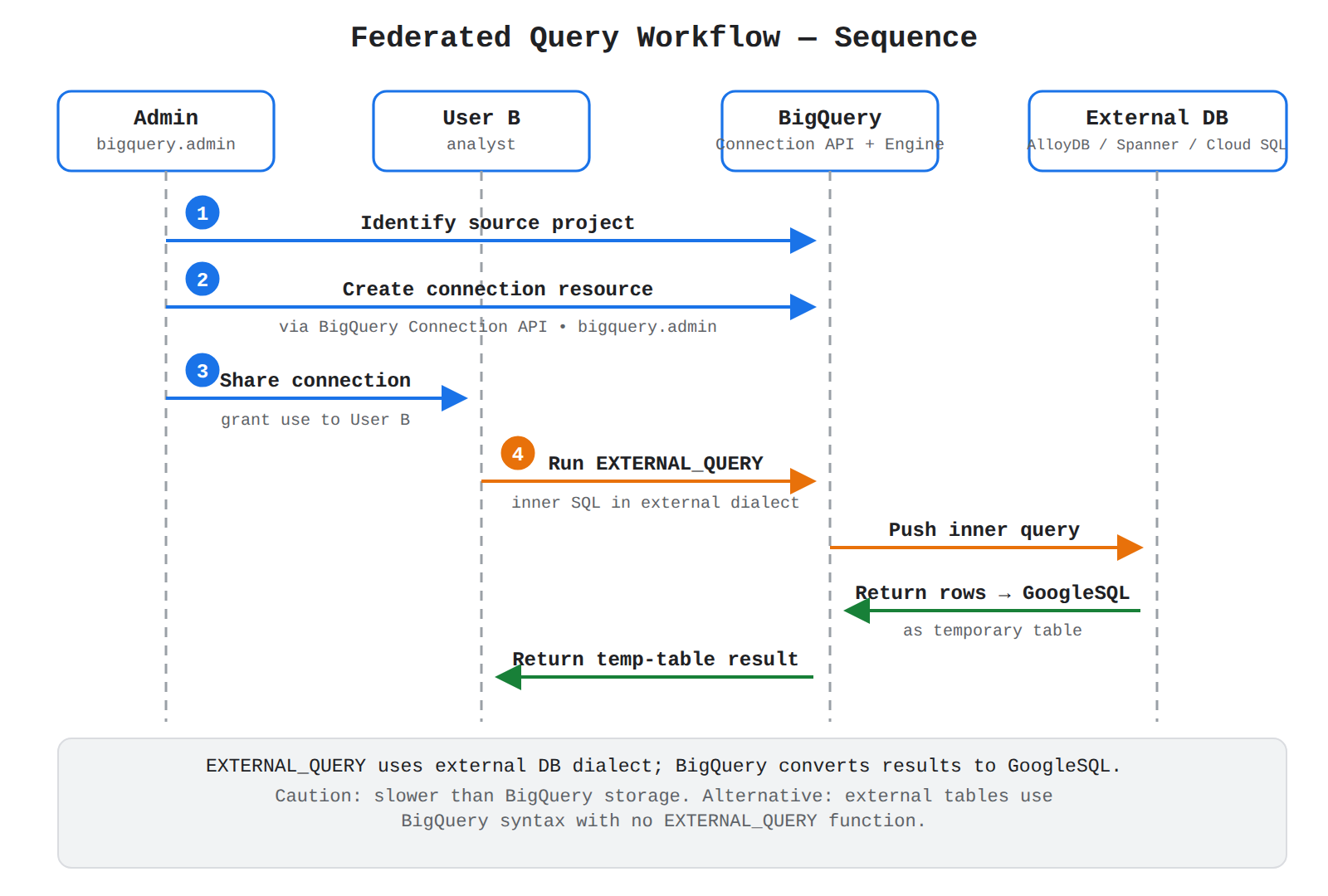
A sequence diagram with Admin, User B, BigQuery, and External DB lifelines showing the four federated query steps: identify project, create connection, share connection, and run EXTERNAL_QUERY returning a temp table.
- Identify source project: Locate the Google Cloud project that contains the AlloyDB, Spanner, or Cloud SQL data source.
- Create connection: A
bigquery.adminuser creates a connection resource in BigQuery. - Share connection: The admin grants permission to use the connection to user B, unless the admin and user B are the same person.
- Run EXTERNAL_QUERY: User B writes a BigQuery query that calls
EXTERNAL_QUERYwith the connection name and the external-database SQL statement.
An alternative pattern is external tables and datasets, which expose operational sources such as Bigtable, Spanner, Cloud Storage, Google Drive, and Salesforce Data Cloud directly in BigQuery. With external tables the query uses BigQuery syntax and no EXTERNAL_QUERY function is needed, and no data has to be copied into BigQuery first.
Exam tip: Use EXTERNAL_QUERY with the external database's SQL dialect for federated queries, but use BigQuery GoogleSQL syntax when querying the same sources through external tables.
API-Based Retrieval in Bigtable and Firestore
API-based retrieval in Bigtable and Firestore uses structured requests instead of full relational SQL. In this pattern, the application sends a request through a client library or API that specifies a table or collection, a row key or document path, and filters, and the service returns only the matching cells or documents. This flow moves from application to API to storage, which keeps single-digit millisecond lookups efficient at very large scale but does not provide cross-table joins in the way Cloud SQL or Spanner does.
Bigtable can also be exposed to analytics tools through BigQuery external tables and through the Data Agent Kit SQL editor, which lets one IDE query BigQuery, Bigtable, Spanner, AlloyDB, and Cloud SQL for MySQL and PostgreSQL. In those cases BigQuery or the IDE translates the request so analysts can use familiar SQL without moving the operational data. Choose native API retrieval when the application needs fast key-based reads and writes, and choose the BigQuery external-table path when the goal is to join or analyze that operational data alongside warehouse tables.
Choosing an Execution Pattern by Service
Choosing an execution pattern depends on where the data lives and whether the work is transactional or analytical. Relational services keep operational data on an instance or cluster, while BigQuery keeps analytical data in datasets and tables.
| Service | Query language | Choose when |
|---|---|---|
| Cloud SQL | MySQL, PostgreSQL, or SQL Server dialect | The data is relational and operational on a single instance |
| AlloyDB | PostgreSQL-compatible SQL | The workload needs PostgreSQL compatibility with demanding transactional scale |
| Spanner | GoogleSQL | The relational data needs global scale and strong consistency |
| BigQuery | GoogleSQL with nested-data extensions | The work is large-scale analytics over warehouse tables |
Federated queries and external tables bridge these services by letting BigQuery read live AlloyDB, Spanner, Cloud SQL, and Bigtable data without a separate extract and load step.
Key Facts
- BigQuery decouples storage and compute by storing compressed columnar data in Colossus using the Capacitor format and executing queries with the Dremel engine using slots of CPU and memory.
- Datasets are the highest-level containers that organize access to BigQuery tables, with schemas, labels, and partitioning used for organization, performance, and cost control.
- BigQuery per-user cached results are kept for approximately 24 hours and cost nothing when the underlying data has not changed.
- Federated queries use the BigQuery Connection API and the
EXTERNAL_QUERYfunction with the external database's SQL dialect, while external tables use BigQuery GoogleSQL syntax with noEXTERNAL_QUERYfunction. - Spanner uses ANSI-compliant GoogleSQL with query, DDL, DML, access-control, and transaction-control statements, while Bigtable and Firestore use key-based structured queries and API-based retrieval without relational joins.
Frequently Asked Questions
What is the difference between federated queries and external tables in BigQuery?
Federated queries use the BigQuery Connection API and the EXTERNAL_QUERY function with the external database's own SQL dialect, while external tables use BigQuery GoogleSQL syntax with no EXTERNAL_QUERY function. Federated queries send a query to AlloyDB, Spanner, or Cloud SQL and receive the result back as a temporary table, while external tables expose operational sources such as Bigtable, Spanner, Cloud Storage, Google Drive, and Salesforce Data Cloud directly in BigQuery without copying data into BigQuery first. Performance of federated queries might be lower than queries that read data residing in BigQuery storage.
When should I use Cloud SQL, AlloyDB for PostgreSQL, Spanner, or BigQuery for querying data?
Use Cloud SQL and AlloyDB for PostgreSQL for transactional relational work, Spanner for global-scale relational work with strong consistency, and BigQuery for large-scale analytics over warehouse tables. Cloud SQL uses MySQL, PostgreSQL, or SQL Server dialect on a single instance, AlloyDB for PostgreSQL uses PostgreSQL-compatible SQL, Spanner uses GoogleSQL, and BigQuery uses GoogleSQL with nested-data extensions. Federated queries and external tables bridge these services by letting BigQuery read live AlloyDB, Spanner, Cloud SQL, and Bigtable data without a separate extract and load step.
How do BigQuery per-user cached results affect cost?
BigQuery keeps per-user cached results for approximately 24 hours when the underlying data has not changed. A repeated query served from that cache costs nothing.
Sample Question
A cloud engineer is managing database instances in Google Cloud and needs to query a relational, globally distributed database directly from Cloud Shell. The database is hosted on Cloud Spanner, and the engineer must run a read-only SQL query against the Orders table in the production-db database hosted on the main-instance instance without establishing an interactive connection session.
Which command should the engineer run?
bq query --use_legacy_sql=false --instance=main-instance "SELECT * FROM production-db.Orders"
gcloud sql execute-sql production-db --instance=main-instance --sql="SELECT * FROM Orders"
gcloud spanner databases execute-sql production-db --instance=main-instance --sql="SELECT * FROM Orders"
cbt lookup production-db Orders "SELECT * FROM Orders" --instance=main-instance
How learners score on this domain
Last updated