Fundamental
Prepare and test your skills

Fundamental
Prepare and test your skills
Cloud Storage Object Lifecycle Policies
Object Lifecycle Management in Cloud Storage (opens in a new tab) automates how objects move through storage and when they are removed. A lifecycle rule pairs a set of conditions with a single action, and Cloud Storage applies the action only when an object satisfies all the conditions in that rule. This pairing lets data flow from active use to colder, lower-cost placement and then to deletion without manual work.
Lifecycle Actions
A lifecycle action in a Cloud Storage bucket defines the change that happens to matching objects. The rule uses lifecycle.rule[].action.type to select the action, and a transition rule also uses lifecycle.rule[].action.storageClass to name the destination class. The action runs automatically once the conditions in the same rule are met.
| Action | What happens to the object | Choose when |
|---|---|---|
| Delete | Cloud Storage permanently removes the matching object or object version from the bucket | Data has a defined retention end and should be cleaned up for cost and compliance |
| SetStorageClass | Cloud Storage rewrites the matching object into the specified storage class, typically a colder class | Data is accessed less often over time but must be kept for future reads |
A SetStorageClass rule moves data placement down the cost curve while keeping the data readable, while a Delete rule ends the object lifecycle.
Age and Date Conditions
Age and date conditions in a Cloud Storage lifecycle rule select objects based on time. These conditions measure how long an object has lived or compare its timestamps to a fixed date, so the same bucket can support both rolling aging and calendar cutoffs.
- Age (
lifecycle.rule[].condition.age): matches live objects that have been alive for at least the specified number of days since creation. - CreatedBefore (
lifecycle.rule[].condition.createdBefore): matches objects created before a specific calendar date, regardless of current age. - CustomTimeBefore (
lifecycle.rule[].condition.customTimeBefore): matches objects whose custom time metadata is before a specific date. - DaysSinceCustomTime (
lifecycle.rule[].condition.daysSinceCustomTime): matches objects a set number of days after their custom time is set. - DaysSinceNoncurrentTime (
lifecycle.rule[].condition.daysSinceNoncurrentTime): matches noncurrent versions a set number of days after they became noncurrent. - NoncurrentTimeBefore (
lifecycle.rule[].condition.noncurrentTimeBefore): matches noncurrent versions that became noncurrent before a specific date.
Age-based conditions fit rolling policies such as transition after 30 days and delete after 365 days. Date-based conditions fit one-time cleanup such as removing everything created before a migration date.
Object Matching Conditions
Object matching conditions in a Cloud Storage lifecycle rule narrow which objects or versions a rule can affect. These conditions filter by current storage class, object name, and version state, so time conditions do not apply too broadly.
- MatchesStorageClass (
lifecycle.rule[].condition.matchesStorageClass[]): matches only objects currently stored in the listed storage classes. - MatchesPrefix (
lifecycle.rule[].condition.matchesPrefix[]): matches only objects whose names begin with the listed prefixes, such aslogs/orarchive/. - MatchesSuffix (
lifecycle.rule[].condition.matchesSuffix[]): matches only objects whose names end with the listed suffixes, such as.logor.bak. - NumNewerVersions (
lifecycle.rule[].condition.numNewerVersions): matches versions when a newer version count exists, which is used to keep only the most recent versions. - WithState: selects live objects, noncurrent versions, or both for versioned buckets.
The combination of matching and time conditions controls data placement. For example, a rule that combines Age with MatchesStorageClass moves objects from their current class to a colder class only after they age, and MatchesStorageClass prevents the same rule from acting again after the transition.
Exam tip: Use Age for objects that should age out on a rolling basis, while CreatedBefore applies to objects created before one fixed date.
Versioning and concurrency logic in Cloud Storage (opens in a new tab) explains what happens when the same object name is written more than once and how automatic rules act on the results. When versioning or object locking is enabled, an overwrite creates a new version instead of replacing data in place, so a bucket holds one live version and one or more noncurrent versions. Cloud Storage lifecycle management then automates transitions and deletions of those versions to control cost and support operational compliance.
How Overwrites Create Noncurrent Versions
An overwrite in a bucket with object locking enabled adds a new version of the object instead of destroying the previous data. The bucket keeps both the previous version and the new version, and both versions can be retrieved. This behavior means concurrent or repeated writes to the same object name produce separate versions rather than a single lost update. Lifecycle management and retention settings then determine how long each version is kept.
How Lifecycle Management Interacts With Versioned Objects
Cloud Storage lifecycle management is a set of bucket rules that automatically transition objects to lower-cost storage or delete them when conditions are met. For versioned buckets, these rules can apply separately to live and noncurrent versions, so old versions do not accumulate forever. This automation helps protect data from erroneous deletion by application software or users while also removing data that is no longer needed. The result is lower storage cost because only the required versions remain.
How the NumNewerVersions Condition Controls Retention
The NumNewerVersions condition is a lifecycle condition that controls retention of noncurrent versions by counting how many newer versions exist. A lifecycle rule with this condition keeps a defined number of the most recent versions and makes older noncurrent versions eligible for transition or deletion. Data flows from live to noncurrent when an overwrite or delete occurs, and then the rule evaluates each noncurrent version against the count. Choose this condition when the goal is to keep recent history for recovery while automatically cleaning up older copies.
Object Version Lifecycle Flow in Cloud Storage
State / Lifecycle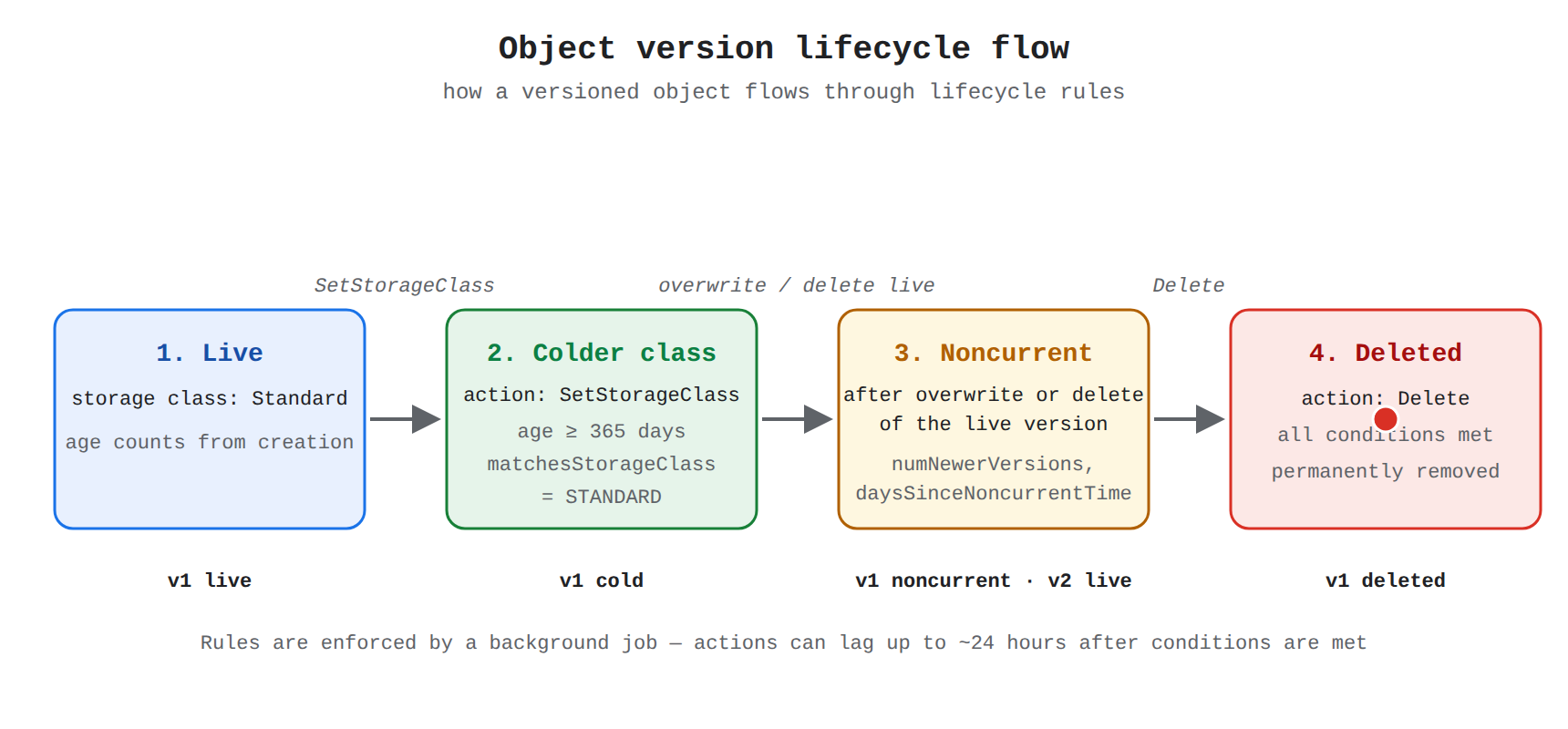
A state diagram showing an object version flowing through four states: live in Standard storage, transitioned to a colder storage class by SetStorageClass, becoming noncurrent after an overwrite or delete of the live version, and finally deleted. A dot travels state to state, revealing the version chain v1 live, v1 cold, v1 noncurrent while v2 is live, and v1 deleted.
How Default Retention Periods Apply to Versions
A default retention period is a bucket policy that requires objects created in the bucket to be kept for a set number of days. Any update to the retention period applies only to objects created in the bucket after the update, and the retention period for pre-existing objects does not change. A bucket configured this way can support a write-once, read-many (WORM) model, where new versions are preserved for their full retention period even if they are later replaced. This separation ensures that lifecycle cleanup and retention protection work together without changing the protection already applied to older versions.
Assessment of lifecycle implementation means checking how rules are stored on the bucket, how long changes take to start working, and which action wins when more than one rule matches the same object. A Cloud Storage (opens in a new tab) bucket holds a lifecycle configuration made of one or more rules, and each rule pairs an action with a set of conditions. Once saved, the rules are enforced by a background process, not instantly, and overlapping delete and keep intents resolve in favor of keeping data.
Lifecycle Rule Structure in Cloud Storage Buckets
A Cloud Storage lifecycle configuration is a list of rules attached to a bucket, where each rule contains an action and its conditions. The action is defined by lifecycle.rule[].action.type, such as deleting the object or changing its class, with lifecycle.rule[].action.storageClass specifying the target class for a SetStorageClass action. The conditions narrow which objects the action applies to, and an object must satisfy the stated conditions for the rule to affect it. This structure lets one bucket automate both cost control through class transitions and compliance through deletions.
The conditions supported for bucket lifecycle rules include time, name, class, and version filters:
lifecycle.rule[].condition.agematches objects based on days since creation.lifecycle.rule[].condition.createdBeforematches objects created before a fixed date.lifecycle.rule[].condition.matchesStorageClasslimits the rule to objects already in listed storage classes.lifecycle.rule[].condition.matchesPrefixandlifecycle.rule[].condition.matchesSuffixlimit the rule by the start or end of the object name.lifecycle.rule[].condition.numNewerVersionsapplies version-based retention when versioning is in use.lifecycle.rule[].condition.customTimeBeforeandlifecycle.rule[].condition.daysSinceCustomTimebase the decision on a user-set custom time.lifecycle.rule[].condition.daysSinceNoncurrentTimeandlifecycle.rule[].condition.noncurrentTimeBeforebase the decision on when a version became noncurrent.
Propagation Time and Background Enforcement
Policy enforcement is asynchronous because automated retention uses a background job that runs periodically rather than acting at the moment of configuration. Changes to cleanup-style policies take effect within approximately one day after they are saved, so newly added, edited, or removed rules should not be expected to act immediately. Deletion itself is also not instantaneous, and expired data typically disappears within 24 hours after its expiration time while still appearing in listings and reads until the worker deletes it. Applying a new policy to existing data can trigger bulk deletion of everything already expired, and that bulk work also completes over time depending on how much data matches.
Resolving Overlapping or Conflicting Rules
Overlapping rule resolution decides the outcome when the same artifact satisfies more than one policy at the same time. Artifact Registry cleanup policies use paired delete policies and keep policies, where delete policies define minimum or maximum age plus filters such as tag state, tag prefixes, version prefixes, and package prefixes. Keep policies define what to retain, either by matching conditions or by keeping a set number of most recent versions, and they exist to protect important artifacts from a broad delete policy. When an artifact matches both kinds of policy, the keep intent controls the result.
| Policy type | Purpose | Result when both delete and keep match |
|---|---|---|
| Delete policy | Remove versions older than a duration or matching tag, version, and package filters | Artifact is kept |
| Keep policy | Retain versions matching conditions or retain the most recent N versions | Artifact is kept |
Because keep wins over delete, teams add a conditional keep or most-recent-versions keep alongside a delete policy to exempt releases or preserve a minimum history. A dry run with validateOnly set to true lets operators preview BatchDeleteVersions effects in audit logs before switching the repository from dry run to deleting artifacts.
Exam tip: Allow approximately one day for a new or changed automated deletion policy to take effect and up to 24 hours for an expired object to disappear, and remember that an object matching both delete and keep is kept.
Key Facts
- A Cloud Storage lifecycle rule pairs conditions with one action, and Cloud Storage applies Delete to remove matching objects or SetStorageClass to rewrite matching objects into a colder storage class.
- Age-based conditions support rolling policies such as transition after 30 days, while CreatedBefore matches objects created before one fixed calendar date.
- An overwrite in a bucket with object locking or versioning creates a new live version and leaves the prior data as a noncurrent version.
- The NumNewerVersions condition keeps a defined number of most recent versions and makes older noncurrent versions eligible for transition or deletion.
- Lifecycle policy changes take effect within approximately one day, expired data typically disappears within 24 hours, and an object matching both delete and keep policies is kept.
Frequently Asked Questions
What is the difference between the Delete and SetStorageClass actions in Cloud Storage Object Lifecycle Management?
The Delete action permanently removes the matching object or object version from the bucket, while the SetStorageClass action rewrites the matching object into the specified storage class, typically a colder class. Use Delete when data has a defined retention end and should be cleaned up for cost and compliance, and use SetStorageClass when data is accessed less often over time but must be kept for future reads.
When should I use Age versus CreatedBefore conditions for Cloud Storage lifecycle rules?
Age is for rolling aging policies and CreatedBefore is for fixed calendar cutoffs. Use Age for rolling policies such as transition after 30 days and delete after 365 days because it matches live objects that have been alive for at least the specified number of days since creation, and use CreatedBefore for one-time cleanup such as removing everything created before a migration date because it matches objects created before a specific calendar date regardless of current age.
How does the NumNewerVersions condition work for versioned Cloud Storage buckets?
The NumNewerVersions condition keeps a defined number of the most recent versions and makes older noncurrent versions eligible for transition or deletion by counting how many newer versions exist. Data flows from live to noncurrent when an overwrite or delete occurs, and then the rule evaluates each noncurrent version against the count.
How long does it take for Cloud Storage lifecycle policy changes to take effect and for expired objects to disappear?
Lifecycle policy changes take effect within approximately one day after they are saved and expired data typically disappears within 24 hours after its expiration time. Newly added, edited, or removed rules should not be expected to act immediately, and expired objects still appear in listings and reads until the background worker deletes them.
Sample Question
An administrator configures an Object Lifecycle Management policy on a Cloud Storage bucket with a rule set to delete all log files once their age exceeds 30 days.
Shortly after an object reaches 31 days of age, an engineer notices that the file is still listed in the bucket and remains downloadable.
What explains this behavior, and how does Cloud Storage handle lifecycle policy actions?
How learners score on this domain
Last updated