Fundamental
Prepare and test your skills

Fundamental
Prepare and test your skills
Estimating Data Storage Costs in Google Cloud
Persistent Disk and database provisioning costs are the ongoing charges for reserved capacity, performance, and redundancy. In Google Cloud, Persistent Disk (opens in a new tab) costs depend on how much capacity is provisioned and whether the disk is zonal or regional, while Cloud SQL (opens in a new tab) costs depend on provisioned instance size plus the long-term value of managed patching, scaling, and reliability.
Provisioned Block Storage Capacity
Provisioned block storage capacity is disk space that is reserved and billed whether or not it is fully used. The baseline design uses zonal Persistent Disk volumes that keep data in a single zone and provide durable storage for virtual machines. Costs grow with the size of each volume and with the number of volumes attached across web, application, and database tiers. Matching disk size to actual workload needs and avoiding over-provisioning keeps capacity costs under control.
Performance Tiers and Flexible Provisioning
Performance tier costs come from the input/output operations per second (IOPS) and throughput a workload needs. Google Cloud Hyperdisk provides better performance, flexibility, and efficiency than Persistent Disk for workloads that need tuning. With Hyperdisk Balanced, IOPS and throughput can be provisioned separately and changed dynamically. This separation lets a database that needs high IOPS but modest throughput, or the reverse, pay for each dimension independently instead of buying a larger fixed tier.
Regional Redundancy and Location Trade-offs
Regional redundancy is the practice of storing extra copies of data in more than one zone or region to survive an outage. Regional Persistent Disk volumes provide more durable storage than zonal volumes by synchronously replicating data across two zones in a region. Shared file storage follows the same pattern, where a Filestore regional instance replicates data synchronously across three zones in a region and can be mounted on multiple virtual machines, with optional replication to another region for protection against a regional outage.
Object and block storage show the same cost-versus-durability choice:
| Storage option | Scope | Replication behavior |
|---|---|---|
| Zonal Persistent Disk | Single zone | Data stays in one zone with lowest redundancy |
| Regional Persistent Disk | Two zones in one region | Data is replicated synchronously across two zones |
| Filestore regional instance | Three zones in one region | Data is replicated synchronously across three zones |
| Cloud Storage dual-region or multi-region bucket | At least two geographic locations | Metadata is written synchronously across regions, data is replicated asynchronously |
Region choice also affects cost beyond the disk itself. Teams weigh latency, resource prices, transfer costs, rules, and sustainability when they estimate total cost:
- End-user latency requirements
- Cost of Google Cloud resources in each region
- Cross-regional data transfer costs
- Regulatory and compliance requirements
- Sustainability and carbon footprint goals
The cheapest region for compute and storage may not have the lowest latency or lowest carbon footprint. For dual-region buckets, turbo replication can ensure objects replicate across region pairs with a recovery point objective (RPO) of 15 minutes.
Exam tip: Choose zonal Persistent Disk for lower-cost single-zone storage, and choose regional Persistent Disk when the workload needs synchronous replication across two zones to survive a zone outage.
Managed Database Provisioning and Total Cost
Managed database provisioning cost includes Cloud SQL instance capacity plus the avoided work for operations and reliability. Self-hosted databases carry hidden costs for patching, scaling, security hardening, and disaster recovery that require dedicated engineering effort. Managed services offset their infrastructure price with built-in reliability, compliance capabilities, and reduced operational overhead.
Cloud SQL for SQL Server (opens in a new tab) is the recommended managed option for Microsoft SQL Server workloads. A self-hosted Microsoft SQL Server failover cluster instance on virtual machines is used only when Cloud SQL does not support the required configuration or when direct access to the operating system is needed. Committed use discounts can lower the rate for steady database and compute capacity in exchange for a one-year or three-year commitment, with resource-based commitments tied to a specific region and spend-based commitments applied at the billing account level.
Data transfer and operational charges are variable storage costs that appear in addition to the price of stored bytes. In NetApp Volumes (opens in a new tab), these charges come from how data is split between the hot tier and cold tier, how quickly data cools, and the network traffic created when data moves between tiers.
How Hot Tier and Cold Tier Are Billed
Hot tier and cold tier billing in NetApp Volumes charges each tier at its own rate inside the same storage pool. The total cold tier size of all volumes in the pool is charged at cold tier pricing, which is significantly less than hot tier pricing, while the hot tier is charged at the pool's hot tier pricing. For Premium and Extreme service levels, the hot tier size is calculated as total pool capacity minus cold tier size, and if that result is smaller than 2 TiB, a minimum of 2 TiB is still charged at the hot tier rate. For the Flex service level, the allocated hot tier capacity is charged at the hot tier rate.
Cooling Threshold and Its Cost Tradeoff
The cooling threshold in NetApp Volumes is the age setting that controls when inactive data moves from the hot tier to the cold tier. Data on the cold tier is priced lower than data on the hot tier, so a shorter threshold moves data to the cold tier sooner and can reduce storage cost. A threshold that is too short can limit savings and create new costs because cold data is slower to access, volume performance depends on hot tier capabilities, and frequent tier changes add transfer charges.
A cooling threshold that is too short can cause:
- Limited cost savings even though more data sits on the lower-priced cold tier
- Slower data access and higher latency when cold data is read
- Reduced throughput and volume performance from frequent movement between tiers
- Higher overall cost from repeated transfer charges
Exam tip: The default cooling threshold is 31 days — a shorter value moves data to the cold tier sooner but can increase movement charges and slow access.
Charges for Moving Data Between Tiers
Charges for moving data between tiers are separate network traffic charges that apply in both directions inside a storage pool. Traffic flows from the hot tier to the cold tier when data cools, and traffic flows from the cold tier back to the hot tier when cold data becomes active again. If the cooling threshold is short, data moves more frequently between tiers, so the volume pays more movement charges while also seeing reduced performance. Auto-tiering does not change the throughput and IOPS capability of Flex Unified and Flex File custom-performance pools, but accessing cold data still results in higher latency and reduced throughput.
Cloud Storage classes and lifecycle management control cost by matching each object to the cheapest place to keep it based on how often it is read. Cloud Storage offers Standard, Nearline, Coldline, and Archive classes, while Object Lifecycle Management and Autoclass automatically move or delete objects as access patterns change.
Storage Classes for Different Access Frequencies
Storage classes in Cloud Storage are tiers that trade lower monthly storage cost for higher access cost as data gets colder. Standard storage is intended for frequent access, Nearline storage is also suited for frequent access but with lower storage cost than Standard, and Coldline storage and Archive storage are intended for infrequent access with the lowest storage cost. When data in Coldline or Archive is read often, operation and retrieval charges make it more expensive than keeping that data in Standard or Nearline.
The four classes compare across intended use and cost behavior:
| Class | Intended access pattern | Cost tradeoff |
|---|---|---|
| Standard storage | Frequently accessed data | Higher storage cost, optimized for future accesses |
| Nearline storage | Frequently accessed but less active data | Lower storage cost than Standard, still suited for reads |
| Coldline storage | Infrequently accessed data | Lower storage cost, higher cost for Class A or B operations and retrieval |
| Archive storage | Rarely accessed data | Lowest storage cost, highest penalty when access spikes occur |
Keeping frequently read objects in Coldline or Archive creates a spike in Class A or B operations. That signal means access costs outweigh storage savings and the objects should move to Standard or Nearline.
Object Lifecycle Management
Object Lifecycle Management is a bucket configuration that applies automated rules to move objects to colder classes or delete them without manual action. The lifecycle engine evaluates objects in the bucket against age and version conditions, then data flows from the current class to the colder destination class or to deletion when a rule matches. A common cost control is to delete noncurrent versions that accumulate after new uploads or to move those older versions to colder storage. Indefinite retention of noncurrent versions increases total bytes stored above trend and raises the bill.
Autoclass for Automatic Cost Savings
Autoclass (opens in a new tab) is a bucket feature that automatically transitions each object to the appropriate storage class based on its individual access pattern. All objects in an Autoclass bucket begin in Standard storage, even if a request specifies a different class, and the bucket default remains Standard storage. Most objects then transition to progressively colder classes when they are not accessed, while any read of object data moves the object back to Standard storage to optimize future accesses.
Autoclass: Storage Class Transitions
State / Lifecycle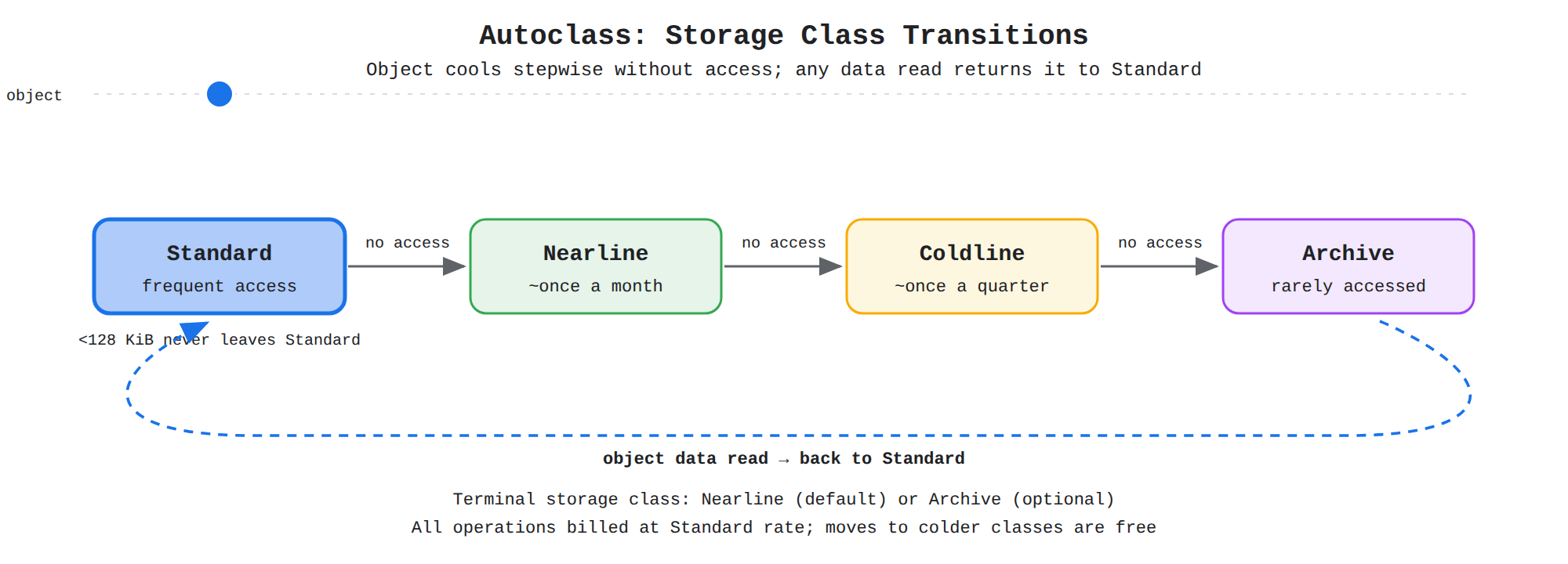
A state diagram of Autoclass storage classes showing an object starting in Standard storage and stepping to Nearline, Coldline, then Archive when not accessed, then returning to Standard via a dashed read path when its data is read.
Autoclass transition behavior follows specific rules. By default the terminal storage class is Nearline storage, which means unaccessed objects stop at Nearline until they are read, and optionally the terminal class can be configured to Archive storage for deeper savings. Objects smaller than 128 KiB never leave Standard storage, where only object data counts toward that size and metadata is ignored. Soft-deleted objects retain their existing class until retention ends, and a restored object begins again in Standard storage.
Autoclass pricing uses Autoclass-specific SKUs with exceptions from normal Cloud Storage pricing:
- A management fee and enablement charge apply for using Autoclass.
- Retrieval fees and early deletion fees are not charged except as part of enablement charges.
- All operations are charged at the Standard storage rate.
- No operation charge applies when Autoclass moves an object to a colder class.
- No Class A operation charge applies for a move from Nearline storage to Standard storage.
- Each move from Coldline storage or Archive storage to Standard storage or Nearline storage incurs a Class A operation charge.
Exam tip: Reading object data moves an Autoclass object to Standard storage, but reading or editing only its metadata does not.
Finding Cost Optimization Opportunities
Storage Intelligence advisor (opens in a new tab) is a centralized view that tracks object count and storage volume over time across projects, folders, or organizations to estimate cost trends. Storage volume over time shows growth by location and storage class, and cumulative object count shows whether growth comes from many small objects or large data volume. Findings such as frequent operations on Coldline or Archive data, storage consumption above the 30-day trend, and cross-region egress between a bucket in one region and compute in another identify when class choice, lifecycle rules, or bucket location are increasing cost.
Key Facts
- Zonal Persistent Disk keeps data in a single zone at lower cost, while Regional Persistent Disk synchronously replicates data across two zones in a region.
- Hyperdisk Balanced lets IOPS and throughput be provisioned separately and changed dynamically.
- For Premium and Extreme NetApp Volumes service levels, hot tier size is total pool capacity minus cold tier size with a 2 TiB minimum charged at the hot tier rate.
- The default NetApp Volumes cooling threshold is 31 days, and data movement between hot and cold tiers carries a network traffic charge in both directions.
- Autoclass objects start in Standard storage, objects smaller than 128 KiB never leave Standard, and reading object data moves an object back to Standard while metadata-only access does not.
Frequently Asked Questions
What is the difference between zonal Persistent Disk and regional Persistent Disk for cost and durability?
Zonal Persistent Disk keeps data in a single zone at lower cost, while regional Persistent Disk synchronously replicates data across two zones in a region for more durable storage to survive a zone outage. Provisioned block storage capacity is reserved and billed whether or not it is fully used, so costs grow with the size of each volume and with the number of volumes attached across tiers.
When should I use Google Cloud Hyperdisk Balanced instead of Persistent Disk?
Google Cloud Hyperdisk provides better performance, flexibility, and efficiency than Persistent Disk for workloads that need tuning. With Hyperdisk Balanced, input/output operations per second (IOPS) and throughput can be provisioned separately and changed dynamically, which lets a database that needs high IOPS but modest throughput, or the reverse, pay for each dimension independently instead of buying a larger fixed tier.
How do Cloud Storage Standard, Nearline, Coldline, and Archive storage classes affect cost?
Standard storage is intended for frequently accessed data, Nearline storage is also suited for frequent access but with lower storage cost than Standard, and Coldline storage and Archive storage are intended for infrequently accessed and rarely accessed data with the lowest storage cost. When data in Coldline or Archive is read often, operation and retrieval charges make it more expensive than keeping that data in Standard or Nearline, so frequent Class A or B operations on Coldline or Archive data means the objects should move to Standard or Nearline.
How does Autoclass in Cloud Storage manage object storage classes and costs?
All objects in an Autoclass bucket begin in Standard storage, even if a request specifies a different class, and most objects then transition to progressively colder classes when they are not accessed, while any read of object data moves the object back to Standard storage to optimize future accesses. Objects smaller than 128 KiB never leave Standard storage, where only object data counts toward that size and metadata is ignored, and reading or editing only metadata does not move the object. By default the terminal storage class is Nearline storage, which means unaccessed objects stop at Nearline until they are read, and optionally the terminal class can be configured to Archive storage for deeper savings.
Sample Question
A financial company stores quarterly audit logs in Google Cloud Storage. The security team accesses these log files approximately once every 9 to 12 months for annual audits. The logs must be retained for at least 90 days without incurring unexpected early deletion or retrieval penalty charges.
Which Cloud Storage class should the company select to minimize data storage costs while matching this access pattern?
How learners score on this domain
Last updated