Fundamental
Prepare and test your skills

Fundamental
Prepare and test your skills
Least Privilege Storage Access Across Project and Bucket
Free sample question with answers and detailed explanation below. The Associate Cloud Engineer practice bank has an additional 2,014 practice questions.Try 10 free realistic questions: instant score, no credit card, and no account required.
You are managing permissions for a data analyst who needs access to resources in your Google Cloud project.
The analyst has the following requirements:
- Must be able to read and view objects across every Cloud Storage bucket within the project.
- Must be able to upload and create new objects only inside a dedicated bucket named
reports-bucket.
Following the principle of least privilege, how should you configure IAM roles for this user?
Explanations
Grant the Storage Object Creator (roles/storage.objectCreator) role at the project level, and grant the Storage Object Viewer (roles/storage.objectViewer) role at the bucket level for reports-bucket.
Grant the Storage Object Creator (roles/storage.objectCreator) role at the project level, and grant the Storage Object Viewer (roles/storage.objectViewer) role at the bucket level for reports-bucket.
What this option does
This option inverts the resource levels for the roles, granting the Storage Object Creator role across the entire project and restricting the Storage Object Viewer role to a single bucket.
Why it doesn't meet the requirement
- Over-grants upload permissions: Granting
roles/storage.objectCreatorat the project level enables the user to upload and create objects in every bucket within the project, violating the requirement to restrict uploads exclusively toreports-bucket. - Fails read requirements: Restricting
roles/storage.objectViewerto the bucket level means the user cannot view or read objects stored in any of the other buckets across the project.
Key characteristics and limitations
- Downward inheritance: IAM permissions granted at the project level automatically propagate to all underlying Cloud Storage buckets.
- No subtractive IAM policies: An IAM role granted at the project level cannot be revoked or denied at the bucket level using standard IAM allow policies.
- Security risk: Distributing broad write permissions across all project buckets exposes data pipelines to unauthorized uploads and unintended data overwrites.
This answer would be correct if
The analyst needed to upload files into every bucket across the entire project but was only permitted to view and inspect uploaded objects within reports-bucket.
Grant the Storage Object Viewer (roles/storage.objectViewer) role at the project level, and grant the Storage Object Creator (roles/storage.objectCreator) role at the bucket level for reports-bucket.
Grant the Storage Object Viewer (roles/storage.objectViewer) role at the project level, and grant the Storage Object Creator (roles/storage.objectCreator) role at the bucket level for reports-bucket.
What this solution is
This configuration applies Identity and Access Management (IAM) roles at distinct levels of the Google Cloud resource hierarchy to enforce the principle of least privilege. It pairs project-level inheritance for project-wide read permissions with a targeted bucket-level binding for object creation.
How it meets the requirements
- Project-wide read access: Assigning the Storage Object Viewer (
roles/storage.objectViewer) role at the project level grants read access to all objects stored in all buckets under that project because IAM permissions are inherited additively down the resource hierarchy. - Restricted upload access: Assigning the Storage Object Creator (
roles/storage.objectCreator) role directly onreports-bucketensures that object creation and write privileges are restricted specifically to that bucket alone.
Hierarchical IAM Permission Inheritance
Hierarchy / Taxonomy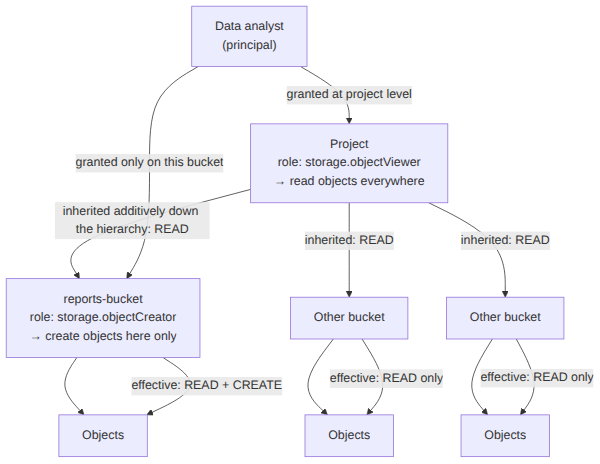
Key advantages and capabilities
- Hierarchical inheritance: Allows broad permissions to be defined once at the project level while keeping sensitive write permissions tightly scoped.
- Additive evaluation: IAM permissions evaluate additively, ensuring that bucket-level assignments supplement project-level permissions without overriding them.
- Granular access control: Prevents accidental modification or deletion across other buckets while providing necessary operational access.
- Support for Uniform bucket-level access: Relies exclusively on Cloud IAM roles rather than legacy Access Control Lists (ACLs), ensuring full compatibility with modern security policies.
Why this is optimal
This approach cleanly fulfills both operational requirements without over-granting permissions. The user receives only read access across the project and write access where needed, avoiding unnecessary administrative overhead or security exposure.
Grant the Storage Legacy Bucket Reader (roles/storage.legacyBucketReader) role at the project level, and grant the Storage Legacy Object Owner (roles/storage.legacyObjectOwner) role at the bucket level for reports-bucket.
Grant the Storage Legacy Bucket Reader (roles/storage.legacyBucketReader) role at the project level, and grant the Storage Legacy Object Owner (roles/storage.legacyObjectOwner) role at the bucket level for reports-bucket.
What this option does
This option relies on Legacy Bucket and Legacy Object IAM roles that were designed for backward compatibility with the legacy ACL system.
Why it doesn't meet the requirement
- Insufficient read access: The Storage Legacy Bucket Reader (
roles/storage.legacyBucketReader) role only grants permissions to list the contents of a bucket and inspect bucket metadata; it does not grant permissions to read the actual object data contents across all buckets in the project. - Over-grants object-level privileges: The Storage Legacy Object Owner role on
reports-bucketgrants full control over objects (including deleting objects and modifying object ACLs) rather than merely allowing object creation and uploading.
Key characteristics and limitations
- Legacy roles: Legacy roles are primarily maintained for backward compatibility with XML API systems and ACL mappings.
- Metadata versus data access: Bucket reader roles handle bucket-level metadata and listing rather than providing object-level read streams (
storage.objects.get). - Non-optimal security posture: Best practices dictate using standard, predefined IAM roles like
roles/storage.objectViewerandroles/storage.objectCreator.
This answer would be correct if
The requirement specifically mandated managing legacy XML API permissions in tandem with bucket ACLs where the user only needed to list bucket contents and administer object ownership in reports-bucket.
Grant the Storage Admin (roles/storage.admin) role at the project level, and configure a bucket Access Control List (ACL) to restrict write access to reports-bucket.
Grant the Storage Admin (roles/storage.admin) role at the project level, and configure a bucket Access Control List (ACL) to restrict write access to reports-bucket.
What this option does
This option grants the Storage Admin (roles/storage.admin) role at the project level, which gives full administrative control over all storage buckets and objects, and attempts to restrict write access using legacy Access Control Lists (ACLs).
Why it doesn't meet the requirement
- Violates least privilege: The Storage Admin role grants complete authority to create, modify, and delete buckets and objects throughout the entire project, vastly exceeding the required read-only access.
- IAM permissions override ACLs: In Google Cloud Storage, IAM permissions evaluate independently of ACLs. If a user possesses project-level IAM admin permissions, setting restrictive ACLs on an individual bucket cannot block their IAM-granted administrative actions.
Key characteristics and limitations
- Excessive administrative control: Includes permissions such as
storage.buckets.delete,storage.buckets.setIamPolicy, andstorage.objects.delete. - Evaluation mechanics: Access is granted if either IAM or ACL allow rules match; restrictive ACLs cannot override an IAM grant.
- Legacy technology: Google Cloud recommends enabling Uniform bucket-level access and avoiding ACLs entirely in modern environments.
This answer would be correct if
The user were a storage infrastructure administrator responsible for managing bucket lifecycles, permissions policies, and storage configurations across the entire Google Cloud project.
Try 10 interactive questions like this one, free
Answer them yourself and get your score the moment you finish. No account needed.
Full access includes
- 2,014 practice questions across all 4 exam domains
- Every answer explained: why it is right, and why the others are not
- Scout, an AI tutor that answers your follow-up questions
- Readiness tracking by domain, so you know when to book the exam
Related free sample questions
Keep the momentum going with these hand-picked practice scenarios
FundamentalAssociate Cloud Engineer
Cloud Storage Signed URLs
Managing and securing objects in Cloud Storage buckets
FundamentalAssociate Cloud Engineer
gcloud compute instances list --filter
Viewing current running Compute Engine instances
FundamentalAssociate Cloud Engineer
Service Account User Role and Bucket-Scoped IAM
Assigning service accounts to resources
FundamentalAssociate Cloud Engineer
Gcloud Services List and Enable
Enabling APIs within projects
FundamentalAssociate Cloud Engineer
GKE Regional vs Zonal Cluster
Deploying a GKE cluster with different configurations (e.g., GKE Autopilot, regional clusters, private clusters)
IntermediateProfessional Cloud Architect
Cloud Run Serverless Containers
Design decision trade-offs
Last updated