Fundamental
Prepare and test your skills
Fundamental
Prepare and test your skills
Low-Code AI Development with Vertex AI
Low-code and no-code development on Google Cloud means building AI applications through managed consoles, pre-built models, and APIs instead of writing all machine learning code from scratch. Vertex AI (opens in a new tab) is the fully managed machine learning (ML) platform that provides this experience, letting users train and deploy ML models and AI applications with intuitive interfaces. The platform combines pre-built models, custom model training, and built-in operations tools so diverse teams can move from idea to deployed model without deep specialized expertise.
Vertex AI as a Managed Platform for Custom Models
Vertex AI is an end-to-end ML platform that handles the full model lifecycle of building, training, deploying, and monitoring. A user brings their own data to custom model training to tailor a solution to a specific need, or starts from pre-built models and algorithms for common tasks to accelerate time to value. Built-in machine learning operations (MLOps) capabilities then manage deployment, monitoring, and management, so the same tools, APIs, and workflows work consistently from experiment to production. Because infrastructure, scaling, and operations are managed by the platform, teams focus on data and business logic rather than servers and pipelines.
Vertex AI runs with the same tools, APIs, and models in Google Cloud and in secure on-premises environments such as Google Distributed Cloud air-gapped. In an air-gapped deployment, Vertex AI services run entirely within a customer data center to maintain data sovereignty and compliance while still offering familiar development. Available managed services include Generative AI for creating content, Online Prediction for deploying models and serving prediction requests, Optical Character Recognition (OCR) for extracting text from images, Speech-to-Text for converting speech to text, Translation for multilingual text, and Vertex AI Workbench for notebook development.
Pre-Trained Models and Ready-to-Use APIs in Vertex AI
Pre-trained models and ready-to-use APIs in Vertex AI remove the need to train complex models from scratch, which otherwise requires large datasets, time, and compute. Model Garden (opens in a new tab) is the library of foundation models for discovery, testing, customization, and deployment, grouped into Google models such as the Gemini family and Imagen for image generation, open models such as Gemma and Llama, and third-party models from partners such as Anthropic. When a pre-trained model needs adaptation, learning transfer reuses its knowledge for a new task by fine-tuning on a smaller specific dataset, which requires less data and compute than starting from scratch.
For many tasks, an application simply sends data to a managed API and receives a result, with no model building at all:
- Cloud Vision API derives insights from images for image analysis, content moderation, and automated data entry.
- Cloud Natural Language API analyzes text structure and meaning for feedback analysis and content categorization.
- Speech-to-Text API converts audio to text across languages and dialects.
- Video Intelligence API identifies objects, scenes, and actions for video search and moderation.
- Document AI API extracts, classifies, and understands document data to automate document workflows.
- Dialogflow API creates conversational interfaces such as chatbots and voice assistants.
- Gemini API provides access to Google's general-purpose generative AI model for text and multimodal tasks.
Intuitive Tools and Deployment Paths for Generative AI
Intuitive development tools let users explore data, design prompts, and deploy models without procuring hardware or writing infrastructure code. Vertex AI Workbench is a managed Jupyter notebook environment for the full data science workflow, with integrations for BigQuery and Cloud Storage, scheduled code execution, Spark processing, and running notebooks as pipeline steps. Colab Enterprise is a collaborative managed notebook environment with Google Cloud security, sharing through a user, group, or domain, Identity and Access Management (IAM) controls, and built-in assistance. Vertex AI Studio (opens in a new tab) provides a console for designing, testing, and customizing prompts sent to large language models, while the Vertex AI SDK and client libraries for Python, Go, Java, and Node.js connect code to the same APIs.
A typical low-code generative AI flow moves through an ordered lifecycle where evaluation repeats until quality is met:
Low-Code GenAI Lifecycle on Vertex AI
Process Flow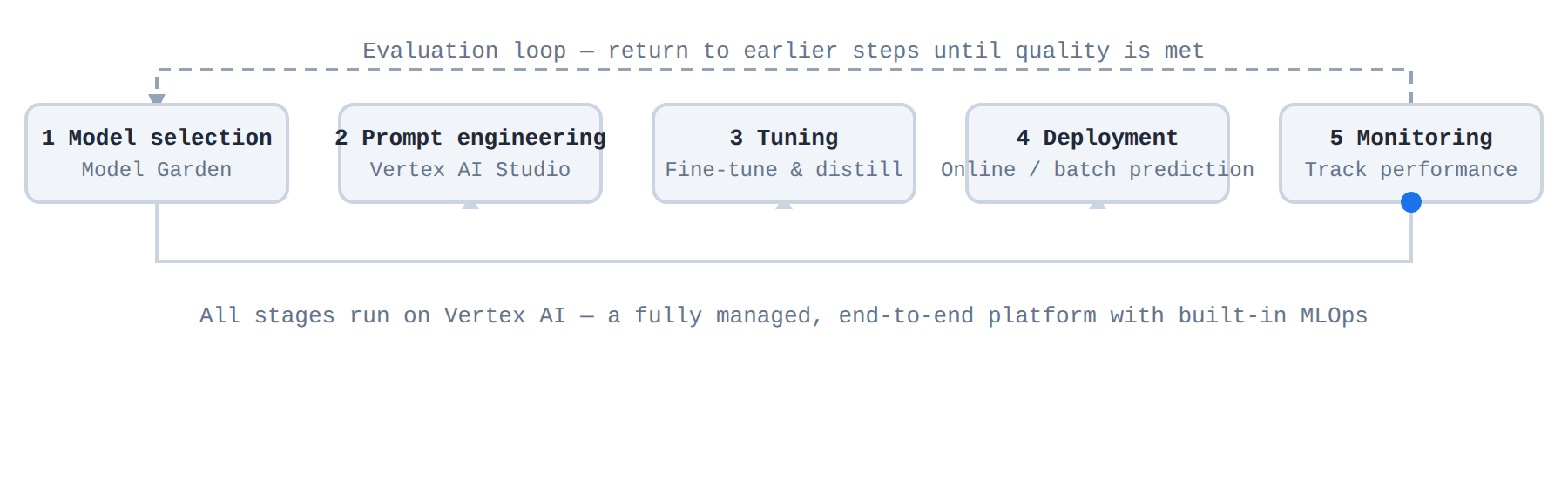
A five-step process flow of the low-code generative AI lifecycle: model selection from Model Garden, prompt engineering in Vertex AI Studio, tuning and distillation, deployment via online or batch prediction, and monitoring. A blue dot travels along the arrows step by step, highlighting each stage in order, with an evaluation loop returning from monitoring to earlier steps.
- Model selection: Choose a foundation model from Model Garden.
- Prompt engineering: Author and compare prompts in Vertex AI Studio.
- Tuning and optimization: Fine-tune and distill the model for the specific task.
- Deployment: Register the model and serve it through online or batch prediction.
- Monitoring: Track performance in production and return to earlier steps when needed.
Google Cloud offers a spectrum from fully managed to fully configurable, so the choice depends on control and management needs:
| Platform | Management model | Choose when |
|---|---|---|
| Vertex AI | Fully managed, end-to-end platform | The team wants MLOps and rapid time to value without managing infrastructure |
| Google Kubernetes Engine (GKE) (opens in a new tab) | Managed Kubernetes with deep control | The team needs custom pipelines, kernel-level customization, very large-scale training, or portability |
| Cloud Run | Serverless containers that scale to zero | The workload is event-driven inference or smaller models where paying only during requests matters |
Exam tip: Choose Vertex AI for low-code speed and offloaded infrastructure management; choose GKE when the requirement is customization, control, and portability across Kubernetes environments.
Ready-to-use AI APIs are pre-trained Google Cloud services that add intelligence to an existing application through a simple API call. The application sends data such as an image, text, audio, or video to the API, Google Cloud runs the pre-trained model, and the API returns the result to the application. This approach removes the need to collect large training datasets, train a model from scratch, or manage the underlying infrastructure.
How Ready-to-Use AI APIs Work
Google Cloud AI APIs follow a consistent integration pattern for embedding intelligence without custom model development. Data flows from the existing application to the API endpoint, the pre-trained model hosted by Google Cloud processes the request, and the processed insight flows back to the application for display or further action. Because Google Cloud hosts, scales, and maintains the models, the development team focuses only on sending the right input and using the returned output. Starting from these pre-trained models significantly reduces cost and development time compared to training complex models from scratch.
Speech, Language, and Translation APIs
Language and voice processing APIs add hearing, speaking, and understanding to applications that handle calls, chats, and text content. An application sends audio or text to the API, and the pre-trained model returns transcription, speech, translation, or text insight without custom training.
- Speech-to-Text (STT) transcribes spoken voice to text and supports a wide range of languages and dialects.
- Text-to-Speech (TTS) synthesizes written text to human voice, so applications can speak responses aloud.
- Cloud Natural Language API analyzes text to understand its structure and meaning, including sentiment analysis, entity analysis, entity sentiment analysis, content classification, and syntax analysis.
- Cloud Translation API translates text between languages, which helps applications serve customers in their preferred language.
These APIs fit common tasks such as customer feedback analysis, content categorization, understanding social media trends, and adding voice input and output to an existing app or contact center workflow.
Vision, Video, and Document APIs
Vision, video, and document APIs extract insight from visual content and files so teams can automate review and data entry. In each case, the application sends the image, video, or document to the API, and the API returns labels, detections, or extracted data for the application to store or act on.
| API | Input to output | Use when |
|---|---|---|
| Cloud Vision API | Image in, insights out | The task needs image analysis, content moderation, or automated data entry |
| Video Intelligence API | Video in, objects, scenes, and actions out | The task needs video content analysis, content moderation, or video search |
| Document AI API | Document in, extracted and classified data out | The task needs to automate document processing workflows |
Choose these APIs when the intelligence is in the content itself and the team does not want to build and train a custom vision or document model.
Conversational Interface APIs
Dialogflow API enables conversational interfaces such as chatbots and voice assistants inside applications and contact centers. The Dialogflow API is part of Google Cloud Conversational AI (opens in a new tab), a collection of conversational tools, solutions, and APIs for designers and developers. Data flows from the customer message to the virtual agent, the agent determines intent and generates a response, and the response flows back to chat, voice, or the contact center. Choose the Dialogflow API when the goal is to create customer service bots and virtual assistants rather than analyzing a single image, text, or audio file.
Exam tip: Use the pre-trained Cloud Natural Language API for standard text understanding, and choose AutoML Natural Language only when you need to train a custom model for classifying content.
Pre-trained models are AI models that have already been trained on vast datasets, so developers can use them without building a model from scratch. Model Garden (opens in a new tab) is Google Cloud's AI/ML model library that helps you discover, test, customize, and deploy these models and assets from Google and Google partners. Using pre-trained models significantly reduces the cost and development time required to create AI solutions, because training complex models from scratch demands substantial computational resources and time.
How Model Garden Centralizes Model Access
Model Garden provides a single location for available models, which simplifies the process of finding the right tool for a task. The library groups models into three categories, and each model has a model card that provides more details. To narrow down the options, you can filter models by task, model collection managed by Google, partners, or you, provider, and features.
- Foundation models are pretrained multitask large models that can be tuned or customized for specific tasks using Agent Studio, Agent Platform API, and the Agent Platform SDK.
- Fine-tunable models are models that you can fine-tune using a custom notebook or pipeline.
- Task-specific solutions are mostly prebuilt models that are ready to use, and many can be customized using your own data.
Accelerating Development with Pre-trained Models
Pre-trained models accelerate the development cycle by providing ready-to-use solutions for complex tasks such as image generation and natural language understanding. Instead of spending time and resources on initial training, developers can start with a model that already understands general patterns. Model Garden offers a consistent deployment pattern for different types of models and provides built-in integration with other parts of Gemini Enterprise Agent Platform, such as model tuning, evaluation, and serving. This integration means that after selecting a model, you can move through tuning, evaluation, and deployment without leaving the platform. For generative AI models, Gemini Enterprise Agent Platform handles the model deployment and serving for you, which removes a significant technical burden.
Security and Governance in Model Garden
Security and governance in Model Garden help teams deploy models safely and control which models are available. Google performs thorough testing and benchmarking on the serving and tuning containers it provides, and active vulnerability scanning is applied to container artifacts. Third-party models from featured partners undergo model checkpoint scans to ensure authenticity. Models from HuggingFace Hub are scanned by HuggingFace and their third-party scanner for malware, pickle files, Keras Lambda layers, and secrets.
Models deemed unsafe are flagged and blocked from deployment in Model Garden. Models deemed suspicious or those that can potentially execute remote code are indicated in Model Garden but can still be deployed, so a thorough review is recommended before deploying them. To control which models are available in your organization, you can set a Model Garden organization policy at the organization, folder, or project level. For example, you can allow access to specific models that you have vetted and deny access to all others.
Understanding Costs for Open Source Models
Cost controls for open source models in Model Garden are based on the compute resources you consume on Gemini Enterprise Agent Platform. Charges apply when you tune, deploy, and explore models, not simply for browsing the library. The three billed areas work together across the model lifecycle from customization to serving.
- Model tuning: You are charged for the compute resources used at the same rate as custom training.
- Model deployment: You are charged for the compute resources used to deploy the model to an endpoint.
- Colab Enterprise: You are charged according to Colab Enterprise pricing.
Exam tip: Model Garden provides a consistent deployment pattern and built-in integration with tuning, evaluation, and serving, while pre-trained models eliminate the need to train from scratch.
Key Facts
- Vertex AI is a fully managed machine learning platform that handles building, training, deploying, and monitoring with built-in MLOps.
- Ready-to-use AI APIs let an application send image, text, audio, video, or document data to a pre-trained model and receive insights without training or managing infrastructure.
- Model Garden is a central library for discovering, testing, customizing, and deploying foundation, fine-tunable, and task-specific models from Google and partners.
- Dialogflow API creates chatbots and voice assistants by routing a customer message to a virtual agent that determines intent and returns a response.
- A Model Garden organization policy at the organization, folder, or project level can allow only vetted models and deny all others.
Frequently Asked Questions
What is Vertex AI and how does it support low-code and no-code AI development?
Vertex AI is a fully managed machine learning platform that handles building, training, deploying, and monitoring models with built-in machine learning operations (MLOps) capabilities. It lets teams build AI applications through managed consoles, pre-built models, and APIs instead of writing all machine learning code from scratch, so they can focus on data and business logic while infrastructure, scaling, and operations are managed by the platform.
When should I use Vertex AI instead of Google Kubernetes Engine (GKE) or Cloud Run?
Vertex AI is the fully managed, end-to-end platform to choose when the team wants machine learning operations and rapid time to value without managing infrastructure. Choose Google Kubernetes Engine when the team needs custom pipelines, kernel-level customization, very large-scale training, or portability, and choose Cloud Run for event-driven inference or smaller models where paying only during requests matters.
How do ready-to-use Google Cloud AI APIs add intelligence to an existing application?
The application sends data such as an image, text, audio, video, or document to the API endpoint, Google Cloud runs the pre-trained model, and the API returns the result for display or further action. This removes the need to collect large training datasets, train a model from scratch, or manage the underlying infrastructure because Google Cloud hosts, scales, and maintains the models.
What is Model Garden in Google Cloud and what kinds of models does it provide?
Model Garden is Google Cloud's AI/ML model library for discovering, testing, customizing, and deploying models from Google and Google partners. It groups models into Google models such as the Gemini family and Imagen for image generation, open models such as Gemma and Llama, and third-party models from partners such as Anthropic, and also distinguishes foundation models, fine-tunable models, and task-specific solutions.
Sample Question
A retail analytics team wants to build a machine learning model to predict customer churn using historical tabular sales records. The business analysts on the team understand the data and business objectives thoroughly but lack specialized coding experience in Python and deep learning frameworks.
Which feature within Google Cloud's Vertex AI platform enables the team to build, train, evaluate, and deploy a custom model through a guided, low-code interface?
Vertex AI Workbench user-managed notebooks
Self-managed virtual machines in Compute Engine
Vertex AI AutoML
Vertex AI Custom Training with Docker containers
How learners score on this domain
Last updated