Fundamental
Prepare and test your skills
Fundamental
Prepare and test your skills
Google Cloud Strengths for Generative AI
Describing how Google's AI-first approach and commitment to future innovation translate into cutting-edge gen AI solutions
Describing how Google's AI-first approach translates into cutting-edge generative AI solutions means tracing research breakthroughs into managed models and infrastructure that businesses can use. Google's long-term research in large-scale language modeling, including the Transformer architecture, created the foundation for modern generative AI. That research reaches enterprises as foundation models and optimized infrastructure for testing, tuning, and deployment (opens in a new tab).
Traditional AI Versus Generative AI Outputs
Traditional AI and generative AI differ in what data they learn from and what they produce. Traditional AI trains on historical data to predict outcomes or assign categories, such as filtering email as spam or not spam, forecasting sales and demand, estimating prices, and segmenting customers. Traditional AI works especially well with structured data such as tables and images. Generative AI trains on broad patterns across text, images, video, and audio, then creates new content such as summaries, answers, code, translations, and media.
| Approach | What it learns from | What it produces |
|---|---|---|
| Traditional AI | Historical tabular data and images | Classifications, continuous predictions, forecasts, and segments |
| Generative AI | Broad patterns across text, images, video, and audio | Summaries, conversations, new content, code, and cross-document insights |
Generative AI excels at content creation and recommendations, conversational search and chatbots, workflow automation, finding insights in documents and data, and generating code. The two approaches can combine when output from traditional AI becomes part of a generative prompt, such as a churn forecast explained in natural language by a chatbot.
Exam tip: Use traditional AI for predictive work on structured data, use generative AI for summarization and multimodal generation, and use a pre-trained API such as Document AI, Vision AI, or Natural Language API when it already meets a classification need.
From Foundation Research to Vertex AI Solutions
From foundation research to Vertex AI solutions is the path that turns models into usable business systems. Vertex AI Model Garden provides Google models such as Gemini and Imagen alongside select open-source and third-party models, including Hugging Face text-generation models. Vertex AI Studio supports prompt design for models including Gemini and PaLM 2. Models selected in Model Garden can deploy in Vertex AI or self-host on Google Kubernetes Engine (GKE) or Compute Engine, where graphics processing units (GPUs) attached to virtual machine (VM) instances accelerate generative workloads.
Research models from the Gemini family flow into Vertex AI, and applications send requests to those models through the Gemini API on Vertex AI with enterprise controls for scale and secure operation. Teams use Vertex AI Studio, Colab Enterprise notebooks, and software development kits (SDKs) and application programming interfaces (APIs) to design prompts, compare outputs, and move from experiment to deployment. Embedded help brings the same family into existing workflows through Gemini Cloud Assist, Gemini Code Assist, Gemini in BigQuery, Gemini in Looker, and Gemini in Security Command Center.
Ordered Development Lifecycle and Scalable Compute
The ordered development lifecycle moves work from idea to running application on Vertex AI. Data and decisions flow from one stage to the next, and the first four stages form a repeating evaluation loop before release:
Vertex AI Development Lifecycle
Process Flow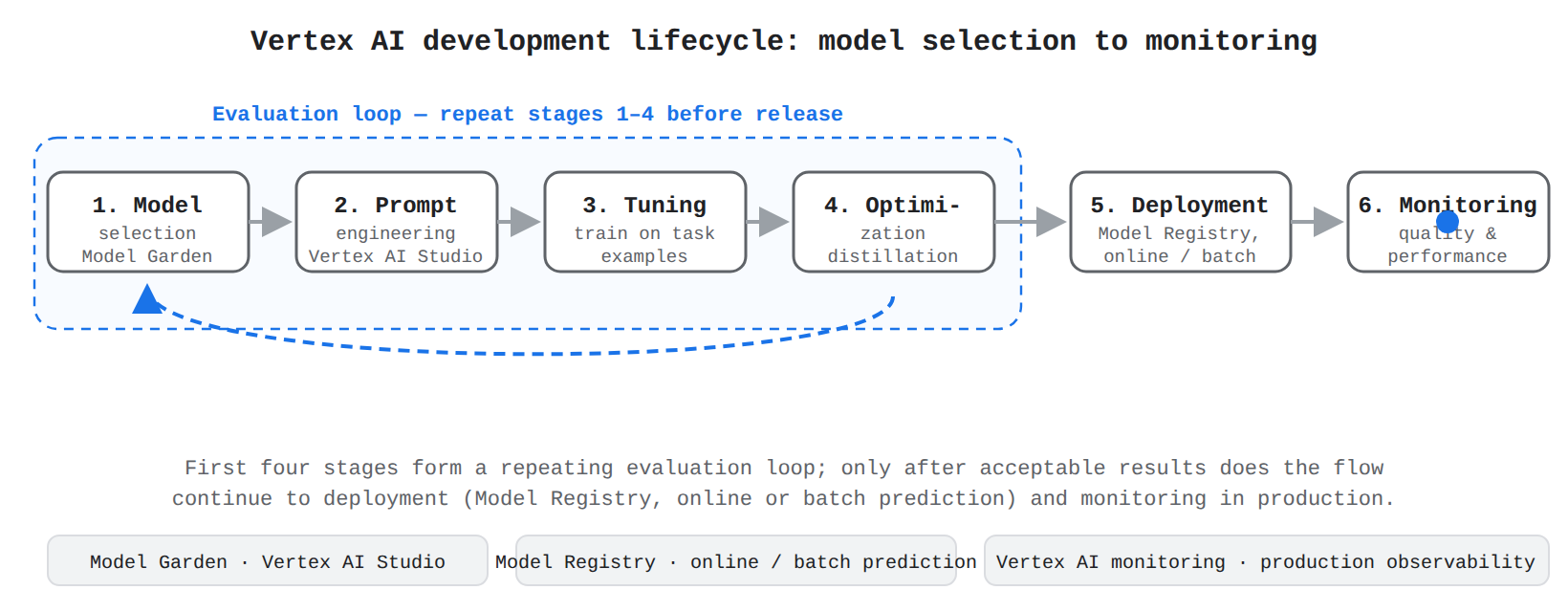
A process flow of the six Vertex AI development stages — Model selection, Prompt engineering, Tuning, Optimization, Deployment, and Monitoring — with an animated dot moving through the stages in order and an evaluation loop arrow showing that the first four stages repeat before release.
- Model selection: Choose a foundation model from Model Garden, including Gemini, Imagen, or select open-source models.
- Prompt engineering: Author and compare prompts in Vertex AI Studio.
- Tuning: Train and tune the general-purpose model on task-specific examples.
- Optimization: Refine the tuned model, including distillation, to balance quality and cost.
- Deployment: Register the model in Model Registry, then serve it through online prediction for real-time requests or batch prediction for large jobs.
- Monitoring: Observe the deployed application in production for quality and performance.
Scalable infrastructure behind the services lets research models meet enterprise demand. GKE acts as the customizable orchestration platform where training and serving run at scale, Compute Engine attaches GPUs to VM instances to accelerate computation, and Cloud TPU (Tensor Processing Unit) accelerates heavy workloads such as training a large language model. AI Hypercomputer co-designs compute, storage, networking, and software to boost efficiency across this entire lifecycle.
Describing how Google Cloud has an enterprise-ready AI platform (e.g., responsible, secure, private, reliable, scalable)
Describing how Google Cloud provides an enterprise-ready AI platform means showing how data control, responsible use, reliability, and scale work together. The platform connects classification, perimeters, access control, safety checks, and managed scaling so generative AI can move from experiment to production. Customer data used in managed search and agent services is not used to train foundation models, which preserves privacy while workloads scale.
Data Boundaries with Isolation and Access Control
Data privacy and security architecture keeps an organization's proprietary information under its own control while AI workloads run. The "your data is your data" commitment means customer data stays isolated, encrypted, and reachable only by identities the customer approves. Sensitive Data Protection finds and classifies sensitive data such as credit card numbers, addresses, and other personally identifiable information (PII), while Knowledge Catalog stores metadata that describes those assets.
Isolation and access control apply in a fixed order:
- Place sensitive data in its own perimeter using VPC Service Controls drawn around Google-managed services so data cannot be copied out without authorization.
- Set Identity and Access Management (IAM) controls so only approved identities can reach data inside the perimeter.
- Require multifactor authentication (MFA) for every user who needs access to sensitive data.
Assured Workloads sets up additional data boundaries for sensitive and regulated workloads to help meet requirements such as FedRAMP and CJIS. The Secure AI Framework (SAIF) (opens in a new tab) extends governance to AI systems, while Supply-chain Levels for Software Artifacts (SLSA), Binary Authorization, Assured Open Source, and Artifact Registry container scanning verify that only trusted builds and libraries reach production.
Exam tip: VPC Service Controls governs whether data can move across a perimeter, while IAM governs which identities can access the data inside it.
Responsible Controls with Safety Filters and Evaluation
Responsible AI principles and governance keep generative AI ethical, transparent, and safe through request-time filters and design-time evaluation. Google's AI Principles require systems to be socially beneficial, avoid unfair bias, be built and tested for safety, be accountable to people, incorporate privacy by design, and avoid prohibited uses such as weapons or harmful surveillance. In Vertex AI, a user prompt first passes through safety classification, then the model generates a response, then the response passes through safety classification again before flowing back to the application.
| Safety category | What the filter checks |
|---|---|
| Hate speech | Attacks based on protected characteristics |
| Harassment | Bullying, threats, or demeaning content |
| Sexually explicit content | Sexual descriptions or solicitation |
| Dangerous content | Content enabling violence, weapons, or unsafe acts |
Administrators choose a threshold for each category from permissive to most restrictive, so a customer-facing chatbot uses stricter settings than an internal analyst tool. Evaluation complements filtering by testing quality, groundedness, and fairness before and after launch: teams define metrics, run curated test prompts, score responses with automatic metrics and human reviewers, then improve prompts, grounding data, or thresholds and retest until outputs meet standards.
Production Scaling with Managed and Self-Hosted Choices
Infrastructure reliability and scalability lets Vertex AI run generative AI from experimentation to production with predictable performance and data boundaries. Vertex AI is the fully managed platform for foundation models including Gemini, with first-class tools and APIs, while teams needing more control can self-host on GKE, Cloud Run, or Compute Engine. Google Cloud resources are hosted in regions and zones, which gives every workload a physical placement foundation.
Scaling adjusts compute to meet demand through autoscaling, which adds or removes resources automatically, or manual scaling, which requires explicit provisioning by an administrator. Production serving includes Vertex AI Agent Engine for deploying AI agents, batch inference for groups of requests, online inference for real-time requests, Vertex AI Vector Search for low-latency vector search, and Vertex AI RAG Engine for retrieval-augmented generation (RAG). For disconnected needs, Vertex AI on Google Distributed Cloud air-gapped runs select pre-trained APIs on a portable appliance with a single NVIDIA A100 80 GB GPU, so only one GPU-dependent API at a time can run.
Recognizing the advantages of Google's comprehensive AI ecosystem (e.g., integration of gen AI across Google products and services)
Recognizing the advantages of Google's comprehensive AI ecosystem means seeing how infrastructure, data, and everyday applications work as one system. Compute, networking, and storage are tuned together to feed accelerators, data platforms supply features and grounding to models, and generative help appears inside email, documents, search, and chat. Data sits at the heart of this system because training requires collecting and storing large amounts of data close to compute.
Optimized Accelerators with Networking and Storage
Full-stack infrastructure optimization means accelerators, networking, storage, and software are designed together to run generative AI at scale. Data flows from cloud storage to the accelerator attached to the VM, where training consumes it, and the trained model then serves inference requests. With GPUs and Cloud TPUs, the speed of moving data from storage to training becomes critical for performance and cost.
| Machine family | GPU attachment | Choose when |
|---|---|---|
| A-series | GPU automatically attached, including NVIDIA H100, A100, B200, and GB200 models | Large-scale model training needs maximum power and scale |
| G-series | GPU automatically attached, including NVIDIA L4 and RTX PRO 6000 models | Smaller-model training and single-host inference |
| N1 general-purpose | Attach a select GPU such as NVIDIA T4, P4, or V100 | Flexible workloads need an added GPU |
GPUs attached to Spot VMs persist only for the life of the VM and cost less, so they fit work that can tolerate interruption. AI Hypercomputer combines accelerators, networking, storage, consumption models, and cluster management into one system, with TensorFlow Enterprise providing supported performance for TensorFlow workloads.
Exam tip: Choose A-series machines for large-scale training and G-series machines for smaller-model training and single-host inference; both have GPUs automatically attached, while N1 requires you to attach a supported GPU.
Unified Data Foundation with Grounding and Feature Serving
Synergy between data analytics and AI platforms means data management and model development share one lifecycle. BigQuery supplies feature data to Vertex AI Feature Store, where a feature group maps to a BigQuery table or view and a feature view materializes features into an online store. Online serving retrieves the latest feature values for real-time inference, while offline or batch serving exports high volumes including historical data for training. The feature view refreshes periodically from BigQuery so the AI platform reads current values.
Grounding connects generative AI to real-time data through RAG so responses are accurate and current. A vector is a numerical representation of text, images, or video, and embedding models translate prompts into vectors for similarity search in a vector database. Google Cloud offers several grounding paths:
- Vertex AI Search as a fully managed solution supporting most data sources without direct access to embeddings
- Vertex AI RAG Engine as a managed orchestrator for building RAG search
- Vertex AI Vector Search as a specialized database for low-latency, large-scale vector search
- Cloud SQL or Firestore when data is accessed programmatically and a query result can go directly into the prompt
Cloud SQL for PostgreSQL version 12 and later can call Vertex AI models inside the database, limited to 4 MB per request and 1,500 requests per minute per region per model per project. Vertex AI Model Registry then tracks model versions, while Experiments, ML Metadata, TensorBoard, and Vizier record runs and tune parameters.
Embedded Assistance with Context Understanding and Support Automation
Integration across Workspace and consumer applications embeds generative AI inside tools people already use. Foundation models learn patterns from vast multimodal data and predict likely responses, while embeddings map content into a vector space where closer proximity means similar meaning. Function calling connects large language models to external tools (opens in a new tab) when the model generates structured data specifying which function to call, the function runs and returns results, and the model folds those results into its answer.
Native AI features interpret full context and nuance rather than only keywords, summarize information from many sources, and accept text, voice, and image together, such as combining a damage photo with a description for troubleshooting. The automated support workflow runs in order: first the chatbot creates and populates a ticket with customer details, categorization, transcript, and issue summary, then it assigns the ticket to the correct team and prioritizes it by urgency, sentiment, and complexity.
Describing the benefits of Google Cloud's open approach means explaining how portability, model choice, and open standards prevent single-vendor dependency. Open software, familiar machine learning frameworks, and consistent operations let teams build once and run in Google Cloud, on-premises, or another cloud. That flexibility supports hybrid and multi-cloud strategies without rebuilding workloads (opens in a new tab).
Portable Operations from Training Through Serving
Multi-cloud flexibility and interoperability lets the same generative AI workload run in different environments with consistent operations. AI Hypercomputer combines performance-optimized hardware, open software, leading frameworks, and flexible consumption models so training, tuning, and serving depend on portable tools rather than a closed-only format. Google Cloud extends AI-enabled infrastructure from cloud to on-premises, so the same models and containers can move across the boundary.
Operational consistency follows an ordered lifecycle:
- Training: The model learns patterns from data using infrastructure such as Cloud TPU clusters on GKE.
- Tuning: The trained model is adapted for a specific task.
- Serving: The tuned model handles live requests and generates outputs.
GKE carries consistency into orchestration with node auto-repair replacing unhealthy nodes and horizontal pod autoscaling adjusting capacity, so the control plane manages health and scale the same way for training and serving.
Flexible Model Selection Across Managed and Self-Hosted Runtimes
Model choice and portability let leaders match models to performance and cost while moving models across environments. Vertex AI is the AI/ML platform for accessing, testing, tuning, and deploying models, and Vertex AI Model Garden is the library for discovering Google models such as Gemini and Imagen alongside select open-source and Hugging Face text-generation models. The same open models can run on Vertex AI for managed deployment, on GKE for Kubernetes-based self-hosting, or on Compute Engine VMs with attached GPUs for full runtime control.
| Option | Best for | Portability note |
|---|---|---|
| Vertex AI | Fully managed end-to-end platform for MLOps and rapid time-to-value | Less infrastructure control, managed by Google Cloud |
| GKE | Customizable platform for high-performance training and serving | Portable through Kubernetes, with more management responsibility |
| Cloud Run | Serverless containerized inference for event-driven apps and smaller models | Scales to zero, with less control than GKE |
Vertex AI on Distributed Cloud extends the same tools, APIs, and models to secure on-premises, air-gapped environments to support data sovereignty while keeping development familiar.
Exam tip: Choose Vertex AI when you want a managed platform for model access and MLOps, and choose GKE when you need Kubernetes-based portability and open standards to avoid vendor lock-in.
Community Standards That Reduce Vendor Lock-In
Open-source contributions give the wider AI community shared building blocks that Google Cloud delivers as managed services without closing them off. Kubernetes is the open container orchestration platform behind GKE, so the same workload definitions and skills carry to other Kubernetes environments. Google contributes Kueue for queueing and prioritizing batch jobs and the Ray on GKE add-on for scaling distributed Python applications for preprocessing, training, and serving.
AI Hypercomputer pairs performance-optimized hardware with open software and leading frameworks so teams keep tools they already know. Open models such as Gemma can deploy on GKE, and TensorFlow Enterprise follows the same pattern for managed TensorFlow. Google Distributed Cloud extends this open foundation to on-premises and edge, while partners and samples such as Online Boutique, Bank of Anthos, and GKE AI Labs show production use on the same standards.
Continue with this study guide: Describing the benefits of Google Cloud's open approach
Identifying the essential components of Google Cloud's AI-optimized infrastructure and its benefits (e.g., hypercomputer, Google's custom-designed TPUs, GPUs, data centers, cloud computing)
Identifying the essential components of Google Cloud's AI-optimized infrastructure means naming the global facilities, accelerators, networks, storage, software, and provisioning that support generative AI at scale. Planetary-scale data centers supply raw capacity, high-speed networking moves data to compute, and AI Hypercomputer (opens in a new tab) co-designs hardware, networking, storage, and software to improve training, tuning, and serving. The foundation reflects over two decades of running planet-scale AI in production.
Global Capacity with Throughput Reliability and Cost Control
Google's global infrastructure pools capacity across many regions so workloads can scale up for large training runs and scale out for high-volume inference. Training flows from development tools to large accelerator clusters, tuning refines models on the same capacity, and serving delivers results from locations close to demand. High-speed networking carries data from storage to accelerator clusters, between nodes during distributed computation, and from serving systems to users, so a bottleneck in one layer does not stall the others.
Enterprise generative AI needs three outcomes together: throughput from performance-optimized hardware and networking that reduces waiting between compute steps, reliability from distributed sites and managed orchestration that replaces unhealthy resources, and cost-efficiency from open software and flexible consumption that lets teams reuse skills and pay to fit the job. AI Hypercomputer combines these benefits into one system where teams can start from Model Garden, configure deployment on GKE, and deploy on the same optimized stack.
Task-Matched Accelerators for Training Versus Serving Fleets
Specialized AI hardware accelerators perform the heavy math behind training and serving, and AI Hypercomputer maximizes goodput, the measure of actual machine learning productivity. Graphics Processing Units (GPUs) are NVIDIA accelerators for general AI workloads from prototyping to large-scale training and real-time serving. Google Cloud manages them as independent units or as tightly coupled clusters depending on whether tasks must stay synchronized.
| GPU type | Management unit | Maintenance and reliability |
|---|---|---|
| General GPUs | Independent compute units | Asynchronous maintenance with standard auto-repair for pod-level uptime |
| Clustered GPUs | Single tightly coupled high-performance cluster | Synchronized maintenance with health monitoring and proactive replacement |
Choose clustered GPUs when large-scale training depends on many nodes acting as one reliable system. Choose general GPUs when a serving fleet needs independent units that can be repaired without stopping the whole system. Tensor Processing Units (TPUs) are Google's custom chips for large matrix operations, with on-chip high-bandwidth memory (HBM) for larger models and batch sizes. TPUs scale in groups called slices with little to no code changes.
Exam tip: Choose single-host TPU virtual machines when you have multiple independent inference workloads, and choose a multi-host TPU slice when multiple interconnected TPU virtual machines must work together as a unit on one workload.
Integrated Hypercomputer Layers for Frameworks and Capacity
Accelerator performance at scale comes from the network, storage, software, and provisioning around the chips. High-bandwidth networking sustains throughput across thousands of instances, while Google Cloud Managed Lustre and Cloud Storage Rapid eliminate input and output bottlenecks. Optimized versions of PyTorch, JAX, and TensorFlow run efficiently on GPUs and TPUs, and orchestration places jobs on the right accelerators through GKE for container-native scaling, Slurm through Cluster Director for managed scheduling, or Cluster Toolkit blueprints for customizable deployment.
Flexible consumption matches cost and availability to the job:
- Flex-start VMs for flexible short-term capacity
- Spot VMs for low-cost, interruptible capacity for fault-tolerant work
- Reservations for guaranteed blocks for predictable production
- Dynamic Workload Scheduler for atomic provisioning of entire blocks of interconnected nodes
The Dynamic Workload Scheduler depends on underlying GPU and TPU clusters because it acquires the whole connected block together, so a distributed job launches only after all nodes are ready.
Explaining how Google Cloud's AI platform provides users with control over their data (e.g., security, privacy, governance, open and leading first party models, pre-built and customizable solutions, agents)
Explaining how Google Cloud's AI platform provides control over data means showing how packaging, ownership, encryption, and governance keep customer information under customer direction. Teams package agents and models in containers they control, data stays owned by the customer and isolated on shared infrastructure, and independent certifications verify the controls. The same protections apply whether the workload uses a first-party model or an open model.
Controllable Agent Hosting with Cloud Run Containers
Customizable solutions and agent deployment use pre-built and adjustable building blocks that keep architectural control with the customer. Cloud Run is the serverless container platform that hosts these solutions, including intelligent agents, where teams package code and dependencies and expose a secure Cloud Run URL endpoint over HTTP. An agent receives a request at its endpoint, calls a model such as Gemini on Vertex AI, then calls tools, APIs, or data sources before returning an answer, so agent logic stays in the customer-controlled container.
Cloud Run provides the following features for AI applications:
- Flexible container support: Package an app with any supported language, library, or framework.
- HTTP endpoint with streaming: Expose services through a secure URL supporting chunked transfer, HTTP/2, and WebSockets.
- Automatic or manual scaling: Scale services automatically and pay only for use, or set manual scaling; instances run as singletons without autoscaling.
- GPU support: Attach GPUs to accelerate models, with services able to scale down to zero.
- Integrated ecosystem: Connect to Vertex AI, BigQuery, Cloud SQL, Memorystore, Pub/Sub, AlloyDB, Cloud CDN, and Secret Manager with observability.
- Enterprise controls: Use direct VPC connectivity and granular networking and security controls.
Agent patterns include microservices where capabilities call each other, Agent2Agent (A2A) communication for collaborative agents, and Model Context Protocol (MCP) servers for standardized context to models. The same platform serves models for inference, builds RAG systems, hosts AI-powered APIs, and supports rapid prototyping.
Ownership Protections with Encryption and Restricted Access
Data privacy, security, and governance protocols define who may access data, how it is encrypted, and which standards verify the controls. Data stored on Google systems belongs to the customer, and Google does not scan it for advertising, sell it to third parties, or use it to train models without permission. Each customer's data is logically isolated even on shared servers, and only a small group of employees can access it under least privilege and need-to-know with formal approval and audit records.
Encryption and isolation protect data at rest, in transit, and in use. Cloud KMS with Cloud EKM encrypts data with keys managed outside Google infrastructure while still allowing compute and analytics, Confidential Computing encrypts data during processing, and BigQuery encrypts data at rest and in transit. Network controls restrict traversal to authorized services, route traffic through front-end servers to stop malicious requests and distributed denial-of-service (DDoS) attacks, and limit device access to authorized employees. Access Transparency logs administrative access by authorized personnel (opens in a new tab), while Access Approval requires customer approval before that access is permitted.
Exam tip: Access Transparency records administrative access after it happens, while Access Approval requires explicit customer approval before an authorized Google administrator can access data.
Verified Governance with Compliance and Response Cycles
Compliance and governance frameworks verify controls through independent certifications such as ISO/IEC 27001, 27017, 27018, 27701, SOC 2 and SOC 3, FedRAMP, BSI C5, and MTCS. Assured Workloads creates and monitors control packages for regional support and programs such as FedRAMP, ITAR, or Sovereign Controls for EU. BigQuery governance adds audit logs, data masking, row-level and column-level controls, VPC perimeters, and Sensitive Data Protection scans, with live zero-copy sharing through linked datasets and clean rooms for sensitive collaboration.
The incident detection and response cycle moves in order from signals to improvement:
- Signal development: Build threat intelligence from incidents, traffic, logs, and exercises into indicators for detection.
- Threat detection: Scan logs against indicators, separating human, service, and impersonation events to prioritize real access.
- Incident investigation: Have separate security teams determine whether access was intentional, accidental, misconfigured, or malicious and collect scope and impact.
- Remediation: Document incidents, extract tactics and procedures, develop new indicators, and reinforce protections with immutable audit logs.
Describing how Google Cloud's AI platform democratizes AI development (e.g., low-code and no-code tools, pre-built and customizable solutions, agents)
Describing how Google Cloud's AI platform democratizes AI development means showing how managed consoles, pre-trained models, and APIs remove the need to build everything from scratch. Vertex AI is the fully managed machine learning platform that handles building, training, deploying, and monitoring with built-in MLOps. Teams focus on data and business logic while infrastructure, scaling, and operations are managed for them.
Managed Creation Paths with Notebooks and Prompt Tools
Vertex AI as a managed platform supports custom training on a team's own data or starting from pre-built models for common tasks to accelerate time to value. The same tools, APIs, and workflows work from experiment to production, and Vertex AI runs consistently in Google Cloud and in secure on-premises environments such as Google Distributed Cloud air-gapped. Air-gapped services include Generative AI, Online Prediction, Optical Character Recognition (OCR), Speech-to-Text, Translation, and Vertex AI Workbench.
Intuitive tools remove infrastructure work: Vertex AI Workbench provides managed Jupyter notebooks with BigQuery, Cloud Storage, scheduled execution, and Spark integration, Colab Enterprise adds collaborative notebooks with IAM controls, Vertex AI Studio supports prompt design and comparison, and SDKs for Python, Go, Java, and Node.js connect code to the same APIs. A typical low-code generative flow moves in order:
- Model selection: Choose a foundation model from Model Garden.
- Prompt engineering: Author and compare prompts in Vertex AI Studio.
- Tuning and optimization: Fine-tune and distill the model for the task.
- Deployment: Register the model and serve it through online or batch prediction.
- Monitoring: Track production performance and return to earlier steps when needed.
Choose Vertex AI for low-code speed without managing infrastructure, GKE for custom pipelines and portability, and Cloud Run for event-driven inference that scales to zero.
Ready-Made Intelligence with Speech Language and Document APIs
Ready-to-use AI APIs add intelligence through a simple call where the application sends data to the API, Google Cloud runs the pre-trained model, and the result flows back. This pattern removes the need to collect large datasets, train from scratch, or manage infrastructure, which significantly reduces cost and development time.
- Speech-to-Text (STT) transcribes voice to text across languages and dialects.
- Text-to-Speech (TTS) synthesizes text into human voice for spoken responses.
- Cloud Natural Language API analyzes structure and meaning, including sentiment, entities, classification, and syntax.
- Cloud Translation API translates text to serve customers in their preferred language.
- Cloud Vision API derives insights from images for analysis, moderation, and data entry.
- Video Intelligence API identifies objects, scenes, and actions for search and moderation.
- Document AI API extracts and classifies document data to automate workflows.
- Dialogflow API creates chatbots and voice assistants where a customer message flows to a virtual agent that determines intent and returns a response.
Use the pre-trained Natural Language API for standard text understanding and choose custom training only when classifying specialized content requires it.
Exam tip: Use pre-trained APIs when a standard capability fits, since they remove training and infrastructure work; choose custom Vertex AI training when the task needs adaptation to specific data.
Centralized Discovery with Model Garden Controls
Model Garden centralizes model access as the library for discovering, testing, customizing, and deploying models from Google and partners. Foundation models are pre-trained multitask models that can be tuned for specific tasks, fine-tunable models can be adapted with a custom notebook or pipeline, and task-specific solutions are mostly prebuilt and ready to use. Each model has a model card with details, and filtering by task, collection, provider, and features narrows the choice. Learning transfer reuses knowledge by fine-tuning on a smaller dataset, which needs less data and compute than starting from scratch.
Security and cost controls govern this choice. Google tests serving and tuning containers, scans artifacts for vulnerabilities, scans partner checkpoints for authenticity, and flags unsafe models to block deployment while marking suspicious models for review. A Model Garden organization policy at the organization, folder, or project level can allow only vetted models and deny others. Charges for open-source models apply to compute consumed for tuning, deployment to an endpoint, and Colab Enterprise use, not for browsing.
Key Facts
- Traditional AI predicts and classifies structured data while generative AI creates summaries, conversations, media, code, and insights from broad multimodal patterns.
- Vertex AI Model Garden provides Gemini, Imagen, open-source, and third-party models, with a lifecycle flowing from selection to prompt engineering to tuning to deployment to monitoring.
- VPC Service Controls prevents data movement across perimeters while IAM controls which identities can access data inside, with Assured Workloads supporting FedRAMP and CJIS needs.
- AI Hypercomputer co-designs accelerators, networking, storage, and software, using GPUs for general workloads and Cloud TPUs for large matrix operations with atomic provisioning for large training jobs.
- Cloud Run hosts customizable agents in containers with GPU support and scaling to zero, while Access Approval requires approval before administrator access and Access Transparency logs it afterward.
Frequently Asked Questions
What is the difference between traditional AI and generative AI in what they learn from and produce?
Traditional AI trains on historical tabular data and images to produce classifications, continuous predictions, forecasts, and segments such as spam filtering, sales forecasting, and customer segmentation. Generative AI trains on broad patterns across text, images, video, and audio to create summaries, conversations, code, translations, and media for content creation, conversational search, workflow automation, and document insights.
What is the ordered development lifecycle from model selection to monitoring on Vertex AI?
The ordered lifecycle on Vertex AI moves from model selection in Vertex AI Model Garden to prompt engineering in Vertex AI Studio to tuning on task-specific examples to optimization including distillation to deployment through Model Registry to monitoring in production. Deployment serves through online prediction for real-time requests or batch prediction for large jobs. The first four stages form a repeating evaluation loop before release.
How do VPC Service Controls and Identity and Access Management (IAM) work together to protect sensitive data on Google Cloud?
VPC Service Controls governs whether data can move across a perimeter drawn around Google-managed services, while Identity and Access Management (IAM) governs which identities can access data inside it. Protection applies in order by placing sensitive data in its own perimeter, setting IAM controls so only approved identities can reach data inside, and requiring multifactor authentication for every user who needs access.
When should I use A-series versus G-series versus N1 machines for Graphics Processing Units (GPUs) on Google Cloud?
Choose A-series machines with automatically attached Graphics Processing Units (GPUs) including NVIDIA H100, A100, B200, and GB200 models for large-scale model training needing maximum power and scale. Choose G-series machines with automatically attached GPUs including NVIDIA L4 and RTX PRO 6000 models for smaller-model training and single-host inference, and choose N1 general-purpose machines where a select GPU such as NVIDIA T4, P4, or V100 must be attached for flexible workloads.
Subdomains
Foundational Research and the Transformer Architecture is the history of how Google's AI-first research created the models behind modern generative AI. Breakthroughs in large-scale language modeling, …
Multi-cloud flexibility and interoperability is the ability to build a generative AI workload once and run it in Google Cloud, on-premises, or another cloud without rebuilding it. Google Cloud's open …
Data Privacy and Security Architecture on Google Cloud is the set of controls that keeps an organization's proprietary information under its own control while AI workloads run. The "your data is your …
Google's global infrastructure is the planetary-scale foundation of data centers, networking, compute, storage, and software that supports enterprise generative AI. The foundation reflects over two de…
Customizable Solutions and Agent Deployment is the use of pre-built and adjustable AI building blocks to tailor generative AI to an organization's needs while keeping architectural control. Cloud Run …
Low-code and no-code development on Google Cloud means building AI applications through managed consoles, pre-built models, and APIs instead of writing all machine learning code from scratch. **Vertex…
Full-stack infrastructure and hardware optimization means the compute, networking, storage, and software layers are designed and tuned together to run generative AI at scale. Data sits at the heart of…
How learners score on this domain
Last updated