Fundamental
Prepare and test your skills
Fundamental
Prepare and test your skills
Gemini App, Gemini Advanced and Custom Gems
Implementing custom Gems for specialized functions means creating reusable AI experts inside Gemini Advanced (opens in a new tab) that carry a specific role, tone, and set of constraints. A Gem is a tailored persona configured for a recurring task or domain, so a user does not have to retype the same background instructions in every chat. The business value is consistency and speed, because routine work follows the same expert pattern and non-specialists can draw on domain-specific help.
Role of Gems in Reusable Domain Expertise
Gems turn repeated prompting into a reusable asset for a person or team. A Gem holds the context for one job, such as reviewing contracts, coaching support replies, or summarizing research, and applies that context each time it is used. This reduces setup time for repetitive tasks and keeps answers aligned to the same standards. Teams use Gems when different people need the same specialized behavior without becoming specialists themselves.
Screening of Gemini Enterprise Requests by Model Armor
Model Armor screens requests and responses for Gemini Enterprise workloads before they reach their destination. Traffic flows from Gemini Enterprise to Model Armor for checking, and Model Armor replies according to the filter configuration in its template. Gemini Enterprise then either blocks the request or response or allows it to proceed. For example, Gemini Enterprise can detect a request containing personally identifiable information (PII) and route it to Model Armor, and if the template is configured to block PII, Model Armor tells Gemini Enterprise to block the request.
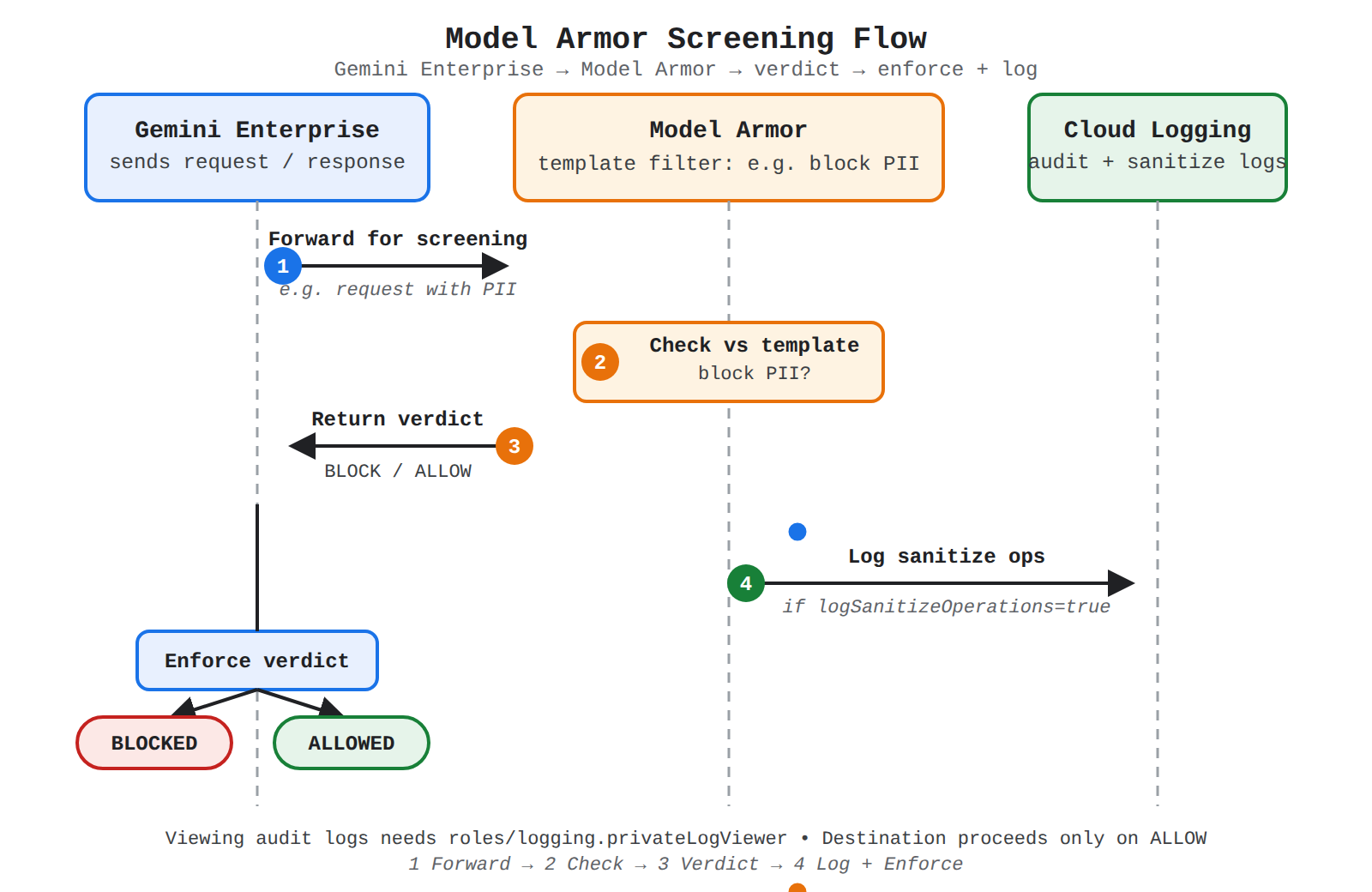
A sequence diagram showing Gemini Enterprise forwarding requests to Model Armor, Model Armor checking the template filter and returning BLOCK or ALLOW, then logging to Cloud Logging and enforcing the verdict.
Model Armor writes platform logs for sanitization requests and responses to Cloud Logging. Viewing Model Armor audit logs requires the Private Logs Viewer (roles/logging.privateLogViewer) Identity and Access Management role. Sanitize operations are logged only when the templateMetadata.logSanitizeOperations field is set to true, so logging depends on that template setting.
Protection of AI Workloads by Secure Posture Controls
The predefined posture template for secure AI, essentials (v1.0.0), protects Gemini and Gemini Enterprise Agent Platform resources and can be deployed without changes. The template contains two policy sets, organization policies and custom Security Health Analytics detectors, both applying to Gemini Enterprise Agent Platform workloads. It is available on the Premium and Enterprise tiers and requires organization-level activation. The Enterprise tier shuts down on May 21, 2027, and organizations on it move automatically to Premium on or after that date.
Organization policies constrain newly created Vertex AI Workbench resources by changing insecure defaults:
ainotebooks.disableFileDownloadsturns off file downloads on new instances, which are enabled by default.ainotebooks.disableRootAccessdisables root access on new user-managed notebooks and instances, which is enabled by default.ainotebooks.disableTerminaldisables the terminal on new instances, which is enabled by default.ainotebooks.requireAutoUpgradeSchedulerequires an automatic upgrade schedule on new user-managed notebooks and instances.ainotebooks.restrictPublicIprestricts public IP access to new notebooks and instances, which is allowed by default.
Custom Security Health Analytics detectors check resources that already exist rather than blocking creation:
| Detector | Resource checked | What it finds |
|---|---|---|
vertexAIDataSetCMEKDisabled | aiplatform.googleapis.com/Dataset | A dataset not encrypted with a customer-managed encryption key (CMEK) |
vertexAIModelCMEKDisabled | aiplatform.googleapis.com/Model | A model not encrypted with a CMEK |
To resolve a CMEK finding, the key and key ring must be created, permissions must be set up, and the key must be supplied when the dataset or model is created. Together the layers work in order: Model Armor filters live traffic before it reaches the workload, organization policies control settings at creation time, and detectors report risks on deployed datasets and models after the fact.
Exam tip: Organization policies in the secure AI posture template prevent insecure settings on newly created Vertex AI Workbench resources, while Security Health Analytics detectors report on resources that already exist.
Evaluating business use cases and strategic value means showing how Gemini for Google Cloud (opens in a new tab) embeds generative AI help inside tools teams already use. Gemini for Google Cloud is a suite of assistants that uses natural language to reduce manual work, speed up analysis, and make advanced skills available to more employees. Its strategic value comes from fitting AI to each department workflow instead of forcing teams to adopt a separate tool.
Organization of Prebuilt Offerings by Type of Work
Gemini for Google Cloud divides assistance by the type of work a user performs, so each role gets help in its own product. A data analyst works in BigQuery or Looker, a developer works in Code Assist, and a security analyst works in Security Command Center. The main offerings differ in audience and daily tasks:
| Product | Type of assistance | Example tasks |
|---|---|---|
| Gemini Cloud Assist | Design, optimize, and operate cloud applications | Manage cloud applications, troubleshoot resources, manage security configurations |
| Gemini Code Assist | Develop, deploy, and troubleshoot code | Generate and debug code, generate unit tests, build integrations |
| Gemini in BigQuery | Prepare and analyze data | Data canvas, data insights, SQL and Python generation |
| Gemini in Looker | Analyze and export Looker data | Custom visualizations, LookML, conversational analytics |
| Gemini in Security Command Center | Simplify search queries and interpret cases | Generate UDM search queries, summarize security cases |
Support for Knowledge Work in the Gemini Enterprise App
Gemini Enterprise (opens in a new tab) is a web and mobile app for knowledge workers and team members that answers questions from connected company data. The app verifies sources, drafts high-quality content, and connects users to agents through the Agent Gallery, which holds Google-made agents, organization-shared tools, and custom multi-step agents built in Workflow Builder. Users can also install custom skills that standardize recurring workflows for consistent results.
The app supports creative and collaborative drafting side by side with chat. In Canvas, users draft, edit, and format documents and presentations while continuing the conversation. Users can generate custom images and visual media for documents and build private notebooks grounded in uploaded documents, Google Drive files, and web links, including audio overviews. The mobile app extends this work with camera photos as context, file uploads, voice input, audio answers, and interactive cards for suggested actions such as sending emails, which the user reviews and confirms.
Assistance for Data and Analytics Tasks
Gemini in BigQuery (opens in a new tab) provides AI-powered help for exploring, transforming, querying, and visualizing data. Users can explore data with data insights, chat with data through conversational analytics, and use BigQuery data canvas to discover and shape results. The assistant generates or suggests SQL and Python code, explains existing SQL queries, and recommends AI-generated transformations for data preparation. The Data Engineering Agent builds, modifies, and troubleshoots data pipelines from natural language prompts and proactively generates semantic metadata.
Gemini in Looker (opens in a new tab) brings similar help to business intelligence users in Looker. Users ask questions in natural language and receive charts or data tables, describe formatting to generate custom visualizations, and write Looker expressions for table calculations and custom fields. The assistant also generates LookML parameters, summarizes an Explore, and generates Quick Start analyses. These features lower the barrier to early exploration and help non-experts get value from data faster.
Help for Development, Cloud Operations, and Security
Gemini Code Assist acts as an AI collaborator for building code and enterprise integrations. In Application Integration, it creates integrations from natural language prompts and configures connector tasks, Call REST API tasks, edge conditions, JavaScript tasks, and integration descriptions. It supports triggers such as API, Cloud Pub/Sub, Salesforce, Jira Cloud, ServiceNow, Zendesk, and Cloud Scheduler, along with tasks such as data mapper, approval, suspend, JavaScript, Cloud Run functions, timer, return, send email, connectors, Call REST endpoint, and Doc AI Process. It also assists with control flow tasks such as For Each Loop, For Each Parallel, While Loop, and Call Integration, but it cannot generate sub-integrations.
Gemini Cloud Assist helps teams design, optimize, and operate cloud applications by creating, optimizing, and troubleshooting resources and managing resource security configurations. Gemini in Security Command Center helps security teams investigate threats by generating Unified Data Model (UDM) search queries from natural language questions. It also summarizes cases opened for security issues and suggests steps to resolve them, which speeds response without changing the investigation workflow.
Business Mapping and Limits for Adoption Planning
The same suite maps to different departments because each team keeps its own tools while gaining faster task completion and more consistent output. Knowledge workers use the Gemini Enterprise app to chat with company data and draft content, data teams use Gemini in BigQuery and Looker to explore data and create code and visuals, developers use Code Assist to generate code and integrations, security teams use Security Command Center assistance to query and summarize cases, and cloud operations teams use Cloud Assist to troubleshoot and secure resources.
Adoption planning must account for accuracy, training, and compliance limits. Gemini for Google Cloud products can generate output that seems plausible but is factually incorrect, so users should validate all output before use. Gemini for Google Cloud does not use prompts or responses to train models without express permission. Setup (opens in a new tab) choices also matter for compliance, because Gemini in BigQuery is part of Gemini for Google Cloud and does not support the same compliance and security offerings as BigQuery, so it should only be set up for projects that do not require unsupported compliance offerings.
Exam tip: Gemini in BigQuery does not provide data residency for individual locations; Gemini processing can be specified for US and EU supported jurisdictions, but data outside these jurisdictions is processed globally.
Differentiating Gemini and Gemini Advanced capabilities means distinguishing a focused, source-bound research assistant from a broad, enterprise-wide assistant with multimodal generation and autonomous agents. Gemini Enterprise (opens in a new tab) is the broad assistant and agentic platform that searches Google and third-party systems, creates text and multimodal content, and orchestrates agents for multi-step work. Gemini Notebook Enterprise is the focused assistant that works only from curated notebooks of trusted sources.
Focused Curation in Gemini Notebook Enterprise
Gemini Notebook Enterprise is an AI-powered research assistant that builds deep understanding from hand-selected sources. A user builds a notebook as an organized collection of documents, websites, and notes on one topic, and that notebook becomes the single reference point for chat, synthesis, and sharing. All answers and generated content stay confined to the notebook sources, which keeps results trusted and controlled.
Gemini Notebook Enterprise provides targeted capabilities built around curation and synthesis:
- Centralized knowledge: notebooks serve as a single, trusted reference for a topic, project, or department.
- Targeted chat: chat-based Q&A is strictly confined to the notebook information.
- One-click content: artifacts such as FAQs, timelines, study guides, and general content are generated directly from sources.
- Interactive audio: notebook content is transformed into interactive audio podcasts for on-the-go consumption.
- Content synthesis: insights are synthesized, summarized, and drafted from uploaded documents.
- Data control: data remains under access control and is not used for external model training (opens in a new tab).
Choose Gemini Notebook Enterprise when the starting sources are known and authoritative. It fits establishing one AI-powered reference for a project, creating Q&A from a defined set of documents, generating FAQs and timelines from a curated base, turning writing into audio, and performing deep analysis within a limited set of documents.
Broad Search and Agent Action in Gemini Enterprise
Gemini Enterprise is an intranet search, AI assistant, and agentic platform for comprehensive retrieval, multimodal creation, and autonomous action. Data flows from connected Google and third-party sources into dedicated data stores (opens in a new tab), and a Gemini Enterprise app connects to those data stores to serve search results, answers, actions, and agents to end users. Because one app can connect to many data stores, in a relationship called blended search, users get one permissions-aware, multimodal interface across systems such as Confluence, Jira, Microsoft SharePoint, and ServiceNow.
Gemini Enterprise provides broad capabilities for discovery and execution:
- Enterprise-wide search: comprehensive search across all enterprise data, including Google and third-party SaaS applications.
- Multi-modal content generation: diverse text and multimodal content, including images, videos, and reports from prompts and attachments.
- Advanced agentic platform: specialized AI agents are built, deployed, and invoked for complex, automated tasks.
- Autonomous workflows: agents execute actions, make decisions, and adapt autonomously to achieve objectives.
- System integration: agents interact with internal systems, external APIs, and users to carry out work.
- Goal-oriented automation: business outcomes are pursued through automated processes, even when the initial path is unclear.
The in-app assistant is grounded in data store content and follows security, privacy, and compliance safeguards. The assistant generates answers with citations, analyzes uploaded PDFs and images, generates images from text prompts, and creates reports with streamed research. With enabled actions, Gemini Enterprise moves beyond retrieval and creates or updates records in real time, such as creating Google Calendar events or editing Jira Cloud issues.
Side-by-Side Comparison of the Two Approaches
The product choice (opens in a new tab) contrasts focused curation against broad discovery and agent orchestration across the same dimensions. The table shows when each product is the better fit and what each one takes in and produces.
| Dimension | Gemini Notebook Enterprise | Gemini Enterprise |
|---|---|---|
| Primary goal | Centralized knowledge and content generation from your own documents | Enterprise-wide search, multimodal content generation, and agent orchestration |
| Input | Uploaded documents, websites, and specific curated sources | Broad queries and data from enterprise systems, including Google and third-party SaaS |
| Output | Synthesized insights, FAQs, timelines, audio podcasts, and Q&A confined to sources | Answers from diverse data, text and multimodal content, and automated actions by agents |
| Intended user | Individual knowledge workers, small teams, and content creators | Process owners, developers, IT, operations, business analysts, and general knowledge seekers |
| Complexity | Focused knowledge management and document-specific chat | Orchestrating multi-agent systems and general AI assistance |
| Core function | Understanding unstructured text and generating content based on your sources | Comprehensive retrieval, multimodal creation, and autonomous agent execution |
Combined Use of Broad Discovery and Trusted Curation
Combined use of the two products links broad discovery to trusted curation in a clear order. Gemini Enterprise first searches broadly across Google and third-party systems and surfaces valuable new sources. The user then adds those discovered sources directly into a Gemini Notebook Enterprise notebook. The notebook becomes more comprehensive and authoritative, while future chat and content generation remain grounded in that curated set.
Exam tip: Choose Gemini Notebook Enterprise when answers must come only from a known set of sources; choose Gemini Enterprise when the starting point is unknown and the task needs broad search or agents that act across systems.
Key Facts
- A Gem is a custom AI expert in Gemini Advanced that reuses a saved role, tone, and constraints for repetitive, domain-specific tasks.
- Traffic flows from Gemini Enterprise to Model Armor for screening, and Model Armor's template decides whether the request or response is blocked or allowed to proceed.
- Organization policies control newly created Vertex AI Workbench resources, while Security Health Analytics detectors report CMEK risks on datasets and models that already exist.
- Gemini Notebook Enterprise confines chat and generated content to curated notebook sources, while Gemini Enterprise uses blended search across many data stores and agents that act across systems.
- Gemini in BigQuery does not support the same compliance offerings as BigQuery and does not provide data residency for individual locations.
Frequently Asked Questions
What is a Gem in Gemini Advanced and when should teams use Gems?
A Gem in Gemini Advanced is a reusable custom AI expert configured with a specific role, tone, and set of constraints for a recurring task or domain. Teams use Gems when different people need the same specialized behavior, such as reviewing contracts, coaching support replies, or summarizing research, so routine work follows the same expert pattern without retyping background instructions in every chat.
What is the difference between Gemini Enterprise and Gemini Notebook Enterprise?
Gemini Enterprise is a broad intranet search, AI assistant, and agentic platform for comprehensive retrieval, multimodal creation, and autonomous action across Google and third-party systems, while Gemini Notebook Enterprise is a focused research assistant that confines chat and generated content strictly to curated notebook sources. Choose Gemini Notebook Enterprise when answers must come only from a known set of documents, websites, and notes, and choose Gemini Enterprise when the starting point is unknown and the task needs blended search across many data stores or agents that act across systems.
How does Model Armor screen Gemini Enterprise requests and responses?
Traffic flows from Gemini Enterprise to Model Armor for checking before it reaches its destination, and Model Armor replies according to the filter configuration in its template. Gemini Enterprise then either blocks the request or response or allows it to proceed, for example blocking a request containing personally identifiable information (PII) when the template is configured to block PII.
What accuracy and compliance limits should organizations consider for Gemini for Google Cloud and Gemini in BigQuery?
Gemini for Google Cloud products can generate output that seems plausible but is factually incorrect, so users should validate all output before use, and Gemini for Google Cloud does not use prompts or responses to train models without express permission. Gemini in BigQuery does not support the same compliance and security offerings as BigQuery, so it should only be set up for projects that do not require unsupported compliance offerings, and it does not provide data residency for individual locations because Gemini processing can be specified for US and EU supported jurisdictions but data outside these jurisdictions is processed globally.
Sample Question
A retail organization wants to deploy generative AI across several business units to enhance operational efficiency and creative workflows:
- Marketing: Needs to brainstorm creative campaign concepts, draft promotional collateral, and generate multimedia assets.
- Sales: Needs rapid analysis and executive summaries of quarterly financial reports, customer earnings filings, and client talking points.
- Human Resources & Administration: Needs an automated assistant to guide employees through internal policy questions and expense resolution.
To achieve consistent results without custom software coding, the organization wants to provide employees with tailored, reusable AI assistants customized with specific instructions, task configurations, and access to departmental enterprise data.
Which capability best addresses these cross-departmental business needs?
Custom AI agents (or Gems) configured with specific instructions and connected enterprise data sources
Gemini Code Assist extensions integrated directly into developer integrated development environments (IDEs)
C2PA Content Credentials applied cryptographically to external marketing media assets
Gemini Cloud Assist Investigations configured within the Google Cloud console
How learners score on this domain
Last updated