Intrigued by the art of cloud architecture? Discover how to design, develop, and manage robust, secure, scalable, and dynamic solutions on Google Cloud as you prepare for the Professional Cloud Architect exam!
Prepare and test your skills
Prepare and test your skills
Successful deployment of a solution on GCP requires that the development and operations teams work together to plan and execute the rollout of both the application code and the underlying infrastructure. Infrastructure as Code (IaC) tools such as Deployment Manager or Terraform allow teams to define cloud resources—like Compute Engine instances, Cloud Storage buckets, and VPC networks—in declarative configuration files. These files are version-controlled and tested, so every environment (development, staging, production) is created from the same source of truth. The deployment pipeline should automate the provisioning of infrastructure, then deploy the application into that environment, ensuring consistency and reducing manual errors. Teams should also define rollback strategies and use canary or blue/green deployments to minimize risk when releasing new versions.
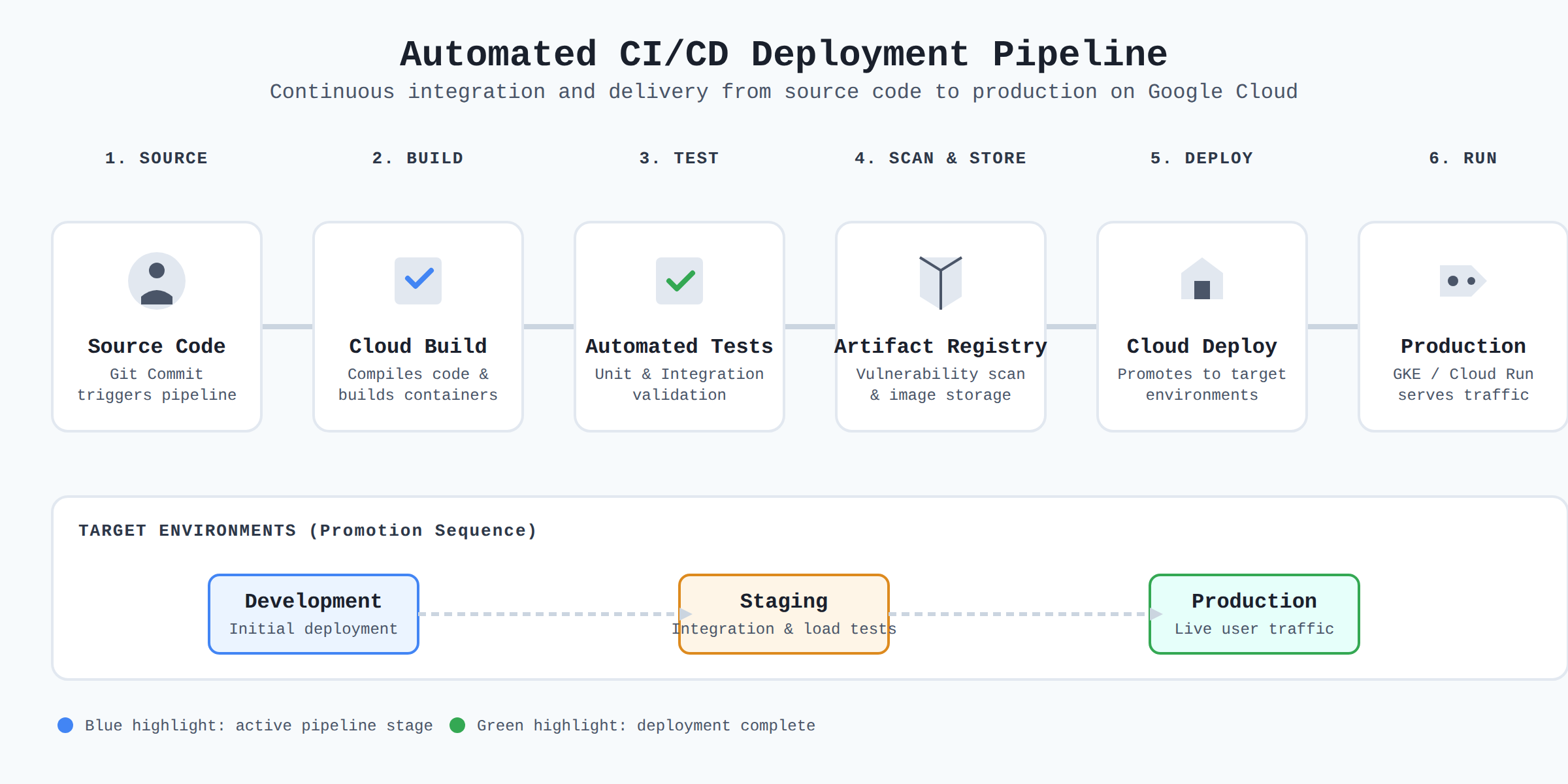
A horizontal flow diagram showing code progressing through commit, build, test, scan, and deploy stages using Cloud Build, Artifact Registry, and Cloud Deploy to reach production on GKE or Cloud Run.
When exposing APIs, organizations need to manage security, traffic, and analytics to ensure reliable and safe consumption. Apigee is GCP’s full-lifecycle API management platform that sits between the API provider and the consumers. It acts as a gateway, enforcing authentication (OAuth, API keys), rate limiting, and quota management to protect backend services from abuse. Apigee also provides analytics on usage patterns, latency, and error rates, which helps teams understand how APIs are performing and where improvements are needed. Development and operations teams should design APIs with versioning (e.g., /v1/ in the URL) and use Apigee’s developer portal to publish documentation and manage access. By applying these practices, teams can onboard external partners safely and monitor API health in production.
To ensure a deployment succeeds, teams must validate that the application works correctly and can handle expected traffic. Unit tests test individual functions or components in isolation, usually run on every code commit. Integration tests verify that different parts of the system—such as the application, database, and message queue—work together as expected. They often run in a dedicated test environment that mirrors production. Load testing (e.g., using tools like Locust or Google Cloud’s Distributed Load Testing) simulates high user traffic to identify performance bottlenecks, such as slow database queries or insufficient compute capacity. The operations team should set up monitoring and alerting during load tests to capture metrics like CPU, memory, and request latency. A deployment should only proceed to production if all three test types pass, with load tests showing acceptable performance under the target load.
Migrating existing data and systems to GCP requires careful planning and the right tooling to minimize downtime and data loss. Database Migration Service (DMS) supports continuous replication from on-premises or other cloud databases (like MySQL, PostgreSQL, SQL Server) to Cloud SQL, allowing near-zero-downtime cutovers. For large-scale data transfers, Transfer Service or Transfer Appliance can move petabytes of data over the network or physically ship disks. Storage Transfer Service handles moving object data into Cloud Storage from other cloud providers or HTTP endpoints. Teams should also consider Migrate for Compute Engine (formerly Velostrata) to move entire virtual machine workloads to GCP with minimal changes. The migration plan should include a rollback procedure, a test run, and validation of data integrity after the move. Operations teams must manage the lifecycle of migrated resources, applying patches and scaling as needed.
Gemini Cloud Assist is an AI-powered tool within Google Cloud Console that helps developers and operators troubleshoot issues, generate code, and optimize cloud resources. It can answer natural-language questions about GCP services, suggest configuration changes, and explain error messages. For deployment, Gemini Cloud Assist can review a Terraform configuration or a deployment manifest and recommend best practices, such as adding health checks or setting appropriate IAM roles. It also assists with operational tasks like analyzing logs, diagnosing performance problems, and suggesting cost-saving measures. Teams should use Gemini Cloud Assist as a collaborative assistant throughout the deployment lifecycle, from initial design to ongoing operations, to improve efficiency and reduce the time spent on manual investigations.
Infrastructure as Code tools allow teams to define cloud resources in declarative configuration files that are version-controlled and tested, ensuring every environment is created from the same source of truth to provide consistency and reduce manual errors.
Apigee acts as a gateway that enforces authentication, rate limiting, and quota management to protect backend services, and it provides analytics on usage patterns, latency, and error rates to help teams understand API performance.
Unit tests validate individual functions or components in isolation. Integration tests verify that different parts of the system work together as expected. Load testing simulates high user traffic to identify performance bottlenecks.
Gemini Cloud Assist is an AI-powered tool that helps troubleshoot issues, generate code, and optimize resources by answering questions, suggesting configuration changes, and reviewing deployment manifests for best practices.
 StudyCerts
 StudyCerts