Intermediate
Prepare and test your skills
Intermediate
Prepare and test your skills
Impersonating Service Accounts Without Static Keys
Free sample question, answered and explained below. The Professional Cloud Architect practice bank has 2,335 more like it. Try 10 free: instant score, no account.
An enterprise organization is designing an automated workflow and developer access model for querying sensitive data across projects. The enterprise security policy strictly forbids generating, downloading, and storing long-lived, static service account private JSON keys due to exfiltration risks.
You need to configure access so that authorized engineers and automated services can dynamically obtain short-lived OAuth2 access tokens to execute tasks with the permissions of a designated workload service account.
Which IAM role configuration should you implement?
Explanations
Grant the principals the Service Account Token Creator role (roles/iam.serviceAccountTokenCreator) on the target service account.
Grant the principals the Service Account Token Creator role (roles/iam.serviceAccountTokenCreator) on the target service account.
What the Service Account Token Creator role is
The Service Account Token Creator role (roles/iam.serviceAccountTokenCreator) grants principals the permissions necessary to impersonate a service account directly and generate short-lived credentials, including OAuth 2.0 access tokens, OpenID Connect (OIDC) ID tokens, and signed JSON Web Tokens (JWTs).
How it meets the requirements
- Eliminates static JSON keys: Principals authenticate with their own identity (e.g., corporate Google Workspace identity or federated identity) and make an API call to dynamically mint short-lived tokens, completely removing the need to create, download, or rotate private JSON key files.
- Enforces least privilege and temporary access: Short-lived tokens expire automatically (typically within one hour), significantly narrowing the blast radius if a credential is leaked or intercepted.
- Direct impersonation: Granting this role at the resource level (on the specific target service account itself) ensures only authorized principals can assume the identity without granting excessive project-wide privileges.
Service Account Impersonation: Short-Lived Token Flow
Sequence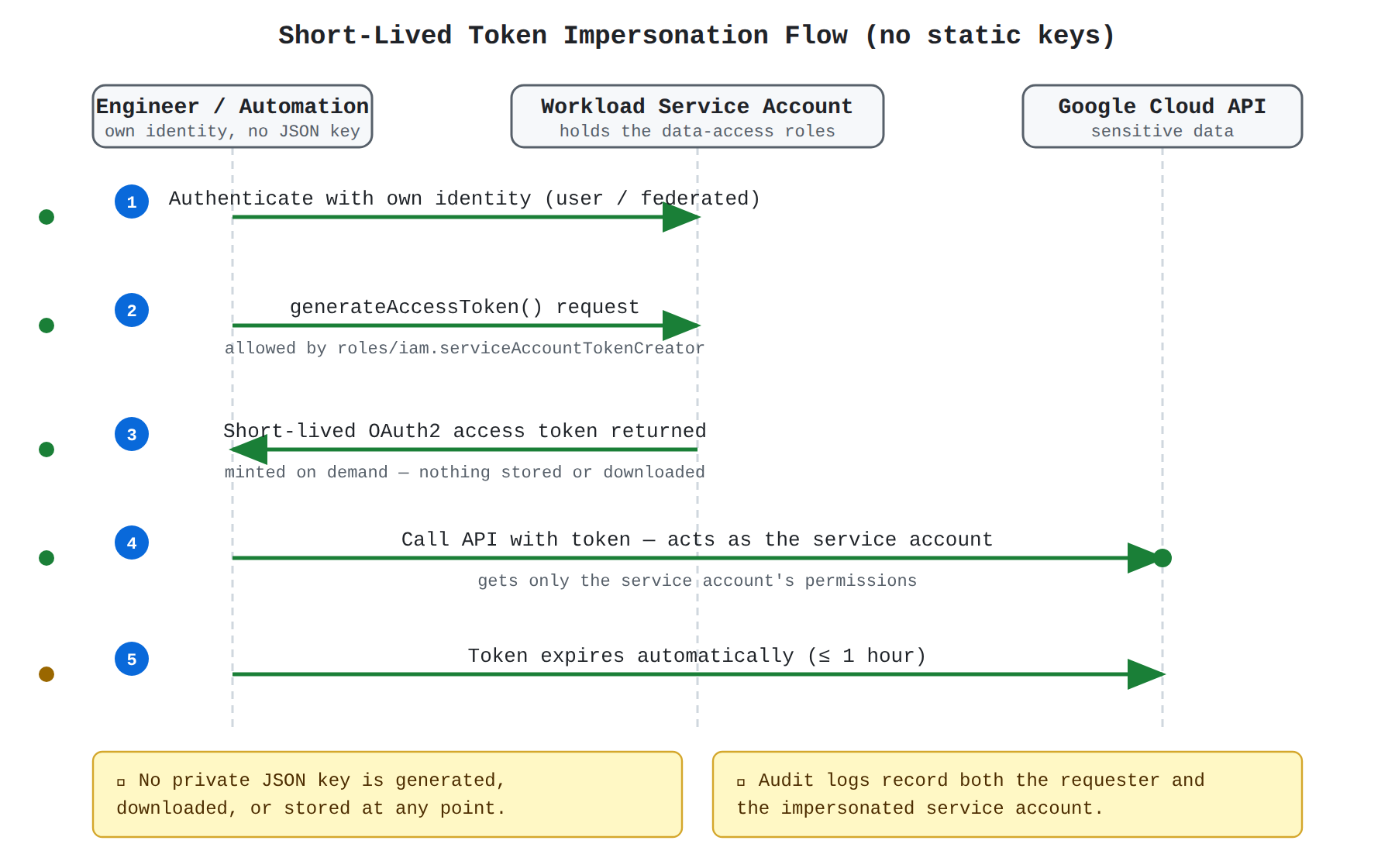
Key advantages and capabilities
- Fine-grained delegation: Allows administrators to delegate permissions on a per-service-account basis rather than broadly across the entire project.
- Comprehensive audit trails: Cloud Audit Logs capture both the impersonation event (
generateAccessToken) by the original principal and the subsequent actions taken by the impersonated service account. - Broad toolchain support: Fully supported by Google Cloud SDK (
gcloud --impersonate-service-account), client libraries, Terraform, and cloud-native services. - Mitigation of credential sprawl: Eliminates unmanaged credentials living on local developer machines or shared file storage.
Why this is optimal
Service account impersonation via the Service Account Token Creator role is Google Cloud's recommended architectural best practice for temporary privilege escalation and automated access without static credential overhead.
Grant the principals the Service Account Key Admin role (roles/iam.serviceAccountKeyAdmin) at the project level.
Grant the principals the Service Account Key Admin role (roles/iam.serviceAccountKeyAdmin) at the project level.
What the Service Account Key Admin role is
The Service Account Key Admin role (roles/iam.serviceAccountKeyAdmin) grants full administrative control over user-managed service account keys, allowing principals to create, list, upload, and delete cryptographic key pairs.
Why it doesn't meet the requirement
- Violates policy: This configuration directly contradicts the requirement forbidding the creation and downloading of static JSON service account keys.
- No short-lived credential generation: This role manages static keys rather than granting the permissions necessary to generate short-lived tokens dynamically.
- Overly permissive: Granting key administration at the project level gives excessive permissions across all service accounts in the project.
Key characteristics and limitations
- Creates long-lived static credentials: Keys generated by key administrators do not expire automatically unless manually deleted or rotated.
- High exfiltration risk: Static keys can be easily leaked, committed to source code repositories, or stored insecurely.
- Operational burden: Requires maintaining complex key rotation schedules and lifecycle monitoring.
This answer would be correct if
The goal was to implement an administrative process for managing, auditing, or deleting legacy static service account key pairs across a project.
Grant the principals the Service Account User role (roles/iam.serviceAccountUser) on the target service account and retrieve static keys via Secret Manager.
Grant the principals the Service Account User role (roles/iam.serviceAccountUser) on the target service account and retrieve static keys via Secret Manager.
What the Service Account User role does
The Service Account User role (roles/iam.serviceAccountUser) provides the iam.serviceAccounts.actAs permission, which allows a principal to attach a service account to a compute resource (such as a Compute Engine VM instance, Cloud Run service, or Cloud Functions pipeline).
Why it doesn't meet the requirement
- Cannot mint access tokens: The
roles/iam.serviceAccountUserrole alone does not grant theiam.serviceAccounts.getAccessTokenpermission required to generate short-lived OAuth 2.0 tokens or perform programmatic service account impersonation. - Relies on static keys: Storing static service account JSON keys in Secret Manager still violates the strict organizational mandate against generating and managing long-lived static keys.
Key characteristics and limitations
- Indirect usage: Primarily intended for attaching service accounts to compute workloads rather than direct identity impersonation.
- No token creation: Does not permit creating OpenID Connect (OIDC) identity tokens or signed payloads.
- Security risk: Storing static keys in Secret Manager only obscures the static credential problem rather than eliminating key generation and rotation risks.
This answer would be correct if
The scenario required a developer to deploy a Cloud Run service or Compute Engine instance configured to execute with that service account attached.
Grant the principals the Service Usage Admin role (roles/serviceusage.serviceUsageAdmin) on the project hosting the service account.
Grant the principals the Service Usage Admin role (roles/serviceusage.serviceUsageAdmin) on the project hosting the service account.
What the Service Usage Admin role is
The Service Usage Admin role (roles/serviceusage.serviceUsageAdmin) allows administrators to enable, disable, and inspect Google Cloud APIs and services for a given project.
Why it doesn't meet the requirement
- No identity or token management: This role does not grant any permissions to manage service accounts, impersonate principals, or generate temporary OAuth 2.0 access tokens.
- Incorrect scope of responsibility: Managing API enablement is entirely unrelated to granting workload-level permissions or authenticating user requests.
Key characteristics and limitations
- API enablement only: Governs the
serviceusage.services.*permission set to turn APIs on or off. - No credential operations: Cannot generate short-lived tokens, sign tokens, or act as another principal.
- Lacks IAM binding: Provides no access to BigQuery or the target resources that the service account needs to access.
This answer would be correct if
The requirement was to allow administrators to enable the IAM Credentials API (iamcredentials.googleapis.com) or BigQuery API in a project where services were currently disabled.
Try 10 interactive questions like this one, free
Answer them yourself and get your score the moment you finish. No account needed.
Full access includes
- 2,335 practice questions across all 6 exam domains
- Every answer explained: why it is right, and why the others are not
- Scout, an AI tutor that answers your follow-up questions
- Readiness tracking by domain, so you know when to book the exam
Related questions
Keep the momentum going with these hand-picked practice scenarios
IntermediateProfessional Cloud Architect
Workload Identity Federation
Secure remote access (e.g., Identity-Aware Proxy, service account impersonation, Chrome Enterprise Premium, and Workload Identity Federation)
IntermediateProfessional Cloud Architect
IAP Context-Aware Access
Secure remote access (e.g., Identity-Aware Proxy, service account impersonation, Chrome Enterprise Premium, and Workload Identity Federation)
IntermediateProfessional Cloud Architect
MIG Instance Flexibility with Spot VMs
Choosing compute resources (e.g., spot VMs, custom machine types, and specialized workload)
IntermediateProfessional Cloud Architect
Pub/Sub StreamingPull Flow Control
Supporting the application design
IntermediateProfessional Cloud Architect
Cloud Logging, Cloud Trace, and Error Reporting
Troubleshooting/root cause analysis best practices
AdvancedProfessional Cloud DevOps Engineer
Gemini Cloud Assist Investigations
Leveraging Gemini Cloud Assist for metrics interpretation
Last updated