Intermediate
Prepare and test your skills
Intermediate
Prepare and test your skills
Compute Engine Live Migration and Automatic Restart
Free sample question, answered and explained below. The Professional Cloud Architect practice bank has 2,335 more like it. Try 10 free: instant score, no account.
An enterprise runs a suite of business-critical production workloads on Compute Engine virtual machines. The operations team needs to establish a post-deployment maintenance strategy that satisfies the following requirements:
- Keep virtual machine instances running without downtime during Google-initiated host infrastructure maintenance.
- Automatically recover and restart the virtual machine instances if an underlying host crash or hardware failure occurs.
- Eliminate the need for manual administrative intervention during standard maintenance events.
Which configuration should you implement on the Compute Engine instances?
Explanations
Set the onHostMaintenance policy to TERMINATE and set the automaticRestart policy to false.
Set the onHostMaintenance policy to TERMINATE and set the automaticRestart policy to false.
What the Option Is
Setting onHostMaintenance to TERMINATE and automaticRestart to false configures Compute Engine instances to shut down permanently whenever host maintenance occurs and to stay offline after any unexpected hardware failure.
Why It Doesn't Meet the Requirement
- Unnecessary Workload Downtime: When
onHostMaintenanceis set toTERMINATE, Google Cloud shuts down the virtual machine instance rather than performing a live migration during routine infrastructure maintenance. - No Automated Recovery: With
automaticRestartset tofalse, the instance remains stopped indefinitely after a host failure or maintenance shutdown until an administrator manually issues a start command. - Fails Operational Continuity: This approach requires significant manual operational intervention and violates the core requirement for zero downtime during scheduled platform maintenance.
Key Characteristics and Limitations
- Instance Shutdown on Host Events: Stops the instance completely when the underlying physical server requires updates.
- Disabled Auto-Restart: Leaves crashed or terminated instances in a
TERMINATEDstate. - Manual Recovery Required: Demands administrative action to restart workloads after every event.
This Answer Would Be Correct If
This configuration would be suitable for batch processing jobs, preemptible workloads, or stateless worker pools where jobs can easily be rescheduled elsewhere and licensing or GPU constraints prevent live migration.
Additional Context
Instances configured with certain hardware attachments (such as specific specialized accelerators) do not support live migration and must use TERMINATE, but general production enterprise workloads should avoid this setting.
Set the onHostMaintenance policy to MIGRATE and set the automaticRestart policy to true.
Set the onHostMaintenance policy to MIGRATE and set the automaticRestart policy to true.
What the Solution Is
In Google Cloud Compute Engine, the instance availability policy determines how virtual machine (VM) instances behave during host events such as planned infrastructure maintenance or unplanned hardware failures. Setting onHostMaintenance to MIGRATE and automaticRestart to true establishes automated resilience and high availability for deployed compute workloads.
How It Meets the Requirements
- Zero-Downtime Host Maintenance: Setting the
onHostMaintenanceproperty toMIGRATEenables Live Migration. When Google performs planned maintenance on physical host hardware, the hypervisor moves running VM instances to an alternative host in the same zone without stopping the guest operating system or dropping network connections. - Automated Crash Recovery: Setting
automaticRestarttotrueensures that if a physical host experiences an unexpected crash, kernel panic, or hardware failure, Google Cloud automatically restarts the virtual machine on a healthy host without requiring manual operator intervention. - Minimal Operational Overhead: Both policies execute automatically within the Compute Engine control plane, completely eliminating manual failovers and ticketing during routine infrastructure updates.
Live Migration and Auto-Restart Decision Flow
Decision Tree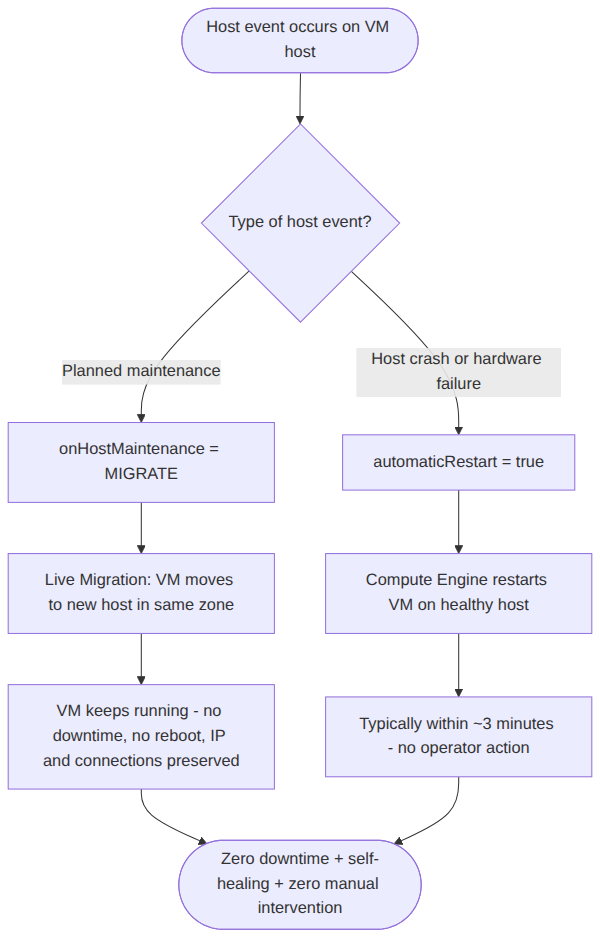
Key Advantages and Capabilities
- Live Migration: Maintains memory state, ephemeral storage, IP addresses, and open TCP connections during maintenance.
- Autonomous Self-Healing: Automatically provisions replacement host resources and restarts guest instances following unexpected outages.
- Default High Availability: Aligning with recommended production baselines ensures continuous availability for critical enterprise systems.
- SLA Protection: Helps applications meet demanding recovery time objectives (RTO) and availability Service Level Agreements.
Why This Is Optimal
This configuration directly fulfills all operational requirements by leveraging native platform resilience mechanisms. It avoids workload disruption during planned maintenance while ensuring rapid automated recovery after unexpected infrastructure incidents.
Redeploy the application software using updated Google Cloud Marketplace packages during every scheduled maintenance window.
Redeploy the application software using updated Google Cloud Marketplace packages during every scheduled maintenance window.
What the Option Is
This option involves tearing down existing VM instances and deploying new software packages from Cloud Marketplace whenever platform maintenance is scheduled.
Why It Doesn't Meet the Requirement
- Wrong Scope of Maintenance: Google Cloud host maintenance is an internal infrastructure event managed by the cloud provider at the hypervisor level. Redeploying application packages addresses guest software updates, not host infrastructure maintenance.
- Causes Extended Downtime: Redeploying software from Marketplace packages requires rebuilding instances, causing severe application downtime and configuration churn.
- High Operational Burden: Requires extensive manual engineering effort and pipeline execution instead of leveraging automated platform features.
Key Characteristics and Limitations
- Applies to Guest Software: Cloud Marketplace package redeployment updates pre-packaged application binaries and OS images, not underlying physical server hosts.
- Destructive Lifecycle: Replaces existing environments rather than maintaining instance state.
- No Auto-Recovery: Does not configure hypervisor policies to recover instances after physical hardware crashes.
This Answer Would Be Correct If
The objective was to apply major vendor security patches to a third-party Marketplace appliance that does not support in-place package updates.
Additional Context
Cloud Marketplace updates software package base images over time, but deployed instances do not receive these image updates automatically. However, this is independent of Compute Engine host-level maintenance.
Set the onHostMaintenance policy to MIGRATE and set the automaticRestart policy to false.
Set the onHostMaintenance policy to MIGRATE and set the automaticRestart policy to false.
What the Option Is
This option enables live migration for planned Google Cloud host maintenance events but disables the automatic restart capability when unexpected crashes or unrecoverable host errors occur.
Why It Doesn't Meet the Requirement
- Fails Unexpected Crash Recovery: While setting
onHostMaintenancetoMIGRATEhandles planned host updates smoothly, settingautomaticRestarttofalseleaves the instance offline if the physical host crashes unexpectedly. - Requires Manual Troubleshooting: When hardware faults occur, engineers must manually detect the outage and issue an API or console command to restart the instance.
- Incomplete Resilience Strategy: High availability requires addressing both predictable maintenance events and unpredictable hardware failures.
Key Characteristics and Limitations
- Live Migration Enabled: Successfully moves running VMs during scheduled Google Cloud hypervisor maintenance.
- No Automatic Hardware Crash Recovery: Disables the hypervisor's ability to automatically relaunch the instance on healthy hardware.
- Increased Recovery Time: Substantially increases the Recovery Time Objective (RTO) for unexpected outages due to human dependency.
This Answer Would Be Correct If
The organization specifically required manual verification of database integrity or external disk states before allowing any crashed system to restart.
Additional Context
Disabling automaticRestart is rarely recommended for production enterprise applications because automated platform restarts are essential for maintaining uptime SLAs.
Try 10 interactive questions like this one, free
Answer them yourself and get your score the moment you finish. No account needed.
Full access includes
- 2,335 practice questions across all 6 exam domains
- Every answer explained: why it is right, and why the others are not
- Scout, an AI tutor that answers your follow-up questions
- Readiness tracking by domain, so you know when to book the exam
Related questions
Keep the momentum going with these hand-picked practice scenarios
IntermediateProfessional Cloud Architect
OpenTelemetry Collector Log Routing
Assisting with the support of deployed solutions
IntermediateProfessional Cloud Architect
Memorystore Redis Cluster Read Replica Consistency
Design decision trade-offs
IntermediateProfessional Cloud Architect
Cloud Build with Kubernetes Engine Developer Role
Understanding the principles and recommendations of the operational excellence pillar of the Google Cloud Well-Architected Framework
IntermediateProfessional Cloud Architect
VPC Service Controls with Shared VPC
Security and compliance
IntermediateProfessional Cloud Architect
Shared VPC Hierarchical Firewall Policy Scope
Security controls (e.g., auditing, VPC Service Controls, context aware access, organization policy, and hierarchical firewall policy)
AdvancedProfessional Cloud DevOps Engineer
Cloud Monitoring Uptime Checks
Creating synthetic monitors to proactively probe application endpoints and workflows
Last updated