Intermediate
Prepare and test your skills
Intermediate
Prepare and test your skills
Shared VPC Hierarchical Firewall Policy Inheritance
Free sample question, answered and explained below. The Professional Cloud Architect practice bank has 2,335 more like it. Try 10 free: instant score, no account.
An enterprise organizes its Google Cloud resource hierarchy into distinct folders for network infrastructure and business workloads. The Shared VPC host project resides in the Core-Networking folder, while multiple service projects containing Compute Engine virtual machines (VMs) reside in the App-Workloads folder.
The central security team applies a hierarchical firewall policy to the Core-Networking folder that denies ingress TCP traffic on port 22. To allow remote access, a development team attaches another hierarchical firewall policy directly to the App-Workloads folder with a high-priority rule allowing ingress TCP traffic on port 22. However, SSH traffic to the VMs connected to the Shared VPC subnets remains blocked.
Why is the ingress traffic on TCP port 22 still blocked on these VM instances?
Explanations
Hierarchical firewall policies assigned at a parent folder level permanently override all rules defined on any child folders regardless of priority.
Hierarchical firewall policies assigned at a parent folder level permanently override all rules defined on any child folders regardless of priority.
What Hierarchical Firewall Rule Evaluation Is
Hierarchical firewall policies are evaluated in order from the highest level of the resource hierarchy (Organization) down through child folders to the project level. When policies exist at multiple folder tiers within the same ancestral path, evaluation proceeds based on rule order and explicit rule actions.
Why It Doesn't Meet the Requirement
- Hierarchical Delegation with Goto-Next: Lower-level folder policies can take effect if an upper-level policy delegates evaluation down the tree using a
goto_nextaction or if traffic does not match an explicit upper rule. - Incorrect Root Cause: The two folders in this scenario (
Core-NetworkingandApp-Workloads) are separate sibling trees rather than a direct parent-child relationship, meaning this is an architectural scoping boundary issue specific to Shared VPC rather than standard vertical inheritance.
Key Characteristics and Limitations
- Higher-level folder rules take evaluation precedence over lower-level rules only within the same hierarchy path.
- Rules within the same policy or inherited chain use explicit priority numbers.
- Sibling folders do not inherit or override rules from one another.
This Answer Would Be Correct If
The App-Workloads folder were a direct subfolder inside Core-Networking and the parent policy contained an explicit terminal deny rule that was evaluated before any child policy rules.
Additional Context
Hierarchical evaluation strictly follows the resource tree ancestry of the governing resource, which for network packets is the host project owning the VPC.
In a Shared VPC deployment, VM network interfaces are governed by the hierarchical firewall policies of the host project hierarchy rather than the service project hierarchy.
In a Shared VPC deployment, VM network interfaces are governed by the hierarchical firewall policies of the host project hierarchy rather than the service project hierarchy.
What Shared VPC Policy Evaluation Is
In Google Cloud networking, hierarchical firewall policies allow organizations to define and enforce consistent firewall rules across resource hierarchy nodes such as organizations and folders. When resources utilize Shared VPC, network interfaces attached to shared subnets reside logically within the shared network hosted by the host project.
How It Meets the Scenario Requirements
- Host Project Governance: In Shared VPC architectures, a VM network interface connected to a host project network is strictly governed by the hierarchical firewall policy rules associated with the host project's resource hierarchy (the
Core-Networkingfolder). - Bypassing Service Project Hierarchy: Even though the VM instances physically reside in service projects inside the
App-Workloadsfolder, the network interfaces inherit policies from the ancestry of the VPC network they attach to, completely ignoring the hierarchical firewall policies applied to theApp-Workloadsfolder.
Shared VPC Inherits Host Firewall Only
System Architecture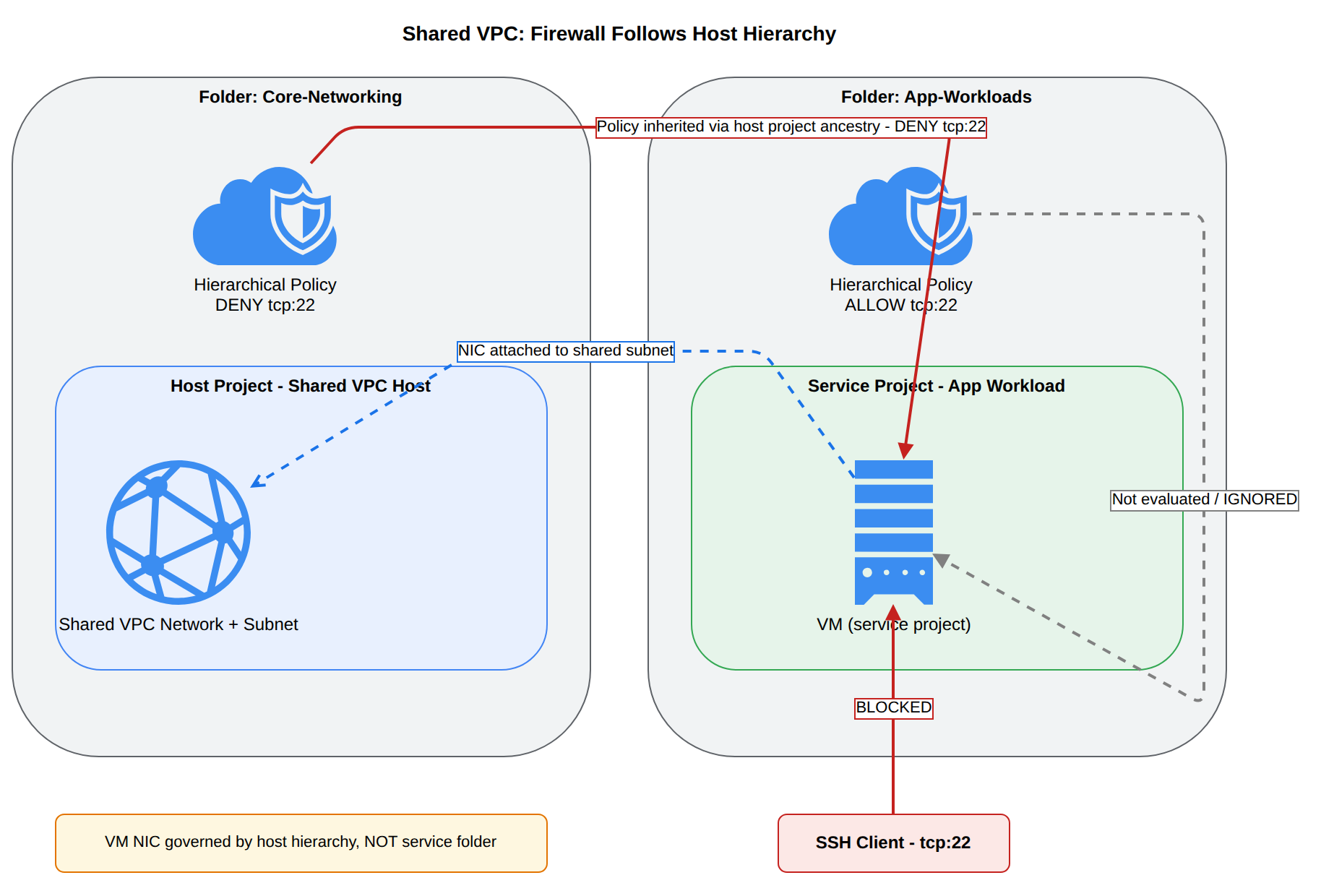
Key Advantages and Capabilities
- Centralized Security Enforcement: Prevents service project administrators or folder admins from inadvertently weakening or bypassing enterprise perimeter security.
- Consistent Network Perimeter: Guarantees that network security rules travel with the VPC network boundary rather than fragmented departmental folders.
- Clear Separation of Duties: Grants network and security administrators total control over traffic flow into shared infrastructure.
- Hierarchical Predictability: Enforces deterministic rule evaluation across complex multi-tenant environments.
Why This Is Optimal
This model preserves strict centralized security boundaries across enterprise cloud deployments. It prevents decentralized teams in child folders from opening security holes on corporate shared networks, ensuring compliance across all connected workloads.
The hierarchical firewall policy applied to the App-Workloads folder requires an Organization Policy override to take effect on Compute Engine instances.
The hierarchical firewall policy applied to the App-Workloads folder requires an Organization Policy override to take effect on Compute Engine instances.
What Organization Policies and Firewall Policies Are
Organization Policies provide centralized governance constraints (such as restricting external IPs or resource locations) over Google Cloud resource configurations. Hierarchical Firewall Policies configure network packet filtering rules (allowing or denying specific IP protocols, ports, and IP ranges).
Why It Doesn't Meet the Requirement
- Separate Control Planes: Hierarchical firewall policies operate entirely independently of the Organization Policy Service. They do not require organization policy overrides or constraints to activate.
- Association Mechanism: Hierarchical firewall policies take effect immediately upon association with a target folder or organization node via IAM permissions (
compute.orgSecurityResourceAdmin), provided the network ancestry matches.
Key Characteristics and Limitations
- Organization policies enforce management-plane configurations (e.g.,
constraints/compute.vmExternalIpAccess). - Firewall policies enforce data-plane packet inspection and filtering directly in the SDN hypervisor layer.
- Neither system requires an override in the other system to function.
This Answer Would Be Correct If
The issue involved a constraint such as constraints/compute.vmExternalIpAccess blocking the creation of instances with public IPs, which would require an Organization Policy override at the project or folder level.
Additional Context
Confusing Organization Policy constraints with Cloud NGFW hierarchical firewall rules is a common misconception in multi-folder governance planning.
Service project VM instances only evaluate local VPC firewall rules and ignore all organization or folder-level hierarchical firewall policies.
Service project VM instances only evaluate local VPC firewall rules and ignore all organization or folder-level hierarchical firewall policies.
What VPC and Hierarchical Firewalls Do
Compute Engine instances evaluate multiple layers of network filtering, combining hierarchical firewall policies, global/regional network firewall policies, and traditional VPC firewall rules into a single effective firewall ruleset via the Andromeda virtualization layer.
Why It Doesn't Meet the Requirement
- Hierarchical Policy Enforcement: VM instances never ignore hierarchical firewall policies. In fact, hierarchical policies applied to the organization or relevant folder ancestors are evaluated before VPC-level firewall rules.
- Shared VPC Behavior: VMs in a service project do evaluate hierarchical policies, but they inherit those attached to the ancestry of the Shared VPC host project, not the service project.
Key Characteristics and Limitations
- Hierarchical firewall rules always take precedence over traditional project-level VPC firewall rules.
- Predefined rules at the hierarchical level pass unmatched traffic down to lower layers using
goto_next. - Security administrators rely on hierarchical rules specifically so project administrators cannot disable or ignore mandatory baseline protections.
This Answer Would Be Correct If
Hierarchical firewall policies did not exist and all network controls were solely configured as traditional per-project VPC firewall rules.
Additional Context
To view all active firewall rules on an instance across both hierarchical and local policies, administrators can check the effective firewall rules on the instance or network.
Try 10 interactive questions like this one, free
Answer them yourself and get your score the moment you finish. No account needed.
Full access includes
- 2,335 practice questions across all 6 exam domains
- Every answer explained: why it is right, and why the others are not
- Scout, an AI tutor that answers your follow-up questions
- Readiness tracking by domain, so you know when to book the exam
Related questions
Keep the momentum going with these hand-picked practice scenarios
IntermediateProfessional Cloud Architect
IAP with Access Context Manager
Security controls (e.g., auditing, VPC Service Controls, context aware access, organization policy, and hierarchical firewall policy)
IntermediateProfessional Cloud Architect
GKE Workload Identity and Network Policies
Container orchestration
IntermediateProfessional Cloud Architect
Cloud Spanner Active-Active Multi-Region
Business use cases and product strategy
IntermediateProfessional Cloud Architect
Cloud Run vs GKE Standard
Mapping compute needs to platform products (e.g., Google Kubernetes Engine [GKE], Cloud Run, and Cloud Run functions)
IntermediateProfessional Cloud Architect
Global External Application Load Balancer Premium Tier
Scalability to meet growth requirements
AdvancedProfessional Cloud Security Engineer
Cloud Armor Preview Mode
Configuring web application firewalls (e.g., Google Cloud Armor).
Last updated