Fundamental
Prepare and test your skills

Fundamental
Prepare and test your skills
Compute Engine Spot VMs and Custom Types
A Spot VM (opens in a new tab) is a Compute Engine virtual machine that runs on excess Compute Engine capacity using the spot provisioning model. Spot VMs cost up to 91% less than on-demand standard VMs for many machine types, GPUs, TPUs, and Local SSDs, but Compute Engine can reclaim the capacity at any time. Spot VMs have no minimum or maximum runtime and no guarantee of availability, so they fit only fault-tolerant workloads that can withstand interruption.
Core Properties and Limits of Spot VMs
Spot VMs work like standard VMs but trade reliability guarantees for much lower prices. Compute Engine can preempt Spot VMs at any time for reasons such as system events, and the chance of preemption is generally low but varies by day, zone, and resource type. Spot prices can change up to once every day, and Spot VMs are finite resources that can return resource-availability errors when excess capacity is limited. Spot VMs are excluded from the Compute Engine service level agreement (SLA) because they offer no availability promise.
Spot VMs also have operational limits that separate them from standard VMs:
- Spot VMs cannot live migrate to become standard VMs while running.
- Spot VMs cannot automatically restart when a host event occurs.
- Spot VMs are not covered by any SLA and are excluded from the Compute Engine SLA.
- Spot VMs do not support the A4X machine series or bare metal instances.
- Google Cloud Free Tier credits for Compute Engine do not apply to Spot VMs.
These limits mean a Spot VM never converts into a protected standard VM on its own. The application must expect the VM to stop or disappear and must recover without manual repair of the host.
Preemption Process and Termination Notice
Preemption is the process where Compute Engine reclaims Spot VM capacity by stopping or deleting the VM. A workload detects coming preemption because Compute Engine updates the preempted value in the VM default metadata to TRUE. The preemption notice duration is the time between that metadata signal and the shutdown signal, and it is set when the Spot VM is created to either 0 seconds or 120 seconds.
Spot VM Preemption in Four Steps
Sequence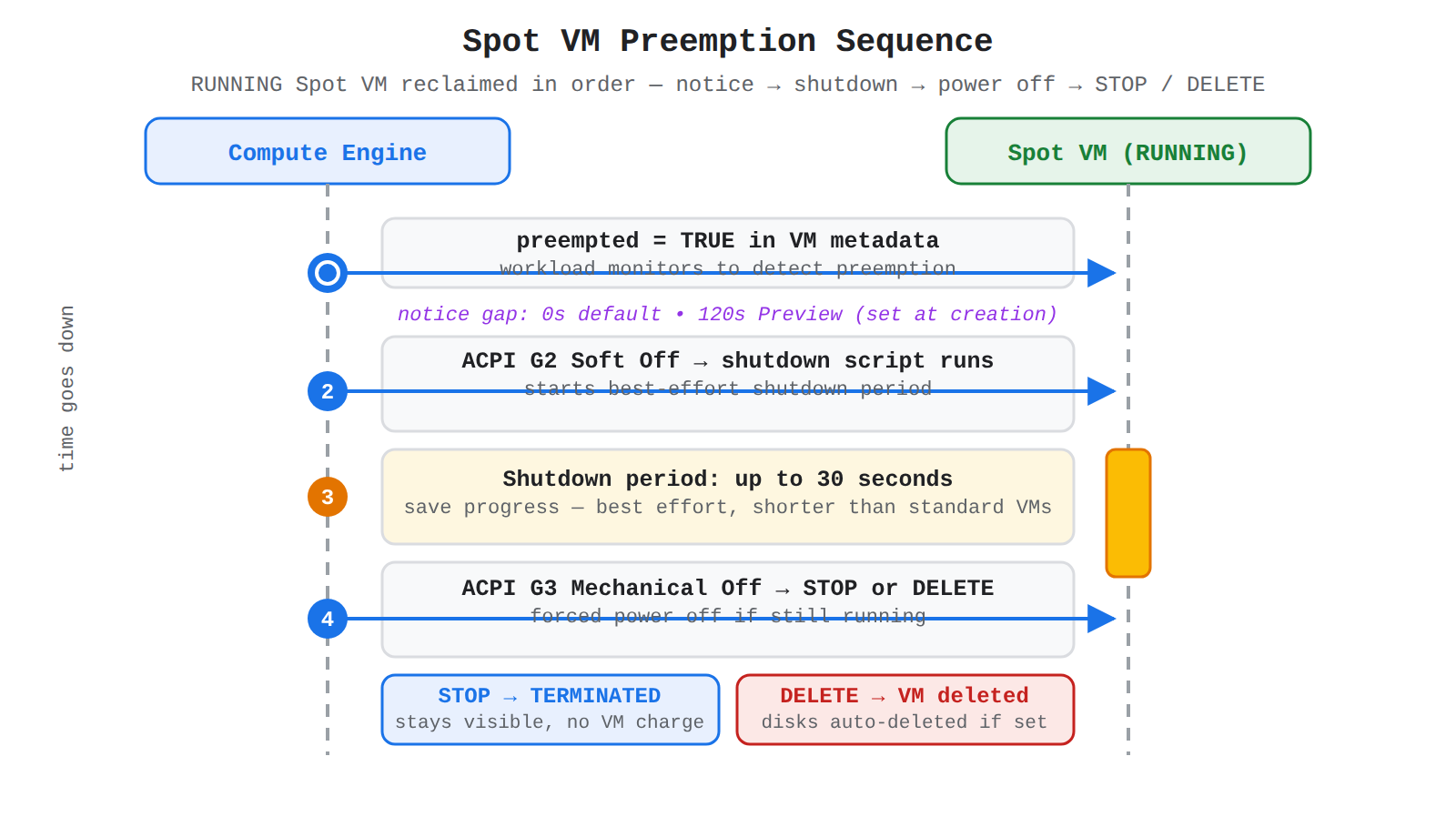
A vertical sequence diagram between Compute Engine and a RUNNING Spot VM showing in order: metadata preempted=TRUE, ACPI G2 Soft Off with shutdown script, up to 30-second shutdown period, then ACPI G3 Mechanical Off leading to STOP to TERMINATED or DELETE.
Compute Engine preempts a Spot VM through an ordered sequence:
- Preemption notice: Compute Engine sets VM metadata
preemptedtoTRUE, which the workload monitors to detect preemption. - Shutdown signal: Compute Engine sends an ACPI G2 Soft Off signal to the operating system, which starts the shutdown period and triggers any configured shutdown script.
- Shutdown period: The VM has a best-effort shutdown period of up to 30 seconds to run the shutdown script and save progress, which is shorter than the shutdown period for other instances.
- Forced power off and final state: If the VM has not stopped after the shutdown period, Compute Engine sends an ACPI G3 Mechanical Off signal, then applies the configured termination action of
STOPorDELETE.
The choice of notice duration changes where handling occurs. With 0 seconds, the default, there is no dedicated delay between the metadata signal and the ACPI G2 Soft Off signal, so the workload handles preemption during the up-to-30-second shutdown period using a shutdown script. With 120 seconds, in Preview, the workload gets a dedicated 120-second window after the metadata signal before the shutdown signal is sent, which fits workloads that need longer than 30 seconds to checkpoint work.
Exam tip: The up-to-30-second shutdown period is best effort after the ACPI G2 Soft Off signal, while the 120-second option is a separate dedicated notice period before that signal that must be selected at creation.
Lifecycle States and Termination Actions
The lifecycle of a Spot VM centers on the RUNNING and TERMINATED states and the configured termination action. Preemption is considered only while a Spot VM is in a RUNNING state, while a VM in a TERMINATED state is not considered for preemption. Stopping a Spot VM and then restarting it moves the VM through TERMINATED back to RUNNING and resets the preemption process, and a stopped and restarted preempted VM can run again as long as capacity exists. Resetting or rebooting a VM instead leaves the VM in a RUNNING state and does not reset the preemption process.
The termination action controls the final state after preemption and affects billing and recovery:
| Termination action | Final state after preemption | Billing and data result |
|---|---|---|
| STOP (default) | Compute Engine stops the VM to TERMINATED, and the VM remains visible in the project | No VM-hour charges while TERMINATED, but attached persistent disks still incur storage charges until deleted |
| DELETE | Compute Engine deletes the VM | VM-hour charges end, and persistent disks marked for auto-delete are deleted with the VM |
Billing protects very short runs from preemption cost. If Compute Engine preempts a Spot VM less than one minute after creation, there is no charge for that VM use, although charges for premium operating systems are still calculated normally. A stopped preempted VM can be restarted many times to resume RUNNING, which lets operators retry Spot capacity before falling back to standard VMs.
Workloads That Fit Spot VMs
Suitable Spot VM workloads are fault-tolerant workloads that keep making progress even if some VMs stop suddenly. Batch processing jobs are the classic example because the overall job slows when some Spot VMs stop but does not completely stop. Stateless applications and jobs that frequently save progress also fit because lost work on one VM can be retried on another VM without corrupting shared state. These workloads complete extra work without placing load on existing standard VMs and without paying full on-demand price for additional capacity.
The cost tradeoff is straightforward: Spot VMs reduce Compute Engine costs significantly when interruptions are acceptable, but they are the wrong choice when interruptions cause failure. Workloads that require continuous uptime, live migration, automatic restart, or SLA coverage should use standard VMs instead. Before creating Spot VMs, operators can compare expected uptime and historical preemption rates by machine type and zone to choose the location and size that best balances cost and disruption risk.
Strategic resource planning in Compute Engine means matching each workload to the right machine type and provisioning model so performance needs are met at the lowest cost. Right-sizing starts with machine type recommendations, which suggest a predefined or custom size that fits observed CPU and memory use. For predictable workloads, custom machine types avoid paying for unused resources, while Spot VMs (opens in a new tab) provide deep discounts for work that can handle interruptions.
Right-Sizing With Predefined and Custom Machine Types
Right-sizing with predefined and custom machine types is the practice of selecting only the virtual CPUs (vCPUs) and memory a workload needs. Predefined machine types bundle fixed amounts of vCPUs and memory, while custom machine types let you provision CPU cores independently of memory for predictable requirements. Compute Engine provides machine type recommendations to identify when a VM is over- or under-sized, and switching to a matching custom size reduces waste. This independent sizing also helps with third-party licensing because license cost can be limited to only the CPU cores that are needed.
Custom machine types also support cost control for migrated workloads that bring their own licenses. With a bring your own license (BYOL) approach for software like Microsoft Windows Server, you create a custom Windows BYOL image and pay only for the VM infrastructure on Google Cloud instead of a premium image charge. You can further lower per-core license cost by disabling simultaneous multithreading (SMT), which reduces vCPUs per core from 2 to 1. When you use a managed service like Cloud SQL instead, the database license cost is already included in the service charge.
Spot VMs for Fault-Tolerant Workloads
Spot VMs are Compute Engine VMs that use excess Google Cloud capacity under the spot provisioning model at discounts of up to 91% off on-demand prices for standard VMs. Spot VMs offer the same machine types, options, and performance as regular VMs, including support for GPUs, TPUs, and Local SSDs in many configurations. Compute Engine can preempt Spot VMs at any time to reclaim capacity, either stopping them by default or deleting them based on the termination action you select. Spot VMs have no minimum or maximum runtime, no Service Level Agreement coverage, and no Google Cloud Free Tier credits.
Spot VMs are suitable only for fault-tolerant work such as batch jobs and scalable application and web tiers that do not require high availability. If some Spot VMs stop during batch processing, the job slows but does not completely stop, so extra capacity completes work without paying full price for standard VMs. Billing reflects this transient model because a stopped Spot VM in a TERMINATED state incurs no VM-hour charges, although attached persistent disks still incur storage charges until deleted. If Compute Engine preempts a Spot VM less than one minute after creation, you are not billed for that VM use, though premium operating system charges still apply normally.
Managing Utilization and Availability
Managing utilization means using autoscaling and flexible placement so capacity grows when traffic rises and shrinks when demand is low. Autoscaling for stateless managed instance groups (MIGs) adds or removes VMs gracefully with demand, which lowers cost during quiet periods, while stateful MIGs cannot be autoscaled. A MIG that uses Spot VMs depends on spare Compute Engine capacity, so the MIG cannot resize or autoscale to its target size when zone resources are limited. Preemption only affects Spot VMs in a RUNNING state, while VMs in a TERMINATED state are not considered for preemption until they are restarted.
You can improve the chance of obtaining and keeping Spot capacity with placement and sizing choices:
- Regional MIGs spread Spot VMs across multiple zones in a region so the workload depends on several capacity pools instead of one zone.
- Instance flexibility allows multiple machine types in one MIG so the MIG can select types with the lowest observed preemption rates.
- Smaller machine types request fewer vCPUs and memory from excess capacity, with smaller predefined types generally easier to obtain than a smaller custom type of similar size.
- Off-peak scheduling runs large Spot clusters at nights and on weekends when overall data-center load is generally lowest.
After the list, the relationship is that flexibility trades strict control for resilience: the more locations, sizes, and times the workload accepts, the more likely Compute Engine can place and retain its Spot VMs. For quota planning, Spot VMs consume standard CPU, GPU, and disk quota unless preemptible quota is requested, and after preemptible quota is granted in a region, all Spot VMs in that region count against that preemptible quota. Checking current availability plus historical preemption rate and pricing before creation helps choose a machine type and zone with longer expected uptime.
Choosing a Cost-Efficient Configuration
Choosing a cost-efficient configuration means comparing cost, availability guarantees, and workload fit before selecting predefined, custom, or Spot capacity:
| Option | Cost | Availability | Choose when |
|---|---|---|---|
| Standard VMs with predefined machine types | On-demand price | Highest availability with autoscaling support | The workload needs steady availability and fits a fixed size |
| Standard VMs with custom machine types | Lower than oversized predefined by removing unused memory or cores | High availability with precise sizing | Requirements are predictable and need a specific CPU-to-memory ratio or lower license cost |
| Spot VMs | Up to 91% discount, prices can change up to once per day | No guarantee, can be stopped or deleted at any time | The workload is fault-tolerant, can save progress, and can retry or mix Spot with standard VMs |
A practical strategy combines models so critical work proceeds on standard VMs while burst or batch work runs on Spot VMs. If Spot VMs are preempted, retrying Spot creation once or twice before falling back to standard VMs keeps costs low while maintaining progress, especially when the workload saves progress regularly and handles shutdown notices. For large, long-term needs, create Spot VMs through instance templates and MIGs so preempted VMs are automatically repaired by recreation when capacity returns.
Exam tip: Choose Spot VMs for fault-tolerant batch work that can be retried, and choose custom machine types when predictable CPU and memory needs let you remove unused capacity to lower infrastructure and per-core license costs.
Custom machine type configuration in Compute Engine (opens in a new tab) is the ability to create a virtual machine (VM) with a chosen number of virtual CPUs (vCPUs) and a chosen amount of memory, instead of using a predefined size. A predefined machine type fixes both CPU and memory together, while a custom machine type lets you match the VM closely to what an application needs. For workloads with predictable resource requirements, this precise sizing avoids paying for unused CPU or memory.
Defining vCPU and Memory Independently
Custom machine type configuration is the process of setting vCPU count and memory size as separate choices for a Compute Engine VM instance. The VM depends on both resources to run, but the workload may need more of one than the other, such as many cores with modest memory or modest cores with large memory. Provisioning the required number of CPU cores independently of memory is especially useful when third-party licensing is charged per core, because you can limit licensing cost to only the cores you need.
This independence still operates inside platform rules. You cannot pick any arbitrary combination of vCPU and memory, because the chosen combination must form a valid machine type for its hardware family and zone.
Resource Constraints and Valid Specifications
Resource constraints for custom machine types are the hardware family ratios and platform limits that control which vCPU and memory combinations are allowed. Each machine family defines valid specifications for how much memory can be paired with a given vCPU count. Increasing one resource might require increasing the other at the same time to follow the specifications of a valid machine type.
Zone availability is another constraint. Compute Engine only supports machine types that are available in the zone where the instance runs, so a custom shape that is valid in one zone may not be valid in another. When Compute Engine suggests a size, it only recommends machine types that are available in that same zone.
How Machine Type Recommendations Guide Custom Choices
Machine type recommendations are Compute Engine suggestions for a standard or custom machine type based on observed CPU and memory use. Compute Engine monitors the CPU and memory utilization of running VMs using the last 8 days of data, based on average utilization over 60-second intervals. For a managed instance group (MIG), Compute Engine generates a recommendation for individual instances and, after adjusting for outliers, chooses one machine type that does not undersize any single running VM instance.
Compute Engine makes different recommendations based on the observed pattern:
- Low CPU utilization most of the time leads to a recommendation with fewer vCPUs.
- High CPU utilization most of the time leads to a recommendation with more vCPUs.
- Low use of a large fraction of memory leads to a recommendation with less memory.
- Active use of a large fraction of memory most of the time leads to a recommendation with more memory.
Recommendations work best when instances in a managed instance group share a reasonably distributed workload. If one instance is heavily loaded and others are lightly loaded, the recommendation protects the heavily loaded instance and the other instances may be oversized.
Exam tip: Machine type recommendations use the last 8 days of history averaged over 60-second intervals, so very brief CPU spikes and spikes less frequent than once in 8 days can be missed.
Key Facts
- Spot VMs cost up to 91% less than on-demand standard VMs but can be preempted at any time and are excluded from the Compute Engine service level agreement (SLA).
- Compute Engine preempts a Spot VM by setting metadata
preemptedtoTRUE, sending an ACPI G2 Soft Off signal, allowing a best-effort shutdown period of up to 30 seconds, then applying the STOP or DELETE termination action. - A stopped Spot VM in a TERMINATED state incurs no VM-hour charges, but attached persistent disks still incur storage charges until deleted.
- Custom machine types let operators provision vCPUs independently of memory within hardware family ratios and zone availability to avoid paying for unused capacity.
- Machine type recommendations are based on the last 8 days of CPU and memory data averaged over 60-second intervals.
Frequently Asked Questions
How does Compute Engine preempt a Spot VM and how much time does the workload have to respond?
Compute Engine sets the VM metadata preempted value to TRUE and then sends an ACPI G2 Soft Off signal to start shutdown, allowing a best-effort shutdown period of up to 30 seconds to run a shutdown script and save progress before forced power off. The preemption notice duration is set at creation to either 0 seconds with no dedicated delay before the shutdown signal or 120 seconds in Preview which provides a dedicated 120-second window after the metadata signal before the shutdown signal is sent.
When should I use Spot VMs instead of standard VMs in Compute Engine?
Spot VMs should be used only for fault-tolerant workloads such as batch processing jobs, stateless applications, and jobs that frequently save progress because the overall job slows but does not completely stop when some Spot VMs are preempted. Workloads that require continuous uptime, live migration, automatic restart, or service level agreement coverage should use standard VMs instead because Spot VMs offer no availability promise, can be stopped or deleted at any time, and are excluded from the Compute Engine service level agreement.
What are custom machine types in Compute Engine and how do custom machine types lower costs compared to predefined machine types?
Custom machine types let you provision virtual CPUs independently of memory within hardware family ratios and zone availability instead of using the fixed CPU and memory bundles of predefined machine types. For predictable workloads this precise sizing avoids paying for unused CPU or memory and can limit third-party per-core licensing cost to only the cores needed.
Sample Question
A media company processes thousands of overnight video rendering jobs using a fault-tolerant batch application. The workload is stateless, automatically saves progress checkpoints every five minutes, and can tolerate unexpected server interruptions.
The engineering team wants to drastically reduce compute costs while ensuring that running instances can execute a graceful cleanup whenever Compute Engine reclaims the underlying capacity.
Which compute configuration and lifecycle strategy should the team implement?
Provision Spot VM instances with high availability policies enabled to guarantee capacity cannot be reclaimed.
Provision standard VM instances with Committed Use Discounts (CUDs) and rely on live migration to prevent preemption.
Provision Spot VM instances and implement a shutdown script to capture state during the 30-second preemption notice window.
Provision custom machine type VMs with preemptible flags disabled and configure a 10-minute graceful shutdown period.
How learners score on this domain
Last updated