Fundamental
Prepare and test your skills

Fundamental
Prepare and test your skills
Short-Lived Service Account Tokens and Federation
Security controls and lifecycle management for short-lived credentials limit how long a stolen token can be used and what it can reach. Short-lived service account credentials are temporary OAuth 2.0 access tokens that prove a service account's (opens in a new tab) identity for a short time. By default these tokens expire after 1 hour, so a stolen token quickly becomes useless. The Service Account Credentials API creates them using a Google-owned and managed key pair whose private key is held in escrow and never exposed to users.
How Short-Lived Credentials Are Created
How short-lived credentials are created depends on a trusted identity asking the Service Account Credentials API to mint them on demand. In many cases the credentials are obtained automatically, so no key file has to be distributed. The flow always runs from the API to the requesting workload, and the workload then presents the credential to Google Cloud APIs:
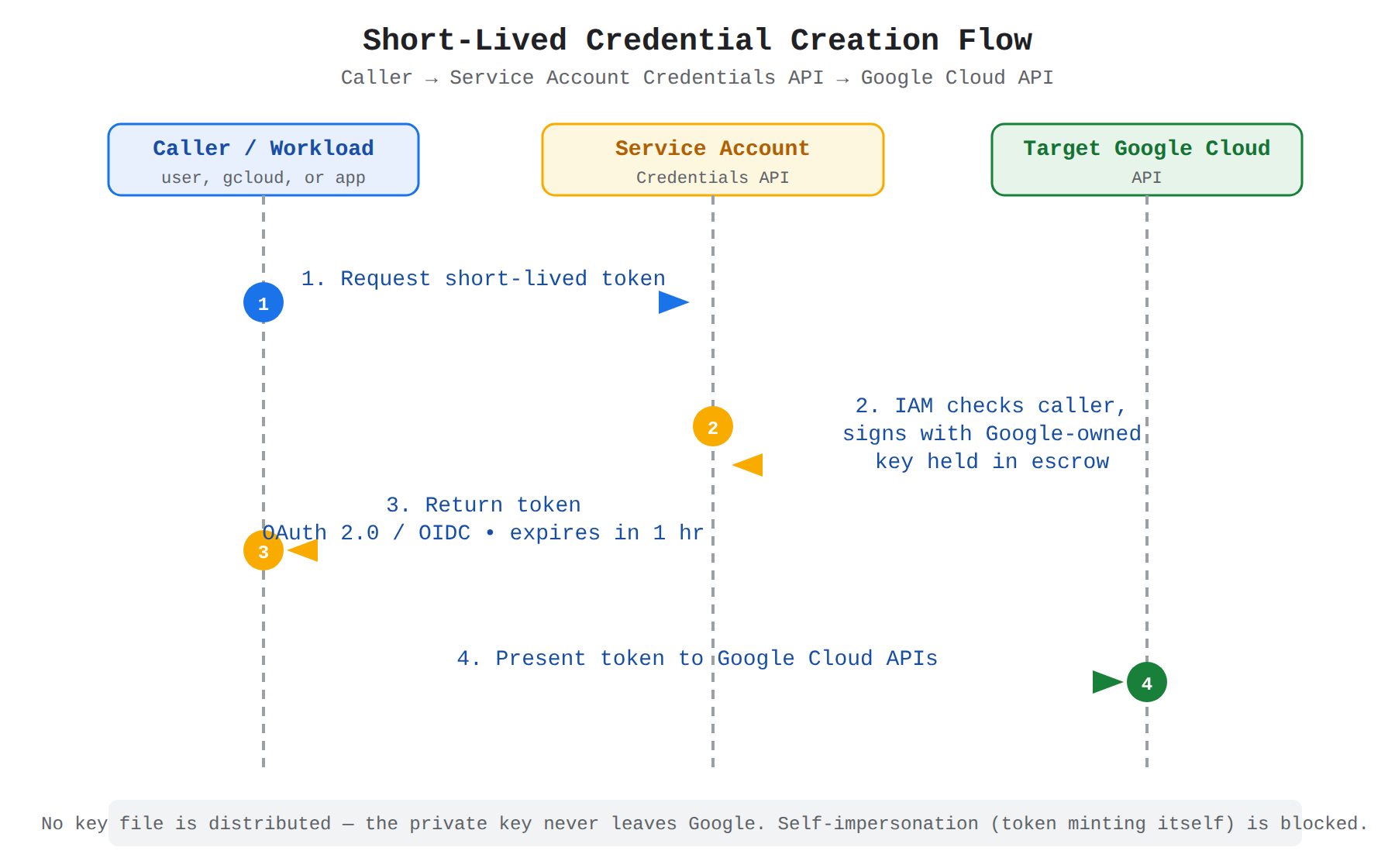
A sequence diagram with three lifelines: the caller workload, the Service Account Credentials API, and the target Google Cloud API. Animated arrows show the caller requesting a short-lived token, the API signing it with the escrowed Google-owned key, the token returning to the caller with a 1-hour default expiry, and the caller presenting the token to the Google Cloud API.
- gcloud CLI request with the
--impersonate-service-accountflag creates short-lived credentials for that service account and runs the command with them. - Attached service account on a Compute Engine virtual machine (VM) instance lets code on the instance use Application Default Credentials (ADC) to obtain short-lived credentials through client libraries.
- Workload identity federation lets an external identity provider exchange its own credentials for short-lived service account credentials.
A service can also call the API directly to give a user temporary access to resources. The API can create four peer credential types: OAuth 2.0 access tokens, OpenID Connect (OIDC) ID tokens, self-signed JSON Web Tokens (JWTs), and self-signed binary blobs.
Key Types Behind Short-Lived Credentials
Key types behind short-lived credentials determine who must protect a private key and who handles rotation. Google manages one type fully, while the customer manages the other type and takes on more risk:
| Key type | Who holds private key | How it is used |
|---|---|---|
| Google-owned and managed key pair | Google holds the private key in escrow and it is never accessible | Service Account Credentials API, App Engine, and Compute Engine use it to generate short-lived credentials and sign blobs and JWTs; Google rotates the active signing key regularly on a probabilistic ramp-up and ramp-down schedule |
| User-managed key pair | Customer holds the private key, known as a service account key, and must store it in a hardware-based or software-based key store | Customer uses the private key to sign a JWT and exchange it for an access token; each service account can have up to 10 keys and Google stores only the public portion |
The public key for a Google-owned pair is publicly verifiable through X.509 certificate, JSON Web Key (JWK), and raw endpoints. If a workload caches that public key, the cache lifetime should be at most 24 hours, and any retrieved key remains valid for at least 24 hours after retrieval.
Expiration and Rotation of Credentials
Expiration and rotation of credentials set a hard end to how long a credential can be abused. Short-lived access tokens expire by default after 1 hour, while user-managed service account keys created from Identity and Access Management (IAM) (opens in a new tab) have no expiry unless one is configured. An expiry can be set on new keys at the project, folder, or organization level, or by uploading a key with a Valid To date in its X.509 certificate, after which the key cannot authenticate but stays attached until deleted.
Expiry times fit temporary needs that still require a key file, such as developing in a non-production environment or using a third-party tool that only accepts service account keys. Expiry should be avoided in three situations where it causes more harm than protection: production workloads where an expired key can cause an accidental outage, non-production workloads that need permanent access such as a continuous integration (CI) pipeline, and key-rotation systems that already prevent use after a set time. For production, use non-expiring keys managed by rotation instead.
Rotation is the process of replacing an existing key with a new key and then invalidating the old key. Regular rotation shrinks the window in which a leaked key is still valid, because a bad actor may take days or weeks to discover a leak. If the key pair was generated locally, stored in a hardware security module (HSM), and only the public key was uploaded to Google Cloud, scheduled rotation may be unnecessary and rotation on suspected compromise is enough.
Revocation and Response to Leaked Keys
Revocation and response to leaked keys end trust in a key immediately by changing its lifecycle state. A key moves in order from active to disabled and then to deleted. If a key is no longer needed, it should first be disabled, then left disabled while workloads are checked for failures, and only deleted when removal is certain to be safe. Deleting is irreversible, while disabling allows fast re-enabling if an unexpected dependency appears.
Google Cloud can automatically disable keys that are detected as publicly exposed when the Service Account Key Exposure Response organization policy constraint is set to DISABLE_KEY. A disabled-by-exposure key gains metadata marking the disable reason as exposed and an extended status marking it as once publicly exposed. To prevent new long-lived keys from being created at all, the iam.disableServiceAccountKeyCreation constraint can be enforced, which is on by default for organizations created on or after May 3, 2024. These behaviors are part of the response to compromised credentials (opens in a new tab).
Scoped Permissions and Least Privilege
Scoped permissions and least privilege limit what a compromised credential can reach, even while it is still valid. Short-lived credentials always reflect the IAM roles granted to the impersonated service account, so least privilege starts with the service account's own grants. Best practices for protecting credentials (opens in a new tab) enforce separation between applications, roles, resources, and machines:
- Grant the service account a predefined role or custom role that meets its needs, and do not grant Owner, Editor, or Viewer in production.
- Apply IAM Conditions to restrict when and on which resources the service account's permissions apply.
- Apply VPC Service Controls perimeters to restrict which resources a compromised service account can reach across network boundaries.
- Create a dedicated service account for each application, so the
principalEmailfield in audit logs identifies the responsible application. - Create a dedicated key for each machine running the same application, so the
serviceAccountKeyNamefield in audit logs identifies the source machine.
Together these controls create three boundaries: the identity boundary sits between applications, the permission boundary sits between roles and resources, and the traceability boundary sits between machines sharing one application.
Monitoring and Limits on Reuse
Monitoring and limits on reuse make short-lived use visible and prevent indefinite refresh of stolen tokens. Most Google Cloud services log both the service account being impersonated and the identity that created the short-lived credential, which answers who created the credential and who was impersonated. Usage signals must be tracked per project and include service account insights for accounts unused in the past 90 days and the Key Authentication Events metric for when and how often a single key authenticated.
The Service Account Credentials API also blocks self-impersonation that would let a stolen token refresh itself forever. A short-lived credential for a service account cannot be used to generate a new access token for the same service account, with self-signed JWTs as the exception, and cannot be used to sign a blob or JWT to call the Identity and Access Management API, the Service Account Credentials API, or the OAuth 2.0 API. A prohibited attempt fails with FAILED_PRECONDITION, and the caller must use different credentials such as end-user credentials or another service account.
Exam tip: Use different credentials to mint a token for a service account; using that same service account's short-lived credential to mint another token for itself is blocked as self-impersonation.
Workload integration and access patterns describe how applications, CI/CD systems, and external workloads acquire and use short-lived credentials. Short-lived service account credentials are temporary tokens that let a workload act as a service account (opens in a new tab) without storing a long-lived key. A service account is a non-human account identified by an email address that an application uses to make authorized API calls. When an application authenticates as a service account, the application can access every resource that the service account has permission to access.
Attached Service Accounts and Metadata Server Retrieval
Attached service accounts and metadata server retrieval are the recommended pattern for production code running on Google Cloud. An administrator creates a user-managed service account, grants it IAM roles, and attaches it to the resource that runs the code, such as a Compute Engine virtual machine (VM) instance. The attached service account then acts as the default identity for any workload on that resource. The workload requests OAuth 2.0 access tokens or OpenID Connect (OIDC) ID tokens from the metadata server, and Application Default Credentials (ADC) passes those tokens to the client libraries automatically.
For most services, the service account must be attached when the resource is created, while Compute Engine lets you attach a service account to a VM at any time. This pattern avoids distributing private keys because the credentials are obtained automatically and expire quickly. Avoid sharing the highly privileged default service accounts across applications, and create a dedicated service account for each application instead.
Workload Identity Federation for GKE
Workload Identity Federation for GKE is the pattern for container workloads running in Google Kubernetes Engine (GKE). A Kubernetes service account in the GKE cluster is configured to act as an IAM service account, so pods can access Google Cloud APIs directly. The cluster exchanges the Kubernetes identity for short-lived Google credentials without using service account impersonation. This flow keeps each workload scoped to its own Kubernetes service account instead of sharing the node's attached service account.
External Workloads and CI/CD With Federation
External workloads and CI/CD with federation use Workload Identity Federation for workloads running outside Google Cloud. This pattern covers on-premises servers, AWS, Azure, and CI/CD systems such as GitHub that follow authentication for Google Cloud APIs (opens in a new tab). The external workload first authenticates to its own external identity provider (IdP), then exchanges that external token for short-lived Google credentials that impersonate a service account. Data flows from the external IdP to Google Cloud's federation pool, and then to the impersonated service account that carries the IAM permissions.
Because no service account key is downloaded or stored in the pipeline, there is no long-lived secret to rotate or leak. Use this federation pattern whenever the external IdP is supported. Create a service account key only as a last resort, because keys are a security risk if they are not managed correctly and you become responsible for protecting the private key.
Service Account Impersonation and Token Exchange
Service account impersonation and token exchange let an already authenticated principal temporarily act as a different service account to gain its permissions. The caller can be a user account or a caller service account, and the target is the privilege-bearing service account whose access is needed. The caller must have permission on the target service account, then requests a short-lived OAuth 2.0 access token, OIDC ID token, self-signed JSON Web Token (JWT), or binary blob. The gcloud CLI supports this with the --impersonate-service-account flag, and local development can use user credentials to impersonate a service account for testing.
An access token created by impersonation comes without a refresh token, so the caller must repeat the impersonation process after the token expires. Impersonation is useful for temporarily granting elevated access, testing whether a set of permissions is sufficient, and letting local or automated code run with production permissions without copying a key. The same caller-to-target relationship applies when one service account impersonates another to gain extra privilege for a single task. Creating short-lived credentials directly (opens in a new tab) follows this same caller-requests-target model.
Comparing Workload Access Patterns
Comparing workload access patterns shows where each workload runs and how the short-lived credential reaches the workload. ADC ties these patterns together because the same application code can run unchanged in development and production. Locally, ADC uses user credentials or impersonation, while in production ADC uses the attached identity or federated identity from the environment.
| Pattern | Where workload runs | How credential is acquired |
|---|---|---|
| Attached service account | Google Cloud compute resource, such as Compute Engine VM | Workload on the resource requests tokens from the metadata server; ADC finds them automatically |
| Workload Identity Federation for GKE | Pods in a GKE cluster | Kubernetes service account acts as IAM service account and receives short-lived credentials directly |
| Workload Identity Federation for external workloads | On-premises, other clouds, or CI/CD such as GitHub | External IdP token is exchanged through a federation pool for short-lived service account credentials |
| Service account impersonation | Local workstation, Cloud Shell, or another authenticated workload | Authenticated caller exchanges its own identity for a short-lived token for the target service account |
Exam tip: Choose federation or an attached service account over a service account key for external and CI/CD workloads, because keys are the least secure option and should be avoided whenever possible.
Mechanisms for generating short-lived credentials are the IAM paths that issue temporary tokens for a service account. Short-lived credentials are temporary tokens that let a workload or principal act as a service account for a limited time. The most common types are OAuth 2.0 access tokens and OpenID Connect (OIDC) ID tokens. In Google Cloud, Identity and Access Management (IAM) (opens in a new tab) issues these credentials through attached service accounts, service account impersonation with the IAM Credentials API, and workload identity mechanisms.
Attached Service Accounts as Default Identity
Attached service accounts as default identity give a Google Cloud compute resource its own service account identity. An attached service account is a user-managed service account that is attached to a Google Cloud compute resource to act as that resource's default identity. Any workload running on the resource uses the service account identity when it calls Google Cloud APIs, so access flows from the workload to the metadata server to the Google Cloud API. The workload requests a token from the metadata server, the metadata server returns a short-lived token for the attached service account, and the workload presents that token to the API.
Attachment has strict lifecycle rules. For most services, the service account must be attached when the resource is created and cannot be added or replaced later. Compute Engine is an exception because a service account can be attached to a virtual machine (VM) instance at any time. To create and attach securely, the administrator needs the Create Service Accounts role and the Project IAM Admin role, and the principal that attaches the account needs the Service Account User role on that service account.
Impersonation Through the IAM Credentials API
Impersonation through the IAM Credentials API lets an already authenticated principal authenticate as a different service account to gain its permissions. The caller can be a user or another service account, and the target is the service account email supplied in the request. The IAM Credentials API (opens in a new tab) generates the short-lived access token only after IAM checks that the caller is allowed to impersonate the target account. The required input is the target service account email address, and the required condition is the iam.serviceAccounts.getAccessToken permission, which is included in the Service Account Token Creator role (roles/iam.serviceAccountTokenCreator).
Impersonation is useful for temporary and controlled access without changing IAM policies. Common uses are temporarily granting a user elevated access, testing whether a set of permissions is sufficient for a task, locally developing applications that can only run as a service account, and authenticating applications that run outside of Google Cloud. The gcloud CLI can obtain these credentials automatically with the --impersonate-service-account flag. An administrator can set auth/impersonate_service_account to the service account email for all commands, or run gcloud auth application-default login --impersonate-service-account=SERVICE_ACCT_EMAIL to create a local Application Default Credentials file for Go, Java, Node.js, and Python client libraries.
Workload Identity Federation Mechanisms
Workload identity federation mechanisms let a workload use an identity from an external identity provider (IdP) to obtain short-lived Google Cloud credentials without a service account key. The trust boundary sits between the external IdP on one side and IAM on the other side. IAM trusts the external identity, verifies it, and then issues a short-lived token that carries the permissions of a mapped service account. This mechanism supports workloads on Google Cloud, Google Kubernetes Engine (GKE), on-premises, AWS, Azure, and GitHub.
For workloads on Google Cloud, two workload identity paths avoid long-lived keys. Workload Identity Federation for GKE grants IAM access directly to GKE clusters and Kubernetes service accounts, so pod workloads access Google Cloud services directly without IAM service account impersonation. Attached service accounts and on-demand short-lived credentials cover other Compute Engine and Google Cloud resources. For workloads outside Google Cloud, the administrator configures Workload Identity Federation so the on-premises or other-cloud workload presents its IdP credential and receives short-lived service account credentials in return. This approach follows the same authentication model for Google Cloud APIs (opens in a new tab) where no private key is stored with the workload.
Comparing Generation Mechanisms
Comparing generation mechanisms shows which IAM path to use based on where the workload runs and what identity it starts with:
| Mechanism | Where workload runs | How short-lived credential is issued |
|---|---|---|
| Attached service account | Google Cloud compute resource, such as a Compute Engine VM | Workload on the resource requests a token from the metadata server for the attached account |
| Service account impersonation | Local workstation, Cloud Shell, or another authenticated environment | Authenticated caller with Token Creator permission requests a token for the target service account email from the IAM Credentials API |
| Workload Identity Federation | GKE, on-premises, AWS, Azure, or GitHub | Workload presents its external IdP identity and IAM exchanges it for a short-lived service account token |
Exam tip: Impersonating a service account requires the Service Account Token Creator role on the target account, while attaching a service account to a resource requires the Service Account User role on that account.
Key Facts
- Short-lived OAuth 2.0 access tokens expire by default after 1 hour and are minted by the Service Account Credentials API using a Google-owned key pair whose private key is never exposed.
- Each service account can have up to 10 user-managed keys, and Google stores only the public portion while the customer must protect the private key.
- A disabled service account key must remain disabled while workloads are checked for failures because deleting a key is irreversible while disabling allows re-enabling.
- Workload Identity Federation lets external workloads on-premises, on AWS, on Azure, or in CI/CD systems exchange an external identity provider token for short-lived service account credentials without storing a key.
- Service account impersonation requires the Service Account Token Creator role containing
iam.serviceAccounts.getAccessTokenon the target service account, while attaching a service account requires the Service Account User role.
Frequently Asked Questions
What is the difference between Google-owned and managed key pairs and user-managed key pairs for short-lived service account credentials?
Google-owned and managed key pairs are held by Google with the private key in escrow and never exposed, while user-managed key pairs require the customer to protect the private key known as a service account key. Google uses its key pair to generate short-lived credentials and rotates the signing key regularly, while each service account can have up to 10 user-managed keys and Google stores only the public portion.
When should I use Workload Identity Federation for external workloads instead of creating a service account key?
Workload Identity Federation should be used whenever the external identity provider (IdP) is supported because no service account key is downloaded or stored in the pipeline. The external workload authenticates to its own external identity provider and exchanges that token through a federation pool for short-lived service account credentials. A service account key should be created only as a last resort because keys are a security risk if they are not managed correctly.
What permissions are required to impersonate a service account compared to attaching a service account to a compute resource?
Service account impersonation requires the Service Account Token Creator role containing the iam.serviceAccounts.getAccessToken permission on the target service account. Attaching a service account to a resource requires the Service Account User role on that service account.
Why cannot a short-lived service account credential be used to create another credential for the same service account?
A short-lived credential cannot be used to generate a new access token for the same service account in order to prevent indefinite refresh of stolen tokens, with self-signed JSON Web Tokens (JWTs) as the exception. Such a prohibited self-impersonation attempt fails with FAILED_PRECONDITION and the caller must use different credentials such as end-user credentials or another service account.
Sample Question
An organization runs automated deployment pipelines in an external CI/CD environment hosted outside of Google Cloud. The pipeline jobs need to authenticate to Google Cloud to deploy artifacts and update infrastructure.
To follow security best practices, your security team has mandated the following requirements:
- Prevent the creation, export, and storage of long-lived service account JSON keys.
- Use short-lived credentials that are automatically requested and expire when deployment tasks finish.
- Use a programmatic identity integration pattern designed specifically for external non-human workloads.
Which access pattern should you implement to satisfy these requirements?
Configure Workload Identity Federation to exchange external identity tokens issued by the CI/CD platform for short-lived Google Cloud access tokens
Configure the CI/CD pipeline to query the Compute Engine metadata server over HTTP to retrieve short-lived OAuth2 access tokens
Configure Workforce Identity Federation to authenticate the CI/CD pipeline against an external enterprise identity provider using interactive user sign-in
Generate a service account private JSON key, register it in the external environment's secrets vault, and use it to sign service account JWT assertions locally
How learners score on this domain
Last updated