Fundamental
Prepare and test your skills

Fundamental
Prepare and test your skills
Autoscaled Managed Instance Groups with Instance Templates
Autoscaling policies for a managed instance group (MIG) (opens in a new tab) automatically add or remove virtual machine (VM) instances to match workload demand. A Compute Engine autoscaler reads the policy, measures current load against the configured scaling signals and limits, and then scales the group out when load rises and scales it in when load falls. This closed loop lets compute capacity follow demand without manual resizing, while staying inside cost and availability bounds.
Autoscaling Loop: Measure, Decide, Resize
Process Flow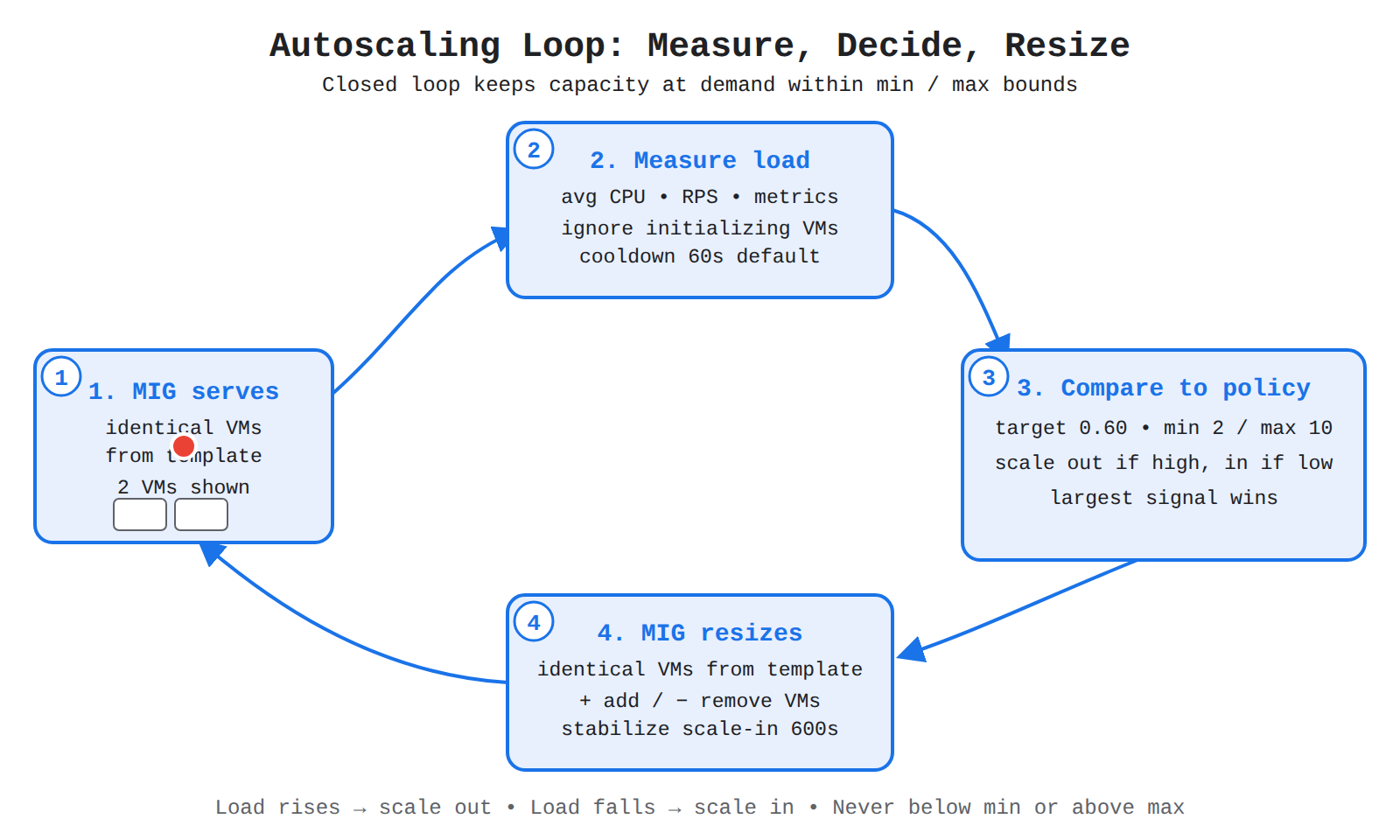
A four-step loop showing a MIG reporting load, autoscaler measuring it, comparing to policy, and resizing the group. Animated dots flow clockwise around the loop.
How an Autoscaling Policy Works
An autoscaling policy is the configuration attached to a MIG that tells the autoscaler when and how far to scale. Every policy must contain at least one scaling signal, plus a minimum and maximum number of instances that bound how far the group can grow or shrink. When a policy contains multiple signals, the autoscaler calculates a recommended size for each signal and applies the largest recommendation, so the group always meets the highest demand.
Autoscaling applies only to managed instance groups, which are built from a common instance template. Unmanaged instance groups do not support autoscaling. A new autoscaled MIG gets a CPU utilization signal by default, which can be kept, edited, or replaced with other signals:
- Average CPU utilization
- Load balancing serving capacity
- Cloud Monitoring metrics
- Schedules for predictable time-based capacity
- Queue-based workload such as Pub/Sub, for zonal MIGs
This design lets one group react to compute pressure, request pressure, custom application metrics, or calendar events while staying within cost and capacity limits.
CPU Utilization Signal
The CPU utilization signal scales the MIG to keep average CPU use at or near a target level. The target is expressed as a decimal, where 0.60 means 60%, and the autoscaler adds VMs when actual use rises above the target and removes VMs when use falls below it. For example, a policy with maxNumReplicas: 10, utilizationTarget: 0.6, and coolDownPeriodSec: 90 allows up to 10 VMs, aims for 60% CPU, and waits 90 seconds for new VMs to initialize.
The initialization period, also called the cool-down period, tells the autoscaler how long application startup takes. The initialization period defaults to 60 seconds, and during scale-out the autoscaler ignores data from VMs that are still initializing because those VMs do not yet represent normal use. Setting an accurate initialization period prevents premature scale decisions while new instances warm up.
Load Balancing Serving Capacity Signal
The load balancing serving capacity signal scales the MIG to maintain a fraction of the capacity defined in the load balancer backend service. Traffic flows from the forwarding rule to the load balancer, then from the load balancer to healthy VMs in the MIG backend, and the autoscaler watches that backend serving capacity to decide when VMs are over or under capacity. If capacity is defined as 100 requests per second (RPS) per instance and the autoscaler target is 0.8, the autoscaler adds or removes instances to hold the group near 80 RPS per instance.
Serving capacity is defined in the backend service using a balancing mode of UTILIZATION or RATE. With UTILIZATION, the target is maximum average backend utilization. With RATE, the target is requests per second per instance. Not every backend setting can be controlled by changing instance count:
| Backend capacity setting | Autoscaling support |
|---|---|
| Maximum backend utilization | Supported, adding instances adds total utilization capacity |
| Maximum requests per second per instance | Supported, adding instances adds total request capacity |
| Maximum requests per second per group | Not supported, the group-wide limit stays fixed whether the group has 2 or 100 instances |
Choose a CPU signal when compute saturation is the main constraint, and choose a load balancing signal when request load or backend utilization better represents user demand.
Exam tip: Autoscaling works with maximum backend utilization and maximum requests per second per instance, but not with maximum requests per second per group.
Instance Limits and Stabilization Timing
Instance limits in an autoscaling policy set the floor and ceiling for dynamic sizing. The minimum number of instances guarantees baseline availability, while the maximum number of instances caps cost and quota use, such as --max-num-replicas 20 in a gcloud compute instance-groups managed set-autoscaling command. The autoscaler never scales the MIG below the minimum or above the maximum, even if a signal recommends it.
Two timers control how quickly those limits are approached. The initialization period defaults to 60 seconds and protects scale-out decisions from incomplete startup data. The stabilization period controls scale-in, with a default of 600 seconds and an allowed range of 0 to 3600 seconds. A shorter stabilization period deletes VMs faster when load drops, while a longer period waits to verify that lower load is consistent before removing capacity.
An instance template (opens in a new tab) in Compute Engine is a standardized blueprint that defines the machine type, boot disk image, network, and other settings for virtual machines (VMs). A managed instance group (MIG) uses the instance template to create many identical VMs, so every VM in the group starts with the same consistent configuration. Because the template fixes these values in advance, scaling out or recreating VMs produces predictable results for performance and cost.
Machine Type and Core Settings
The machine type in an instance template controls the virtual CPU and memory available to each VM created from the template. If no settings are supplied, the gcloud compute instance-templates create command uses defaults of an n1-standard-1 machine type, the latest Debian image, a new standard boot disk named after the VM, the default Virtual Private Cloud (VPC) network, an ephemeral external IPv4 address, and stack type IPV4_ONLY. Explicit values can be set at creation time, for example --machine-type=e2-standard-4 with --image-family=debian-13, --image-project=debian-cloud, and --boot-disk-size=250GB. A regional template must include the region with the --instance-template-region flag, while a global template omits that flag and can be used more broadly.
Boot Disk Images and Startup Configuration
The boot disk image in an instance template defines the operating system and preinstalled software for every VM. Templates can use two main approaches:
| Option | What is preinstalled | Startup behavior |
|---|---|---|
| Custom image | Applications and settings are baked into the image | More deterministic and starts more quickly |
| Public image with startup script | A public image plus a startup script installs or configures software after boot | More flexible for updating apps and settings |
An instance template can point to a specific image or to an image family, which always resolves to the latest image in that family. If the image lives in a different project, the owner of that project must grant the MIG access to the image before the template can use it. Using a regional template that specifies a region and subnet also controls where MIG instances are created, which helps with load balancing placement.
Network, Disks, and Template Reuse
Network configuration in an instance template defines which VPC network, subnetwork, and IP address settings each VM receives. In the console this is edited under Advanced options and Networking, where the network interface and IP settings can be changed from the default VPC and ephemeral external IPv4 address. Templates can also include up to 15 secondary non-boot disks using repeated --create-disk flags, including blank disks, disks from public or custom images, and regional disks defined with replica-zones.
An instance template cannot be updated after it is created. When settings go out of date, a new template must be created, either from scratch or by copying an existing template with Create similar and then editing the configuration. The MIG can then be updated to use the properties from the different template, which keeps deployments consistent without editing the original blueprint.
Exam tip: Choose a custom image when fast, repeatable startups matter, and choose a public image with a startup script when flexibility to change apps and settings matters more.
A managed instance group (MIG) (opens in a new tab) is a collection of virtual machine (VM) instances in Compute Engine that you manage as a single entity. A MIG operates applications on multiple identical VMs and keeps each managed instance running based on an instance template and an optional stateful configuration. By contrast, an unmanaged instance group contains heterogeneous VMs that you add and remove yourself and does not offer autoscaling, autohealing, rolling updates, multi-zone support, or instance templates.
Regional or Zonal Groups
A MIG is configured as either zonal or regional, which controls how widely Compute Engine spreads its instances for availability and capacity. A zonal MIG deploys instances to a single zone, while a regional MIG deploys instances to multiple zones across the same region. Regional deployment replicates app load so traffic can continue from instances in the remaining zones if one zone fails, and it also provides more total capacity.
| Group type | Deployment scope | Default size limit |
|---|---|---|
| Zonal MIG | Single zone in a region | Up to 1,000 VMs |
| Regional MIG | Multiple zones in the same region | Up to 2,000 VMs |
If a group needs to grow beyond its default limit, you can increase the size limit of the MIG or contact support.
Health Checks and Autohealing Policies
Health checks and autohealing policies in a MIG keep applications available by detecting failed VMs and failed applications and recreating the affected instances. Automatic repair recreates a VM when it stops, crashes, is preempted as a Spot VM, or is deleted by an action not initiated by the MIG, using the same VM name and the same template so the VM can resume work. Application-based autohealing adds a health-check signal that periodically verifies that the application responds as expected on each instance, and the MIG deletes and recreates any instance that becomes UNHEALTHY.
MIG health checks behave differently from load balancing health checks, even though both use health-check signals. Traffic flows from the load balancer to healthy instances and away from non-responsive instances, but a load balancing health check does not cause Compute Engine to recreate instances. Data flows from the MIG health check to the MIG manager as a recreate signal, so the MIG manager deletes the UNHEALTHY instance and creates a replacement from the template.
Exam tip: Use separate health checks for load balancing and autohealing: make the load balancing check more aggressive to redirect user traffic quickly, and make the autohealing check more conservative because it triggers replacement of the instance.
Network, Load Balancing, and Autoscaling Properties
Network, load balancing, and autoscaling properties connect a MIG to its VPC environment, to its traffic distribution, and to its capacity policy. The instance template defines the VPC network and subnet that all member instances use, and if no VPC network is specified Google Cloud attempts to use the VPC network named default with its automatically created subnet. A MIG that needs IPv6 addressing must use an instance template created with either the dual-stack or IPv6-only setting.
For traffic, Google Cloud load balancing uses the MIG to serve clients by adding the group to a target pool or to a backend service, depending on the load balancer type. For capacity, an autoscaling policy dynamically adds instances when load rises and removes instances when load falls, based on one or more signals:
- CPU utilization
- Load balancing serving capacity
- Cloud Monitoring metrics
- Schedules
- Queue-based workload such as Pub/Sub, for zonal MIGs
The MIG depends on the autoscaler for size changes, on the load balancer for traffic distribution, and on the instance template for machine configuration, so the template, health check, and scaling policy together determine availability, resilience, and cost.
Key Facts
- A managed instance group (MIG) uses an instance template to create identical virtual machines, and only managed instance groups support autoscaling.
- An autoscaling policy requires at least one scaling signal plus minimum and maximum instance counts, and with multiple signals the autoscaler applies the largest recommended size.
- The CPU utilization target is a decimal such as 0.60 for 60%, with a default initialization period of 60 seconds and a default scale-in stabilization period of 600 seconds.
- Load balancing autoscaling supports maximum backend utilization and maximum requests per second per instance, but not maximum requests per second per group.
- A zonal MIG deploys to a single zone with a default limit of 1,000 VMs, while a regional MIG deploys to multiple zones in the same region with a default limit of 2,000 VMs.
Frequently Asked Questions
What scaling signals can an autoscaling policy use for a Compute Engine managed instance group (MIG)?
An autoscaling policy for a managed instance group (MIG) can use average CPU utilization, load balancing serving capacity, Cloud Monitoring metrics, schedules for predictable time-based capacity, and queue-based workload such as Pub/Sub for zonal groups. Every policy must include at least one scaling signal plus minimum and maximum instance counts, and when multiple signals are configured the autoscaler applies the largest recommended size.
When should I use CPU utilization instead of load balancing serving capacity to autoscale a Compute Engine managed instance group (MIG)?
Use the CPU utilization signal when compute saturation is the main constraint and use the load balancing serving capacity signal when request load or backend utilization better represents user demand. Load balancing autoscaling supports maximum backend utilization and maximum requests per second per instance but does not support maximum requests per second per group.
What are the default initialization and stabilization periods for Compute Engine autoscaling of a managed instance group (MIG)?
The initialization period defaults to 60 seconds and protects scale-out decisions by ignoring data from virtual machines (VMs) that are still initializing. The stabilization period controls scale-in with a default of 600 seconds and an allowed range of 0 to 3600 seconds, where a shorter period deletes virtual machines faster and a longer period waits to verify that lower load is consistent.
What is the difference between a zonal managed instance group (MIG) and a regional managed instance group (MIG) in Compute Engine?
A zonal managed instance group (MIG) deploys instances to a single zone with a default limit of up to 1,000 virtual machines (VMs), while a regional managed instance group deploys instances to multiple zones in the same region with a default limit of up to 2,000 virtual machines. Regional deployment replicates application load so traffic can continue from instances in the remaining zones if one zone fails and also provides more total capacity.
Sample Question
Your company deploys a web application across multiple zones using a Compute Engine regional Managed Instance Group (MIG). The application instances require approximately three minutes to complete their startup scripts and initialize dependencies before they can successfully answer HTTP requests. After attaching an autohealing policy with an application health check, newly created instances are repeatedly marked unhealthy and recreated before they finish initializing.
Which configuration adjustment should you make to the autohealing policy to resolve this issue?
How learners score on this domain
Last updated