Fundamental
Prepare and test your skills

Fundamental
Prepare and test your skills
Stateless Workloads with Kubernetes Deployments in GKE
Free sample question with answers and detailed explanation below. The Associate Cloud Engineer practice bank has an additional 2,014 practice questions.Try 10 free realistic questions: instant score, no credit card, and no account required.
You are preparing to deploy a stateless containerized web application to a Google Kubernetes Engine (GKE) cluster. Your workload must meet the following operational requirements:
- Maintain high availability by running three identical pod replicas across the cluster nodes
- Use the label
app: web-frontendso that workload controllers and services can target the pods - Reserve a baseline compute allocation of
200mCPU per container - Follow declarative management practices to create or update the desired state from a configuration file
How should you configure and deploy this workload?
Explanations
Create a Job manifest with spec.parallelism: 3 and container resource limits, then execute kubectl autoscale job web-store --min=3 --max=3 to manage pod count.
Create a Job manifest with spec.parallelism: 3 and container resource limits, then execute kubectl autoscale job web-store --min=3 --max=3 to manage pod count.
What a Kubernetes Job Is
A Kubernetes Job (kind: Job) is a controller object designed for batch processing and short-lived tasks. A Job creates one or more pods and ensures that a specified number of them successfully terminate upon completing their execution.
Why It Doesn't Meet the Requirement
- Inappropriate workload type: Web applications are long-running, continuous stateless services. A Kubernetes Job expects processes to run to completion and exit with a zero status code; it is not meant for persistent web servers.
- Invalid autoscaling target: The
kubectl autoscalecommand creates a Horizontal Pod Autoscaler (HPA) targeting scalable controllers like Deployments or ReplicaSets, not batch Jobs. - Imperative overriding: Relying on an imperative
kubectl autoscalecommand with static bounds (--min=3 --max=3) defeats the purpose of maintaining a clean declarative manifest for desired replica states.
Key Characteristics and Limitations
- Jobs terminate pods once tasks complete rather than keeping web servers alive
- Batch workloads do not provide service routing endpoints for continuous HTTP traffic
- Autoscaling controllers are designed for Deployments and StatefulSets, not batch Jobs
This Answer Would Be Correct If
You needed to run parallel batch computation tasks (such as image rendering, batch database migrations, or report generation) where three worker pods process items until the job is complete.
Create a single Pod manifest that defines three identical container entries under the spec.containers list, each with resources.requests.cpu: 200m, then run kubectl apply -f pod.yaml.
Create a single Pod manifest that defines three identical container entries under the spec.containers list, each with resources.requests.cpu: 200m, then run kubectl apply -f pod.yaml.
What a Multi-Container Pod Is
A single Pod manifest defining multiple entries in its containers array creates a multi-container Pod (such as a sidecar or proxy pattern). All containers inside that single pod are co-located and scheduled together on the exact same worker node, sharing the pod's network namespace and storage volumes.
Why It Doesn't Meet the Requirement
- Fails high availability and replication: Defining three containers inside one Pod specification runs three distinct containers inside one single pod instance. It does not create three independent replica pods distributed across the cluster.
- No self-healing or scaling: Standalone Pods are not managed by a workload controller. If the node hosting the pod fails or restarts, Kubernetes will not automatically reschedule or recreate the pod.
- Incorrect container architecture: Replicating identical application server instances inside the same network namespace creates port conflicts if all three containers bind to the same network port.
Key Characteristics and Limitations
- Multi-container pods are intended for tightly coupled helper processes (e.g., logging agents, proxies)
- Standalone pods lack automated replication and controller-driven rolling updates
- Pods created directly without a controller offer no high availability guarantees
This Answer Would Be Correct If
You needed to deploy a primary application container alongside two supporting sidecar proxy or log-forwarding containers that must share the same localhost network interface and storage volume on a single node.
Create a StatefulSet manifest without defining label selectors, set spec.replicas: 1, and then execute the imperative command kubectl scale statefulset web-frontend --replicas=3.
Create a StatefulSet manifest without defining label selectors, set spec.replicas: 1, and then execute the imperative command kubectl scale statefulset web-frontend --replicas=3.
What a StatefulSet Is
A StatefulSet (kind: StatefulSet) is a Kubernetes controller used to manage stateful applications that require unique, stable network identities, persistent ordered scaling, and dedicated persistent storage per pod (e.g., distributed databases like Cassandra or ZooKeeper).
Why It Doesn't Meet the Requirement
- Overhead for stateless apps: Stateless web frontends do not require ordinal pod naming (
pod-0,pod-1), ordered deployments, or dedicated persistent volume claims, making StatefulSet an unnecessary and inefficient controller choice. - Invalid manifest structure: Kubernetes manifest validation requires a
spec.selectorthat matchesspec.template.metadata.labels; omitting selectors causes the API server to reject the manifest. - Imperative scaling vs. declarative state: Modifying the running replica count using
kubectl scalediverges from the declared configuration in the manifest file, leading to configuration drift when manifests are reapplied.
Key Characteristics and Limitations
- StatefulSets are tailored for stateful clustering, stable hostnames, and persistent disk attachments
- Manifests missing required label selectors will fail API validation
- Imperative scaling commands override desired states without recording changes in source control
This Answer Would Be Correct If
You were deploying a distributed database cluster where each pod instance required dedicated persistent storage, a consistent ordinal index, and strict startup ordering.
Create a Deployment manifest specifying spec.replicas: 3, matching labels under spec.selector.matchLabels and spec.template.metadata.labels, and resources.requests.cpu: 200m in the container spec, then run kubectl apply -f deployment.yaml.
Create a Deployment manifest specifying spec.replicas: 3, matching labels under spec.selector.matchLabels and spec.template.metadata.labels, and resources.requests.cpu: 200m in the container spec, then run kubectl apply -f deployment.yaml.
What a Kubernetes Deployment Manifest Is
A Kubernetes Deployment is a declarative controller resource (apiVersion: apps/v1, kind: Deployment) used to manage stateless containerized workloads. It automates the lifecycle of ReplicaSets and individual Pods, ensuring the cluster maintains the specified desired state, handles zero-downtime rolling updates, and automatically replaces unhealthy pod instances.
How It Meets the Requirements
- Workload stability and availability (
spec.replicas: 3): Setting thereplicasfield in the Deployment spec ensures that the controller continuously maintains exactly three running pod replicas. - Label matching (
app: web-frontend): Thespec.selector.matchLabelsblock instructs the Deployment controller which pods to manage, corresponding directly to the labels defined in the pod template metadata (spec.template.metadata.labels). - Resource allocation (
resources.requests.cpu: 200m): Declaringrequestsunder the container configuration ensures the Kubernetes scheduler places pods on nodes with at least 200 millicores of available CPU capacity. - Declarative application (
kubectl apply -f): Applying the YAML manifest usingkubectl applysubmits the desired state to the Kubernetes API server, creating the resource if it does not exist or updating it declaratively.
Key Advantages and Capabilities
- Self-healing workloads: Automatically recreates failed or evicted pods to maintain the desired replica count
- Declarative management: Allows tracking infrastructure and application state in version control systems
- Predictable scheduling: Guarantees compute capacity on worker nodes through explicit resource requests
- Seamless rollouts and rollbacks: Facilitates zero-downtime rolling updates when updating container image tags
Why This Is Optimal
Using a Deployment resource combined with kubectl apply is the foundational best practice for managing stateless applications in GKE. It couples desired state replication, resource reservations, and label selection within a single declarative configuration file.
Deployment Manifest Desired State
Annotated Structure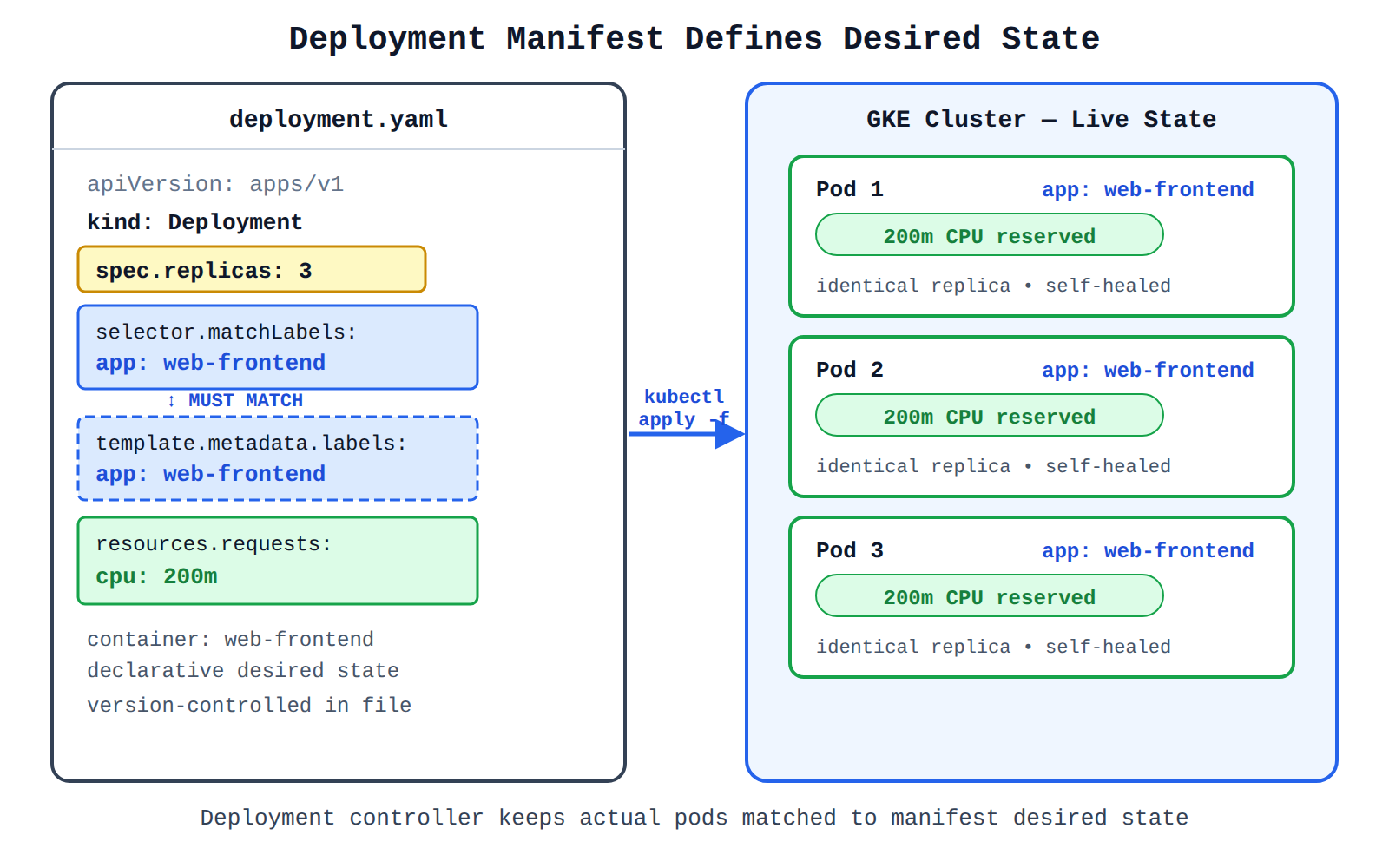
Try 10 interactive questions like this one, free
Answer them yourself and get your score the moment you finish. No account needed.
Full access includes
- 2,014 practice questions across all 4 exam domains
- Every answer explained: why it is right, and why the others are not
- Scout, an AI tutor that answers your follow-up questions
- Readiness tracking by domain, so you know when to book the exam
Related free sample questions
Keep the momentum going with these hand-picked practice scenarios
FundamentalAssociate Cloud Engineer
Kubernetes ClusterIP Internal Service Exposure
Deploying a containerized application to GKE
FundamentalAssociate Cloud Engineer
Artifact Registry Docker Image URI Format
Deploying a containerized application to GKE
FundamentalAssociate Cloud Engineer
Cloud Run Scale to Zero
Selecting appropriate compute choices for a given workload (e.g., Compute Engine, Google Kubernetes Engine [GKE], Cloud Run, Cloud Run functions, Knative serving)
FundamentalAssociate Cloud Engineer
Google Cloud Regional Service Availability
Confirming availability of products in geographical locations (e.g., regional, global)
FundamentalAssociate Cloud Engineer
Cloud Run Traffic Splitting
Deploying new versions of a Cloud Run application
IntermediateProfessional Cloud Developer
NetworkPolicy DNS Egress Allowance
Incorporating secure service-to-service communications (e.g., Cloud Service Mesh, Kubernetes Network Policies, Direct VPC egress, private service connectivity)
Last updated