Fundamental
Prepare and test your skills

Fundamental
Prepare and test your skills
Artifact Registry Docker Image Path Format
Free sample question with answers and detailed explanation below. The Associate Cloud Engineer practice bank has an additional 2,014 practice questions.Try 10 free realistic questions: instant score, no credit card, and no account required.
Your company is building a containerized web application that will be hosted on Google Kubernetes Engine (GKE). You have created a Docker repository named app-repo located in the us-central1 region inside the Google Cloud project my-prod-project.
You need to properly tag the local image web-frontend with the version v1.0 so that it can be pushed to Artifact Registry and pulled by your GKE workloads.
Which image path follows the correct Artifact Registry tagging convention?
Explanations
us-central1-docker.pkg.dev/my-prod-project/app-repo/web-frontend:v1.0
us-central1-docker.pkg.dev/my-prod-project/app-repo/web-frontend:v1.0
What Artifact Registry image naming is
Artifact Registry organizes Docker and OCI-compliant container images using a standardized hierarchical Uniform Resource Identifier (URI) structure. The standard path structure for Docker repositories identifies the repository location, the registry service domain, the Google Cloud project ID, the repository name, the specific image name, and the tag.
Artifact Registry Image Path, Piece by Piece
Annotated Structure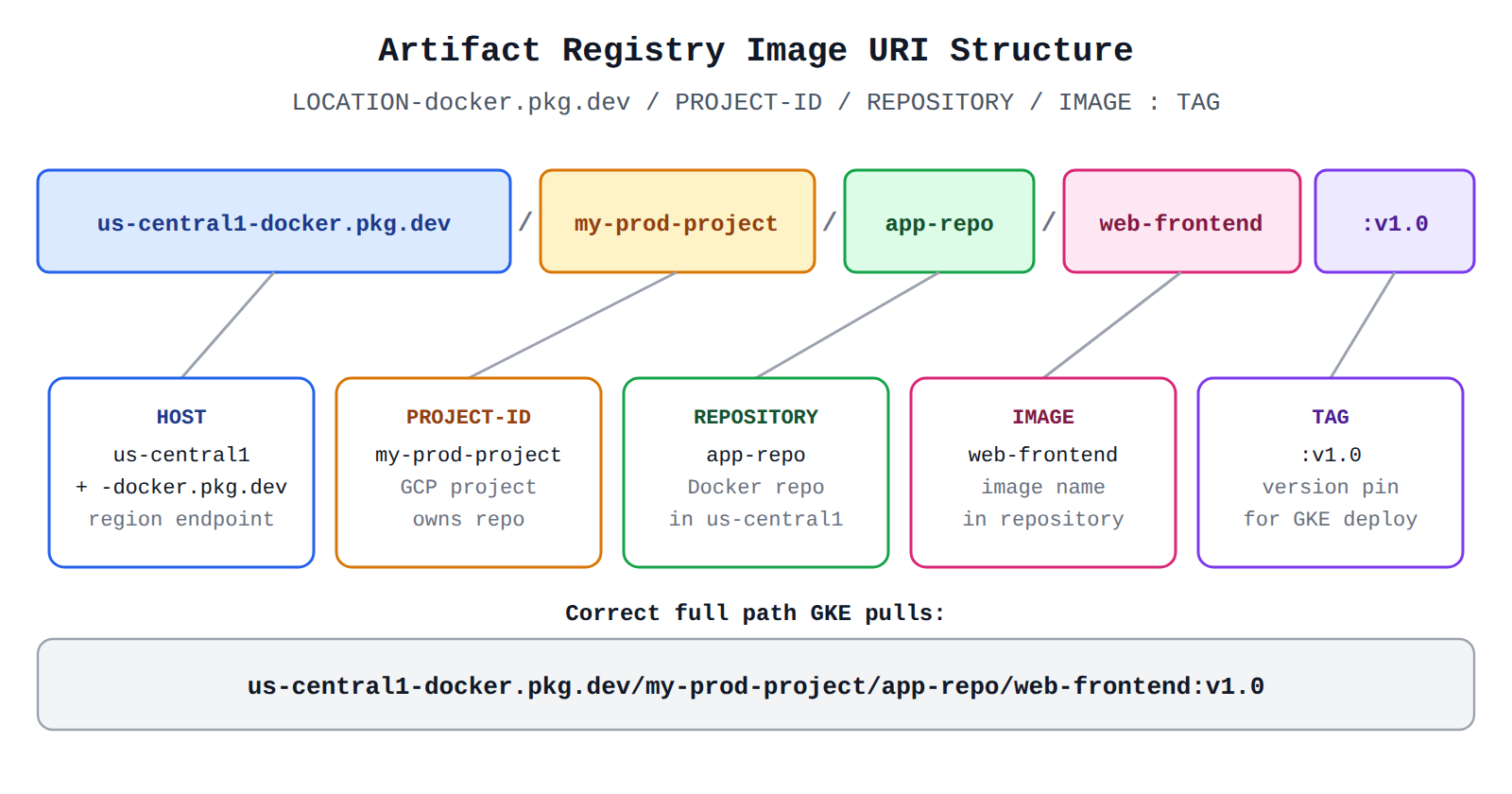
How it meets the requirements
To push and reference container images in Artifact Registry, the path must strictly follow the format:
LOCATION-docker.pkg.dev/PROJECT-ID/REPOSITORY/IMAGE:TAG
For this scenario:
- Location:
us-central1 - Host:
docker.pkg.dev - Project ID:
my-prod-project - Repository:
app-repo - Image name:
web-frontend - Tag:
v1.0
Combining these elements yields us-central1-docker.pkg.dev/my-prod-project/app-repo/web-frontend:v1.0.
Key advantages and capabilities
- Seamless GKE integration: By default, nodes in a GKE cluster running in the same Google Cloud project use the Compute Engine default service account, which automatically has permissions to pull images from Artifact Registry Docker repositories.
- Granular regional control: Storing images in the same region (
us-central1) as the GKE cluster minimizes network latency during Pod scheduling and image pull operations, while eliminating cross-region egress charges. - Version tracking: The tag (
:v1.0) clearly pins the container version for Kubernetes Deployment manifests, enabling reproducible rollouts and rollbacks. - Multi-repository support: Allows organizing multiple distinct container images inside isolated named repositories within a single project.
Why this is optimal
This format is the standard naming scheme supported by Google Cloud Artifact Registry for Docker repositories. It allows the Docker client, Cloud Build, and GKE kubelets to resolve the exact host and repository endpoint to authenticate and fetch images securely.
docker.pkg.dev/us-central1/my-prod-project/web-frontend:v1.0
docker.pkg.dev/us-central1/my-prod-project/web-frontend:v1.0
What the option is/does
This option incorrectly specifies us-central1 as a URL path segment rather than as a subdomain prefix on the hostname, and omits the required repository name.
Why it doesn't meet the requirement
- Missing repository name: In Artifact Registry, repositories are user-created resources that sit under a project. This option attempts to place the image directly under the project without the
app-reporepository name. - Incorrect location placement: The location (
us-central1) must precede-docker.pkg.devas part of the hostname prefix (e.g.,us-central1-docker.pkg.dev). Placingus-central1in the path causes the client to misinterpretus-central1as the Google Cloud project ID.
Key characteristics and limitations
- Unlike legacy registries that only mapped to top-level projects, Artifact Registry mandates an explicit repository name in every image path.
- The client parser expects the first segment after the host domain to be the Google Cloud
PROJECT-ID.
This answer would be correct if
Artifact Registry used a centralized docker.pkg.dev host where the first URI path segment represented the region, which is not how Google Cloud organizes Artifact Registry domains.
gcr.io/us-central1/my-prod-project/app-repo/web-frontend:v1.0
gcr.io/us-central1/my-prod-project/app-repo/web-frontend:v1.0
What the option is/does
This URI structure attempts to use the legacy Container Registry domain (gcr.io) while incorrectly mixing regional prefixes and repository namespaces.
Why it doesn't meet the requirement
- Incorrect service hostname: Google Cloud's modern package management service is Artifact Registry (
docker.pkg.dev), whereasgcr.iorepresents the deprecated Container Registry. - Invalid path hierarchy: Container Registry used regional subdomains (such as
us.gcr.iooreu.gcr.io) and did not support custom repository names (app-repo) as intermediate namespaces. In Container Registry, paths were limited to[REGION.]gcr.io/PROJECT-ID/IMAGE:TAG. - Fails authentication: Pushing or pulling from this address will fail to reach the newly provisioned Artifact Registry repository.
Key characteristics and limitations
- Container Registry (
gcr.io) is the predecessor to Artifact Registry and is not recommended for new workloads. - Legacy
gcr.iorepositories map directly to Cloud Storage buckets rather than dedicated Artifact Registry repository resources. - Does not support regional repositories in arbitrary Google Cloud regions such as
us-central1.
This answer would be correct if
You were working with an existing legacy Google Container Registry repository configured with a multi-region endpoint such as us.gcr.io/my-prod-project/web-frontend:v1.0.
us-central1.pkg.dev/my-prod-project/docker/app-repo/web-frontend:v1.0
us-central1.pkg.dev/my-prod-project/docker/app-repo/web-frontend:v1.0
What the option is/does
This string misconstructs the host header and adds an invalid docker/ subpath into the repository path.
Why it doesn't meet the requirement
- Malformed hostname: Artifact Registry uses format-specific hosts for Docker repositories, structured as
LOCATION-docker.pkg.dev. Placing a dot (.) directly between the location andpkg.devcauses DNS resolution errors for Docker CLI and Kubernetes node image pullers. - Redundant path elements: The format specifier
dockerbelongs in the host subdomain (us-central1-docker.pkg.dev), not as a separate path segment between the project ID and repository name.
Key characteristics and limitations
- Artifact Registry repository paths have a strict 3-part hierarchy after the hostname:
PROJECT-ID/REPOSITORY/IMAGE. - Inserting additional directory segments like
/docker/corrupts the repository resolution in Artifact Registry.
This answer would be correct if
Google Cloud used generic top-level regional endpoints with format path parameters, but Artifact Registry enforces hostname-based protocol mapping.
Try 10 interactive questions like this one, free
Answer them yourself and get your score the moment you finish. No account needed.
Full access includes
- 2,014 practice questions across all 4 exam domains
- Every answer explained: why it is right, and why the others are not
- Scout, an AI tutor that answers your follow-up questions
- Readiness tracking by domain, so you know when to book the exam
Related free sample questions
Keep the momentum going with these hand-picked practice scenarios
FundamentalAssociate Cloud Engineer
Kubernetes ClusterIP Internal Service Exposure
Deploying a containerized application to GKE
FundamentalAssociate Cloud Engineer
Kubernetes Deployment Manifest
Deploying a containerized application to GKE
FundamentalAssociate Cloud Engineer
gcloud projects add-iam-policy-binding
Granting members Identity and Access Management (IAM) roles within a project
FundamentalAssociate Cloud Engineer
Service Account-Based Firewall Filtering
Using Tags (e.g., secure Tags) and service accounts in Cloud NGFW policy rules
FundamentalAssociate Cloud Engineer
Cloud Storage Lifecycle Asynchronous Execution
Setting object lifecycle management policies for Cloud Storage buckets
AdvancedProfessional Cloud Network Engineer
Cloud DNS DNSSEC 3000 Record Set Limit
Managing Cloud DNS zones and records.
Last updated