Fundamental
Prepare and test your skills

Fundamental
Prepare and test your skills
Blocking Service Account Key Creation Centrally
Free sample question with answers and detailed explanation below. The Associate Cloud Engineer practice bank has an additional 2,014 practice questions.Try 10 free realistic questions: instant score, no credit card, and no account required.
Your company wants to improve its security posture by minimizing the risks associated with long-lived credentials. An internal audit revealed that developers frequently generate user-managed service account keys and download them to local workstations, increasing the risk of credential leakage and unauthorized privilege escalation. Your organization wants to establish a centralized guardrail that strictly blocks developers from generating any new user-managed service account keys across all existing and future projects.
Which action should you take to achieve this goal?
Explanations
Revoke the Service Account User (roles/iam.serviceAccountUser) role from all developers across the organization.
Revoke the Service Account User (roles/iam.serviceAccountUser) role from all developers across the organization.
What the Service Account User Role Does
The Service Account User role (roles/iam.serviceAccountUser) grants a principal permission to attach a service account to a compute resource (such as a Compute Engine virtual machine or Cloud Run service) and run workloads under that service account's identity.
Why It Doesn't Meet the Requirement
- Fails to block key creation: The
roles/iam.serviceAccountUserrole does not control the creation or deletion of service account keys. Service account key creation is governed by key management permissions found in roles like Service Account Key Admin (roles/iam.serviceAccountKeyAdmin), Editor (roles/editor), or Owner (roles/owner). - Disrupts legitimate workloads: Removing this role prevents developers from deploying and associating service accounts with compute workloads, breaking day-to-day operations without actually disabling key creation for users with project-level Editor or Owner permissions.
Key Characteristics and Limitations
- Workload impersonation focus: It is designed to let users "act as" the service account on compute instances, not manage the service account's lifecycle or credentials.
- Independent from key administration: A developer can lack the Service Account User role and still create keys if they hold Editor, Owner, or Service Account Key Admin roles.
- High operational disruption: Revoking this role universally would prevent developers from testing or launching instances attached to custom service accounts.
This Answer Would Be Correct If
This approach would be appropriate if your objective was to prevent developers from attaching privileged service accounts to unvetted virtual machines or executing code under that service account's identity.
Additional Context
A common misconception is that all service account permissions stem from the Service Account User role. However, Google Cloud IAM maintains a clear separation between using a service account (actAs permissions) and administrating service account keys (iam.serviceAccountKeys.* permissions).
Enforce the 'Disable service account key creation' organization policy constraint at the root node of the organization hierarchy.
Enforce the 'Disable service account key creation' organization policy constraint at the root node of the organization hierarchy.
What Organization Policy Constraints Are
An Organization Policy provides centralized, programmatic control over an organization's cloud resources. Organization policy constraints allow cloud administrators to configure specific restrictions across the entire resource hierarchy (organization, folders, and projects). The constraints/iam.disableServiceAccountKeyCreation constraint specifically prevents users and automated processes from creating new user-managed service account keys.
How It Meets the Requirements
- Centralized enforcement: Applying the constraint at the organization root ensures that the rule inherits down through all folders, projects, and newly created projects automatically.
- Blocks key creation: When enforced, any attempt to generate a user-managed service account key via the Google Cloud Console, Google Cloud CLI (
gcloud), or Cloud APIs is rejected immediately. - Prevents credential sprawl: It eliminates the root cause of credential leakage by stopping persistent private keys from being created and downloaded to local developer workstations.
Org Policy Constraint Inheritance Blocks Key Creation
Hierarchy / Taxonomy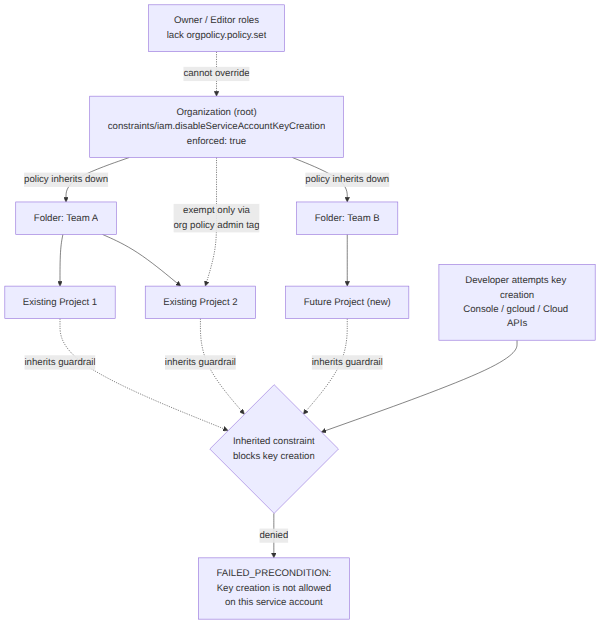
Key Advantages and Capabilities
- Inherited protection: Policies set at the root level apply to all current and future descendant projects without needing individual project-by-project configuration.
- Immunity from project-level roles: Modifying organization policies requires the
orgpolicy.policy.setpermission. Basic roles such as Owner (roles/owner) and Editor (roles/editor) do not have this permission, preventing project developers from bypassing the restriction. - Default security standard: Google Cloud enforces this constraint by default on organizations created on or after May 3, 2024, reflecting recommended identity hygiene.
- Granular exceptions: Administrators can explicitly exempt specific projects where keys are strictly necessary while keeping the rest of the enterprise secure.
Why This Is Optimal
Enforcing the organization policy constraint is the most effective and administrative-friendly solution. Rather than attempting to micromanage permissions across hundreds of projects or reacting after keys are already generated and leaked, an organization policy establishes a hard prevention guardrail at the foundational resource hierarchy level.
Store all user-managed service account keys in Google Cloud Secret Manager and configure automatic secret rotation.
Store all user-managed service account keys in Google Cloud Secret Manager and configure automatic secret rotation.
What Secret Manager Does
Google Cloud Secret Manager is a secure storage system for sensitive data such as API keys, database passwords, certificates, and configuration secrets. It encrypts secrets at rest and in transit, provides audit logging, and supports automated rotation workflows.
Why It Doesn't Meet the Requirement
- Does not prevent key creation: Moving or storing service account keys inside Secret Manager does not stop developers from creating user-managed keys or downloading them to their local machines.
- Architectural anti-pattern: Using Secret Manager to manage service account keys introduces circular dependency and credential redundancy. To read a secret from Secret Manager, an application must already possess an authenticated identity recognized by Google Cloud. If the workload already has an identity capable of querying Secret Manager, it should authenticate directly to Google Cloud APIs using that native identity or Workload Identity Federation, eliminating the need for a service account key entirely.
Key Characteristics and Limitations
- Circular identity dependency: Applications need Google Cloud credentials to fetch secrets from Secret Manager, making service account key storage in Secret Manager redundant.
- Persistent credential risks remain: Even when stored in Secret Manager, the service account key remains a long-lived private key vulnerable to extraction and misuse.
- Administrative overhead: Managing rotation pipelines and synchronization for static key files adds unnecessary operational complexity compared to adopting keyless authentication.
This Answer Would Be Correct If
This answer would be appropriate if you needed to store and automatically rotate third-party API credentials, database connection strings, or external partner tokens that cannot leverage native Google Cloud IAM.
Additional Context
Best practices explicitly advise against storing user-managed service account keys in secret vaults like Secret Manager, Azure Key Vault, or AWS Secrets Manager when accessing Google Cloud services, as cloud-native authentication mechanisms provide superior security.
Configure an organization-wide key expiry policy that sets an automatic 8-hour lifetime on all existing service account keys.
Configure an organization-wide key expiry policy that sets an automatic 8-hour lifetime on all existing service account keys.
What Key Expiry Policies Do
Key expiry allows administrators to set a maximum lifetime on newly generated service account keys (for example, hours, days, or weeks) so that they automatically become invalid after a specified time without requiring manual deletion.
Why It Doesn't Meet the Requirement
- Does not block key creation: Setting an expiration policy still permits developers to generate and download user-managed service account keys, leaving the threat of credential sprawl and leakage active.
- Does not apply to existing keys: In Google Cloud, key expiry constraints only apply to newly generated keys. Any existing keys currently deployed or stored on workstations remain completely unaffected until manually rotated or deleted.
- Risk of unexpected outages: Key expiration can cause production workloads to fail abruptly when credentials expire if automated rotation mechanisms are not implemented.
Key Characteristics and Limitations
- Prospective application only: Organization policies or project constraints defining key expiry do not retroactively invalidate or modify pre-existing keys.
- Intended for temporary access: Key expiry is intended for short-term temporary developer access or short-lived third-party integrations, not as a permanent preventative control.
- Does not eliminate key leakage: A leaked key remains fully valid and usable by bad actors throughout its active window prior to expiration.
This Answer Would Be Correct If
This approach would be correct if the organization permitted the temporary use of service account keys for sandbox testing or third-party tools and wanted to ensure those newly generated keys would expire automatically after a project ended.
Additional Context
To effectively protect production workloads, Google recommends using keys that do not expire while managing their lifecycle via structured key rotation, or ideally eliminating user-managed keys altogether using Workload Identity Federation and IAM policies.
Try 10 interactive questions like this one, free
Answer them yourself and get your score the moment you finish. No account needed.
Full access includes
- 2,014 practice questions across all 4 exam domains
- Every answer explained: why it is right, and why the others are not
- Scout, an AI tutor that answers your follow-up questions
- Readiness tracking by domain, so you know when to book the exam
Related free sample questions
Keep the momentum going with these hand-picked practice scenarios
FundamentalAssociate Cloud Engineer
gcloud Service Account Creation and IAM Binding
Creating service accounts
FundamentalAssociate Cloud Engineer
OS Login Ignores Metadata SSH Keys
Configuring OS Login
FundamentalAssociate Cloud Engineer
Static Internal IP Primary CIDR Requirement
Reserving static external or internal IP addresses
FundamentalAssociate Cloud Engineer
Cloud Billing Account Project Relationship
Linking projects to a billing account
FundamentalAssociate Cloud Engineer
Persistent Disk Provisioned Capacity Billing
Estimating costs of data storage resources
IntermediateProfessional Cloud Database Engineer
Shared VPC Private Services Access
Configure networking, key management, encryption, and security
Last updated