Fundamental
Prepare and test your skills

Fundamental
Prepare and test your skills
Creating Service Accounts and Binding Project Roles
Free sample question with answers and detailed explanation below. The Associate Cloud Engineer practice bank has an additional 2,014 practice questions.Try 10 free realistic questions: instant score, no credit card, and no account required.
You need to create a new user-managed service account named app-processor using the Google Cloud CLI. The configuration must satisfy the following operational requirements:
- Provide a human-readable display name of
App Processorand a description ofProcesses incoming storage objects. - Grant the service account the Storage Object Viewer role (
roles/storage.objectViewer) at the project level in projectmy-corp-prod.
Which sequence of gcloud commands should you execute to accomplish this?
Explanations
- Run
gcloud iam service-accounts create app-processor --display-name="App Processor" --description="Processes incoming storage objects"
- Run
gcloud projects add-iam-policy-binding my-corp-prod --member="user:app-processor@my-corp-prod.iam.gserviceaccount.com" --role="roles/storage.objectViewer"
- Run
gcloud iam service-accounts create app-processor --display-name="App Processor" --description="Processes incoming storage objects" - Run
gcloud projects add-iam-policy-binding my-corp-prod --member="user:app-processor@my-corp-prod.iam.gserviceaccount.com" --role="roles/storage.objectViewer"
What the user: Prefix Member Binding Does
The gcloud projects add-iam-policy-binding command binds an IAM role to a specified identity on a project. However, this option specifies the member string with the user: prefix (user:app-processor@my-corp-prod.iam.gserviceaccount.com) instead of the serviceAccount: prefix.
Why It Doesn't Meet the Requirement
- Incorrect principal identifier: Google Cloud IAM strictly differentiates between identity types using type prefixes. The prefix
user:designates a human user with a Google Account or Google Workspace account. - Policy validation failure: Because
app-processor@my-corp-prod.iam.gserviceaccount.comis a service account and not a Google user account, attempting to bind it using theuser:prefix results in a validation error or fails to authenticate the workload properly. - Fails operational authorization: The workload running as the service account will not receive the granted
roles/storage.objectViewerpermissions because Cloud IAM will not match the service account's identity token to auser:policy binding.
Key Characteristics and Limitations
- Prefix requirement: Every IAM member must include an explicit principal type prefix, such as
user:,serviceAccount:,group:, ordomain:. - Service account format: All service accounts managed in GCP must be referenced using the prefix
serviceAccount:, followed by the full email address ending in.iam.gserviceaccount.com.
This Answer Would Be Correct If
This command would be correct if app-processor@my-corp-prod.iam.gserviceaccount.com were an individual human user's email address authenticated through Google Workspace or Cloud Identity, rather than a service account identity.
Additional Context
Always remember the principal prefixes used in Google Cloud IAM:
serviceAccount:for user-managed and Google-managed service accounts.user:for individual Google Accounts or Google Workspace users.group:for Google Groups.domain:for an entire Google Workspace domain.
Run gcloud iam service-accounts create app-processor --display-name="App Processor" --description="Processes incoming storage objects" --role="roles/storage.objectViewer"
Run gcloud iam service-accounts create app-processor --display-name="App Processor" --description="Processes incoming storage objects" --role="roles/storage.objectViewer"
What the Single Create Command With --role Attempts
This option attempts to create the service account and assign an initial project-level IAM role simultaneously by appending a --role flag directly to the gcloud iam service-accounts create command.
Why It Doesn't Meet the Requirement
- Invalid command-line syntax: The command
gcloud iam service-accounts createdoes not support a--roleflag. Executing this command will result in an unrecognized argument error from thegcloudCLI. - Architectural separation: In Google Cloud IAM, creating a principal identity (a service account) and updating a resource's access control policy (binding a role at the project level) are separate API operations. A service account cannot be assigned project-wide permissions within the service account resource creation call itself.
Key Characteristics and Limitations
- Parameter scope: The
gcloud iam service-accounts createcommand only accepts flags related to identity metadata, such as--display-name,--description, and--project. - Policy boundaries: Project-level IAM bindings reside on the
resourcemanager.projectsresource, requiring a call togcloud projects add-iam-policy-binding. - Console vs. CLI divergence: While the Google Cloud Console interface combines account creation and initial role assignment into a single visual wizard, the underlying APIs and CLI commands remain discrete operations.
This Answer Would Be Correct If
This syntax would be correct if the Google Cloud CLI implemented a composite helper command that automatically chained identity creation and project IAM policy binding under a single CLI flag, but such a flag does not exist on gcloud iam service-accounts create.
Additional Context
Candidates often confuse the graphical Cloud Console workflow with CLI commands. In the console, Step 2 allows selecting project roles before finishing, which leads some beginners to mistakenly assume that --role is a direct parameter of service account creation in gcloud.
- Run
gcloud iam service-accounts create app-processor --display-name="App Processor" --description="Processes incoming storage objects"
- Run
gcloud projects add-iam-policy-binding my-corp-prod --member="serviceAccount:app-processor@my-corp-prod.iam.gserviceaccount.com" --role="roles/storage.objectViewer"
- Run
gcloud iam service-accounts create app-processor --display-name="App Processor" --description="Processes incoming storage objects" - Run
gcloud projects add-iam-policy-binding my-corp-prod --member="serviceAccount:app-processor@my-corp-prod.iam.gserviceaccount.com" --role="roles/storage.objectViewer"
What the gcloud IAM Workflow Is
Creating and configuring a service account in Google Cloud using the Google Cloud CLI (gcloud) requires a multi-step workflow. The command gcloud iam service-accounts create provisions the non-human identity within the project, allowing you to define administrative metadata such as the display name and description. Once provisioned, permissions on project resources are assigned by binding IAM roles to the service account identity at the project level using gcloud projects add-iam-policy-binding.
Two-Step gcloud Workflow for a Service Account
Process Flow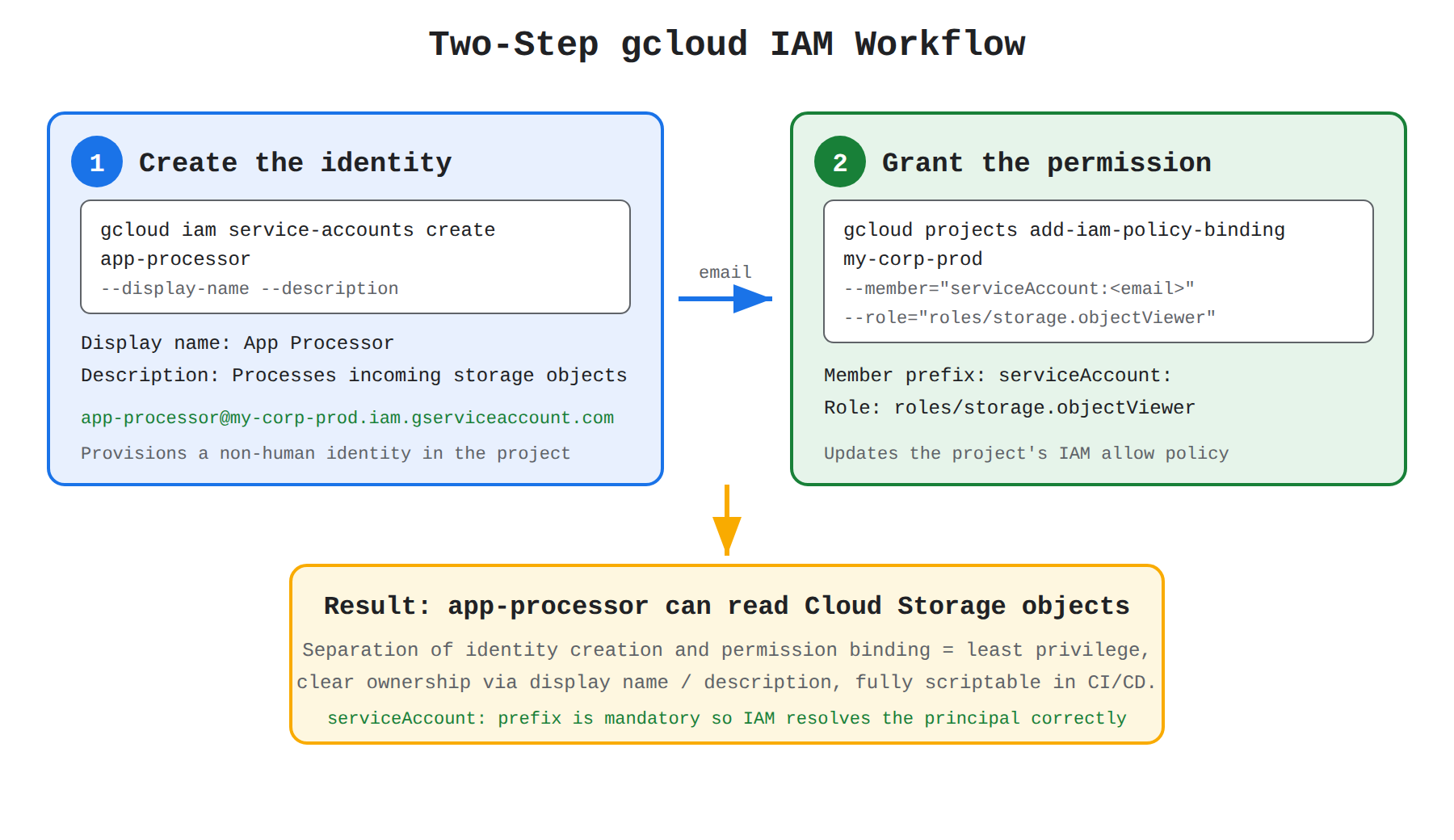
How It Meets the Requirements
- Service account creation and metadata: Executing
gcloud iam service-accounts create app-processorgenerates the new service account resource with the email formatapp-processor@my-corp-prod.iam.gserviceaccount.com. The flags--display-name="App Processor"and--description="Processes incoming storage objects"assign user-friendly identifiers to document the account's operational context. - Granting project-level access: Running
gcloud projects add-iam-policy-binding my-corp-produpdates the project's IAM policy. Setting--member="serviceAccount:app-processor@my-corp-prod.iam.gserviceaccount.com"accurately specifies the service account member type prefix, and--role="roles/storage.objectViewer"grants read access to Cloud Storage objects across the project.
Key Advantages and Capabilities
- Separation of identity and permission: Decoupling account provisioning from permission assignment aligns with the principle of least privilege and granular IAM policy management.
- Clear operational tracking: Specifying display names and descriptions prevents confusion over service account ownership and operational lifecycle over time.
- Fully scriptable and declarative: Enables automation in CI/CD pipelines and infrastructure deployment scripts without requiring manual intervention.
- Correct principal prefix: Employing the mandatory
serviceAccount:prefix ensures Cloud IAM resolves the principal as a managed service account identity rather than a user account.
Why This Is Optimal
Unlike the Cloud Console walkthrough—which combines service account creation, project role assignments, and user delegation into a single wizard—the command-line interface separates service account generation from project policy bindings. Using gcloud projects add-iam-policy-binding with the designated serviceAccount: prefix is the standard, valid command syntax to grant operational roles to newly created service accounts.
- Run
gcloud iam service-accounts create app-processor --display-name="App Processor" --description="Processes incoming storage objects"
- Run
gcloud iam service-accounts add-iam-policy-binding app-processor@my-corp-prod.iam.gserviceaccount.com --member="serviceAccount:app-processor@my-corp-prod.iam.gserviceaccount.com" --role="roles/storage.objectViewer"
- Run
gcloud iam service-accounts create app-processor --display-name="App Processor" --description="Processes incoming storage objects" - Run
gcloud iam service-accounts add-iam-policy-binding app-processor@my-corp-prod.iam.gserviceaccount.com --member="serviceAccount:app-processor@my-corp-prod.iam.gserviceaccount.com" --role="roles/storage.objectViewer"
What gcloud iam service-accounts add-iam-policy-binding Does
The command gcloud iam service-accounts add-iam-policy-binding modifies the IAM access policy of the service account itself, rather than granting the service account access to external project resources like Cloud Storage.
Why It Doesn't Meet the Requirement
- Wrong target resource: A service account acts both as an identity (a principal that accesses resources) and as a resource (an object that other users manage or impersonate). This command configures access to the service account.
- Invalid permission assignment: Attempting to assign
roles/storage.objectVieweron the service account itself is meaningless, because a service account resource does not hold Cloud Storage objects. - Circular binding: The command binds the service account as a member to its own resource policy, which does not confer any operational permissions to read Cloud Storage buckets within the project
my-corp-prod.
Key Characteristics and Limitations
- Purpose of service account policies: IAM policies on service accounts are strictly meant to control who can use or manage the account, utilizing roles such as Service Account User (
roles/iam.serviceAccountUser) or Service Account Token Creator (roles/iam.serviceAccountTokenCreator). - Resource hierarchy: To grant access to project-level resources (such as Storage, Compute, or BigQuery), policy bindings must be applied to the project (
gcloud projects add-iam-policy-binding) or to the specific resource directly.
This Answer Would Be Correct If
This command structure would be correct if the goal were to grant a human user or developer the ability to attach or impersonate the service account using the roles/iam.serviceAccountUser role on the service account resource.
Additional Context
Understanding the dual nature of service accounts as both an identity (principal) and a resource is a core requirement of Google Cloud IAM. Confusing gcloud projects add-iam-policy-binding with gcloud iam service-accounts add-iam-policy-binding is a common mistake on cloud security exams.
Try 10 interactive questions like this one, free
Answer them yourself and get your score the moment you finish. No account needed.
Full access includes
- 2,014 practice questions across all 4 exam domains
- Every answer explained: why it is right, and why the others are not
- Scout, an AI tutor that answers your follow-up questions
- Readiness tracking by domain, so you know when to book the exam
Related free sample questions
Keep the momentum going with these hand-picked practice scenarios
FundamentalAssociate Cloud Engineer
Organization Policy Disable Service Account Key Creation
Creating service accounts
FundamentalAssociate Cloud Engineer
Artifact Registry Docker Image URI Format
Deploying a containerized application to GKE
FundamentalAssociate Cloud Engineer
Google Cloud Regional Service Availability
Confirming availability of products in geographical locations (e.g., regional, global)
FundamentalAssociate Cloud Engineer
Regional vs Global Quotas
Assessing quotas and requesting increases
FundamentalAssociate Cloud Engineer
GKE Workloads Console Page
Viewing current running GKE cluster inventory (e.g., nodes, Pods, Services)
FundamentalAssociate Data Practitioner
Eventarc Trigger Cloud Run
Use Eventarc triggers in event-driven pipelines (Dataform, Dataflow, Cloud Functions, Cloud Run, Cloud Composer)
Last updated