Intermediate
Prepare and test your skills
Intermediate
Prepare and test your skills
IAM Allow Policies Inherit Down the Resource Hierarchy
Free sample question, answered and explained below. The Professional Cloud Architect practice bank has 2,335 more like it. Try 10 free: instant score, no account.
A financial enterprise uses a multi-tier Google Cloud resource hierarchy structured as follows:
- Organization:
example.com- Folder:
Engineering- Folder:
Backend-Services- Project:
payment-prod- Resource: Cloud Storage Bucket
payment-logs
- Resource: Cloud Storage Bucket
- Project:
- Folder:
- Folder:
A security administrator reviews the following IAM allow policy bindings for the user auditor@example.com across this lineage:
roles/viewergranted on theEngineeringfolderroles/storage.objectViewergranted on theBackend-Servicesfolderroles/storage.admingranted on thepayment-prodproject
To prevent auditor@example.com from modifying objects in the payment-logs bucket, the administrator removes all bucket-level role bindings so that no direct allow policy is set on payment-logs.
What is the effective permission level of auditor@example.com on the payment-logs bucket, and why?
Explanations
The user retains full administrative control over the bucket because IAM allow policies are additive and inherited down the resource hierarchy, meaning project-level grants cannot be revoked by omitting bucket-level bindings.
The user retains full administrative control over the bucket because IAM allow policies are additive and inherited down the resource hierarchy, meaning project-level grants cannot be revoked by omitting bucket-level bindings.
What IAM Policy Inheritance Is
In Google Cloud, the resource hierarchy organizes resources into a parent-child structure consisting of the organization, folders, projects, and individual service resources. IAM allow policies are attached to these container nodes and are inherited down the tree. The union of all allow policies applied directly to a resource and its ancestors forms the effective allow policy.
How Policy Inheritance Determines Effective Permissions
- Additive Evaluation: IAM allow policies are strictly additive. If a principal is granted a role at any ancestor level (such as the
payment-prodproject), that role automatically propagates to all descendant resources within that container. - Inherited Project Rights: Because
roles/storage.adminis granted at thepayment-prodproject level, the user inherits complete control (storage.buckets.*andstorage.objects.*) over every bucket in that project, includingpayment-logs. - Absence of Child Policy: Omitting or deleting direct role bindings on the child bucket does not revoke or restrict permissions inherited from parent folders or projects.
Additive IAM Policy Inheritance
Hierarchy / Taxonomy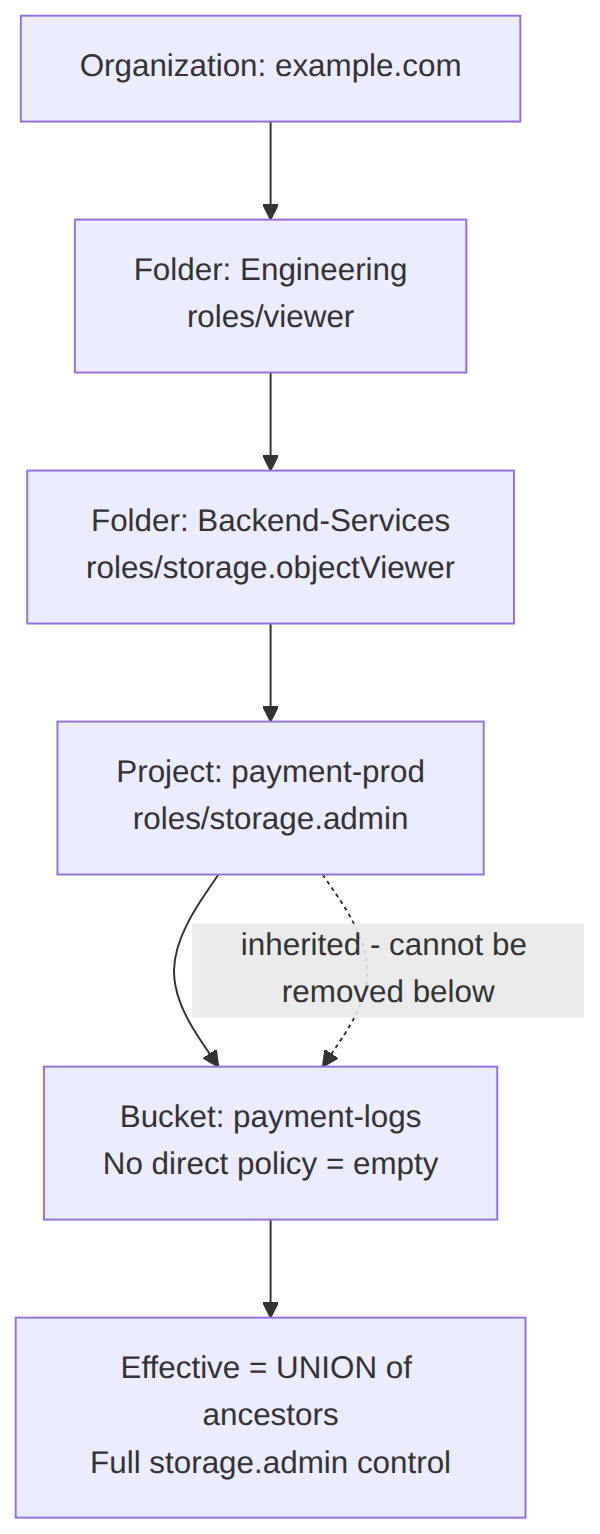
Key Characteristics of IAM Allow Policy Inheritance
- Ancestral Precedence: A permission granted at a higher hierarchy level cannot be reduced or overridden simply by omitting permissions at a lower hierarchy level.
- Union of Grants: The effective permissions for any API operation equal the logical union of permissions granted across all parent folders, projects, and the organization.
- Container-Level Propagation: Assigning a role to a container automatically extends those capabilities to non-configurable child resources or resources without explicit child policies.
Why This Is Optimal
Understanding that allow policies are strictly cumulative ensures cloud architects recognize that restricting access requires modifying the specific ancestor node where the role was granted, implementing IAM Deny policies, or using separate trust boundaries (projects/folders) to achieve least privilege.
The user only has read-only access to objects because the roles/storage.objectViewer role granted on the Backend-Services folder overrides lower project-level policies.
The user only has read-only access to objects because the roles/storage.objectViewer role granted on the Backend-Services folder overrides lower project-level policies.
What Folder-Level Inheritance Does
Assigning roles/storage.objectViewer on the Backend-Services folder grants read access to Cloud Storage objects across all child folders and projects within that specific folder subtree.
Why It Does Not Meet the Requirement
- No Policy Override: Google Cloud IAM allow policies do not implement an override model where folder-level grants replace or restrict project-level grants.
- Additive Permissions: Because allow policies are additive, the
roles/storage.admingranted at the project level adds full management capabilities on top of the inheritedroles/storage.objectViewerpermissions.
Key Characteristics and Limitations
- No Specificity Precedence: Folder policies cannot narrow down or override broader project or resource policies within allow evaluation.
- Cumulative Access: An identity granted multiple roles across different levels of the resource hierarchy receives the union of all permissions contained in those roles.
This Answer Would Be Correct If
Google Cloud IAM allow policies followed an explicit nearest-ancestor override rule where lower or higher hierarchical assignments completely suppressed all other bindings, which is not how IAM operates.
The user is restricted to roles/viewer access because the highest parent container in the hierarchy sets the maximum permissible access ceiling.
The user is restricted to roles/viewer access because the highest parent container in the hierarchy sets the maximum permissible access ceiling.
What Organization and High-Level Folder Grants Do
Granting roles/viewer at the top-level Engineering folder allows the principal to view resource configurations across all projects and resources nested within that folder.
Why It Does Not Meet the Requirement
- Allow Policies Are Not Ceilings: An allow policy binding at an upper-level folder does not act as a maximum permission ceiling for child resources. It simply provides the base set of permissions bundled in that role to all child resources.
- Expansion Downstream: Additional role bindings applied downstream (such as
roles/storage.adminonpayment-prod) expand the principal's total permissions for those downstream resources.
Key Characteristics and Limitations
- Ceilings Require Specific Tools: To set mandatory access boundaries or ceilings across subtrees, organizations must use tools like IAM Deny policies, Principal Access Boundary (PAB) policies, or Organization Policies, not basic allow bindings.
- Evaluation Union: Standard allow policies at higher hierarchy tiers cannot prevent child containers from granting higher administrative roles.
This Answer Would Be Correct If
Basic IAM allow policies on parent containers acted as restrictive permission boundaries or access scopes that capped child permissions.
The user is denied all access to the bucket because Cloud Storage requires an explicit bucket-level allow policy for any data or administrative operations.
The user is denied all access to the bucket because Cloud Storage requires an explicit bucket-level allow policy for any data or administrative operations.
What Bucket-Level IAM Policies Do
Bucket-level IAM allow policies provide granular access control directly on a specific Cloud Storage bucket. They allow administrators to assign roles to users specifically for that individual bucket without granting access across the entire Google Cloud project.
Why It Does Not Meet the Requirement
- Inherited Access Sufficiency: Cloud Storage does not require a direct bucket-level allow policy to permit access. If a principal has inherited permissions from the project, folder, or organization level, Cloud Storage honors those permissions immediately.
- Uniform Resource Evaluation: Cloud Storage evaluates inherited project-level roles such as
roles/storage.adminas fully authoritative for all operations on buckets inside that project.
Key Characteristics and Limitations
- Optional Direct Binding: Direct allow policies on child resources are optional mechanisms to grant additional permissions, not mandatory prerequisites for access.
- Container-Level Governance: Granting storage roles at the project or folder level centralizes management and automatically covers all newly created and existing buckets.
This Answer Would Be Correct If
Google Cloud resources operated in an isolated security silo requiring explicit localized authorization bindings on every discrete resource before ancestral policies were acknowledged.
Try 10 interactive questions like this one, free
Answer them yourself and get your score the moment you finish. No account needed.
Full access includes
- 2,335 practice questions across all 6 exam domains
- Every answer explained: why it is right, and why the others are not
- Scout, an AI tutor that answers your follow-up questions
- Readiness tracking by domain, so you know when to book the exam
Related questions
Keep the momentum going with these hand-picked practice scenarios
IntermediateProfessional Cloud Architect
IAM Recommender Role Recommendations
Identity and Access Management (IAM)
IntermediateProfessional Cloud Architect
GKE Workload Identity
Identity and Access Management (IAM)
IntermediateProfessional Cloud Architect
VM Manager Patch Deployment Zone-by-Zone Disruption Budget
Infrastructure orchestration, resource configuration, and patch management
IntermediateProfessional Cloud Architect
Custom Machine Types
Compute resource provisioning
IntermediateProfessional Cloud Architect
VPC Firewall Rule Priority Ordering
Security protection (e.g. intrusion protection, access control, and firewalls)
AdvancedProfessional Cloud DevOps Engineer
Vertex AI Pipelines Conditional Model Deployment
Deployment strategies (e.g., canary, blue/green, rolling, traffic splitting, feature flags) and defining success metrics based on application or ML pipeline telemetry
Last updated