Intermediate
Prepare and test your skills
Intermediate
Prepare and test your skills
Aggregated Sinks with Exclusion Filters for Centralized Logging
Free sample question, answered and explained below. The Professional Cloud Architect practice bank has 2,335 more like it. Try 10 free: instant score, no account.
Your enterprise organization consists of hundreds of Google Cloud projects organized within a folder hierarchy. Your security compliance team requires all Cloud Audit Logs across the entire resource hierarchy to be aggregated into a dedicated central logging project for long-term security analysis and auditing.
To control ingestion and storage costs, your team also needs to optimize log volume by sampling high-volume VPC Flow Logs at 50% and excluding low-severity development logs, while guaranteeing that critical security audit logs cannot be missed.
What should you configure to meet these requirements?
Explanations
Create an aggregated log sink at the organization or folder level pointing to the central project, configure inclusion filters for audit logs, and apply exclusion filters with the sample function for high-volume logs.
Create an aggregated log sink at the organization or folder level pointing to the central project, configure inclusion filters for audit logs, and apply exclusion filters with the sample function for high-volume logs.
What Aggregated Log Sinks and Exclusion Filters Are
An aggregated log sink routes log entries from an organization, folder, or billing account (and all their child resources) to a centralized destination such as a dedicated Google Cloud project, Cloud Storage bucket, BigQuery dataset, or Pub/Sub topic. Exclusion filters specify which log entries to omit from ingestion into a sink's destination, preventing unwanted log volume and controlling costs.
How It Meets the Requirements
- Hierarchy-Wide Centralization: Configuring the sink at the organization or folder level allows it to automatically capture logs from all current and future child projects and route them to the central security project (
logging.googleapis.com/projects/DESTINATION_PROJECT_ID). - Audit Log Retention: Inclusion filters can target critical Cloud Audit Logs (
cloudaudit.googleapis.com), ensuring security compliance. - Cost Optimization: Configuring exclusion filters using the
samplefunction allows you to ingest only a percentage (e.g., 50%) of high-volume logs like VPC Flow Logs while filtering out non-critical debug or development entries.
Org Aggregated Sink to Central Logging
System Architecture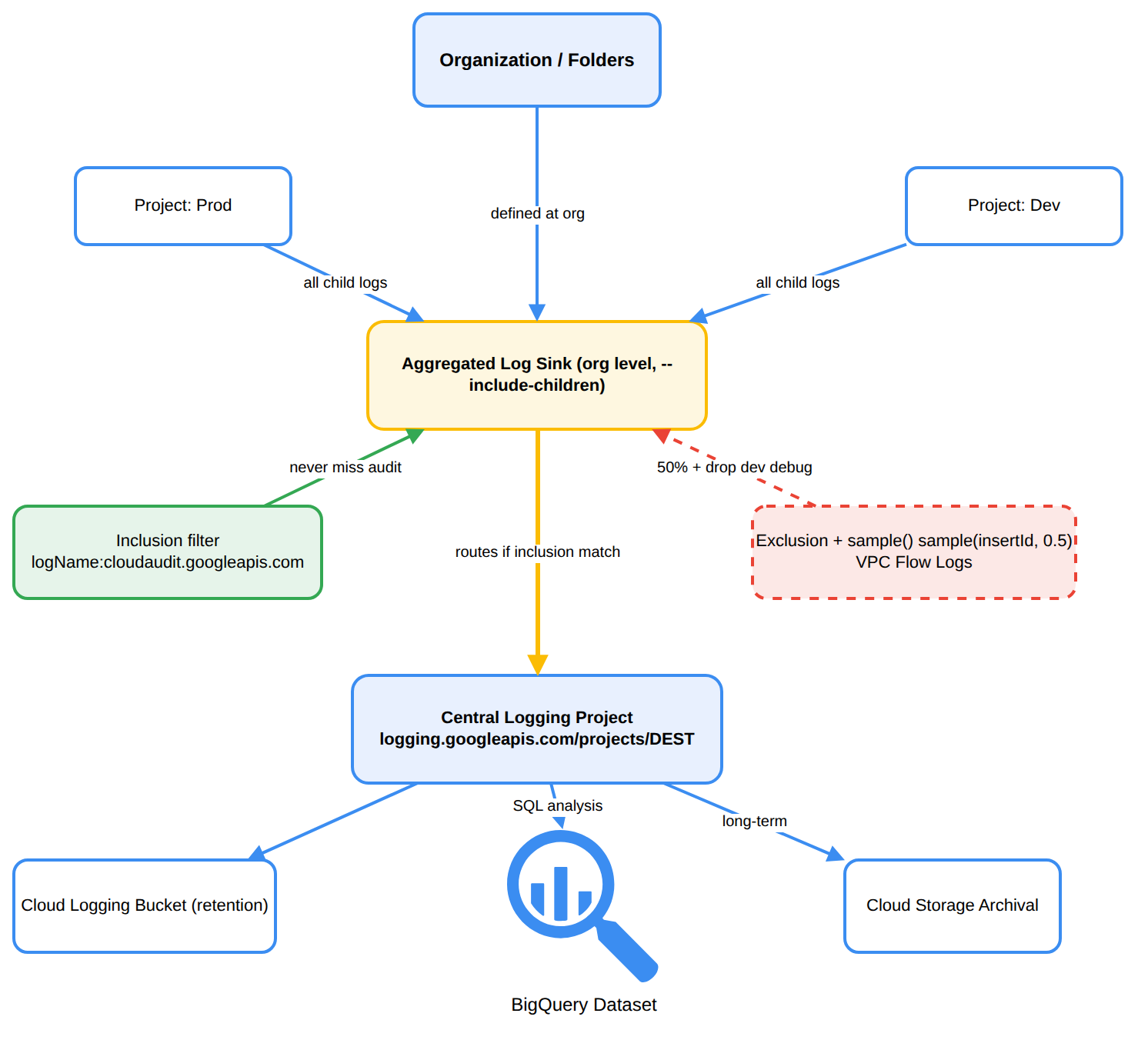
Key Advantages
- Single Control Point: Eliminates the operational overhead of managing individual sinks across hundreds of projects.
- Granular Cost Control: Combining inclusion filters, exclusion filters, and sampling minimizes Cloud Logging ingestion and storage charges.
- Continuous Ingestion: Child projects are inherited dynamically as the organization structure changes.
Why This Is Optimal
Aggregated sinks at the resource hierarchy parent node (organization or folder) provide unified governance and security oversight while leveraging native exclusion and sampling features to reduce data volume before incurring unnecessary destination charges.
Configure an exclusion filter on the _Required bucket in the central project to drop Admin Activity audit logs and retain only VPC Flow Logs.
Configure an exclusion filter on the _Required bucket in the central project to drop Admin Activity audit logs and retain only VPC Flow Logs.
What This Approach Is
This option attempts to configure exclusion filters on the system-defined _Required log bucket to discard Admin Activity logs while collecting network flow logs.
Why It Doesn't Meet the Requirement
- Violates Technical Constraints: The
_Requiredlog bucket is immutable; you cannot add exclusion filters, delete, or disable the ingestion of Admin Activity or System Event logs. - Contradicts Security Compliance: The scenario explicitly mandates that Cloud Audit Logs must be retained and aggregated for security compliance, whereas this approach attempts to drop them.
- Misunderstands Bucket Roles: VPC Flow Logs are routed through the
_Defaultsink or custom sinks, not the_Requiredsink.
Key Limitations
_Requiredlog buckets cannot be modified or filtered.- Admin Activity audit logs are essential for security auditing and cannot be excluded.
This Answer Would Be Correct If
Admin Activity logs were optional and configurable, which is not how Google Cloud Observability security controls operate.
Deploy a project-level log sink in each child project routed to a Pub/Sub topic, and use a Cloud Function to filter out 50% of the VPC Flow Logs before writing to Cloud Logging buckets.
Deploy a project-level log sink in each child project routed to a Pub/Sub topic, and use a Cloud Function to filter out 50% of the VPC Flow Logs before writing to Cloud Logging buckets.
What This Approach Is
This design sets up individual log sinks in every child project to export logs to a central Cloud Pub/Sub topic, triggering a Cloud Function to process and filter entries before re-inserting them into Cloud Logging.
Why It Doesn't Meet the Requirement
- High Operational Overhead: Managing individual sinks across hundreds of projects requires repetitive maintenance and is prone to configuration drift compared to organization-level aggregated sinks.
- Increased Costs and Ingestion Latency: Routing all logs through Pub/Sub and processing them with Cloud Functions incurs additional compute and messaging costs, rather than filtering them for free at the Log Router level prior to ingestion.
- Suboptimal Architecture: Google Cloud Logging already provides native exclusion filters and sampling functions directly in the Log Router.
Key Limitations
- Project-level sinks do not automatically inherit new projects created under the folders.
- Adds custom code maintenance for filtering logic that the Log Router provides out-of-the-box.
This Answer Would Be Correct If
You needed to perform complex custom data transformation, payload masking, or enrichment that cannot be handled by standard Log Router filter expressions before sending logs to an external third-party SIEM.
Disable the _Default and _Required log sinks in all child projects, and deploy a Cloud Logging agent to stream logs directly to a central BigQuery dataset.
Disable the _Default and _Required log sinks in all child projects, and deploy a Cloud Logging agent to stream logs directly to a central BigQuery dataset.
What This Approach Is
This option suggests modifying built-in sinks (_Default and _Required) across individual projects and relying on VM-level logging agents to send logs straight into BigQuery.
Why It Doesn't Meet the Requirement
- Impossibility of Disabling
_Required: Google Cloud does not permit disabling or modifying the_Requiredsink, which ensures Admin Activity and System Event audit logs are always preserved. - Agent Limitations: Compute-based logging agents cannot capture organization-level audit logs, control-plane activity, or serverless service events; they only capture guest OS logs.
- Lack of Hierarchical Governance: Modifying sinks across individual projects does not provide an automated, scalable solution across a complex folder hierarchy.
Key Limitations
- The
_Requiredlog bucket and its sink cannot be disabled, excluded, or modified. - Agents do not capture VPC Flow Logs or Google Cloud control-plane audit logs.
This Answer Would Be Correct If
The workload was limited to capturing custom application files from standalone Compute Engine virtual machines without requiring native cloud platform audit trails.
Try 10 interactive questions like this one, free
Answer them yourself and get your score the moment you finish. No account needed.
Full access includes
- 2,335 practice questions across all 6 exam domains
- Every answer explained: why it is right, and why the others are not
- Scout, an AI tutor that answers your follow-up questions
- Readiness tracking by domain, so you know when to book the exam
Related questions
Keep the momentum going with these hand-picked practice scenarios
IntermediateProfessional Cloud Architect
Rolling Compliance Period and Error Budget
Monitoring and logging
IntermediateProfessional Cloud Architect
Cloud Trace Context Propagation
Monitoring and logging
IntermediateProfessional Cloud Architect
Cloud Storage Bucket Lock Object Legal Holds
Data retention and data lifecycle management
IntermediateProfessional Cloud Architect
Cloud NAT for Private VM Egress
Gemini Cloud Assist
IntermediateProfessional Cloud Architect
GKE Usage Metering Cost Attribution
Customer success management
AdvancedProfessional Data Engineer
Dataflow Enrichment with Bigtable
Processing data
Last updated