Intermediate
Prepare and test your skills
Intermediate
Prepare and test your skills
Persistent Cloud Shell Customization with Boot Script
Free sample question, answered and explained below. The Professional Cloud Architect practice bank has 2,335 more like it. Try 10 free: instant score, no account.
A lead cloud engineer uses Google Cloud Shell to perform administrative tasks, execute deployment scripts, and manage cloud resources using command-line tools. The engineer encounters a problem where custom system utilities installed via the Debian package manager are lost whenever the Cloud Shell session terminates due to 40 minutes of inactivity and a new virtual machine instance is provisioned.
The engineer has the following requirements:
- Automatically install required system packages with root privileges whenever a new Cloud Shell VM instance boots.
- Ensure user shell aliases and persistent
gcloudCLI preferences persist across sessions and apply to new terminal tabs. - Retain all deployment scripts and workspace files across session terminations.
Which approach should the engineer implement?
Explanations
Enable Cloud Shell Ephemeral mode, mount a secondary persistent disk for scripts, and schedule a cron job in /etc/cron.hourly to reinstall utilities.
Enable Cloud Shell Ephemeral mode, mount a secondary persistent disk for scripts, and schedule a cron job in /etc/cron.hourly to reinstall utilities.
What This Approach Does
This option enables Ephemeral mode in Cloud Shell, attempts to mount a custom secondary disk for persistent files, and uses a system cron directory (/etc/cron.hourly) to handle utility installation.
Why It Doesn't Meet the Requirement
- Ephemeral Mode Disables Persistent Storage: Ephemeral mode explicitly starts Cloud Shell without mounting the persistent 5 GB
$HOMEdisk. When a session in Ephemeral mode ends, all files and changes created during the session are immediately discarded. - No Support for Secondary Persistent Disk Mounting: Standard Cloud Shell does not support manually attaching independent Persistent Disks across managed container sessions.
- Cron Configuration Lost on Termination: The
/etc/cron.hourlydirectory exists on the ephemeral root disk and will not persist across instance restarts, rendering any scheduled cron jobs lost.
Key Limitations
- Complete Data Loss: Ephemeral mode is intended strictly for stateless, throwaway sessions.
- Ignored Persistence Quota: Disregards the complimentary 5 GB persistent storage provided by default.
- Incompatible with Instance Bootstrapping: Cron jobs run on a schedule rather than at instance provisioning time.
This Answer Would Be Correct If
The engineer specifically required a completely fresh, stateless environment with faster initial connection performance and had no need to persist files, keys, or scripts.
Configure sudo apt-get installation commands directly inside $HOME/.bashrc, and set CLOUDSDK_CONFIG=/tmp/gcloud to persist gcloud settings.
Configure sudo apt-get installation commands directly inside $HOME/.bashrc, and set CLOUDSDK_CONFIG=/tmp/gcloud to persist gcloud settings.
What This Approach Does
This approach places package manager commands (apt-get) directly inside $HOME/.bashrc and sets the CLOUDSDK_CONFIG environment variable to point to a folder inside /tmp.
Why It Doesn't Meet the Requirement
- Repetitive Execution and Latency: Unlike
$HOME/.customize_environment(which runs once at boot time as root),$HOME/.bashrcis evaluated every single time an interactive shell or new terminal tab is opened. Runningapt-geton every tab launch causes substantial latency, permission issues (if run without non-interactive passwordless configuration), and unnecessary overhead. - Non-Persistent CLI Preferences: Setting
CLOUDSDK_CONFIGto/tmp/gcloudplaces CLI configuration files in a temporary directory that does not persist across session recycling, causing configuration properties to reset. - Permission Constraints: Commands in
.bashrcexecute as the standard user, requiring explicit privilege escalation, whereas.customize_environmentis executed natively as root.
Key Limitations
- Tab Launch Overhead: Causes high latency every time the user opens a new terminal window.
- Ephemeral Temp Path: Files written to
/tmpare wiped upon instance termination. - Improper Hook Usage: Fails to use the dedicated boot customization script designed for system packages.
This Answer Would Be Correct If
The user only wanted to define lightweight user-space environment variables, paths, and shell aliases that do not require root package management.
Add package installation commands to $HOME/.customize_environment, configure CLI preferences and aliases in $HOME/.bashrc, and store scripts within the $HOME directory.
Add package installation commands to $HOME/.customize_environment, configure CLI preferences and aliases in $HOME/.bashrc, and store scripts within the $HOME directory.
What Cloud Shell Environment Customization Is
Google Cloud Shell is an on-demand, Debian-based virtual machine pre-loaded with developer and administrative utilities such as the gcloud CLI, Terraform, and Docker. While the underlying VM instance is ephemeral and gets recycled after 40 minutes of inactivity or a maximum session length of 12 hours, Cloud Shell provides a 5 GB persistent disk storage volume mounted at $HOME that survives across instance restarts and terminations.
Cloud Shell: Ephemeral VM, Persistent $HOME
System Architecture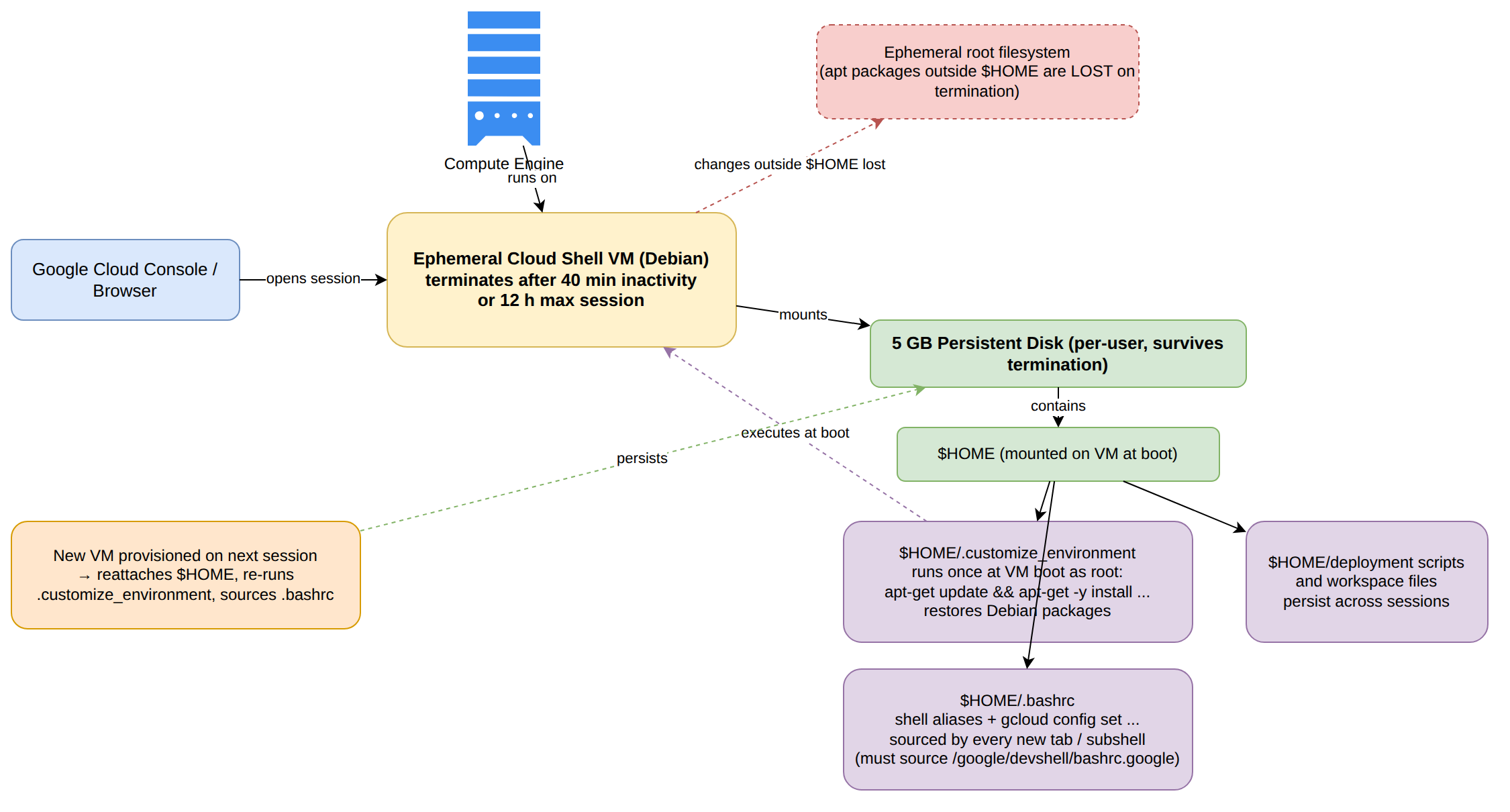
How It Meets the Stated Requirements
- Automated Package Installation: Creating an executable shell script at
$HOME/.customize_environmentinstructs Cloud Shell to run package installation commands (such asapt-get update && apt-get -y install) with root privileges in the background during instance startup. Because this script executes once when the VM boots, required Debian packages are automatically restored. - Persistent Preferences and Aliases: Custom shell aliases and default CLI behaviors defined in
$HOME/.bashrcpersist between sessions on the home disk and are sourced every time a new interactive subshell or tab is launched. - Retaining Workspace Files: Storing scripts, configuration files, and source code under
$HOMEensures they are saved to the persistent 5 GB disk storage rather than the ephemeral root filesystem.
Key Advantages and Capabilities
- Boot-time Execution: The
$HOME/.customize_environmentscript runs automatically on boot without requiring manual re-installation steps. - Persistent Storage: Preserves user configurations, keys, and source repositories up to 5 GB without recurring cost.
- Seamless Tab Experience: Modifying
$HOME/.bashrcensures environment variables andgcloudproperty overrides propagate across all newly opened tabs. - Zero Custom Image Overhead: Provides automated environment customization without needing to maintain specialized VM images.
Why This Is Optimal
This solution leverages built-in Cloud Shell lifecycle hooks and persistent storage primitives. It solves the ephemeral filesystem limitation cleanly by isolating customizations to the persistent home directory and boot scripts.
Add package installation commands to /etc/profile.d/startup.sh, set default CLI configurations in /tmp/.gcloud, and store scripts in /var/scripts.
Add package installation commands to /etc/profile.d/startup.sh, set default CLI configurations in /tmp/.gcloud, and store scripts in /var/scripts.
What This Approach Does
This option attempts to configure system-wide startup commands by writing a shell script inside /etc/profile.d/ and placing custom application scripts inside /var/scripts and /tmp/.gcloud.
Why It Doesn't Meet the Requirement
- Loss of Modifications on Session Termination: In Cloud Shell, the VM backing the session is ephemeral. Any directory located outside
$HOME—including/etc,/tmp, and/var—resides on the temporary root disk. When the session reaches 40 minutes of inactivity, the instance is destroyed, and all modifications made to these directories are permanently discarded. - Temporary Storage in
/tmp: The/tmpdirectory is wiped across sessions and is unsuitable for persistent CLI preferences or project code. - Failure to Automate on Boot: Because
/etc/profile.d/startup.shis lost when the VM instance terminates, it will not exist when a new VM is provisioned on subsequent logins.
Key Limitations
- Non-persistent Root Filesystem: System paths outside
/home/are not preserved on persistent storage. - Manual Reconfiguration Required: Requires rebuilding directories and scripts on every new session.
- Incompatible with Lifecycle: Bypasses the official
$HOME/.customize_environmentboot trigger provided by the Cloud Shell platform.
This Answer Would Be Correct If
The workload ran on a dedicated, non-ephemeral Compute Engine VM where root filesystem modifications are written to a permanent boot disk attached to a single continuous instance.
Try 10 interactive questions like this one, free
Answer them yourself and get your score the moment you finish. No account needed.
Full access includes
- 2,335 practice questions across all 6 exam domains
- Every answer explained: why it is right, and why the others are not
- Scout, an AI tutor that answers your follow-up questions
- Readiness tracking by domain, so you know when to book the exam
Related questions
Keep the momentum going with these hand-picked practice scenarios
IntermediateProfessional Cloud Architect
Cloud Code Debug on Kubernetes
Cloud Shell Editor, Cloud Code, and Cloud Shell Terminal
IntermediateProfessional Cloud Architect
VPC Firewall Rule Priority Ordering
Security protection (e.g. intrusion protection, access control, and firewalls)
IntermediateProfessional Cloud Architect
Cloud Functions vs Cloud Run
Serverless computing
IntermediateProfessional Cloud Architect
TensorFlow steps_per_execution Parameter
Using AI Hypercomputer (e.g., using AI Hypercomputer, Cloud Run functions, and Vertex AI for ML/AI workloads; integrating GPUs and TPUs in ML model training and serving; optimizing for different consumption models; and running large-scale AI model training
IntermediateProfessional Cloud Architect
Cloud Armor vs Cloud NGFW
Security protection (e.g. intrusion protection, access control, and firewalls)
AdvancedProfessional Data Engineer
Apache Beam Runner Portability
Designing for data and application portability (e.g., multi-cloud and data residency requirements)
Last updated