Intermediate
Prepare and test your skills
Intermediate
Prepare and test your skills
Sustained CPU Alerts Using Retest Window
Free sample question, answered and explained below. The Professional Cloud Architect practice bank has 2,335 more like it. Try 10 free: instant score, no account.
An e-commerce company runs an order-processing backend on Google Compute Engine instances. The CPU utilization metric is sampled every 60 seconds. During normal operation, background memory garbage collection creates transient CPU utilization spikes of up to 90% that resolve within 45 seconds.
The operations team currently suffers from alert fatigue due to frequent false alarms triggered whenever a single measurement exceeds 85% CPU utilization. You need to configure a Cloud Monitoring metric-threshold alerting policy that ignores these transient spikes and only alerts when CPU utilization remains continuously above 85% for at least 5 minutes.
How should you configure the condition settings in Cloud Monitoring?
Explanations
Set the alignment period (rolling window) to 5 minutes, configure the retest window (duration) to 0 minutes, and set the missing data evaluation policy to treat missing data as violating the condition.
Set the alignment period (rolling window) to 5 minutes, configure the retest window (duration) to 0 minutes, and set the missing data evaluation policy to treat missing data as violating the condition.
What the Option Is
This configuration uses a 5-minute rolling window with no retest window and sets the Evaluation of missing data setting to EVALUATION_MISSING_DATA_ACTIVE (treating missing data points as violations of the policy condition).
Why It Doesn't Meet the Requirement
- Fails Duration Filtering: Disabling the retest window (
0 minutes) causes any single 5-minute aligned window that exceeds the threshold to open an incident immediately. - Introduces Unintended Alerts: Treating missing data as violations causes the metric-threshold policy to behave like a metric-absence condition. If network latency or VM restarts temporarily delay metric ingestion, Cloud Monitoring treats the absence of samples as a threshold breach and generates spurious alerts.
Key Characteristics and Limitations
- The missing data policy controls policy behavior during telemetry ingestion gaps, not during active metric spikes.
- A 0-minute retest window disables the primary mechanism used to evaluate sustained conditions over consecutive intervals.
This Answer Would Be Correct If
You were designing an alert for a mission-critical heartbeat daemon where both high CPU utilization and unexpected service termination (silent death where metrics stop reporting entirely) should trigger an immediate page.
Set the alignment period (rolling window) to 5 minutes, select the max aligner, and configure the retest window (duration) to 0 minutes (no retest).
Set the alignment period (rolling window) to 5 minutes, select the max aligner, and configure the retest window (duration) to 0 minutes (no retest).
What the Option Is
This configuration sets the alignment period to a 5-minute rolling window and uses the ALIGN_MAX (max aligner) function to compute the single highest sample point found within the entire 5-minute block. It configures the retest window to zero (No retest), which immediately evaluates the policy on each single aligned value.
Why It Doesn't Meet the Requirement
- Exacerbates Alert Fatigue: Using the
maxaligner over a 5-minute rolling window means that even a single sub-minute spike of 90% CPU will cause the aligned value for that entire 5-minute window to be evaluated as 90%. - Instant Triggering: Because the retest window is set to 0 minutes, the alerting engine fires immediately on that single aligned violation, guaranteeing that every 45-second garbage collection spike triggers a false alarm.
Key Characteristics and Limitations
ALIGN_MAXcaptures extreme peak values across the rolling window rather than average trends.- A 0-minute retest window creates maximum responsiveness at the expense of noise and false positives.
- A 5-minute rolling window with
maxalignment keeps the elevated peak in the evaluated time series for 5 full minutes.
This Answer Would Be Correct If
The workload required immediate notification of any single hard ceiling breach (such as reaching 100% memory allocation or a critical hardware error) where even a microsecond peak constitutes a failure.
Set the alignment period (rolling window) to 1 minute, select the mean aligner, and configure the retest window (duration) to 5 minutes.
Set the alignment period (rolling window) to 1 minute, select the mean aligner, and configure the retest window (duration) to 5 minutes.
What the Solution Is
In Google Cloud Observability (Cloud Monitoring), a metric-threshold condition relies on an alignment period (rolling window), an aligner function, and a retest window (duration). The alignment period groups raw metric samples into discrete time intervals and applies a mathematical function (such as mean or max) to produce regularized time-series values. The retest window enforces a temporal duration requirement, dictating that all aligned values within that window must continuously violate the threshold before Cloud Monitoring opens an incident and dispatches notifications.
Retest Window: 5 Continuous Minutes Above 85%
Timeline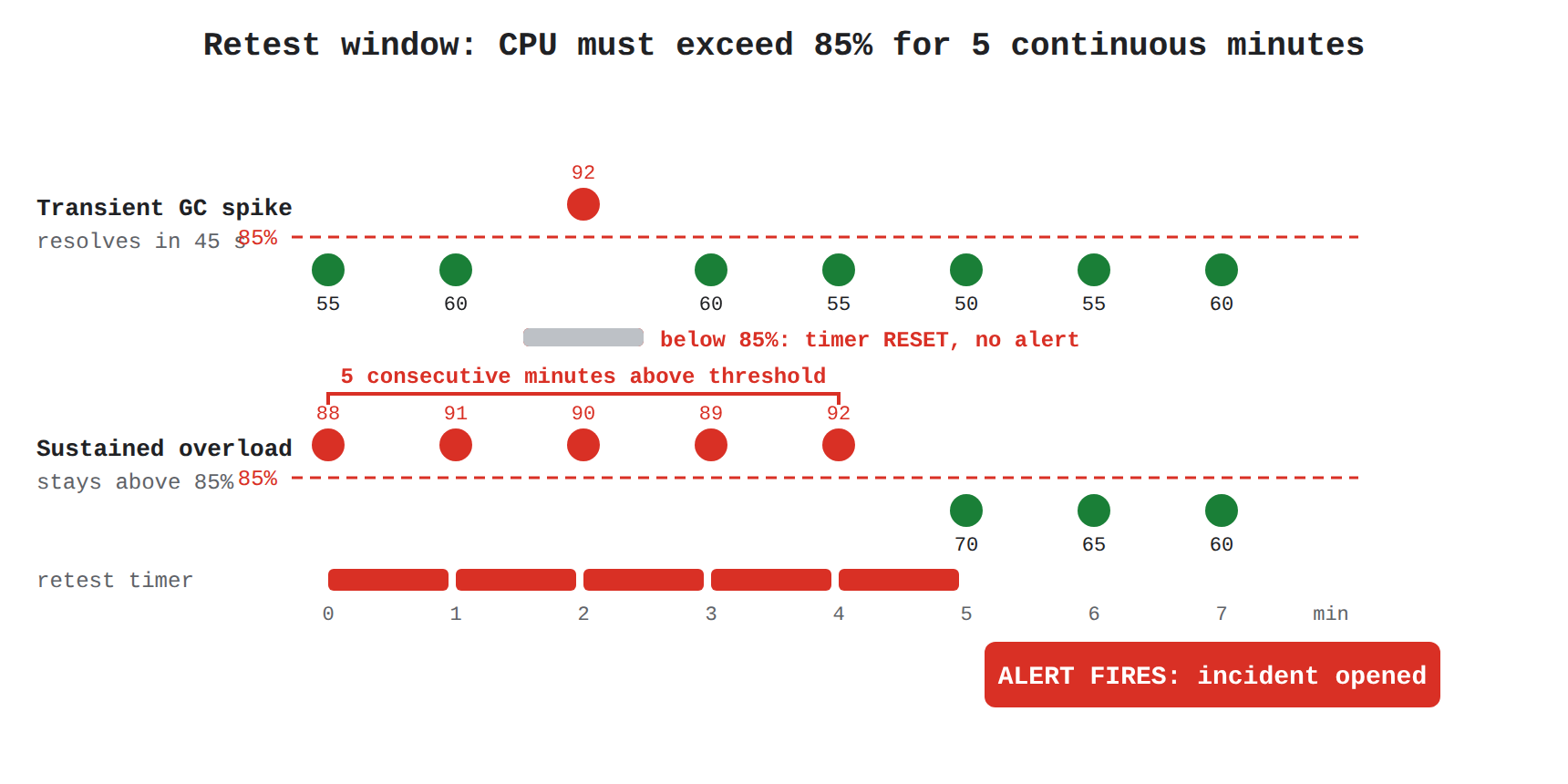
How It Meets the Requirements
- Suppresses Transient Spikes: Because garbage collection spikes last only 30–45 seconds, the 1-minute aligned mean value will either not exceed the 85% threshold or will immediately drop back below 85% on the subsequent 1-minute evaluation.
- Resets on Normal Measurements: Cloud Monitoring automatically resets the retest window timer whenever an aligned measurement evaluates below the threshold. A transient spike cannot accumulate the required 5 minutes of continuous violation.
- Detects Sustained Anomalies: When CPU utilization remains genuinely elevated above 85% across every evaluation for 5 consecutive minutes (300 seconds), the retest window condition is satisfied, and an incident is opened.
Key Advantages and Capabilities
- Minimizes Alert Fatigue: Filters out non-actionable, short-lived metric blips without missing genuine service degradation.
- Aligns with Sampling Frequency: Setting the alignment period to 1 minute matches the underlying 60-second sampling rate of the Compute Engine CPU utilization metric.
- Accurate Regularization: Using the
meanaligner calculates the representative average utilization over each sample window. - Configurable Responsiveness: Adjusting the retest window gives operations teams fine-grained control over alert sensitivity and latency.
Why This Is Optimal
Configuring a 1-minute alignment period alongside a 5-minute retest window directly addresses the root cause of alert fatigue. It ensures that only prolonged, severe CPU saturation triggers on-call pages while allowing self-healing, transient tasks to execute harmlessly.
Set the alignment period (rolling window) to 1 minute, configure the retest window (duration) to 0 minutes, and set the condition combiner to OR.
Set the alignment period (rolling window) to 1 minute, configure the retest window (duration) to 0 minutes, and set the condition combiner to OR.
What the Option Is
This option keeps the alignment period at 1 minute and disables the retest window (0 minutes / No retest), while configuring the multi-condition trigger combiner setting to OR (Any condition is met).
Why It Doesn't Meet the Requirement
- Fails to Suppress Spikes: With a 0-minute retest window, a single 1-minute aligned data point that crosses the 85% threshold instantly opens an incident and dispatches a notification.
- Irrelevant Combiner Setting: Condition combiners (such as
OR,AND, orAND_WITH_MATCHING_RESOURCE) only apply when an alerting policy contains multiple distinct conditions (e.g., monitoring both CPU and Disk IOPS). In a single-metric policy, the combiner setting has no effect on threshold duration or false-positive suppression.
Key Characteristics and Limitations
- A condition without a retest window cannot distinguish between a transient 45-second anomaly and a sustained 10-minute outage.
- Combiner options define logical operators across multiple conditions, not time-series filtering over time.
This Answer Would Be Correct If
The alerting policy monitored multiple separate metrics (such as CPU utilization OR memory exhaustion) across independent resources where an immediate trigger on any individual metric anomaly was desired.
Try 10 interactive questions like this one, free
Answer them yourself and get your score the moment you finish. No account needed.
Full access includes
- 2,335 practice questions across all 6 exam domains
- Every answer explained: why it is right, and why the others are not
- Scout, an AI tutor that answers your follow-up questions
- Readiness tracking by domain, so you know when to book the exam
Related questions
Keep the momentum going with these hand-picked practice scenarios
IntermediateProfessional Cloud Architect
Active Assist and IAM Recommender
Gemini Cloud Assist
IntermediateProfessional Cloud Architect
Cross-Region Internal Application Load Balancer
VPC design and load balancing (e.g., access to cloud, internet, and cloud adjacent services)
IntermediateProfessional Cloud Architect
Gemini Cloud Assist Investigations
Gemini Cloud Assist
IntermediateProfessional Cloud Architect
Vertex AI Service Agent Cross-Project BigQuery Access
Preparing for Vertex AI data integration
IntermediateProfessional Cloud Architect
Cloud SQL High Availability and Cross-Region Read Replica
High availability and fail-over design
AdvancedProfessional Cloud Security Engineer
Cloud Scheduler Triggering Cloud Build
Automating virtual machine and container image creation (e.g., hardening, maintenance, VM patch management).
Last updated