Fundamental
Prepare and test your skills

Fundamental
Prepare and test your skills
Cloud Trust, Zero Trust and Threat Protection
Fundamental cloud security concepts in Google Cloud explain who can do what, where controls apply, and how secure operation is maintained over time. Google secures the underlying infrastructure, while the customer secures data, applications, and access under shared responsibility (opens in a new tab). This partnership is supported by identity controls, resource organization, guardrails, and continuous monitoring.
Controlling Access with IAM and Least Privilege
Controlling access with Identity and Access Management (IAM) means granting only the access each person or workload needs. Access follows least privilege, so each identity receives only the permissions required for its job. Cloud Identity centrally manages users and groups and enables single sign-on to Google Cloud and third-party applications.
The IAM access model connects four parts, where a policy attached to a resource grants a role to a principal:
IAM Allow Policy: Who Gets What Where
Entity RelationshipAn entity-relationship model showing how a Principal is bound to a Role in an Allow Policy on a Resource, and how a Role groups Permissions that allow actions.
- Principal: an identity that can access a resource, such as a Google Account, a service account for applications, a Google Group, or a Google Workspace or Cloud Identity account.
- Role: a collection of permissions that can be granted together.
- Permission: a rule that allows a specific operation, such as reading a bucket or starting a virtual machine.
- IAM allow policy: a binding that attaches principals to a role on a specific resource.
When a principal requests an action, Google Cloud checks the allow policy on the requested resource. The request succeeds only if the policy binds that principal to a role containing the required permission, so the policy enforces the boundary between who is trusted and what they can change.
Exam tip: A role contains permissions, while an IAM allow policy binds principals to a role on a resource — the role defines what is allowed, the policy defines who gets it and where.
Organizing Resources and Enforcing Guardrails
Organizing resources and enforcing guardrails means using hierarchy and automatic limits to control where workloads run and how data is separated. The Organization resource sits at the top and gives central visibility and control, and it contains folders that group related projects. Projects then contain service resources such as Compute Engine virtual machines, Pub/Sub topics, Cloud Storage buckets, and Cloud VPN endpoints. Placing sensitive data with special access or residency needs inside dedicated Assured Workloads (opens in a new tab) folders or projects keeps it separate and makes stricter controls easier to apply.
Guardrails apply automatically across folders and projects through policies and perimeters. Organization policies set constraints such as limiting where workloads can be deployed, including resource location constraints that keep workloads in pre-approved regions. VPC Service Controls create a security perimeter around sensitive services and data, where traffic inside the perimeter can flow between protected services while requests crossing the perimeter are denied unless explicitly allowed. Policy Intelligence tools show who has access to accounts and resources, so overly broad access can be found and fixed before it is abused.
Monitoring Operations and Protecting Sensitive Data
Monitoring operations and protecting sensitive data means recording activity, detecting threats, and keeping regulated data in protected places. Security Command Center (opens in a new tab) is the centralized service for continuous monitoring, threat detection, and response, combining threat intelligence, threat detection, and web scanning to find misconfigurations, vulnerabilities, and active threats. Because misconfiguration is a leading cause of breaches, continuous monitoring gives early warning before a weak setting becomes an incident.
Logging makes access visible for review and audit, and findings flow from Google Cloud resources to Security Command Center and logging systems, then back to administrators who adjust IAM policies, organization policies, or perimeters. Access Transparency logs show qualifying Google personnel access, including support and outage recovery. Sensitive data such as account information, health information, personal identifiers, cardholder data, and ID numbers must stay inside compliant folders and must not be placed in resource names and IDs, project and folder names, descriptions and labels, log-based metrics, URIs and file paths, timestamps, user IDs, firewall rules, or scan configurations.
Continue with this study guide: Discuss fundamental cloud security concepts.
Today's top cybersecurity threats and business implications describe how modern attacks work and what they cost organizations in the cloud. Ransomware, phishing, and software vulnerabilities provide entry points that can disrupt operations, trigger legal penalties, and damage customer trust. Cloud-specific risks such as misconfiguration and inconsistent controls across providers make centralized visibility and layered defenses essential.
How Ransomware Attacks Unfold
A ransomware attack is a sequenced intrusion in which malicious software encrypts, steals, or blocks access to data until a ransom is paid. Attackers target organizations, their supply chains, and their customers, so one compromise can spread beyond the first victim. Attackers typically demand payment in cryptocurrency in exchange for the decryption key, and data flows from infected systems to the attacker during exfiltration while the key flows back only after payment.
A horizontal timeline showing the five ransomware stages in order from reconnaissance to ransom demand, with phishing and vulnerability entry, C2 key retrieval, and data exfiltration.
The typical attack moves through these stages in order:
- Identification and reconnaissance: The attacker scans for vulnerable organizations and selects an attack vector.
- Initial intrusion: The attacker enters through a vector such as a phishing email with a malicious URL or an exposed software vulnerability.
- Installation and command and control: The ransomware installation (opens in a new tab) contacts the command and control server (opens in a new tab) to retrieve encryption keys.
- Spread, encryption, and exfiltration: The ransomware spreads through the network, infects resources, encrypts data, and exfiltrates data out of the organization.
- Ransom demand: The attacker demands payment so the organization can obtain the decryption key.
Because ransomware is often difficult to detect, prevention, monitoring, detection, and rapid response are essential for business continuity.
Exam tip: The two most common ransomware vectors are phishing emails with malicious URLs and exploitation of an exposed software or supply-chain vulnerability.
Entry Vectors and Built-In Platform Defenses
Entry vectors and built-in platform defenses explain how attackers get in and how Google controls block them before installation. Email is a key vector for phishing credentials and distributing ransomware binaries, where a user clicks a malicious URL or opens a dangerous attachment that gives the attacker a foothold. The other common entry is an exposed vulnerability in software the organization uses or in its software supply chain, which lets the attacker bypass the user and install code directly. In both cases, the threat moves from outside the trust boundary to inside, where it can spread between resources.
Threat intelligence and platform controls form a detection layer around workloads. Google Threat Intelligence develops intelligence for Google Cloud products, VirusTotal provides a malware database and visualization for understanding malware in the enterprise, and Mandiant services provide research and incident response. Gmail adds phishing and malware protection that can quarantine emails and block dangerous attachments, while Security Sandbox detects unknown malware. Chrome Safe Browsing warns about malicious sites, and sandboxing and site isolation contain malicious code. Chromebooks further reduce exposure with read-only ChromeOS, per-app sandboxing, verified boot, Safe Browsing checks, and security chips. Intelligence flows from researchers and samples into products and monitoring tools, including detection of malicious code execution (opens in a new tab) and malicious command lines (opens in a new tab).
Business Impact and Cloud Risk Mitigation
Business impact and cloud risk mitigation connect technical incidents to financial loss, legal risk, and long-term trust. Financial loss includes downtime, emergency response, and complex remediation, and finding vulnerabilities early lowers both risk and fix cost. Legal penalties arise when organizations fail to protect payment or privacy data under rules such as PCI DSS, GDPR, CCPA, FedRAMP, and CJIS, which require controls such as data classification, residency limits, encryption, and audit logging validated by external auditors. Loss of customer trust remains after systems are restored, because a breach signals that identity, network, and data protection were not strong enough.
A prioritized program reduces impact in stages, where a strong foundation comes first, then critical regulations, then advanced prevention:
- Establish a strong security foundation: Focus on identity and access management, network security, and data protection.
- Address critical regulations: Prioritize PCI DSS, GDPR, and relevant national laws to mitigate legal risk and build trust.
- Implement advanced security: Adopt zero trust, AI-driven security, and proactive threat hunting.
Cloud-specific risks include misconfigured resources, unauthorized data access, inconsistent controls across providers, and siloed visibility that prevents cross-environment threat intelligence. Mitigation combines technical controls such as firewalls, logging, Cloud VPN, and Cloud Interconnect; contractual protections such as the Cloud Data Processing Addendum; and third-party attestations such as ISO/IEC 27017. The compliance journey then follows assessment of obligations, gap remediation, and continual monitoring, supported by Security Command Center, Security Health Analytics, and built-in malicious behavior detection (opens in a new tab).
Cloud security in Google Cloud shifts protection from a fixed building to software-defined, identity-based controls that travel with users and workloads. Traditional on-premises security relies on physical perimeters and hardware appliances at the network edge. Google Cloud instead uses zero trust, centralized visibility, and automation across its global infrastructure.
From Physical Perimeters to Identity-Based Zero Trust
From physical perimeters to identity-based zero trust is the change in where trust is decided. Traditional data centers use layered physical safeguards such as access cards, alarms, fencing, biometrics, cameras, guards, and a security corridor with multi-factor badge and biometric checks. Hardware appliances at the network edge inspect and filter traffic, creating a trust boundary where users and devices inside may be treated as more trusted than those outside.
Google Cloud removes perimeter-based trust so no user or device is inherently trustworthy. Every access request must be authenticated and authorized regardless of origin, based on user role, device posture, and location, with least-privilege access only to necessary resources. The model uses an assume-breach mindset that assumes an attacker may already be inside and requires continuous verification. Identity-Aware Proxy (IAP) and Chrome Enterprise Premium enforce access based on identity and context, and customers benefit from the same global controls that protect Google services such as Search, YouTube, and Gmail.
Exam tip: In a zero-trust model, being inside the network does not make a user or device trusted; every access request must be authenticated and authorized.
Software Controls That Replace Hardware Appliances
Software controls that replace hardware appliances are cloud services that enforce access, segmentation, and edge protection in a distributed way. The shared responsibility model shifts the boundary so Google protects the cloud itself while the customer secures data and configurations with software policies instead of managing physical security. In infrastructure as a service (IaaS), Google is responsible only for hardware, storage, and network, while in software as a service (SaaS), Google is responsible for everything except data and its access and usage.
The controls form peer categories that work together:
- Access control: IAP and Chrome Enterprise Premium enforce identity and context-based access.
- Identity management: Single identity provider, federation with Active Directory, single sign-on, least-privilege service accounts, and Workload Identity Federation.
- Network connectivity: Cloud Interconnect, IPsec VPNs, Private Service Connect, and Cloud Service Mesh egress gateways.
- Segmentation: Multiple Virtual Private Cloud (VPC) networks, firewall policies at organization, folder, and VPC levels, and Shared VPC.
- Data exfiltration prevention: VPC Service Controls perimeters and strict egress firewall rules.
- Edge protection: Google Cloud Armor to allow, deny, or redirect traffic against DDoS and web threats.
- Automation and secure foundation: Terraform, Jenkins, Cloud Build, and the Enterprise foundations blueprint.
Continuous Monitoring and Shared Duties
Continuous monitoring and shared duties replace manual audits with automated, centralized oversight. In a traditional center, teams patch by hand and review scattered logs after incidents. In Google Cloud, Security Command Center (opens in a new tab) provides centralized visibility where automated detectors check configurations continuously and findings flow to one place.
Security Health Analytics performs those checks, where each detector maps to controls in PCI DSS v3.2.1 and NIST SP 800-53. Example detectors include PUBLIC_DATASET, AUDIT_LOGGING_DISABLED, OPEN_SSH_PORT, MFA_NOT_ENFORCED, KMS_KEY_NOT_ROTATED, and SSL_NOT_ENFORCED. A finding names the affected resource and provides description, recommendation, control ID, and remediation steps. Remediation follows a fixed order:
- Detector reports: An enabled detector creates an active finding for the affected resource.
- Team remediates: The team corrects the configuration using finding guidance.
- Score updates: Compliance recalculates, where active findings lower the score and muted findings are excluded.
Centralized logging checks that audit logging, VPC Flow Logs, and locked retention are enabled, while the Compliance (opens in a new tab) page shows daily pass percentages for standards at organization, folder, or project scope. Assured Workloads (opens in a new tab) maps controls to regulatory expectations, and predefined posture templates (opens in a new tab) bundle detectors for a standard. Provider duties such as default encryption and Shielded VMs support customer duties such as IAM, key choice, firewall rules, and data security posture (opens in a new tab), but a misconfigured identity or firewall remains the customer duty.
Describe the importance of control, compliance, confidentiality, integrity, and availability in a cloud security model.
Control, compliance, confidentiality, integrity, and availability together keep cloud data private, accurate, and usable while proving that protections work. Confidentiality keeps Customer Data private, integrity keeps data and systems free from unauthorized change, and availability keeps services running when needed. In Google Cloud, these principles are applied through deny-by-default access, auditable justifications, universal logging, strong authentication, and shared duties (opens in a new tab).
Confidentiality, Integrity, and Availability in Google Cloud
Confidentiality, integrity, and availability in Google Cloud define how data is protected and services stay resilient. Confidentiality means Customer Data belongs to the customer and is not visible by default, where Google personnel are denied access by default and Access Approval requires explicit owner approval before human access to user content in many cases. Access by a Google employee with an internal tool to view a Spanner database for support is administrative access, while access the customer grants directly through IAM is non-administrative access.
Integrity means production systems resist improper change, where every administrative access needs an auditable business justification and Binary Authorization for Borg requires review and approval before production deployment. Emergency access for an urgent threat can override Access Approval and is logged as auto-approved, while normal support access follows approval. Availability means Google always protects the underlying network and infrastructure while customers always protect access policies and data, supported by cryptographic credentials for jobs, application layer transport security (ALTS), context-aware access decisions, and continuous threat detection that scans logs and revokes access.
Exam tip: Human access to user content creates Access Transparency logs, while automated system checks with no human viewing do not.
Administrative, Technical, and Operational Controls
Administrative, technical, and operational controls are the governance, boundary, and monitoring mechanisms that enforce the three principles. Administrative controls govern people and processes through confidentiality agreements, Code of Conduct, onboarding and security training, privileged-access justification, Access Transparency, Access Approval, Key Access Justifications, and Assured Workloads access criteria such as background checks. Technical controls enforce boundaries and protect data through VPC Service Controls perimeters, data residency in a selected region, FIPS-140-2 compliant Google-managed keys, and customer-managed encryption keys (opens in a new tab) for added control.
Operational controls keep governance active through ongoing monitoring and automation. Security Command Center (opens in a new tab) Premium monitors compliance, notifications alert on noncompliance, and Firewall Rules Logging and VPC Flow Logs record network activity. Three complementary log types make the principles auditable:
- Cloud Audit Logs provide customer logs of data access and activity in customer projects.
- Access Transparency provides logs of human access by Google personnel to user content.
- Deployment integrity logs provide internal logs about code-change exceptions.
Proving Compliance with Evidence and Boundaries
Proving compliance with evidence and boundaries means matching controls to laws and showing auditors that they work. Assured Workloads automatically sets baseline personnel, location, and key-management controls when an organization selects a compliance regime, and blueprints with Terraform modules provide recommended configurations for regimes such as FedRAMP and HIPAA. Google-managed keys support FedRAMP Moderate, while customer-managed keys add separation of duties.
Audit Manager lets organizations download third-party audit documents such as certifications, audit reports, business continuity plans, and statements of applicability for frameworks including ISO 27001, SOC 1/2/3, PCI DSS, FedRAMP, HIPAA, C5, CSA STAR, and IRAP. An administrator grants the Audit Manager Auditor role, then the user follows this order:
- Go to the Audit Manager page in the console.
- Click Compliance Reports to open the report library.
- Select documents for the needed frameworks.
- Click Downloads to receive a ZIP file of PDFs.
Service-specific boundaries complete the picture, where Certificate Authority Service supports VPC Service Controls, Access Transparency, Access Approval, workforce federation, and data residency, and Google Security Operations supports residency and FedRAMP, DoD, HIPAA, and PCI DSS needs. If Google receives a government request for Customer Data, policy directs the government to request data directly from the customer, keeping control with the data owner.
Key security terms and concepts define how identities are verified, how layered defenses protect data, and how duties split between provider and customer. Identity and Access Management (IAM) controls who can act, defense-in-depth ensures no single layer is the only protection, and the shared responsibility model names which side owns each control. Together they support data protection, privacy, and compliance in Google Cloud.
Authentication, Accounts, and Least-Privilege Authorization
Authentication, accounts, and least-privilege authorization control access in two ordered steps. Authentication proves identity for people and workloads, while authorization determines what that verified identity may do. In Google Cloud, a token flows from the authentication system to the Google API carrying identity and authorized access type, and the API checks the token and then checks Identity and Access Management (IAM) (opens in a new tab) before allowing the method.
User accounts represent people and are managed with Google Workspace, Cloud Identity, or Workforce Identity Federation, while service accounts represent workloads such as code on a virtual machine that reads storage. Common ways for a workload to use a service account, from most secure to least secure, are attach a user-managed service account with Application Default Credentials, use impersonation for temporary privilege, use Workload Identity Federation for external workloads, use the default service account, and use a long-lived service account key. Permissions allow one API action and are grouped into roles granted through allow policies inherited from parent to child, so a project grant applies to resources inside that project.
| Role type | Breadth | Choose when |
|---|---|---|
| Basic roles, including Owner | Thousands of permissions across services | Broader access is needed for test or development |
| Predefined roles, such as Publisher | Limited set for a service or job | Production work needs only task permissions |
| Custom roles | Customer-defined set | Predefined roles are too broad or too narrow |
Exam tip: Authentication proves who the principal is, while authorization controls what the principal can do — IAM roles grant authorization only after authentication succeeds.
Defense in Depth with Layered Encryption
Defense in depth with layered encryption uses multiple controls so failure of one layer does not expose data. Physical controls include data center design and technology, administrative controls include security culture, training, dedicated security and privacy teams, and internal audits, and technical controls include default encryption (opens in a new tab), infrastructure controls, vulnerability management, malware prevention, and security monitoring. Security monitoring gathers telemetry from network traffic, employee actions, and vulnerability knowledge into one location for unified analysis.
Encryption protects data by making it unreadable without correct keys and serves as an inherited control for audit evidence. Google encrypts stored data by default, uses Transport Layer Security (TLS) in transit including CECPQ2 for quantum resistance, and provides Tink cryptographic libraries. For data in use, the customer controls who can access data during processing. If service account keys must be used, rotate them in order:
- Create a new key for the service account.
- Switch applications to the new key.
- Disable the old key so it can no longer be used.
- Delete the old key when it is no longer needed.
Cloud Audit Logs verify least privilege over time as logs flow from resources to storage for review, and the same access policies must protect log storage itself.
Shared Responsibility Across IaaS, PaaS, and SaaS
Shared responsibility (opens in a new tab) across IaaS, PaaS, and SaaS moves the security boundary with how much Google manages. Google always secures the underlying network and infrastructure, while the customer always secures access policies and stored data. In software as a service (opens in a new tab), Google owns most layers but the customer still controls data and access.
Try the scenario
Shared responsibility across IaaS, PaaS, and SaaS
Change the inputs and watch how the outcome changes.
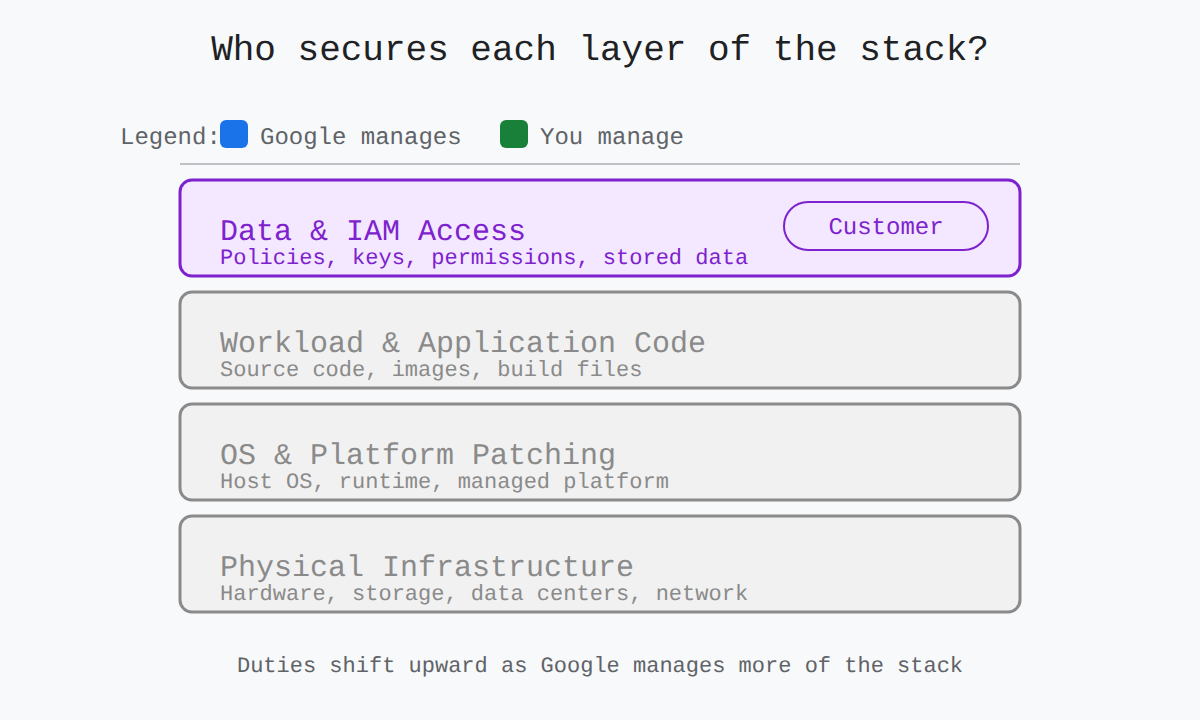
Pick a service model and a security layer to see who secures it.
| Service model | Google Cloud manages | Customer manages |
|---|---|---|
| IaaS | Hardware, storage, and network | Everything above, including data and access |
| PaaS | Service and infrastructure, including control plane and patching | Data, access, code, images, and IAM configuration |
| SaaS | Everything except data and its access and usage | Data and its access and usage |
Examples include Compute Engine and Cloud Storage for IaaS, App Engine, Google Kubernetes Engine, and BigQuery for PaaS, and Google Workspace for SaaS. Google duties include physical security, default encryption, VPC Service Controls, secure development, patched control planes, isolated execution environments, and integrations for IAM, audit logs, key management, and security by design (opens in a new tab). Customer duties include securing code, images, tokens, IAM with least privilege, dedicated service accounts, vulnerability scanning, Binary Authorization, monitoring, and credential rotation. Shared fate extends this split into continuous partnership with secure landing zones, secure blueprints, Assured Workloads, Security Command Center Premium, organization policies, and risk programs.
Continue with this study guide: Define key security terms and concepts.
Key Facts
- The customer is always responsible for securing data and its access and usage, while Google is always responsible for securing the underlying infrastructure.
- An IAM allow policy binds principals to a role on a specific resource, while the role itself is the collection of permissions that defines what is allowed.
- VPC Service Controls create a security perimeter where traffic inside can flow between protected services and requests crossing the boundary are denied unless explicitly allowed.
- Security Command Center provides centralized continuous monitoring, threat detection, and response for misconfigurations, vulnerabilities, and active threats.
- Human access by Google personnel to user content creates Access Transparency logs, while purely automated checks with no human viewing do not.
Frequently Asked Questions
What is the difference between an Identity and Access Management (IAM) role and an IAM allow policy in Google Cloud?
An Identity and Access Management role is a collection of permissions that defines what is allowed, while an IAM allow policy binds principals to a role on a specific resource and defines who gets it and where. When a principal requests an action, Google Cloud checks the allow policy on the requested resource and the request succeeds only if the policy binds that principal to a role containing the required permission.
How do VPC Service Controls protect sensitive services and data in Google Cloud?
VPC Service Controls create a security perimeter around sensitive services and data. Traffic inside the perimeter can flow between protected services while requests crossing the perimeter are denied unless explicitly allowed.
What is the difference between authentication and authorization in Google Cloud Identity and Access Management (IAM)?
Authentication proves identity for people and workloads, while authorization determines what that verified identity may do. In Google Cloud, a token flows from the authentication system to the Google API carrying identity and authorized access type, and the API checks the token and then checks Identity and Access Management before allowing the method.
Subdomains
Identity and Access Management (IAM) is the Google Cloud system that controls which identities can act on which resources and what actions they can take. A principal, such as a person or a workload, m…
Modern cyber threats are malicious techniques that exploit weaknesses in digital infrastructure to disrupt operations, steal data, or demand payment. Ransomware is code created by a third party to…
Confidentiality, integrity, and availability are the three core principles that protect information and keep cloud services reliable. Confidentiality keeps Customer Data private so only authorized par…
Identity and Access Management (IAM) and operational security practices decide who can do what in Google Cloud and how that secure state is kept over time. IAM and resource hierarchy design control ac…
Physical versus software-defined security is the difference between protecting a fixed building and protecting every user and device with software rules. Traditional on-premises security relies on phy…
How learners score on this domain
Last updated