Fundamental
Prepare and test your skills

Fundamental
Prepare and test your skills
IAM Roles, Least Privilege and Shared Responsibility
Identity and Access Management (IAM) (opens in a new tab) is the Google Cloud system that controls which identities can act on which resources and what actions they can take. A principal, such as a person or a workload, must first prove its identity and then is allowed only the actions granted by IAM roles. The principle of least privilege holds the system together by requiring every grant to be denied by default, temporary when possible, and no broader than needed to do the job.
Authentication and Authorization
Authentication and authorization are two separate steps that control access to Google Cloud. Authentication verifies identity by proving who or what is making the request, while authorization determines what that verified identity is allowed to do on a resource. In Google Cloud, authentication supports user accounts for people and service accounts for workloads, and authorization is then checked in IAM before an API method is allowed.
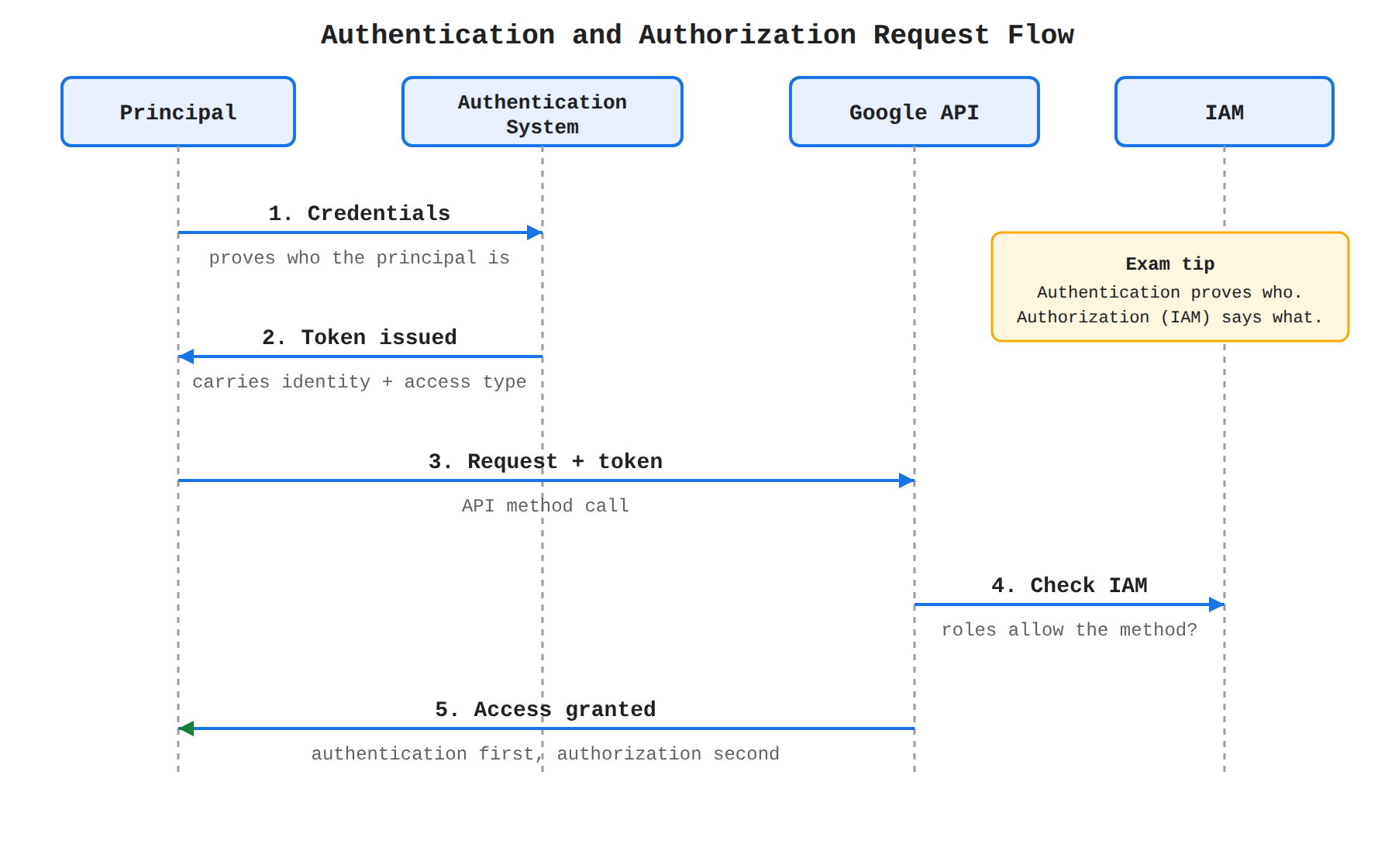
A sequence diagram showing a principal submitting credentials to the authentication system, receiving a token, and sending a request to the Google API, which verifies the token and checks IAM authorization before allowing the method. The animation traces each message in order to show that authentication proves identity first and IAM grants authorization second.
For each request, a token flows from the authentication system to the Google API and carries both the identity of the principal and the type of access it is authorized for. The token is a digital object that shows the caller provided proper credentials and was issued proof in return. The API checks the token to confirm the identity is authenticated and then checks IAM to confirm the identity is authorized for the requested method.
User Accounts and Service Accounts
User accounts and service accounts are the two main types of principals that authenticate to Google Cloud. User accounts represent people, such as developers or administrators, and are managed as Google Accounts with Google Workspace or Cloud Identity or federated from an outside provider with Workforce Identity Federation. Service accounts represent non-human workloads, such as code running on a virtual machine that needs to read from storage or publish a message.
A person can use a user account to sign in with the Google Cloud CLI, set up Application Default Credentials (ADC) for local development, impersonate a service account, or generate access tokens. Common ways to let a workload use a service account, ordered from most secure to least secure, are:
- Attach a user-managed service account to the resource and use ADC to authenticate automatically.
- Use impersonation to grant extra privilege temporarily without sharing long-lived secrets.
- Use Workload Identity Federation for on-premises or other-cloud workloads.
- Use the default service account created with the resource.
- Use a long-lived service account key stored by the user.
Exam tip: Authentication proves who the principal is, while authorization controls what the principal can do — IAM roles grant authorization only after authentication succeeds.
Roles, Permissions, and Allow Policies
IAM roles, permissions, and allow policies are the objects that grant authorization in Google Cloud. A permission allows one specific action, such as calling one API method, and permissions are never granted directly to users. Permissions are grouped into roles, and roles are granted to principals through allow policies attached to resources.
An allow policy set on a parent resource, such as an organization or project, is inherited by its child resources. A grant at the project level therefore applies to every matching resource inside that project. Google Cloud offers three categories of roles that differ in breadth and control:
Try the scenario
IAM Role Inheritance and Least Privilege: Granting Access to orders-topic
Change the inputs and watch how the outcome changes.
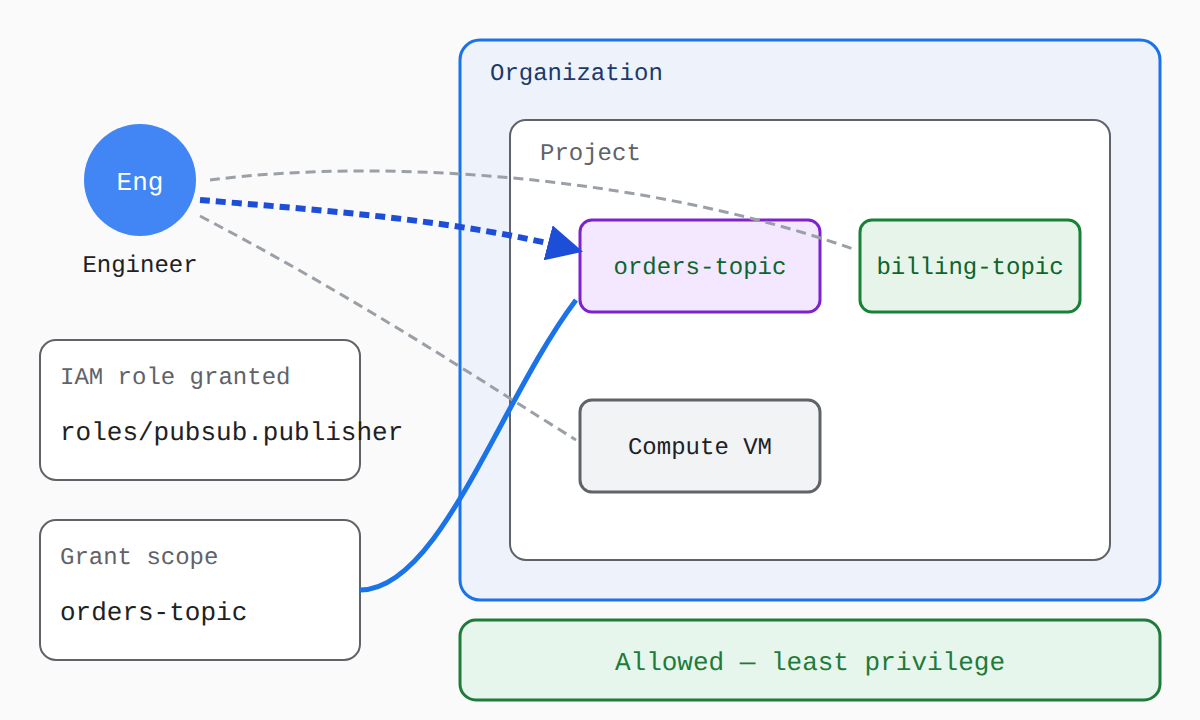
Change the role, the grant scope, and the requested action to see how IAM scope and role breadth decide whether the engineer's request is allowed and how closely it matches least privilege.
| Role type | Breadth | Choose when |
|---|---|---|
Basic roles, including Owner (roles/owner) | Thousands of permissions across all Google Cloud services | Broader access is needed for test or development, or nearly universal access is required |
| Predefined roles, such as Publisher or Project IAM Admin | Limited set of permissions for a specific service or job function | Production work needs only the permissions for that task |
| Custom roles | Customer-defined set of permissions | Predefined roles are too broad or too narrow for the need |
Grant roles at the smallest scope needed and prefer groups over individual users. For example, grant the Publisher role to a user only for the specific Pub/Sub topic they must publish to rather than for the whole project. If a principal needs access to all projects, grant the role at the organization level, and grant roles to a Google group so membership can be updated without editing every allow policy.
Principle of Least Privilege in Practice
The principle of least privilege means access to data is denied by default and any grant is temporary and no greater than absolutely necessary. Google applies this rule to its own staff through privileged access management (opens in a new tab), where Google personnel acting as privileged administrators can access Customer Data only with an active, valid business justification such as resolving a support ticket. That access is limited so a single person cannot view data alone, and monitoring processes identify, triage, and remediate violations.
Customers apply the same principle to their own IAM grants to prevent unauthorized access and limit damage if credentials are stolen:
- Do not grant basic roles in production unless there is no alternative, because they include thousands of permissions; use role recommendations and Policy Simulator to replace them with limited predefined or custom roles.
- Treat each application component as a separate trust boundary by creating a separate service account for each service that needs different permissions, then granting only the required permissions to each service account.
- Grant roles at the smallest resource scope, remember that child resources inherit parent allow policies, and use conditional role bindings to let access expire automatically or grant temporary elevated access.
- Be cautious with powerful grants such as Service Account User, which lets a user access all resources the service account can access, and Owner, which allows access to and modification of almost all resources including allow policies.
Secure Service Accounts and Auditing
Secure service accounts and auditing protect workloads and verify that least privilege keeps working over time. Any workload using a service account inherits its permissions, so service accounts must have limited privileges and be protected against threats. Avoid using service account keys if another option is available, since keys are a security risk if not managed correctly and the holder is responsible for securing the private key.
If keys must be used, rotate them in order to limit exposure:
- Create a new key for the service account.
- Switch applications to the new key.
- Disable the old key so it can no longer be used.
- Delete the old key when it is no longer needed.
Never check keys into source code or leave them in a Downloads directory. Cloud Audit Logs provides the audit trail that verifies least privilege over time, with logs flowing from Google Cloud resources to log storage where administrators review changes to allow policies and access to service account keys. Audit who can change allow policies, export audit logs to Cloud Storage to retain them for long periods, and apply the same access policies to log storage and Logs Explorer so log data itself does not create a new path for unauthorized access.
Defense-in-depth is a security approach that uses multiple layers of controls so that if one layer fails, others still protect data. In Google Cloud, these layers include physical, administrative, and technical controls that work together rather than depending on a single defense. Default encryption (opens in a new tab) is a technical layer and inherited control that protects stored data and helps customers show their security posture to auditors and regulators.
Layers of Defense-in-Depth
Layers of defense-in-depth in Google Cloud combine physical, administrative, and technical controls. Physical controls include the design of data centers and the technology they house. Administrative controls include a security-focused culture, hiring and onboarding practices, ongoing security and privacy training, dedicated security and privacy teams, and internal audits. Technical controls include default encryption, infrastructure controls, vulnerability management, malware prevention, and security monitoring.
- Physical controls: Data center design and the technology inside them.
- Administrative controls: Security culture, training, dedicated security team, privacy team, and internal audit.
- Technical controls: Default encryption, infrastructure controls, vulnerability management, malware prevention, and security monitoring.
The dedicated security team maintains defense systems, reviews security plans, scans for vulnerabilities, and monitors for suspicious activity. Security monitoring gathers information from internal network traffic, employee actions on systems, and outside knowledge of vulnerabilities, then stores security telemetry in one location for unified analysis. Vulnerability management uses quality assurance, software security reviews, penetration testing, and external audits to find and fix weaknesses.
Encryption as a Technical Layer
Encryption as a technical layer protects data by encoding it so only authorized parties can read it without the correct keys. Google Cloud provides default encryption as an inherited security control, which customers can use as evidence of their security posture to auditors and regulators. For data at rest, default encryption helps protect stored data, while for data in use the customer must control who can access data while it is being processed.
For data in transit, Google uses Transport Layer Security (TLS) to protect connections, as described in encryption in transit (opens in a new tab). Google developed the combined elliptic-curve and post-quantum (CECPQ2) algorithm to protect TLS connections against quantum computer attacks. Google cryptographers also developed Tink, an open-source library of cryptographic APIs that Google uses in its internal products and services.
Shared Responsibility and Defense-in-Depth
Shared responsibility and defense-in-depth together define which security layers belong to Google Cloud and which belong to the customer. Google Cloud always remains responsible for the underlying network and infrastructure, while customers always remain responsible for their access policies and the data they store. In Software as a Service (SaaS), Google owns most security responsibilities, while customers remain responsible for access controls and the data they choose to store.
| Responsibility | Google Cloud | Customer |
|---|---|---|
| Underlying network and infrastructure | Always responsible | Not responsible |
| Access policies | Not responsible | Always responsible |
| Data stored in the service | Not responsible | Always responsible |
This boundary means defense-in-depth is a joint effort where Google secures the infrastructure layers and customers secure their data and access layers. Function as a Service (FaaS), such as Cloud Run functions, has a similar shared responsibility list as SaaS. Inherited controls like default encryption and infrastructure controls can be used by customers as part of their evidence of security posture.
How Layers Work Together
How layers work together in defense-in-depth is that each layer reinforces the others to provide comprehensive protection against different threat vectors. Administrative controls, such as training and security reviews, reduce the chance that a technical control is misconfigured. Technical controls, such as vulnerability management and security monitoring, detect and address threats that reach the infrastructure.
Encryption protects data by making it unreadable without the correct keys, so it adds protection even when other layers are bypassed. Compliance frameworks like Payment Card Industry Data Security Standard (PCI DSS), Health Insurance Portability and Accountability Act (HIPAA), and General Data Protection Regulation (GDPR) define how responsibilities are shared between Google Cloud and the customer. Encryption therefore works alongside access controls and other layers rather than replacing them.
Exam tip: Google Cloud always secures the underlying network and infrastructure, while the customer always secures access policies and data. Encryption is an inherited technical control that supports the customer's data protection responsibilities.
The shared responsibility model (opens in a new tab) is a security framework that divides duties between a cloud provider and its customer. In Google Cloud, Google is responsible for protecting the cloud itself, meaning the underlying infrastructure, while the customer is responsible for securing what they bring to the cloud. The customer is always responsible for securing their data, and Google is responsible for securing the infrastructure that stores and processes it.
How Responsibilities Split Across Service Models
How responsibilities split across service models depends on how much of the stack Google Cloud manages. In infrastructure as a service (IaaS), Google Cloud manages only the hardware, storage, and network, while the customer manages everything above those layers, including data and access. In platform as a service (PaaS), Google Cloud manages the service itself and its underlying infrastructure, while the customer manages data, access, and application-level configuration. In software as a service (SaaS), Google Cloud manages the security of everything except the data and its access and usage.
Shared Responsibility Across IaaS, PaaS, and SaaS
Comparison MatrixA comparison matrix showing how security responsibilities split between Google Cloud and the customer for IaaS, PaaS, and SaaS: Google always manages the underlying infrastructure, while the customer always manages data and its access, with the customer's share shrinking from IaaS to SaaS.
| Service model | Google Cloud manages | Customer manages |
|---|---|---|
| IaaS | Hardware, storage, and network | Everything above those layers, including data and access |
| PaaS | Service itself and underlying infrastructure, such as control plane, patching, and isolated execution environments | Data, access, application source code, configuration files, container images, and IAM configuration |
| SaaS | Security of everything except data and its access and usage | Data and its access and usage |
For PaaS examples, Cloud Build, Cloud Deploy, Google Kubernetes Engine (GKE), and Cloud Workstations show the same pattern. In each case, Google Cloud secures the service and its infrastructure, while the customer secures how the service is used, including data, access, source code, and configuration.
Exam tip: The customer is always responsible for data and its access and usage, even in software as a service (SaaS), while Google Cloud is responsible for the underlying infrastructure.
Google Cloud Responsibilities
Google Cloud responsibilities cover protecting the cloud itself through physical, administrative, and technical controls. These duties keep the underlying infrastructure secure and give customers tools they can inherit or integrate with. The provider's duties include:
- Protect underlying infrastructure, including hardware, firmware, kernel, operating system, storage, and network.
- Protect physical data centers, encrypt data at rest and in transit by default, and secure network components.
- Provide network protection using VPC Service Controls.
- Follow secure software development practices.
- Manage and secure the service control plane, including APIs, backends, and schedulers, with patching and hardening.
- Provide ephemeral, isolated execution or build environments for service operations.
- Harden and patch managed components, such as node operating systems, Kubernetes node components, and the GKE control plane.
- Provide integrations for Identity and Access Management (IAM), Cloud Audit Logs, Cloud Key Management Service (Cloud KMS), Security Command Center, and others.
- Restrict and log Google administrative access to customer resources for contractual support using Access Transparency and Access Approval.
- Maintain compliance with relevant data protection laws and regulations and undergo independent verification of security, privacy, and compliance controls.
Customer Responsibilities
Customer responsibilities cover security in the cloud, meaning the data, access, and configurations the customer controls. This includes the applications and settings customers bring to the environment and how they use Google Cloud services. Customer duties include:
- Secure data and its access and usage; the customer is always responsible for data.
- Secure application source code, build configuration files, container images, and workloads.
- Evaluate image suitability, use the latest supported image versions, and follow best practices for open source components and build configuration.
- Safeguard third-party integration tokens and secrets, and guard against exfiltration.
- Configure IAM for all users, groups, and service accounts using the principle of least privilege.
- Use dedicated, user-specified service accounts instead of default service accounts.
- Enable and act on vulnerability scanning for build artifacts, generate build provenance data, and implement deployment policies such as Binary Authorization to deploy only authorized and verified images.
- Manage access controls to data, services, workstation instances, and backing resources such as Compute Engine instances and Persistent Disks.
- Monitor applications for security incidents and report incidents to Google as needed.
- Rotate cluster credentials and keep Standard node pools enrolled in automatic upgrades for GKE.
- Ensure embedded tool versions are compatible when replacing tool versions.
- Comply with applicable laws and regulations for their use cases.
Why the Partnership Matters
Why the partnership matters in the shared responsibility model is that both sides must succeed to protect infrastructure and data together. Google Cloud secures the infrastructure that runs services, and the customer secures the data, access, and configurations that run on top of it. If either side fails, security can break, and misconfiguration is a common cause of cloud security breaches.
Google Cloud helps reduce this risk by providing secure defaults, best practices, blueprints, and landing zone guidance. Secure defaults lower the chance of an accidental exposure, while blueprints and landing zones give customers a safer starting point. The partnership therefore protects both the cloud infrastructure and the data stored within it.
Shared Fate Extending the Partnership
Shared fate (opens in a new tab) is Google Cloud's approach to go beyond dividing duties by treating the provider and customer as ongoing partners. It includes help getting started with a secure landing zone, secure blueprints with security recommendations enabled by default, and governance tools such as Assured Workloads, Security Command Center Premium, Organization policies, Policy Intelligence tools, Confidential Computing, and Sovereign Controls by Partners. These tools help customers stay secure as their environment grows and changes.
The Risk Protection Program and Cyber Insurance Hub help customers understand their cloud security posture and manage risk with cyber insurance. Shared fate helps customers start secure and continuously improve security rather than only dividing duties. It extends shared responsibility from a one-time split into continuous joint improvement.
Key Facts
- Identity and Access Management (IAM) grants authorization through roles grouped from permissions and attached with allow policies, only after authentication has verified the user account or service account.
- The principle of least privilege requires that access is denied by default and any grant is temporary and no broader or longer than necessary.
- Defense-in-depth combines physical, administrative, and technical controls so protection does not depend on a single layer, with encryption protecting data by making it unreadable without the correct keys.
- Google Cloud is always responsible for the underlying network and infrastructure, while the customer is always responsible for data and its access policies across IaaS, PaaS, and SaaS.
- Shared fate extends shared responsibility with secure landing zones, secure blueprints, governance tools, and risk programs for continuous joint security improvement.
Frequently Asked Questions
What is the difference between authentication and authorization in Google Cloud?
Authentication verifies identity by proving who or what is making the request, while authorization determines what that verified identity is allowed to do on a resource. In Google Cloud, authentication supports user accounts for people and service accounts for workloads, and authorization is then checked in Identity and Access Management (IAM) before an API method is allowed.
When should I use basic roles, predefined roles, or custom roles in Identity and Access Management (IAM)?
Basic roles such as Owner (roles/owner) include thousands of permissions across all Google Cloud services and are for broader access in test or development or when nearly universal access is required. Predefined roles such as Publisher or Project IAM Admin provide a limited set of permissions for a specific service or job function and are for production work needing only permissions for that task, while custom roles are customer-defined sets of permissions for when predefined roles are too broad or too narrow.
How does the shared responsibility model divide security duties between Google Cloud and the customer?
Google Cloud is always responsible for the underlying network and infrastructure, while the customer is always responsible for data and its access policies and usage across infrastructure as a service (IaaS), platform as a service (PaaS), and software as a service (SaaS). The amount Google Cloud manages grows from hardware, storage, and network in IaaS to the service and infrastructure in PaaS to everything except data and its access and usage in SaaS.
Sample Question
A company has configured Cloud Identity to verify employee identities upon sign-in. Now, the security team needs to configure resource authorization in their production environment for a new developer while strictly adhering to the principle of least privilege.
The developer's daily tasks require the following access:
- View objects stored in a specific Cloud Storage bucket
- Administer a specific Cloud SQL database instance
Which approach should the security team implement to authorize this access and minimize security risks?
Grant the basic Editor role (
roles/editor) at the organization level so the developer automatically inherits access to both servicesConfigure Workforce Identity Federation and enforce a strong password policy for the developer's account
Grant separate predefined roles tailored to Cloud Storage and Cloud SQL directly on the specific bucket and database resources
Assign a single Service Agent role (
serviceAgent) at the project level to bundle permissions across multiple Google Cloud services
How learners score on this domain
Last updated