Fundamental
Prepare and test your skills

Fundamental
Prepare and test your skills
Cloud Economics Service and Deployment Models
Economic benefits and core cloud characteristics explain why organizations move to the cloud and how the cloud supports growth. The economic benefit is a shift from buying physical infrastructure to paying only for resources as they are used. Core characteristics such as rapid elasticity, on-demand self-service, and shared resource pooling make that shift work by letting capacity scale quickly and efficiently.
From Capital Expenditure to Operational Expenditure
The shift from capital expenditure (CapEx) to operational expenditure (OpEx) is the change from large upfront hardware purchases to ongoing pay-for-use spending. With CapEx, an organization buys servers, builds data centers, and pays for power, cooling, maintenance, and support before any workload runs. With OpEx, the organization provisions cloud infrastructure quickly for a project and pays based on actual usage. This change creates flexibility for short-term projects, seasonal demand, and long-term transformation because teams can start small, scale when demand grows, and avoid paying for idle capacity.
Total Cost of Ownership and Business Value
Total cost of ownership (TCO) (opens in a new tab) is the complete cost of running a workload, including hardware, software, power, cooling, maintenance, patching, scaling, security hardening, and disaster recovery. A TCO-aware mindset looks beyond upfront price and compares self-hosted data centers and databases with managed cloud services that reduce operational work. Balancing cost against business metrics, such as revenue per customer or transaction volume, helps distinguish healthy scaling from inefficiency. When higher spend is driven by profitable growth, further cloud investment is justified, while wasteful use can be right-sized or re-architected.
Rapid Elasticity Through Autoscaling
Rapid elasticity is the ability to dynamically adjust capacity based on workload changes so applications have resources when needed without overprovisioning. Autoscaling policies use metrics such as CPU utilization, memory usage, queue depth, or incoming traffic to add capacity during peaks and remove capacity when demand falls. Traffic flows from users to the autoscaler and then to the added or removed capacity, so performance stays stable during spikes and costs fall when demand drops.
Autoscaling Flow: Traffic to More VMs
Process Flow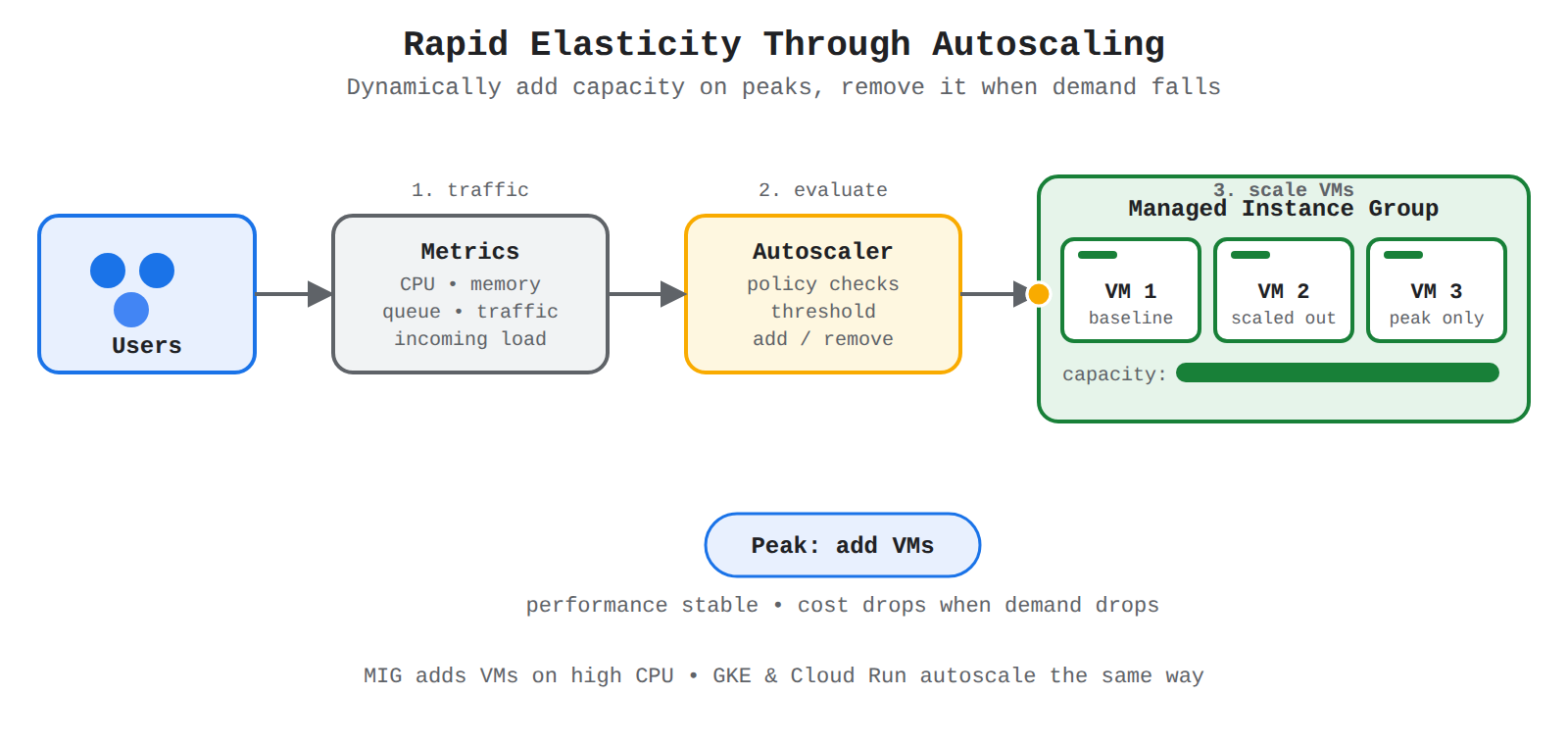
A left-to-right flow from Users to Metrics to Autoscaler to a Managed Instance Group. Animation shows traffic moving forward, the policy detecting over-threshold load, and extra VMs scaling out to handle the peak.
| Option | What it scales | How scaling is triggered |
|---|---|---|
| Compute Engine managed instance groups (MIGs) | Groups of virtual machines (VMs) managed as a single entity | Policy adds VMs when CPU utilization reaches a threshold and removes VMs when utilization drops |
| Google Kubernetes Engine (GKE) autoscaling | Cluster nodes and Pod replicas | Cluster Autoscaler adds or removes nodes based on Pod demand, Horizontal Pod Autoscaler changes replicas, and Vertical Pod Autoscaler tunes requests and limits |
| Cloud Run | Serverless container instances | Built-in autoscaling increases instances as incoming traffic rises and decreases instances as traffic falls |
On-Demand Self-Service and Shared Resource Pooling
On-demand self-service is the ability for teams to provision, manage, and optimize their own cloud resources without waiting for manual setup. Self-service tools let teams monitor use with Cloud Monitoring (opens in a new tab), receive right-sizing guidance from Recommender, and respond quickly to changing needs. Shared resource pooling supports this model because the provider maintains large pools of compute, storage, and networking capacity across zones and regions, and each customer draws from the pool on demand. Together, self-service and pooling remove the rigid limits of an on-premises data center and let organizations experiment, innovate, and scale globally while staying mindful of cost.
Cost Optimization Strategies That Support Flexibility
Cost optimization strategies lower the OpEx billing rate while preserving the ability to scale. Google Cloud options for getting the best value from spending include peer pricing choices:
- Committed use discounts (CUDs) provide discounts in exchange for committing to a minimum level of usage or spend over a one-year or three-year period.
- Sustained use discounts in Compute Engine provide automatic discounts for consistent use of a service without a prior commitment.
- Spot VMs provide access to unused VM capacity at a lower cost than regular VMs for fault-tolerant and flexible workloads.
Cloud Billing budgets and alerts track spending against defined budgets and notify stakeholders of potential overruns. Tagging and labeling resources by project, team, or department connects spending to its source, so dashboards and reports can show trends, forecast costs, and identify underutilized resources for cleanup.
Exam tip: Choose Spot VMs when the workload is fault-tolerant and flexible to save more than 80% compared with regular VMs; choose CUDs when usage is steady and predictable over one or three years.
Cloud deployment models describe where an application's parts run and how resources are spread across locations or providers. Google Cloud organizes public cloud placement into deployment archetypes (opens in a new tab): zonal, regional, multi-regional, and global. Hybrid and multicloud models extend placement across on-premises environments or other cloud platforms, while the shared responsibility model divides security and maintenance duties between provider and customer.
Public, Private, Hybrid, and Multicloud Models
A deployment model defines where workloads run and how that placement affects security, compliance, and availability. A public cloud deployment runs entirely in a provider environment such as Google Cloud. A private cloud deployment runs in a dedicated environment, often on-premises. Hybrid combines on-premises resources with Google Cloud, and multicloud combines Google Cloud with other cloud platforms.
| Model | Where workloads run | Security, compliance, and availability impact |
|---|---|---|
| Public | Entirely in one cloud provider, such as Google Cloud | Availability, cost, and complexity depend on the zonal, regional, multi-regional, or global archetype used. |
| Private | In a dedicated environment, often on-premises | On-premises and Google Cloud resources must be managed consistently; security tools may not be standard across environments. |
| Hybrid | Some parts on-premises, some in Google Cloud | Adds hybrid networking, monitoring, and management costs; data sovereignty and residency can limit failover regions. |
| Multicloud | Some parts in Google Cloud, some in other cloud platforms | Adds cross-cloud networking, redundant storage, and security skill needs; use cases include disaster recovery and Google Cloud AI, ML, and BigQuery capabilities. |
In hybrid and multicloud deployments, security features and tools are not standard across platforms, so administrators need skills to manage security across all environments. Tools like Terraform can reduce provisioning effort, and GKE attached clusters can manage containerized multicloud applications.
Shared Responsibility Model
The shared responsibility model defines which security and maintenance tasks belong to the cloud provider and which belong to the customer. The provider is responsible for the security and maintenance of the cloud infrastructure and for built-in features of managed services, such as high availability, backups, and scalability. The customer is responsible for securing what they place in the cloud, including data, configurations, access, and cross-platform security controls. Using managed services shifts more maintenance to the provider because managed services provide high availability backed by service level agreements (SLAs) and built-in backup and resilience features.
Comparing Zonal, Regional, Multi-Regional, and Global Archetypes
Google Cloud deployment archetypes differ in infrastructure availability, robustness against outages, cost, and operational complexity. Zonal is easiest to set up and has the lowest cost but provides 99.9% availability. Regional improves availability to 99.99% and handles zone outages well. Multi-regional and global both target 99.999% availability and handle zone and region outages well when replication is synchronous.
| Design consideration | Zonal | Regional | Multi-regional | Global |
|---|---|---|---|---|
| Infrastructure availability | 99.9% (3 nines) | 99.99% (4 nines) | 99.999% (5 nines) | 99.999% (5 nines) |
| Robustness against zone outages | RTO of hours or days | Near-zero RTO if replication is synchronous | Near-zero RTO if replication is synchronous | Near-zero RTO if replication is synchronous |
| Robustness against region outages | RTO of hours or days | RTO of hours or days | Near-zero RTO if replication is synchronous | Near-zero RTO if replication is synchronous |
| Cost of Google Cloud resources | Low | Medium | High | Medium |
| Operational complexity | Simpler than the other archetypes | More complex than zonal | More complex than regional | Potentially simpler than multi-regional |
Global resources like a global load balancer require Premium Tier networking, while regional load balancers can use Standard Tier. Global can be medium cost and potentially simpler than multi-regional when using global resources.
Hybrid and Multicloud Costs and Connectivity
Hybrid and multicloud deployments add cost and operational complexity beyond a Google Cloud-only architecture. Additional costs include hybrid or cross-cloud networking and monitoring and managing resources across multiple environments. For multicloud, data may need to be stored redundantly within each cloud, and redundant resources may be underutilized. Inter-cloud connectivity can use Cross-Cloud Interconnect for high-bandwidth dedicated connectivity. Multicloud use cases include using another cloud as a disaster recovery site and enhancing applications on other clouds with Google Cloud archive storage, AI and ML, and BigQuery.
High Availability, Disaster Recovery, and Compliance
High availability (HA) (opens in a new tab) and disaster recovery (DR) are different concepts with different replication and failover rules. HA generally applies to regional deployments and uses synchronous replication between zones within a single region, supporting near-zero recovery time objective (RTO) and recovery point objective (RPO) and active-active topologies without single points of failure. DR generally applies to multi-region deployments and often uses asynchronous replication, so teams must define a replication strategy, assess its effect on RTO and RPO, and identify manual or semi-automated failover steps. Data sovereignty and data residency regulations can limit which failover region can be used. For critical financial services, a multi-region topology across at least two regions and three zones per region is recommended. Managed multi-regional services like Spanner and Cloud Storage can help with data replication.
Managing Availability and Cost Tradeoffs
Managing availability means using resources with wider locational scope and removing single points of failure. To improve availability, use regional resources instead of zonal and multi-regional or global resources instead of regional. In each region, use three zones rather than two and overprovision capacity by a third more than estimated to handle failovers. Eliminate single points of failure by avoiding a single application server or database, using managed instance groups (MIGs) for automatic VM recreation, using load balancing to distribute traffic, using HA configurations for Cloud SQL, and using regional persistent disks with synchronous replication. Aggregate availability is affected by each tier: chained services multiply availability and lower it, while parallelized services can have higher end-to-end availability than individual services. Increasing availability generally costs more and adds complexity, so architects balance availability, cost, latency, and compliance.
Exam tip: Zonal is the simplest and lowest-cost archetype, but multi-regional and global can provide 99.999% availability and near-zero RTO for zone and region outages when replication is synchronous.
Cloud service models describe how responsibility for computing resources is divided between the cloud provider and the customer. The three models are Infrastructure as a Service (IaaS), Platform as a Service (PaaS), and Software as a Service (SaaS). As you move from IaaS to PaaS to SaaS, the provider manages more of the stack and the customer manages less, which means less control but also less operational work.
Infrastructure as a Service
Infrastructure as a Service (IaaS) provides virtualized computing resources such as virtual machines, storage, and networks over the internet. The cloud provider owns and manages the physical data centers, servers, and virtualization layer, while the customer manages the operating system, middleware, runtimes, data, and applications. This division gives the customer the most control over configuration, patching, and security settings, but it also requires the most management effort. Choose IaaS when an organization needs to run custom workloads, migrate existing virtual machines to the cloud, or keep full control of the software environment, such as with Compute Engine virtual machines.
Platform as a Service
Platform as a Service (PaaS) provides a ready-to-use platform for developing, running, and managing applications without managing the underlying infrastructure. The cloud provider manages the physical infrastructure plus the operating system, runtime, and development tools, while the customer provides only the application code and data. Because the platform handles scaling, patching, and availability of the runtime, developers can deploy faster and focus on building features rather than maintaining servers. Choose PaaS when a team wants to build or run custom applications quickly, such as a web app or API deployed to App Engine or Cloud Run (opens in a new tab), without administering servers.
Software as a Service
Software as a Service (SaaS) provides finished software that the customer uses directly, usually through a web browser or mobile app. The cloud provider manages almost the entire stack, including infrastructure, platform, application code, updates, and availability, while the customer only manages user access, basic settings, and its own data inside the app. This model requires almost no operational work from the customer, but it also offers the least control because the customer cannot change the underlying infrastructure or application logic. Choose SaaS when an organization needs common business functions such as email, document collaboration, or customer management, such as Gmail, Google Workspace, or Salesforce.
Comparing IaaS, PaaS, and SaaS Responsibilities
The three service models differ by who manages what and how much control the customer keeps. The tradeoff is consistent: more customer control requires more customer management, while more provider management means faster use with less flexibility.
IaaS, PaaS, SaaS: Who Manages Each Layer
Layered StackThree layered stacks compare infrastructure as a service, platform as a service, and software as a service. In each stack the provider manages the lower hardware, virtualization, and platform layers, while the customer manages the upper application, data, and settings layers — with responsibility shifting to the provider as you move from IaaS to PaaS to SaaS.
| Model | Provider manages | Customer manages | Choose when |
|---|---|---|---|
| Infrastructure as a Service (IaaS) | Physical hardware, virtualization, networking | Operating system, runtimes, data, applications | Maximum control or custom infrastructure is needed |
| Platform as a Service (PaaS) | Hardware plus operating system, runtime, and scaling | Application code and data | Developers need to build apps without managing servers |
| Software as a Service (SaaS) | Almost everything, including the finished application | User settings and data inside the app | A ready-to-use application is needed with minimal work |
Exam tip: IaaS gives the most control and most management work, SaaS gives the least control and least management work, and PaaS sits in the middle for building custom apps.
Key Facts
- The shift from capital expenditure (CapEx) to operational expenditure (OpEx) moves spending from upfront hardware purchases to pay-for-use billing based on actual usage.
- Rapid elasticity uses autoscaling policies to add capacity during peaks and remove capacity when demand falls, keeping performance stable while lowering cost.
- Google Cloud deployment archetypes range from zonal at 99.9% availability to regional at 99.99% and multi-regional and global at 99.999% with synchronous replication.
- The shared responsibility model assigns infrastructure security and managed-service features to the provider and data, configurations, and access to the customer.
- Infrastructure as a Service (IaaS) gives the most customer control, Software as a Service (SaaS) gives the least control with the least work, and Platform as a Service (PaaS) sits in the middle for building custom apps.
Frequently Asked Questions
What is the difference between capital expenditure (CapEx) and operational expenditure (OpEx) in cloud computing?
The shift from capital expenditure (CapEx) to operational expenditure (OpEx) moves spending from large upfront hardware purchases to ongoing pay-for-use spending based on actual usage. With CapEx an organization buys servers and pays for power, cooling, maintenance, and support before any workload runs, while with OpEx it provisions cloud infrastructure quickly and can start small, scale when demand grows, and avoid paying for idle capacity.
When should I use Spot VMs instead of committed use discounts (CUDs) on Google Cloud?
Choose Spot VMs when the workload is fault-tolerant and flexible because they provide access to unused virtual machine capacity at a lower cost than regular virtual machines. Choose committed use discounts (CUDs) when usage is steady and predictable because they provide discounts in exchange for committing to a minimum level of usage or spend over a one-year or three-year period.
What is the difference between Infrastructure as a Service (IaaS), Platform as a Service (PaaS), and Software as a Service (SaaS)?
Infrastructure as a Service (IaaS) gives the customer the most control and the most management work, Software as a Service (SaaS) gives the least control with the least work, and Platform as a Service (PaaS) sits in the middle for building custom apps. With IaaS the provider manages hardware, virtualization, and networking while the customer manages the operating system, runtimes, data, and applications, with PaaS the provider also manages the operating system, runtime, and scaling while the customer provides only application code and data, and with SaaS the provider manages almost everything including the finished application while the customer manages only user settings and data inside the app.
What availability levels do Google Cloud zonal, regional, multi-regional, and global deployment archetypes provide?
Zonal deployments provide 99.9 percent availability, regional deployments provide 99.99 percent availability, and multi-regional and global deployments both target 99.999 percent availability with synchronous replication. Zonal is the simplest and lowest-cost archetype, while multi-regional and global can provide near-zero recovery time objective for zone and region outages when replication is synchronous.
Sample Question
An enterprise is planning its infrastructure modernization strategy. The organization must retain proprietary database workloads in its existing on-premises data center due to strict data sovereignty and regulatory compliance requirements, while deploying user-facing applications to Google Cloud to leverage on-demand scaling.
Which cloud deployment model is the enterprise implementing?
Hybrid cloud
Multi-cloud
Public cloud
Private cloud
How learners score on this domain
Last updated