Fundamental
Prepare and test your skills

Fundamental
Prepare and test your skills
Scalability Elasticity Reliability Agility and TCO
Operational scalability, elasticity, and reliability describe how an application handles changing demand and survives failures to protect business continuity. Scalability is the ability to add or remove resources as work grows or shrinks. Elasticity is automated scaling in response to workload changes, and reliability is the ability to keep functioning despite component failures.
Scalability: Adjusting Capacity to Meet Demand
Scalability is the ability of a system to handle varying amounts of work by adding or removing resources. A scalable web application works well for one user or many users and handles traffic peaks and dips without breaking. This flexibility is a key reason to move to the cloud, because unused resources can be removed to save cost while extra resources can be added during high traffic to protect user experience.
Google Cloud supports scalability with managed compute and data services that grow with demand. Compute Engine (opens in a new tab) virtual machines and Google Kubernetes Engine (GKE) clusters work with autoscalers that grow or shrink capacity based on defined metrics. BigQuery, Spanner, and Bigtable are database products that keep performance steady across very large data sizes. Cloud Monitoring (opens in a new tab) collects metrics across applications and infrastructure, so scaling decisions are based on actual usage.
Elasticity Through Automated Scaling
Elasticity is automated scalability that changes capacity without manual action when workloads rise or fall. Manual scalability requires people to watch utilization and adjust allocation, where over-provisioning wastes money and under-provisioning causes slowdowns and bottlenecks. Automated elasticity adds resources when demand rises and removes them when demand falls, so the application has what it needs when it needs it.
MIG Autoscaling Feedback Loop
Process Flow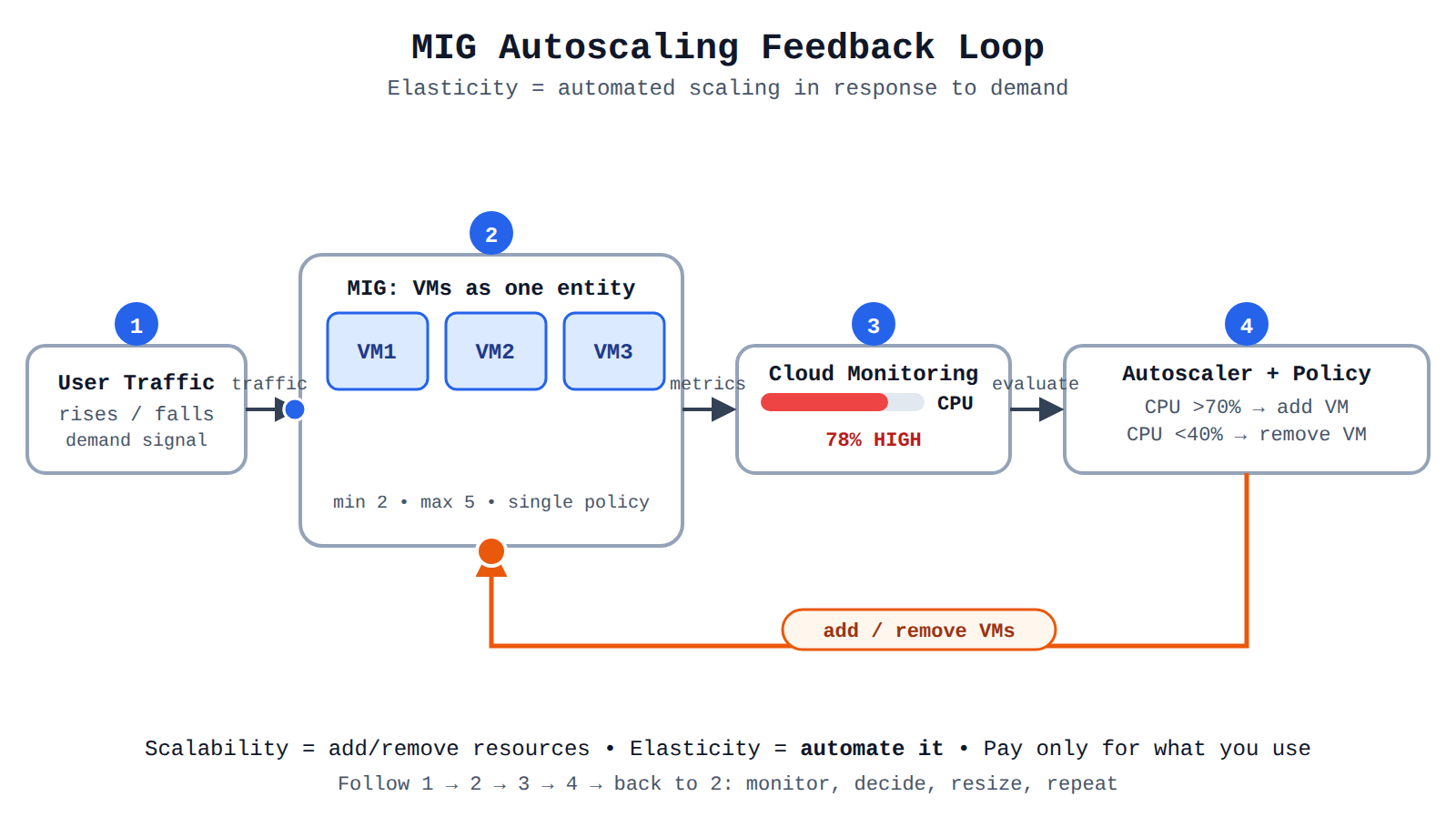
A process flow showing user traffic hitting a MIG, Cloud Monitoring sending CPU metrics to an autoscaler policy, and the autoscaler adding or removing VMs in a loop. Animation moves requests forward and a dot around the feedback loop while a new VM appears and CPU drops.
Compute Engine managed instance groups (MIGs) (opens in a new tab) are groups of virtual machines (VMs) that are managed and scaled as a single entity. An autoscaling policy for a MIG sets the minimum and maximum number of VMs and the trigger for scaling, such as adding VMs when CPU use passes a threshold and removing them when it drops. Serverless compute and database services scale quickly from zero to high request volumes, and customers pay only for what they use.
| Approach | How capacity changes | When it fits |
|---|---|---|
| Manual scalability | Administrators monitor metrics in Cloud Monitoring and adjust allocation, supported by Recommender suggestions for right-sizing | Steady or predictable workloads where timely review prevents waste and bottlenecks |
| Automated elasticity | Autoscaling policies or serverless platforms add and remove capacity automatically based on thresholds and demand | Fluctuating or spiky workloads where demand changes faster than people can respond |
Exam tip: Scalability is the ability to add or remove resources, elasticity is automation of that change in response to demand, and reliability is continuing to function despite failures.
Reliability and Resilience: Withstanding Failures
Reliability is the ability of an application to keep working despite failures of its components. A resilient application continues to function when parts fail, and availability measures the fraction of time a service is usable as a key indicator of service health. Highly available designs maximize availability by deploying components redundantly, which means distributing compute resources, balancing traffic across them, and replicating data.
Three design themes support scalable and resilient applications:
- Automation: automating provisioning, testing, and deployment increases consistency and speed and reduces human error and repetitive work.
- Loose coupling: building the system as independent, loosely coupled components allows flexible placement of resources and more resilient application and storage design.
- Data-driven design: collecting metrics and logs to understand behavior supports decisions about when to scale and whether a service is unhealthy.
Reliability requirements differ by workload and by critical period. (opens in a new tab) An ATM service or trading platform may need very high availability, while a nightly batch process may have a data-freshness target such as eight hours. Peak periods such as holiday shopping, tax-filing season, university admissions, or trading hours from 8 AM to 5 PM Monday to Friday need planned capacity, peak-load testing, and practices such as freezing production code.
Global Infrastructure and Practices That Minimize Disruption
Global infrastructure minimizes disruption by placing redundant capacity and traffic controls across geographic boundaries. Google Cloud services run in regions and zones around the world, so an application can be deployed near its users and meet its availability goals. Compute Engine instance groups and GKE clusters can be spread and managed across the zones in a region, so failure of one component or zone has less impact.
Data and traffic controls move requests from users to healthy capacity on the other side of a failure. Cloud Load Balancing includes global load balancing that directs traffic to a healthy region closest to users. Compute Engine regional persistent disks replicate data synchronously across zones in a region to preserve data. The serverless platform includes managed compute and database products with built-in redundancy and load balancing.
Operational practices further protect continuity during attacks and outages. Google Cloud Armor security policies help applications stay available during denial of service attacks, while caching in the load balancer lets users reach cached content even when origin servers are down. Infrastructure Manager, Config Connector, Terraform, and continuous integration and continuous deployment (CI/CD) pipelines with Cloud Build automate provisioning and deployment for consistent, repeatable changes.
Total Cost of Ownership (TCO) is the complete cost of running a workload over its lifetime, not just the upfront price. TCO analysis in Google Cloud compares buying and maintaining on-premises hardware with paying only for cloud resources that are actually used. This comparison shows why moving to the cloud shifts spending from large upfront investments to flexible operating costs.
From Capital Expenditure to Operational Expenditure
The shift from capital expenditure (CapEx) to operational expenditure (OpEx) is the core financial change when moving to cloud infrastructure. With CapEx, an organization buys physical servers, storage, and data center space upfront and owns that capacity whether it is fully used or not. With OpEx, the organization pays as it goes for virtual machines, storage, and services, so spending rises and falls with actual demand. This shift removes the need to overbuy hardware as a safety net, because extra capacity can be added and removed on demand.
On-premises ownership also carries ongoing maintenance costs that shrink or disappear in the cloud. Those hidden costs include rack space, power, cooling, and physical maintenance per host, plus salaries for server, network, and security administrators. Hardware must be amortized over its useful life, often measured in years, and storage must account for raw disk price and redundancy policies. In Google Cloud, the provider manages the physical data center, so customer TCO focuses on consumed cloud resources, migration, and support instead of facilities and hardware refreshes.
Components That Make Up TCO
TCO includes every cost category that keeps a workload running for one year or over a longer period such as five years. A TCO-aware view looks beyond the first bill and includes operations, licenses, and support alongside infrastructure. Google Cloud breaks cloud TCO into shared components that can be compared directly with on-premises estimates.
- Compute: cost of virtual CPUs, memory, and instance running time in the cloud versus physical hosts and cores on-premises.
- Storage: cost of disk types and provisioned capacity versus raw storage price per GiB and redundancy overhead on-premises.
- Network: cost of data movement and connectivity in the cloud versus on-premises networking equipment and operations.
- Operation: cost of IT operations staff time, monitoring, and management, informed by IT salary and hosts-per-administrator ratios.
- OS licenses and support: cost of operating system licenses and the selected Google Cloud support tier, plus one-time migration cost per virtual machine (VM).
Right-sizing connects these components by matching allocated vCPU, memory, and storage to actual demand. Cloud Monitoring (opens in a new tab) gives real-time visibility into utilization, while Recommender (opens in a new tab) analyzes that history to suggest smaller or more efficient configurations. When right-sizing is combined with accurate on-premises baselines for CPU burst, memory burst, and vCPU-to-core ratio, the comparison shows true savings rather than sticker price.
Pay-As-You-Go and Optimized Resource Use
Pay-as-you-go pricing means resources are billed for the time and capacity used, so idle capacity does not have to be paid for. Autoscaling strengthens this model by adding capacity when demand rises and removing it when demand falls. This dynamic adjustment avoids both overprovisioning, which wastes money, and underprovisioning, which causes slowdowns.
- Compute Engine managed instance groups (MIGs): groups of VMs managed and scaled as a single entity use autoscaling policies with minimum and maximum VM counts, adding VMs when CPU use passes a threshold and removing them when it drops.
- Google Kubernetes Engine (GKE) autoscaling: cluster resources adjust to application needs through Cluster Autoscaler for nodes, Horizontal Pod Autoscaler for pod replicas, Vertical Pod Autoscaler for pod requests and limits, and Node Auto-Provisioning for optimized node pools.
- Cloud Run: serverless platform with built-in autoscaling adjusts the number of instances based on incoming traffic, scaling up for load and scaling down to reduce cost when traffic falls.
Discounts further lower the billing rate for steady or flexible use:
| Option | How it works | Choose when |
|---|---|---|
| Committed use discounts (CUDs) | Discount for committing to minimum usage or spend for one year or three years | Usage is predictable and steady in a region or across a billing account |
| Sustained use discounts | Automatic discount in Compute Engine for consistent use of a service | VMs run for a large part of the month without a formal commitment |
| Spot VMs | Access to unused VM capacity at more than 80% lower cost than regular VMs | Workloads are fault-tolerant and flexible and can handle interruptions |
Exam tip: TCO means all lifetime costs — compute, storage, network, operations, and licenses — not just the upfront hardware or instance price.
Estimating and Managing TCO in Google Cloud
The Quick TCO Estimator in Migration Center (opens in a new tab) creates a side-by-side comparison of Google Cloud and on-premises costs. The Summary view shows average yearly and monthly Compute Engine TCO with estimated savings percentage, total workload scope for right-sized vCPU, memory, and storage, and a 5-year TCO comparison. The Technical breakdown view lists the target cloud configuration such as machine series, vCPUs, memory, and disk type alongside best-fit on-premises hardware recommendations. The Pricing breakdown view shows annual and 5-year TCO split into compute, storage, network, operation, and license components.
Ongoing control depends on visibility, accountability, and value measurement. Cloud Billing (opens in a new tab) and Cost Management tools track spending trends, forecast costs, and send budgets and alerts when spending exceeds limits. Tags and labels by project, team, or department assign costs to their owners and reveal high-use areas. FinOps (opens in a new tab) builds on this data by giving teams self-service optimization tools and linking cloud spend to business value through unit economics, such as revenue per customer or cost per transaction, so spending growth can be judged as healthy scaling or inefficiency.
Business agility and technical flexibility are two related benefits of moving to cloud infrastructure. Business agility is the speed at which an organization can experiment, release features, and respond to market change. Technical flexibility is the freedom to choose and combine the right compute, storage, analytics, and application services for each business need.
Business Agility: Innovate Faster and Respond Quickly
Business agility in the cloud means teams can innovate rapidly, respond quickly to change, and deliver value faster without waiting for hardware purchases or manual setup. Teams use self-service platforms to provision, manage, and optimize their own cloud resources on their own, which builds ownership and shortens time-to-market. A common example is a temporary research and development environment for three to six months with low capital spending, using on-demand pricing and high compute capacity that can be set up quickly.
Cloud agility is strengthened by practices that automate and speed up application releases for shorter cycle times. DORA metrics (opens in a new tab) measure software delivery performance through change failure rate (CFR), time to detect (TTD), and time to restore (TTR) to find and fix bottlenecks in development and deployment. Site Reliability Engineering (SRE) (opens in a new tab) improves operational reliability through automation, observability, and incident response, which reduces downtime, lowers recovery time, and avoids overprovisioning resources just as a safety net.
Technical Flexibility: Choose the Right Tools for Each Need
Technical flexibility in the cloud is the ability to select and integrate diverse managed services, high-level APIs, and infrastructure options for specific workloads. Instead of being limited to one on-premises environment, an organization can use best-in-breed solutions, open source technologies, and global infrastructure to meet technical and regulatory needs. Google Cloud (opens in a new tab) supports this with an open cloud model that offers maximum choice while hiding complexity, and managed Kubernetes helps reduce management and security complexity across hybrid and multicloud environments.
Common technical drivers that show this flexibility include:
- Building new capabilities such as advanced analytics and AI that are hard to build in existing environments
- Improving quality and performance of service for users
- Automating and accelerating application rollouts for faster time to market
- Using high-level APIs and services to speed up development
- Accelerating provisioning of compute and storage resources on demand
- Using serverless services to build elastic services and capabilities faster and at scale
- Using global infrastructure to build global or multi-regional architectures
A multicloud approach (opens in a new tab) extends flexibility by letting organizations use unique capabilities from each cloud service provider (CSP) without being limited to one provider. This choice helps avoid vendor lock-in and lets teams pick the best solution for each need, although it requires weighing interoperability, consistent security, management complexity, and the cost of building across multiple clouds.
Exam tip: Business agility is about speed — faster experimentation and time-to-market — while technical flexibility is about choice — selecting the right services and providers for each need.
Balancing Agility With Cost Efficiency
Balancing agility with cost efficiency means keeping flexible infrastructure for rapid innovation while still controlling spending and resource use. Flexible and reliable operations prevent revenue loss from outages and improve customer satisfaction, which protects value even as teams move fast. When reliability improves through automation and observability, the organization can respond to market demands quickly without overprovisioning extra capacity just to handle failures.
Key Facts
- Scalability is the ability to add or remove resources, elasticity is automated scaling in response to demand, and reliability is continuing to function despite component failures.
- Compute Engine managed instance groups (MIGs) scale as a single entity using autoscaling policies with minimum and maximum VM counts based on thresholds such as CPU utilization.
- Total Cost of Ownership (TCO) covers all lifetime costs including compute, storage, network, operations, and OS licenses and support, and moving to the cloud shifts spending from upfront capital expenditure (CapEx) to pay-as-you-go operational expenditure (OpEx).
- Spot VMs offer unused capacity at more than 80% lower cost than regular VMs for fault-tolerant workloads, while committed use discounts (CUDs) reward one-year or three-year commitments for steady use.
- Business agility is speed of experimentation and time-to-market, while technical flexibility is choice of the right managed services and providers for each need.
Frequently Asked Questions
What is the difference between scalability, elasticity, and reliability in cloud applications?
Scalability is the ability to add or remove resources as work grows or shrinks, elasticity is automated scalability that changes capacity without manual action when workloads rise or fall, and reliability is the ability to keep working despite failures of its components. Automated elasticity adds resources when demand rises and removes them when demand falls, while reliability is supported by redundant deployment, traffic balancing, and data replication.
How does moving to Google Cloud affect Total Cost of Ownership (TCO) and the shift from capital expenditure (CapEx) to operational expenditure (OpEx)?
Total Cost of Ownership (TCO) is the complete cost of running a workload over its lifetime, including compute, storage, network, operation, and operating system licenses and support. Moving to the cloud shifts spending from capital expenditure (CapEx), where an organization buys physical servers and capacity upfront, to operational expenditure (OpEx), where the organization pays as it goes for resources actually used so spending rises and falls with demand.
When should I use Committed use discounts (CUDs), sustained use discounts, or Spot VMs in Google Cloud?
Committed use discounts (CUDs) provide a discount for committing to minimum usage or spend for one year or three years and fit predictable and steady usage. Sustained use discounts are an automatic discount in Compute Engine for consistent use for a large part of the month without a formal commitment. Spot VMs provide access to unused virtual machine capacity at more than 80 percent lower cost than regular VMs and fit fault-tolerant and flexible workloads that can handle interruptions.
What is the difference between business agility and technical flexibility when moving to cloud infrastructure?
Business agility is the speed at which an organization can experiment, release features, and respond to market change without waiting for hardware purchases or manual setup. Technical flexibility is the freedom to choose and combine the right compute, storage, analytics, and application services for each business need, including using best-in-breed solutions and multiple cloud service providers.
Sample Question
A retail company wants to test a new machine learning recommendation system for three months to determine whether it increases online sales conversions.
The leadership team wants the developers to quickly build and test the prototype using managed tools without purchasing upfront server hardware or committing to permanent infrastructure if the experiment fails.
How does transitioning to cloud infrastructure provide the business agility and technical flexibility needed for this initiative?
It requires deploying on-premises physical data center expansion before launching any software prototypes.
It requires entering into multi-year physical hardware leases to secure fixed compute capacity for all experimental workloads.
It eliminates the need for developers to write custom application code or integrate business data with cloud services.
It enables on-demand provisioning of managed services, allowing rapid experimentation and faster time-to-market with minimal upfront capital expenditure.
How learners score on this domain
Last updated