Fundamental
Prepare and test your skills

Fundamental
Prepare and test your skills
Controlling Cloud Costs with Guardrails
Financial guardrails in Google Cloud are the combination of spending plans and consumption limits that keep cloud costs visible and under control. Budgets (opens in a new tab) track planned versus actual spending and trigger notifications when thresholds are reached, while quotas limit how many resources can be created or used. Together they give product owners, developers, administrators, and financial analysts the information and boundaries needed to make cost-effective decisions.
Budgets and Cost Allocation
Budgets in Google Cloud are standardized spending plans that define how much teams or projects are expected to spend after discounts and shared costs are included. A cost allocation system divides the overall cloud budget and assigns a portion to each team or project, which gives each team ownership over its spending and encourages decisions within its limit. Standardized budgeting aligns those allocations with organization goals and enables proactive cost management instead of reacting after overspending. Because individual choices about provisioning and managing resources affect costs, clear ownership ensures everyone contributes to cost optimization. Stakeholders need three related types of cost data to connect spending to business value:
- Projected resource costs: cost estimates created at design and deployment time.
- Real-time resource usage costs: up-to-date cost data used for ongoing monitoring and budget validation.
- Costs mapped to business metrics: insights into how spending affects key performance indicators (KPIs).
When teams can see projected, real-time, and business-linked costs, they can validate budgets during development and deployment and identify cost-effective strategies before costs grow.
Automated Alerts and Ongoing Visibility
Automated alerts in Google Cloud are notifications sent to administrators and other stakeholders when usage or spending reaches a predefined threshold. The Google Cloud Billing dashboard provides real-time insight into cloud spending and regular snapshots, for example weekly cost progression views, that support budgeting and forecasting. Cloud Monitoring (opens in a new tab) provides real-time visibility into resource utilization metrics, while Recommender analyzes utilization data to suggest better resource allocation. Custom metrics can also track application-specific utilization and trigger alerts when thresholds are met. A budget guardrail works as an ordered response loop:
Budget Guardrail Loop: Monitor, Alert, Act
Process Flow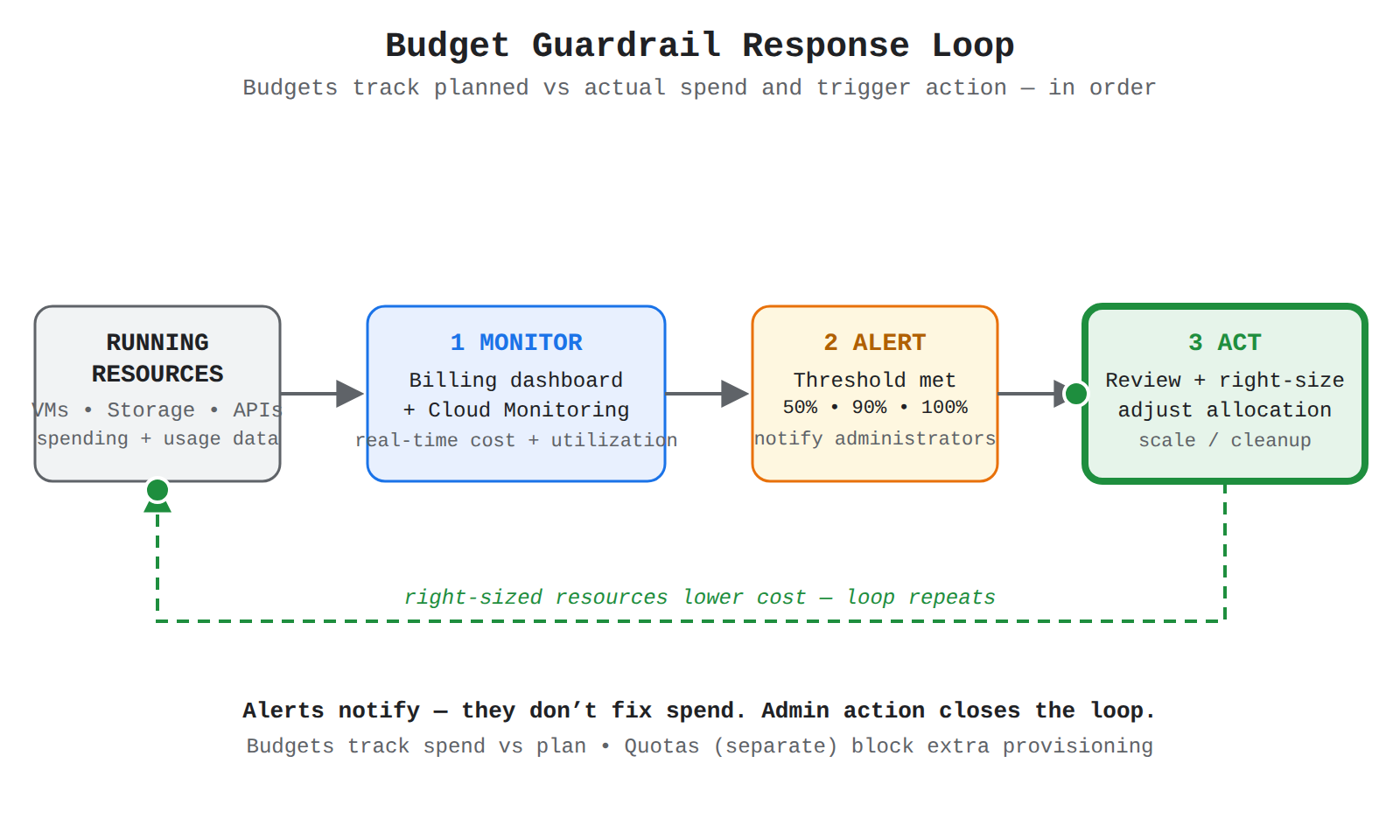
A left-to-right process flow from running resources to Monitor to Alert to Act, with a feedback arrow back to resources. Animation moves a dot through Monitor, Alert, and Act in order while each step highlights in sequence.
- Monitor: Spending and utilization data flows from running resources to the Billing dashboard and Cloud Monitoring.
- Alert: The system sends a notification to administrators when a predefined spending or utilization threshold is met.
- Act: Administrators review the data and adjust resource allocation to right-size resources and prevent cost problems.
Alerts do not fix spending by themselves because they depend on administrators to take action after the notification. This loop keeps budgets proactive, because timely scaling and cleanup balance cost against performance and user experience.
Quotas as Limits on Resource Consumption
Quotas in Google Cloud are limits that control how many resources a project can create or use, which directly caps consumption and cost. Project quotas affect the ability to create resources such as Compute Engine virtual machines, Pub/Sub topics, Cloud Storage buckets, and Cloud VPN endpoints inside Google Cloud projects. Projects sit inside folders, and folders sit inside the Organization resource (opens in a new tab) at the top of the resource hierarchy, so the hierarchy defines where billing is collected and where roles and permissions apply. Because the hierarchy also establishes the security and billing boundary, a quota on a project prevents one team from consuming more than its share of the organization's resources. Budgets and quotas provide different kinds of control, as compared below:
| Control | Primary purpose | What happens at the threshold or limit |
|---|---|---|
| Budgets | Track planned versus actual spending for a team or project | Stakeholders receive an alert and then decide how to adjust allocation |
| Quotas | Limit how much can be provisioned or consumed in a project | Additional resource creation is blocked, which prevents further cost from that consumption |
Complementary capacity limits, such as minimum and maximum sizes on Compute Engine managed instance groups (MIGs), show the same idea: autoscaling adds machines when utilization is high and removes them when it drops, but only within the defined minimum and maximum.
Exam tip: Budgets notify stakeholders when spending thresholds are reached, while quotas prevent unexpected costs by blocking additional resource consumption.
Cost optimization and efficiency in Google Cloud means getting the best value from cloud spending while keeping performance and scalability. An efficient workload avoids over-provisioning, matches resources to actual demand, and pays the lowest billing rate for the resources it does use. Google Cloud supports this balance with discount programs that lower rates and with rightsizing tools that match resource size to real usage.
Committed Use Discounts (CUDs)
Committed Use Discounts (CUDs) (opens in a new tab) are discounted prices offered in exchange for committing to a minimum level of use or spend for a one-year period or a three-year period. Resource-based CUDs apply when an organization commits to use a minimum quantity of Compute Engine resources in a specific region, and for most Cloud Billing accounts the discount is shared across all projects linked to that account. Spend-based CUDs apply when an organization commits to spend a minimum amount on a particular product, with the discount applied at the billing account level regionally or globally depending on the product. Organizations can use CUD auto-renewal to avoid manually repurchasing commitments when they expire, and CUD savings can apply on top of enterprise discounts.
Sustained Use Discounts (SUDs)
Sustained Use Discounts (SUDs) (opens in a new tab) are automatic discount credits for consistent use of Compute Engine and Google Kubernetes Engine (GKE) resources during a billing cycle. Sustained Use Discounts require no upfront commitment or action because the discount is applied after continuous resource usage passes specific duration thresholds. This makes Sustained Use Discounts different from Committed Use Discounts, where the organization must purchase a one-year or three-year commitment before the discount applies. Choose Sustained Use Discounts for steady workloads that run for much of the month but are not ready for a long-term commitment.
Exam tip: Committed Use Discounts require a one-year or three-year commitment, while Sustained Use Discounts are automatic credits for continuous usage with no commitment.
Rightsizing Recommendations to Improve Financial Efficiency
Rightsizing is the practice of continuously monitoring resource utilization and adjusting allocation to match actual demand. Over-provisioning creates unnecessary cost, while under-provisioning creates performance bottlenecks that affect applications and user experience. Cloud Monitoring (opens in a new tab) provides real-time visibility into utilization metrics, and Recommender (opens in a new tab) analyzes that utilization data to suggest more efficient allocations, so data flows from the monitored workload to Recommender and then to the administrator as an actionable recommendation. Administrators can also use custom metrics and alerts to trigger timely action, where the metric tracks application-specific usage and the alert notifies the administrator when a threshold is met. Rightsizing recommendations from Recommender help improve financial efficiency by targeting waste that discounts alone cannot fix:
- Idle VM recommendations: identify Compute Engine instances that are unused and can be decommissioned.
- Idle resources recommendations: identify unneeded attached resources that continue to generate usage costs.
- Machine type recommendations: suggest a more cost-effective instance type when a VM is consistently over-provisioned.
Decommissioning confirmed idle resources and applying machine type changes reduces the billed usage that Committed Use Discounts and Sustained Use Discounts are applied to.
Comparing Discount Options for Common Workloads
Discount options in Google Cloud differ by how the lower rate is earned and what workload pattern each option fits. The three options below cover predictable, steady, and flexible workloads without changing application architecture.
| Option | How discount is earned | Choose when |
|---|---|---|
| Committed Use Discounts (CUDs) | Commit to minimum quantity or spend for one year or three years | Usage is predictable and steady over a long term |
| Sustained Use Discounts (SUDs) | Run Compute Engine or GKE resources continuously past monthly thresholds | Usage is steady through the month but no long-term commitment is wanted |
| Spot VMs (opens in a new tab) | Use unused VM capacity at more than 80% lower cost than regular VMs | Workloads are fault-tolerant and flexible, such as batch jobs that can tolerate preemption |
Spot VMs flow from spare Compute Engine capacity to the workload at a low price, but Compute Engine can preemptively stop or delete Spot VMs to reclaim capacity. Because pricing models and features change over time, organizations should regularly review pricing and consider alternative features to keep architecture and discount choices aligned with current demand.
Visibility and accountability through resource organization means structuring Google Cloud so every cost can be traced to the team, project, or purpose that created it. The resource hierarchy provides the structure, labels and tags add business context, and Cloud Billing reports turn that structure into visible spending patterns. Together they let finance and engineering see who spent money, for what purpose, and where to act.
How the Resource Hierarchy Maps Costs to Departments and Projects
The Google Cloud resource hierarchy is the parent-child structure that organizes all resources for access control and cost analysis. Costs flow upward from individual resources to the project that contains them, then to folders and the organization, while a Cloud Billing account tracks the charges for all projects linked to it for payment. Ownership, which controls Identity and Access Management (IAM) permission inheritance, is separate from payment linkage, which defines which Cloud Billing account pays for a project. Because projects and folders can mirror business structure, billing data can be grouped by department or application without manual spreadsheets. The hierarchy contains four levels with distinct roles:
Cost Roll-Up Through Resource Hierarchy
Hierarchy / TaxonomyA bottom-up hierarchy where resource costs roll up through projects and folders to the Organization, with projects linked by payment to a separate Cloud Billing account for reports.
- Organization: (opens in a new tab) The root node of the hierarchy, linked to one company domain. The Organization parents all folders, projects, resources, and Cloud Billing accounts for central policy and visibility.
- Folders: Grouping containers under the Organization that can hold projects or other folders. Folders share common IAM policies, so a folder can represent a department, cost center, or environment.
- Projects: The required base-level container for using services such as Compute Engine virtual machines, Pub/Sub topics, and Cloud Storage buckets. A project can represent a team, application, or business function, and any resource exists in exactly one project.
- Resources: The service-level components at the lowest level, such as a virtual machine or storage bucket. Resource usage charges are collected under their parent project.
How Labels and Tags Create Cost Accountability
Labels (opens in a new tab) are key-value pairs attached to resources to add business meaning, such as team=banking_appdev, region=emea, or product=frontend. Label data is forwarded to the billing system, so charges can be broken down and analyzed by label in Cloud Billing and in BigQuery exports. Tags are also key-value pairs used for detailed cost allocation analysis such as chargebacks and audits through billing exports. Newly created labels can take up to a day to appear in Cloud Billing, so teams should apply labels at creation time and review them regularly.
A strong metadata strategy keeps this accountability accurate and simple:
- Validity: Choose tags and labels that map to business indicators, chargebacks, and regulatory needs, such as team, product, or region.
- Automation: Enforce tagging automatically with tools like Terraform, because manual tagging creates errors and inconsistency.
- Simplicity: Measure simple, uncorrelated factors and avoid complex rules for edge cases that confuse operational teams.
How Billing Reports Monitor Spending Patterns
Cloud Billing reports (opens in a new tab) are the primary tool for seeing cost trends and answering which services, projects, or labels cost the most. A report can be filtered and grouped by project, service, SKU, and label, and shows the impact of credits and discounts on net cost. The Cost Table gives a detailed tabular view for invoice reconciliation, while Cost Breakdown shows an at-a-glance view of costs after savings. When the hierarchy and labels are in place, reports reveal patterns such as high usage by one team, growth in a specific region, or unexpected spikes. For deeper analysis, billing data can be exported to BigQuery and visualized in custom dashboards that compare spend against budgets and business goals. Regular review of these reports lets owners identify waste, forecast costs, and keep each department responsible for its own usage.
Exam tip: A Cloud Billing account pays for linked projects but is not their IAM parent, so projects do not inherit permissions from the billing account they are linked to.
Key Facts
- Budgets track planned versus actual spending and send alerts when thresholds are reached, while quotas block additional resource creation to prevent further cost.
- Committed Use Discounts (CUDs) require a one-year or three-year commitment to a minimum quantity or spend, while Sustained Use Discounts (SUDs) are automatic credits for continuous Compute Engine or GKE usage with no commitment.
- Spot VMs use spare Compute Engine capacity at more than 80% lower cost but can be preemptively stopped or deleted to reclaim capacity.
- Costs flow upward from resources to projects to folders to the Organization, while a Cloud Billing account tracks charges for all linked projects for payment.
- Labels and tags are key-value pairs forwarded to the billing system so Cloud Billing reports can break down costs by team, product, region, or other business meanings.
Frequently Asked Questions
What is the difference between Budgets and quotas in Google Cloud?
Budgets in Google Cloud track planned versus actual spending and send notifications to stakeholders when thresholds are reached, while quotas limit how many resources a project can create or use. When a budget threshold is met stakeholders receive an alert and decide how to adjust allocation, but when a quota limit is reached additional resource creation is blocked which prevents further cost from that consumption.
When should I use Committed Use Discounts (CUDs) instead of Sustained Use Discounts (SUDs) in Google Cloud?
Committed Use Discounts (CUDs) should be used when usage is predictable and steady over a long term because they require committing to a minimum quantity or spend for a one-year period or a three-year period. Sustained Use Discounts (SUDs) should be used when Compute Engine or Google Kubernetes Engine (GKE) usage is steady through the month but no long-term commitment is wanted because they are automatic credits applied after continuous usage passes duration thresholds with no upfront commitment or action.
How do labels and tags in Google Cloud create cost accountability?
Labels in Google Cloud are key-value pairs such as team, product or region attached to resources to add business meaning and tags are also key-value pairs used for detailed cost allocation analysis. Label and tag data is forwarded to the billing system so Cloud Billing reports can break down and analyze charges by team, product, region or other business meanings for chargebacks and audits.
Sample Question
An enterprise operates multiple applications across different business units in Google Cloud. The finance team requires a mechanism to allocate infrastructure expenses granularly to specific cost centers and development environments, as well as visualize spending trends over time.
Which approach should the organization use to categorize these costs and monitor spending patterns?
How learners score on this domain
Last updated