Fundamental
Prepare and test your skills
Fundamental
Prepare and test your skills
GMEK, CMEK, and CSEK Encryption Use Cases
Encryption in Google Cloud is decided by who owns the key encryption key (KEK) that protects data. Google-managed encryption keys (GMEK) (opens in a new tab) are owned and managed by Google with no customer action, customer-managed encryption keys (CMEK) (opens in a new tab) are created and managed by the customer in Cloud Key Management Service (Cloud KMS), and customer-supplied encryption keys (CSEK) are supplied directly by the customer. A single organization can mix approaches, using simple software keys for least-sensitive data and hardware or external keys for most-sensitive data.
Google-Managed Keys for Automatic Default Protection
Google-managed encryption keys (GMEK), also called Google default encryption, are the automatic baseline where Google owns and manages the symmetric KEKs that protect customer data at rest. Services such as Filestore encrypt customer content at rest by default, and the customer takes no action to enable or manage keys. Data flows from the service to Google-managed keys for encrypt and decrypt operations, so ownership, rotation, and availability stay entirely on the Google side of the trust boundary. Choose GMEK when operational simplicity matters most and there is no compliance or control requirement to manage keys, set boundaries, or view key audit logs.
Customer-Managed Keys for Control and Compliance Needs
Customer-managed encryption keys (CMEK) are Cloud KMS keys that the customer controls and uses with CMEK-integrated services such as Filestore and Google SecOps (opens in a new tab). CMEK uses envelope encryption, where the service generates a data encryption key (DEK) to encrypt the data and the customer's KEK in Cloud KMS wraps, or encrypts, that DEK. Because the service depends on Cloud KMS to unwrap the DEK on every access, revoking or disabling the CMEK blocks the service from reading, writing, ingesting, or processing data.
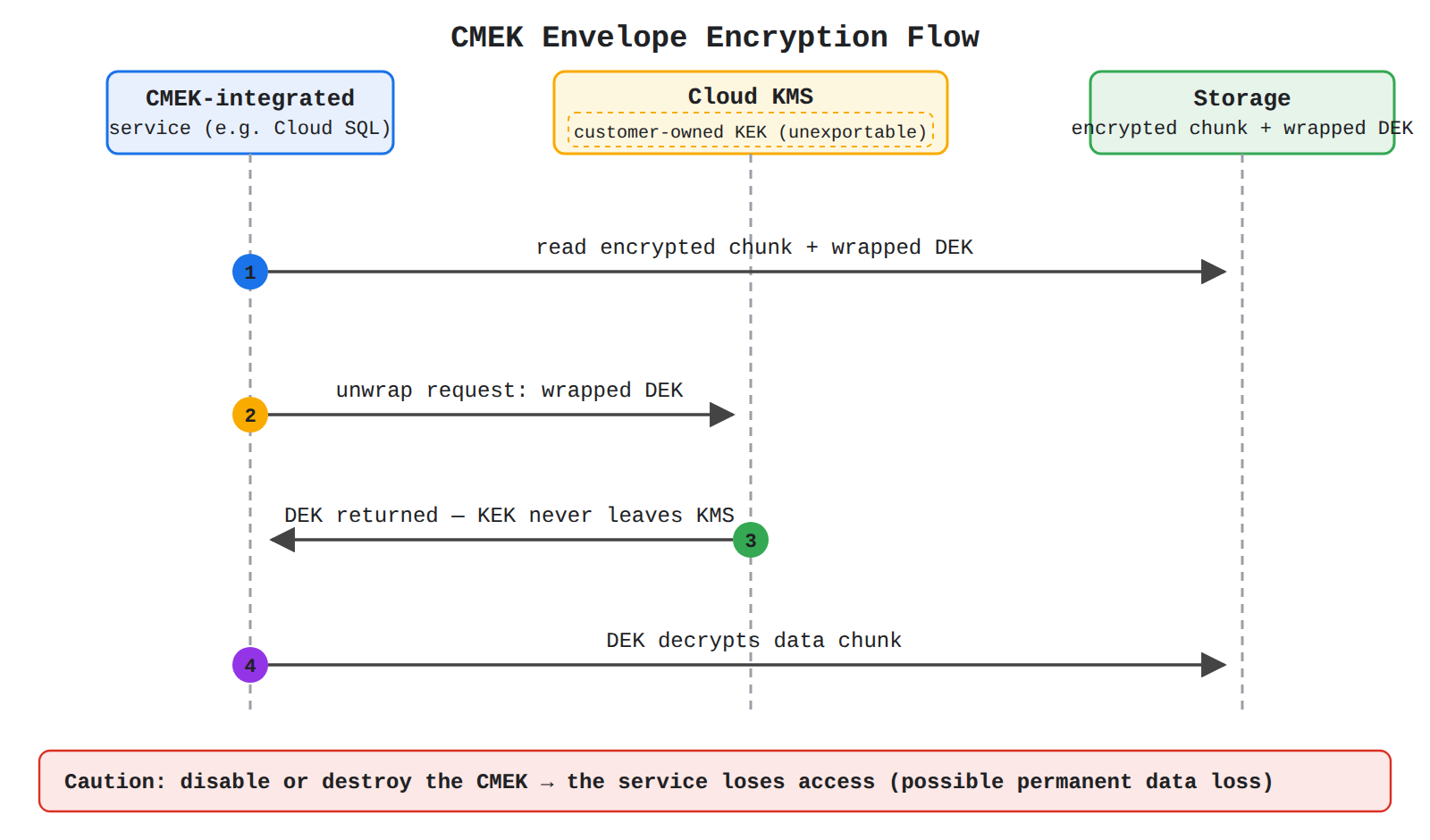
A sequence diagram showing a CMEK-integrated service reading an encrypted chunk and wrapped DEK from storage, sending the wrapped DEK to Cloud KMS, receiving the unwrapped DEK while the customer-owned KEK never leaves KMS, and using the DEK to decrypt the data chunk. Steps reveal in order, with a caution that disabling the key blocks access.
CMEK gives the customer control that GMEK does not:
- Protection level, including software keys, hardware keys in an HSM cluster, and external keys in Cloud External Key Manager (Cloud EKM)
- Location of the key ring and key, which must be in the same location as the protected resource
- Rotation schedule to limit the impact of a potential compromise
- Usage and access permissions granted to service accounts
- Cryptographic boundaries for where keys can be used
- Audit logs for key use and key lifecycle control, including disable, destroy, and delete
Choose CMEK when compliance, governance, or security policy requires control over rotation, location, access, and auditability, or when organization policy must enforce it. Cloud KMS Autokey fits teams that want CMEK control without pre-provisioning every key ring, key, and service account, because Autokey generates them on demand during resource creation.
Customer-Supplied Keys for Direct Key Supply
Customer-supplied encryption keys (CSEK) are the third encryption category listed alongside Google default encryption and CMEK, where the customer supplies the key material for protecting data. CSEK keeps key supply on the customer side of the trust boundary rather than having Google own the keys or having the customer manage keys inside Cloud KMS. Choose CSEK only for use cases that specifically require supplying keys directly instead of using the default Google-managed model or the Cloud KMS-managed CMEK model with its integrated rotation, audit, and policy controls.
Choosing Between Options and Enforcing CMEK With Policy
The three options differ by ownership, management effort, and control. GMEK is automatic and simplest, CMEK adds customer control in Cloud KMS, and CSEK adds direct customer supply of key material.
| Option | Who owns and manages the KEK | Choose when |
|---|---|---|
| Google-managed encryption keys (GMEK) | Google owns and manages keys automatically | Default protection is enough and no extra key control is needed |
| Customer-managed encryption keys (CMEK) | Customer manages keys in Cloud KMS, including software, HSM, or Cloud EKM keys | Compliance or control requires authority over location, rotation, permissions, boundaries, audit logs, and lifecycle |
| Customer-supplied encryption keys (CSEK) | Customer supplies the key material | The use case requires direct customer supply rather than Google-managed or Cloud KMS-managed keys |
Organizations can enforce the CMEK choice with policy constraints applied at the organization, folder, or project level. The constraint constraints/gcp.restrictNonCmekServices requires listed services to use CMEK, so a new instance cannot be provisioned without selecting a key, while constraints/gcp.restrictCmekCryptoKeyProjects restricts which projects can supply those keys.
Setting up CMEK follows an ordered dependency where the key must exist and be accessible before the protected resource is created:
- Create key ring and key: Create a Cloud KMS key ring and symmetric key in the same location as the future instance or resource.
- Grant access: Grant the service's service account permission to use the key for encrypt and decrypt operations.
- Create new resource with the key: Create a new instance and select the Cloud KMS key, which can only be enabled on a new instance, not added to an existing one.
- Operate and rotate: Optionally set a rotation schedule and monitor logs for unavailable keys.
This added control creates added responsibility. Disabling a key in active use can cause permanent data loss, and loss of access stops all data operations until access is restored. After rotation begins, wait two weeks before disabling or destroying the previous version, and if access is lost, data is deleted after 30 days while full recovery after re-enabling can take up to two weeks.
Exam tip: Choose GMEK when default protection with no key management is enough, and choose CMEK when you must control rotation, location, permissions, audit logs, and lifecycle in Cloud KMS.
Operational implications describe who does the work to protect data at rest. With Google default encryption, Google creates, stores, rotates, and revokes keys automatically. With customer-managed encryption, the customer takes control of those lifecycle decisions in Cloud Key Management Service (Cloud KMS) (opens in a new tab) and accepts responsibility for availability and safe rotation.
How Default Encryption Handles Operations
Google-managed encryption keys (GMEK) are the default encryption for services such as Filestore (opens in a new tab), where Google encrypts customer content at rest without any customer action. Google owns and manages the symmetric key encryption keys (KEKs) that wrap data encryption keys (DEKs) through envelope encryption. The customer has no key ring to create, no location or rotation schedule to manage, and no key permissions to grant. Access to the resource feels the same as with customer-managed keys, but revocation by the customer is not possible because Google controls the key lifecycle.
How Customer-Managed Encryption Changes Responsibilities
Customer-managed encryption keys (CMEK) are Cloud KMS keys that the customer creates and assigns to CMEK-integrated services. The customer creates a key ring and key, grants the service account permission to use the key, and selects that key when creating the resource. The key ring and key can live in a different project from the resource, but they must be in the same location.
CMEK gives the customer direct control over key governance:
- Protection level, including software keys, hardware keys in an HSM cluster, and external keys in Cloud External Key Manager (Cloud EKM)
- Location, cryptographic boundaries, and which projects can supply keys
- Rotation schedule and key version lifecycle
- Usage, access permissions, and audit logs
Cloud KMS Autokey reduces setup work by generating key rings, keys, and service accounts on demand during resource creation. Organization policy constraints can require CMEK with constraints/gcp.restrictNonCmekServices and limit allowed key projects with constraints/gcp.restrictCmekCryptoKeyProjects. If the first constraint lists a service such as Google SecOps (opens in a new tab) but no key is supplied, provisioning is blocked.
Comparing Generation, Storage, Rotation, and Revocation
The choice between GMEK and CMEK changes who generates and stores keys, who controls rotation, and who can revoke access. GMEK keeps all key operations on the Google side of the trust boundary, while CMEK moves key generation, storage, rotation, and revocation to the customer side in Cloud KMS.
| Option | Key generation and storage | Rotation and lifecycle | Revoke access to data |
|---|---|---|---|
| GMEK | Google generates and stores KEKs; no customer key ring needed | Google manages rotation automatically | Customer cannot revoke by disabling a key |
| CMEK | Customer generates keys in Cloud KMS or links external EKM keys; customer manages key ring location | Customer sets rotation schedule and manages disable, destroy, and delete of versions | Customer can revoke by disabling or destroying the active key version, which blocks encrypt and decrypt operations |
Revocation is the main tradeoff of CMEK. Disabling or destroying the active CMEK version stops the service from reading, writing, updating, ingesting, storing, or processing data. External EKM keys add another dependency because a third party manages availability, and Google Cloud is not responsible for key availability.
Rotation, Revocation, and Recovery Timelines for CMEK
Key lifecycle controls for CMEK follow strict timelines to prevent permanent data loss. Rotation creates a new key version for new data while the previous version is still needed for existing data, so the old version must stay enabled during a grace period. Monitoring logs helps detect an unavailable or unauthorized key while there is still time to restore access.
After rotation begins, wait two weeks before disabling or destroying the previous CMEK version. If access is lost through intentional revocation or unintentional EKM connectivity loss, data is deleted after 30 days. If access is restored by re-enabling the key or restoring EKM connectivity, ingestion and processing resume automatically but can take up to two weeks to fully recover.
Permanently removing a key uses an ordered sequence:
- Disable the key or key version: Stop use of the version; some organization policies require this step before destruction.
- Destroy the key version: Make the key material unrecoverable.
- Delete the key: Remove the key object after destruction.
Exam tip: Do not disable a CMEK key that is in active use, and confirm migration requirements before rotation, because disabling or destroying the active version can cause permanent data loss.
Google Cloud protects data at rest with envelope encryption for all three key types, but the owner of the key encryption key (KEK) and who manages it is different. Google-owned and Google-managed encryption means Google owns and manages the KEK with no action from you. Customer-managed encryption keys (CMEK) (opens in a new tab) means you own a KEK stored in Cloud Key Management Service (Cloud KMS) (opens in a new tab) and control how it is used. Customer-supplied encryption keys (CSEK) means you supply the raw contents of the key yourself, while CMEK means you create and manage the key inside Cloud KMS.
How Google-Owned Encryption Protects Stored Data
Google-owned and Google-managed encryption is the default encryption that protects customer content at rest without any setup. Data flows from your upload into Google storage, where it is split into chunks and each chunk is encrypted with its own data encryption key (DEK). Each DEK is then wrapped by a KEK retrieved from Google's internal keystore, and the encrypted chunks plus wrapped DEKs are distributed across Google's storage infrastructure.
Google-owned and Google-managed keys are owned and managed entirely by Google, and data from multiple customers is typically protected by shared KEKs. You cannot view key metadata, control rotation, enforce use through organization policy, or audit key access, and there is no logical separation through encryption unique to your data. This option is free and requires no key operations, so choose this option when you do not have a regulatory or policy requirement for customer control of keys.
How Customer-Managed Keys Work With Cloud KMS
Customer-managed encryption keys (CMEK) are KEKs that you own and control in Cloud KMS and assign to a CMEK-integrated service such as Cloud SQL, Cloud Run, or Pub/Sub. The data flow is the same as default encryption except for one change: the KEK is retrieved from Cloud KMS instead of Google's internal keystore. When data must be decrypted, the service sends the wrapped DEK to Cloud KMS, Cloud KMS unwraps it with the unexportable KEK and returns the DEK, and the service then uses the DEK to decrypt the stored data.
A CMEK-integrated service depends on a service account to request encrypt and decrypt operations from Cloud KMS, so you must grant that service account access to the key. The key is unique to your organization, which provides logical separation through encryption and supports regulatory requirements for customer-managed keys. You can create keys manually for full control, or use Cloud KMS Autokey to have key rings, keys, and service-agent permissions generated on demand when a resource is created.
Managing a CMEK gives you direct control over the key lifecycle and cryptographic boundaries:
- Create keys and choose their protection level, such as software, HSM, or external key manager
- Assign management authority and control access and usage through Identity and Access Management (IAM)
- Set, modify, or trigger the rotation schedule for key versions
- Change key status, destroy key versions, and delete keys, versions, and key rings
- View key metadata, track usage, and log administrative and data access to keys
- Enforce use with CMEK organization policies, including centralizing allowed key projects
Control brings operational responsibility. Cloud KMS use is subject to quotas and variable pricing, unlike free default encryption. Location matters because the Cloud KMS key ring location must match the resource region, and for Cloud SQL a multi-region or global key will not work. If a CMEK is disabled or revoked, dependent resources lose access, so new instances of existing Cloud Run revisions will not start and new deployments will fail unless a new valid key is supplied.
How Customer-Supplied Keys Differ in Ownership
Customer-supplied encryption keys (CSEK) are keys where you specify the contents of the encryption key yourself. CMEK lets you create and manage a key using Cloud KMS and assign that key to specific resources across Google Cloud, while CSEK means the key material comes directly from you. CSEK therefore keeps key material outside Google key management, which increases your operational burden because you must supply and protect the key contents.
Support for CSEK depends on the service. Cloud SQL supports CMEK but does not support CSEK, so a Cloud SQL instance that needs customer control must use a Cloud KMS key. Choose CSEK only when a service explicitly supports supplying your own key material and your requirements call for holding the raw key yourself.
Exam tip: CMEK means you manage the key in Cloud KMS, while CSEK means you supply the key contents; Cloud SQL supports CMEK but does not support CSEK.
Side-by-Side Comparison of Ownership and Effort
The three options differ by who owns the KEK, who performs key operations, and what visibility you retain. Default encryption minimizes effort, manual CMEK maximizes control, Autokey keeps customer ownership with easier setup, and CSEK keeps raw key material with the customer.
| Option | Ownership of KEK | How the KEK is provided | Control and visibility |
|---|---|---|---|
| Google-owned and Google-managed | Google retrieves the KEK from its internal keystore | No key metadata, rotation control, audit logging, or organization policy; free | |
| CMEK manual | Customer | Customer creates and manages the KEK in Cloud KMS | Full control of rotation, access, lifecycle, audit logs, and policies; variable pricing |
| CMEK with Autokey | Customer | Cloud KMS Autokey generates the KEK on demand, with manual control still supported | Same customer control and audit as manual CMEK, with automated creation and IAM setup |
| CSEK | Customer | Customer supplies the key contents | Customer holds key material; availability depends on service support |
Use default encryption for simplicity when customer key control is not required. Use CMEK when you need ownership, rotation control, audit logs, policy enforcement, and the ability to revoke access by disabling the key. Use CSEK only for services that accept customer-supplied key material and when supplying the raw key is an explicit requirement.
Key Facts
- Google-managed encryption keys (GMEK) are the free default where Google owns and manages KEKs with no customer key management or revocation.
- Customer-managed encryption keys (CMEK) are customer-owned KEKs in Cloud Key Management Service (Cloud KMS) that wrap DEKs and allow control of location, rotation, permissions, boundaries, audit logs, and lifecycle.
- Disabling or destroying an active CMEK version blocks all service access to data and can cause permanent data loss.
- After CMEK rotation begins, wait two weeks before disabling the prior version; lost access leads to data deletion after 30 days and up to two weeks for full recovery.
- Customer-supplied encryption keys (CSEK) mean the customer supplies raw key material, and Cloud SQL supports CMEK but does not support CSEK.
Frequently Asked Questions
When should I use customer-managed encryption keys (CMEK) instead of Google-managed encryption keys (GMEK)?
Use Google-managed encryption keys (GMEK) when default automatic protection is enough and there is no compliance or control requirement to manage keys, set boundaries, or view key audit logs. Use customer-managed encryption keys (CMEK) when compliance, governance, or security policy requires control over rotation, location, access, auditability, and lifecycle in Cloud Key Management Service (Cloud KMS).
What is the difference between customer-managed encryption keys (CMEK) and customer-supplied encryption keys (CSEK)?
Customer-managed encryption keys (CMEK) are keys you create and manage inside Cloud Key Management Service (Cloud KMS) and assign to supported services, while customer-supplied encryption keys (CSEK) are keys where you supply the raw key contents yourself. For example, Cloud SQL supports CMEK but does not support CSEK, so an instance that needs customer control must use a Cloud KMS key.
What happens when an active customer-managed encryption keys (CMEK) key is disabled or destroyed?
Disabling or destroying an active customer-managed encryption keys (CMEK) version blocks the service from reading, writing, ingesting, or processing data and can cause permanent data loss. After rotation begins wait two weeks before disabling or destroying the previous version, and if access is lost data is deleted after 30 days while full recovery after re-enabling can take up to two weeks.
Sample Question
A financial services organization is designing a data storage architecture on Google Cloud. The company's compliance policy mandates that the security team must maintain direct administrative control over encryption key lifecycles—including key creation, rotation schedules, and immediate key revocation—directly through Google Cloud's centralized key management service, while allowing cloud storage services to automatically handle encryption and decryption operations.
Which encryption key management strategy should the organization implement?
How learners score on this domain
Last updated