Fundamental
Prepare and test your skills

Fundamental
Prepare and test your skills
Persistent Disk Snapshots and Custom Images
Lifecycle management of persistent disk snapshots is the end-to-end process of creating backups, checking them, restoring disks from them, and deleting old copies to control cost. In Compute Engine, a Persistent Disk (opens in a new tab) is durable network storage that exists independently of its virtual machine (VM) instance. A snapshot captures the contents of that disk at a point in time, is incremental after the first full capture, can be created in minutes even while attached to a running VM, and has a lifecycle independent of the source VM.
Creating Manual Incremental Backups
Manual snapshot creation produces an incremental backup that stores only changed blocks and supports compression and encryption. Data flows from the source zonal or regional Persistent Disk to the snapshot, and later from the snapshot to a new disk created during restore. The backup can be copied across regions and used to recreate a disk after user error, equipment failure, or disaster (opens in a new tab).
Regional disks replicate writes across two zones, so a backup VM can force-attach the disk in the secondary zone after a zonal outage. If snapshot creation (opens in a new tab) fails, the original disk cannot be deleted until a clean snapshot is captured. This dependency protects source data when a backup does not complete.
Automating Backups with Snapshot Schedules
A snapshot schedule (opens in a new tab) is a resource policy that automatically backs up one or more Persistent Disk or Google Cloud Hyperdisk volumes on a regular interval. The schedule must be created in the same region as the disk, for example a disk in us-west1-a needs a schedule in us-west1, but the snapshots it produces can be stored in a different location. Schedules can be applied by creating a schedule and attaching it to an existing disk, or by creating a new disk with a schedule already attached.
Encryption and defaults shape how scheduled backups behave. If a disk uses a customer-managed encryption key (CMEK), all snapshots from its schedule are automatically encrypted with the same key. Schedules cannot be used with disks that use a customer-supplied encryption key (CSEK). Unless customized in project snapshot settings, new globally scoped snapshots use a predefined default location in the multi-region nearest the source disk, and a retention policy (opens in a new tab) is required when the schedule is created in the console or with the gcloud CLI, while REST can omit retention to keep snapshots indefinitely.
Verifying Snapshots and Restoring Disks
Verifying snapshots means listing snapshots by project, location, or source disk and checking their details before relying on them for recovery. Standard snapshots are global resources by default, so a new disk can be created from a snapshot in any project or region regardless of where the snapshot is stored. A regionally scoped snapshot keeps snapshot data and metadata co-located in one region and can restrict where snapshots are created and restored, which helps control network costs and limit exposure. Snapshots can also be shared across projects so another project can create disks from the same backup.
Accessing data in a snapshot requires restoring the snapshot by creating a new disk from the snapshot. The new disk from a standard snapshot can immediately achieve maximum performance without pre-warming. Restoring does not overwrite the source disk and does not delete the source snapshot, so the same snapshot remains available for additional restores.
Deleting Obsolete Snapshots to Control Cost
Deleting obsolete snapshots reduces storage cost because each snapshot type is stored in its own separate incremental chain. Deleting a snapshot never affects disks that were already created from that snapshot, so cleanup can proceed without breaking restored workloads. The best practice is to rely on a schedule retention policy for routine cleanup and to manually delete specific snapshots that are no longer needed for recovery, audit, or compliance.
Deletion safety differs sharply by snapshot type:
| Snapshot type | Recovery and cost profile | What deletion means |
|---|---|---|
| Standard snapshots | Geo-redundant backup for local, zonal, and regional outages with faster restore than archive | Deletion may be reversible when the recycle bin is enabled, which retains deleted snapshots for a three-day retention period by default |
| Archive snapshots | Lower-cost geo-redundant storage for rarely accessed data retained for months or years | Deletion is irreversible and deleted snapshots cannot be recovered |
| Instant snapshots | Local in-place backup in the same zone or region for fast restore after user error or corruption | Snapshots exist only until the source disk is deleted, so deleting the source disk deletes its instant snapshots |
Exam tip: Deleting a snapshot does not delete disks created from it, but deleting a source disk does delete its instant snapshots, while standard and archive snapshots survive source-disk deletion.
A custom machine image in Compute Engine is a saved copy of a configured boot disk that can start new VM instances without repeating setup steps. A team configures one persistent disk with an operating system, applications, and settings, saves that state as a custom image (opens in a new tab), and then creates many VMs from the image with the same starting state. Custom images can be built from an existing source disk, a snapshot, or another image, and versioning is managed by grouping related images into families.
What a Custom Image Contains
A Compute Engine image is a cloud resource that provides a reference to an immutable disk. An image is a bundle of the raw bytes used to create a prepopulated hard disk, including a partition table and the partitions that hold data. For a disk to be bootable as an image, the disk must contain a partition table in master boot record or GUID partition table format and at least one bootable partition.
The disk bytes are written to a file named disk.raw, archived in tar format, compressed with GZIP into a *.tar.gz file, uploaded to Cloud Storage, and registered as an image in Compute Engine. After registration, the image can create exact replicas of the original disk in any region of Google Cloud, most often as boot volumes for new instances. Public images supplied by Google provide the same base mechanism, while custom images preserve an organization's own standardized configuration for fast deployment, scaling, disaster recovery (opens in a new tab), and rollback.
Creating a Custom Image from a Source Disk
Creation of a custom image captures the state of a source disk so future VMs start from that exact configuration. Custom images are ideal after a persistent boot disk has been created and modified to a desired state, because saving that state prevents duplicating manual setup for every new VM. Data flows from the source disk to the new image resource, and then from the image to the boot disks of VMs created later.
Creation requires project-level image access, and the required roles bind to the namespace of the project where the VM resides:
- Virtual Machine Image Project Admin creates, lists, and deletes custom VM images in the project namespace.
- Virtual Machine Project Admin creates, modifies, lists, and deletes VMs in the project namespace.
- Project Viewer views all resources within the project namespaces.
The console flow creates a disk image from a persistent disk in order:
- Select project: Choose the project that will own the image.
- Open Images: Navigate to Virtual Machines > Images.
- Start creation: Click Create Image.
- Name image: Enter a unique name for the image, no longer than 35 characters.
- Add version: Enter a version to add to the image name.
- Choose source: Select a disk in the Source Disk field.
- Set size: Enter a disk size in the Minimum Disk Size field.
- Describe image: Enter a description of the image.
- Create: Click Create, after which the image appears in the list of images.
A copy can also be made directly from another image, which preserves the same configuration under a new image name.
Preparing a Source VM for Capture
Preparation of a source VM makes a custom image more reliable by stopping changes while the disk is copied. An image can be created from a disk while the disk is attached to a running VM, but the captured bytes are more consistent when the VM is not writing to the disk. Stopping the VM lets the guest operating system shut down and stops all writes to the persistent disk.
If the VM cannot be stopped, writes to the persistent disk must be minimized and the file system synchronized before capture. The order preserves consistency from applications down to the disk:
- Pause writers: Pause apps or operating system processes that write to the persistent disk and flush each app to disk if necessary.
- Stop writes: Stop apps from writing to the persistent disk.
- Sync filesystem: Run
sudo syncto flush remaining filesystem data to disk.
An image created while the source disk is still attached to an active VM can be corrupt, and in some flows the import process will not run successfully unless writes are stopped.
Using Image Families to Manage Versions
An image family (opens in a new tab) in Compute Engine is a named group that holds successive versions of the same base configuration. Each new custom image is added to the same family with a new name and version, while the family name stays constant for consumers. New instances that reference the family name receive the newest non-deprecated image in that family, so updates roll out without changing instance templates, scripts, or deployment instructions.
The image family lifecycle moves forward as new versions are published and older versions are retired. Older images in the family can be marked as deprecated to signal that they should no longer be used for new VMs, while existing VMs continue to run. Lifecycle policy and sharing between projects then control how long versions are kept and which projects can use them, which keeps standard configurations current across compute resources. Custom image creation in hosted environments (opens in a new tab) follows the same source-disk to image to new-VM flow.
Exam tip: Reference the image family name to launch from the newest version automatically; reference a specific image name only when a fixed version is required.
Automation of data protection through snapshot schedules is the use of a recurring policy to back up disks without manual snapshots. A snapshot schedule (opens in a new tab) regularly and automatically creates snapshots of zonal and regional Persistent Disk and Google Cloud Hyperdisk volumes. Using snapshot schedules is a best practice to back up Compute Engine workloads and reduce the risk of unexpected data loss.
What a Snapshot Schedule Is
A snapshot schedule is a resource policy that defines when snapshots are taken and how long they are kept. The resource policy lives separately from any single disk and can be applied to one or more Persistent Disk or Hyperdisk volumes. Once the schedule is attached to a disk, Compute Engine creates snapshots of that disk automatically according to the schedule. For application-aware backups that capture in-memory data, called application consistent, guest-flush, or VSS snapshots, a separate Linux or Windows process is required, as described in application-consistent backups (opens in a new tab).
Backup Frequency and Retention Policy
Backup frequency and retention policy in a snapshot schedule control how much data can be lost and how far back recovery can go. Frequency defines how often a new snapshot is created, so a more frequent schedule lowers the recovery point objective by shortening the window of unprotected changes. Retention defines how long snapshots are kept before automatic deletion, so longer retention allows recovery from older points but increases storage cost.
When a schedule is created in the Google Cloud console or with the gcloud CLI, a retention policy must always be set. When a schedule is created with REST, the retention field can be omitted and snapshots are retained indefinitely. The schedule also controls where snapshots are stored, using either the project default snapshot storage location or a custom override such as a multi-regional location for higher availability at higher cost.
How to Create and Attach a Snapshot Schedule
Creating and attaching a snapshot schedule links a regional resource policy to specific disks for automatic backup. The snapshot schedule must be created in the same region where the disk resides, for example a disk in zone us-west1-a requires a schedule in region us-west1. The snapshots generated by that schedule can still be stored in a different location from the schedule and disk.
Snapshot Schedule Flow: Automate Disk Backups
Process Flow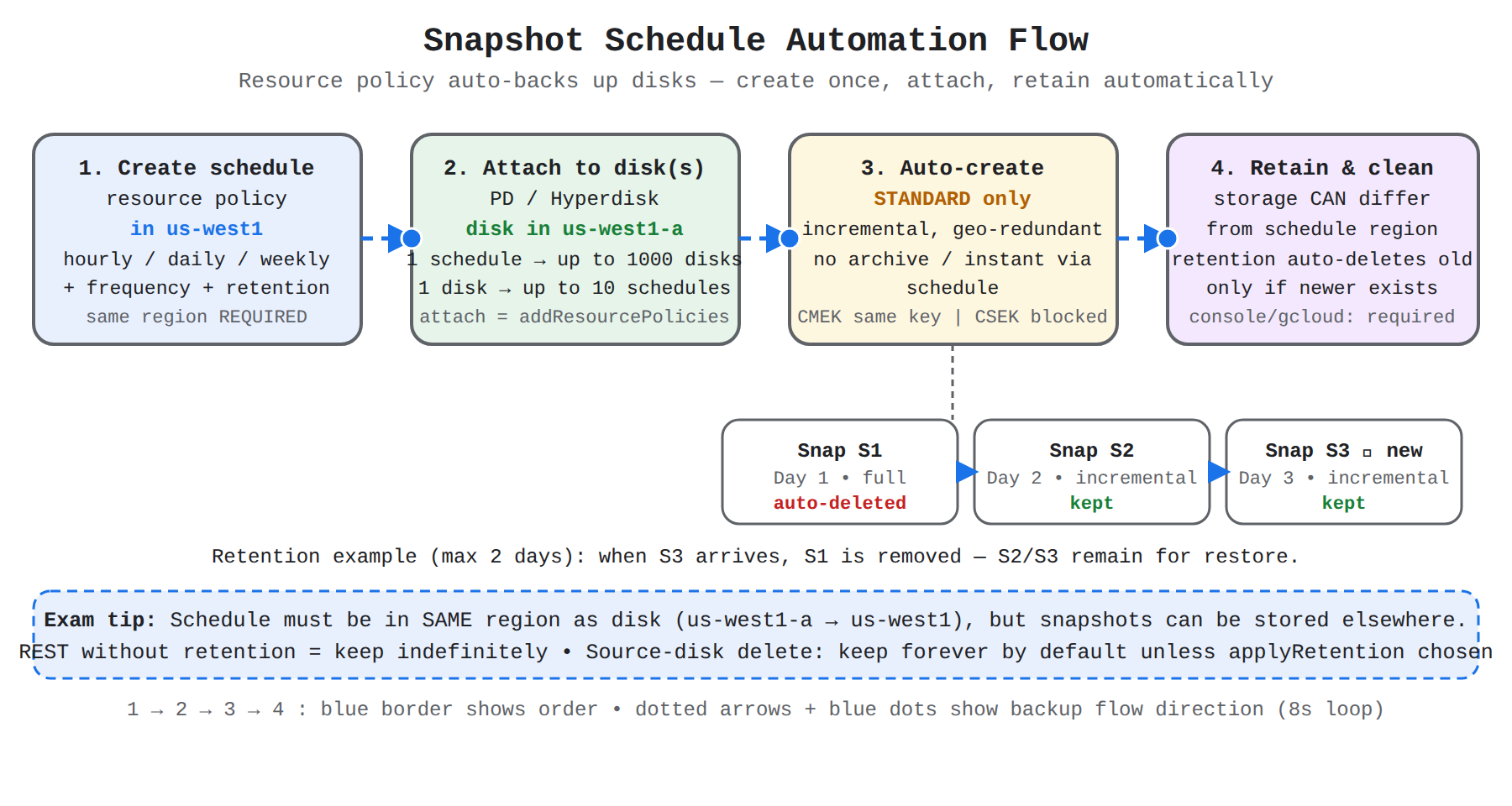
A four-step left-to-right flow showing a snapshot schedule resource policy attached to a disk to auto-create standard snapshots, stored separately and cleaned by retention.
There are two supported approaches:
- Create a snapshot schedule first and then attach it to one or more existing disks.
- Create a new disk with a snapshot schedule attached at creation time.
Attaching a schedule depends on Identity and Access Management permissions on both the disk and the policy:
- To create a snapshot schedule requires
compute.resourcePolicies.createon the project or organization. - To attach a snapshot schedule to a disk requires
compute.disks.addResourcePolicieson the disk andcompute.resourcePolicies.useon the resource policy. - To create a disk with a snapshot schedule requires
compute.disks.create,compute.resourcePolicies.create, andcompute.disks.addResourcePolicies.
Management of existing schedules, including attaching, detaching, and changing frequency or retention, is done through snapshot schedule management (opens in a new tab), while manual backup steps remain covered by snapshot creation (opens in a new tab). These automated backups support disaster recovery (opens in a new tab) by providing regular restore points separate from the source disk.
Exam tip: The schedule must be in the same region as the source disk, but the snapshots it creates can be stored in a different location.
Encryption and Snapshot Type Rules
Encryption and snapshot type rules determine which disks and snapshot kinds work with automated schedules. If a disk uses a customer-managed encryption key (CMEK), all snapshots created by its snapshot schedule are automatically encrypted with the same key. Disks that use a customer-supplied encryption key (CSEK) cannot be used with snapshot schedules.
Only standard snapshots can be created by snapshot schedules. Archive and instant snapshots do not support schedules and must be created separately:
| Snapshot type | Can be created with snapshot schedules | Storage redundancy | Deleted when source disk is deleted |
|---|---|---|---|
| Standard snapshots | Yes | Redundant, stored in one or more regions separate from the source disk | No |
| Archive snapshots | No | Redundant, stored in one or more regions separate from the source disk | No |
| Instant snapshots | No | Not redundant, stored only in the same zone or region as the source disk | Yes |
Standard snapshots are therefore the choice when automated, geo-redundant backup that survives deletion of the source disk is required.
Key Facts
- Persistent Disk snapshots are incremental backups with a lifecycle independent of the source VM, and restoring a snapshot means creating a new disk without overwriting the source disk or deleting the snapshot.
- A snapshot schedule is a resource policy that must be created in the same region as the Persistent Disk or Hyperdisk it backs up, but the snapshots it creates can be stored in a different location.
- Only standard snapshots can be created by snapshot schedules; disks encrypted with customer-supplied encryption keys (CSEK) cannot use snapshot schedules.
- A custom machine image is an immutable copy of a configured boot disk built from a source disk, snapshot, or another image, and referencing an image family name launches VMs from the newest non-deprecated version.
- Deleting a snapshot never deletes disks already created from it, but deleting a source disk deletes its instant snapshots while standard and archive snapshots survive.
Frequently Asked Questions
What is the difference between standard snapshots, archive snapshots, and instant snapshots in Compute Engine?
Standard snapshots are geo-redundant backups for local, zonal, and regional outages with faster restore than archive snapshots, archive snapshots are lower-cost geo-redundant storage for rarely accessed data retained for months or years, and instant snapshots are local in-place backups in the same zone or region for fast restore after user error or corruption. Only standard snapshots can be created by snapshot schedules, while archive and instant snapshots must be created separately. Deleting the source disk deletes its instant snapshots, while standard and archive snapshots survive source-disk deletion.
When should I use a snapshot schedule for Persistent Disk volumes in Compute Engine instead of creating manual snapshots?
Use a snapshot schedule when you want recurring automatic backups of zonal and regional Persistent Disk or Google Cloud Hyperdisk volumes without creating manual snapshots. A snapshot schedule is a resource policy that must be created in the same region as the disk it backs up, but the snapshots it creates can be stored in a different location, and only standard snapshots can be created by schedules. Frequency controls how often snapshots are created and retention controls how long they are kept before automatic deletion, with longer retention allowing recovery from older points but increasing storage cost.
What happens to Compute Engine disks and snapshots when a persistent disk snapshot is deleted or when the source disk is deleted?
Deleting a persistent disk snapshot never affects disks that were already created from that snapshot, so cleanup can proceed without breaking restored workloads. Deleting a source disk deletes its instant snapshots, while standard and archive snapshots survive source-disk deletion because they are stored separately from the source disk. Deletion of a standard snapshot may be reversible when the recycle bin is enabled, which retains deleted snapshots for a three-day retention period by default, while deletion of an archive snapshot is irreversible.
How do image families work for versioning custom machine images in Compute Engine?
An image family in Compute Engine is a named group that holds successive versions of the same base configuration for custom machine images. A custom machine image is a saved copy of a configured boot disk built from a source disk, a snapshot, or another image, and each new image is added to the same family with a new name and version while the family name stays constant. New instances that reference the family name receive the newest non-deprecated image in that family, while older images can be marked as deprecated to signal that they should no longer be used for new virtual machine (VM) instances.
Sample Question
An organization runs critical stateful workloads on Google Compute Engine virtual machines (VMs) using attached persistent disks. To satisfy corporate governance and meet a Recovery Point Objective (RPO) of 24 hours, the operations team needs to automate backups under the following requirements:
- Backups must run automatically once per day at a designated off-peak time.
- Backups must be retained for exactly 14 days and automatically deleted afterward.
- The solution must require minimal operational maintenance and rely on native Google Cloud features.
Which solution should the cloud engineer implement?
Create a snapshot schedule resource policy with a daily frequency and 14-day retention rule, then attach the policy to the persistent disks
Create an Instance Template configured with an automated disk lifecycle policy, and apply it to a Managed Instance Group containing the database VMs
Deploy a Cloud Function triggered by Cloud Scheduler daily to run a custom script that creates snapshots and deletes snapshots older than 14 days
Configure a Storage Transfer Service job to copy persistent disk blocks to a Cloud Storage bucket daily, with an Object Lifecycle Management rule of 14 days
How learners score on this domain
Last updated