Simulation
Log retention limits and sink export routing in Cloud Logging
Change the retention period and downstream requirement to see when logs stay in a log bucket, when a linked dataset works, and when a sink export is required.
Try the scenario
Log retention limits and sink export routing in Cloud Logging
Change the inputs and watch how the outcome changes.
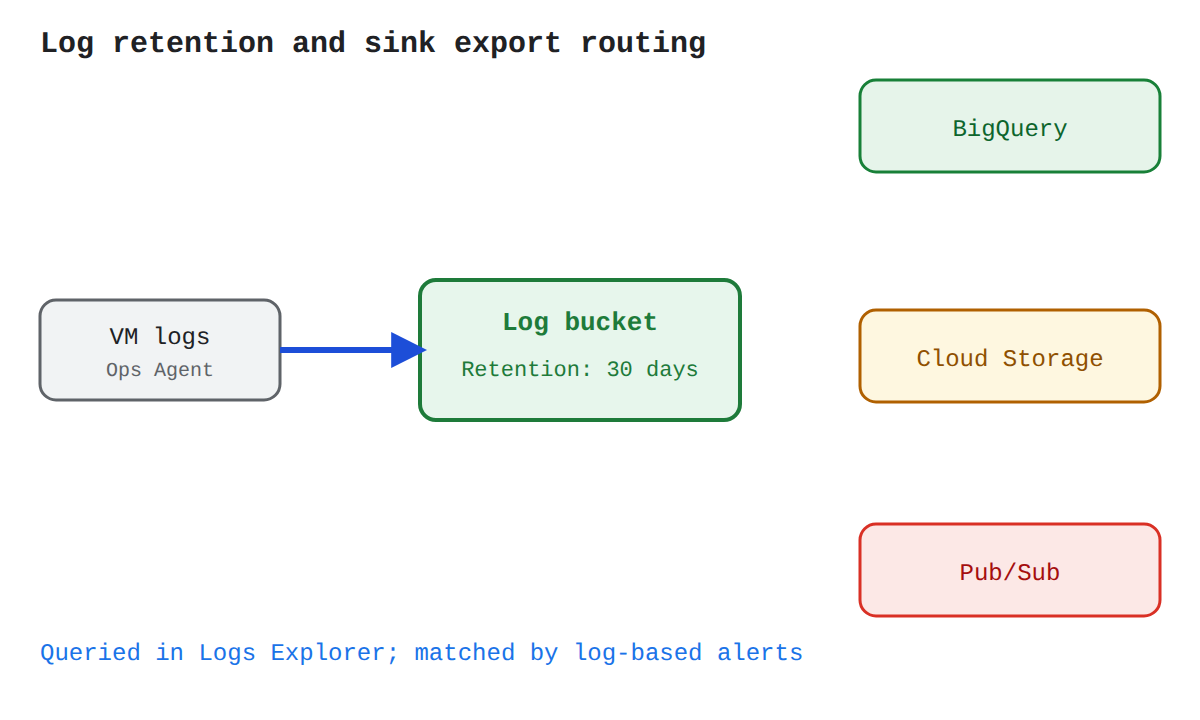
Change the retention period and downstream requirement to see when logs stay in a log bucket, when a linked dataset works, and when a sink export is required.
Every outcome
Succeeds
5 outcomesLog bucket at default retention, no sink
With a 30-day retention period and only basic search needs, all log entries stay in the log bucket and no sink is configured. Logs are queried in Logs Explorer and matched by log-based alerting policies, and the bucket's retention rule controls how long every entry is kept.
Starting scenarioEvery input at its default
Log bucket with custom retention, no sink
Because the retention period stays within the 1-to-3,650-day range a bucket supports, a custom retention rule on the log bucket covers every entry it holds. Basic search and log-based alerts still work directly against the bucket, so no sink is needed.
Linked BigQuery dataset for SQL analysis
Because the retention period stays within the bucket's supported range, SQL joins do not require an export sink. The log bucket connects to BigQuery through a linked dataset, so queries in BigQuery Studio can join the stored log data with other BigQuery datasets without duplicating entries in a new destination.
What changed
- Downstream requirementBasic search and log alertstoSQL joins across datasets
Pub/Sub sink for real-time delivery
Real-time delivery needs a log sink, because a bucket only stores entries for later retrieval. The sink evaluates incoming entries and forwards matching ones to Pub/Sub immediately, where the destination service applies its own storage and pricing for the downstream pipeline.
What changed
- Downstream requirementBasic search and log alertstoReal-time pipeline delivery
Cloud Storage sink for cold archival
A cold compliance archive calls for a log sink rather than bucket retention, because the bucket is the operational storage tier. The sink routes matching entries to Cloud Storage, a low-cost and durable destination where the archived copies are governed by the destination service's own storage and pricing.
What changed
- Downstream requirementBasic search and log alertstoCold compliance archive
Mixed
3 outcomesRetention cap exceeded: export to Cloud Storage
Because the requested retention period changed to 4,000 days, the log bucket can no longer hold the logs: custom retention in Cloud Logging is capped at 3,650 days for the whole bucket. To preserve entries for compliance beyond that limit, a sink must export them to Cloud Storage, whose own storage rules apply at the destination.
What changed
- Retention period30 daysto4,000 days
Retention cap exceeded: BigQuery sink required
Because the retention period changed to 4,000 days, a linked BigQuery dataset is not enough: the link only exposes data stored in the log bucket, and bucket retention is capped at 3,650 days. A sink must export the entries directly to BigQuery so the SQL analysis works on data held outside the bucket.
What changed
- Retention period30 daysto4,000 days
- Downstream requirementBasic search and log alertstoSQL joins across datasets
Retention cap exceeded: Pub/Sub sink still delivers
Because the retention period changed to 4,000 days, the bucket itself cannot hold the logs past its 3,650-day cap. For real-time delivery this does not block the pipeline: a Pub/Sub sink forwards each matching entry immediately on arrival, so long-term retention is delegated to whatever consumes the Pub/Sub stream.
What changed
- Retention period30 daysto4,000 days
- Downstream requirementBasic search and log alertstoReal-time pipeline delivery
In the Domain
Configure Cloud Logging and Data Export
Configuring Cloud Logging and data export means setting up where logs are stored and how they are routed for long-term use. Logs are held in a log bucket, which controls how long entries are kept, while a log sink routes copies of logs to other destinations. Together, buckets for storage and sinks for export give a project both operational visibility and durable telemetry history.
Domain 6 of 11
Provisioning and setting up products in Google Cloud Observability
Read the Domain summaryPractice this Domain
24 practice questions
Practice this DomainLast updated