Fundamental
Prepare and test your skills

Fundamental
Prepare and test your skills
Cloud Storage Classes and Shared File Storage
Network-attached storage solutions are shared file systems that multiple clients can mount and use at the same time. On Google Cloud, Filestore (opens in a new tab) provides managed network file storage for general shared workloads, while Google Cloud NetApp Volumes (opens in a new tab) provides enterprise file storage for demanding workloads such as high-performance computing and legacy application migrations. Filestore connects into a Virtual Private Cloud (VPC) network through private services access, while NetApp Volumes organizes capacity into storage pools that hold large-capacity volumes.
Filestore on a Shared VPC Network
Filestore is the managed service for creating shared network file systems, such as an NFS file share named vol1, that clients mount over the VPC network. When Filestore is used with a Shared VPC network, the host project must first enable private services access for Google managed services. Once that private connection exists, a Filestore instance can be created from a service project on the Shared VPC network, with settings for instance ID, type, storage type, capacity, region and zone, file share name, IP range, and access controls.
Setting up Filestore on a Shared VPC network follows an ordered workflow where each step depends on the previous one:
- Create a peering address range: Create a global address named
google-service-rangewith purposeVPC_PEERINGin the host project and Shared VPC network. - Create the private connection: Connect the Shared VPC network to
servicenetworking.googleapis.comusing that address range, which starts a long-running operation. - Check the operation: Describe the operation name to confirm the private connection succeeded before creating instances.
The size of the peering range depends on planned usage. Basic-tier Filestore instances require a /29 prefix and zonal-tier instances require a /26 prefix, but the range is shared by all Google Cloud managed services. If you plan to run multiple Filestore instances or other managed services, use a larger prefix such as /20. After private services access is enabled, you can optionally enable VPC Service Controls to place the peering under a service perimeter.
Exam tip: Basic-tier Filestore needs a /29 peering prefix, while zonal-tier Filestore needs a /26 — use a larger range like /20 when sharing the range across many instances.
Google Cloud NetApp Volumes for Demanding File Workloads
Google Cloud NetApp Volumes is the enterprise file storage service for workloads with large datasets, very large file counts, intensive metadata operations, and strict performance requirements. Electronic design automation (EDA) (opens in a new tab) is a key example, where design jobs generate large datasets and perform many small metadata operations while needing consistent performance to meet release schedules. NetApp Volumes addresses this with large-capacity volumes that store large datasets, efficiently manage numerous files, and optimize metadata operations for smooth data access.
NetApp Volumes simplifies management by organizing storage into storage pools before volumes are created, so the workflow depends on the storage pool as the container for capacity and performance. The service is designed to keep file systems available and resilient against system failures, which supports reliable database services and other enterprise applications that cannot tolerate downtime. For planning, NetApp Volumes provides application resilience considerations and guidance for optimizing Linux NFS client access for workloads such as EDA.
Choosing Between Filestore and NetApp Volumes
The choice between Filestore and NetApp Volumes depends on performance, scale, and enterprise features. Both solutions provide shared file systems, but they fit different workload requirements:
| Solution | Typical workload focus | Key capability |
|---|---|---|
| Filestore | Shared NFS file share for service projects, Cloud Run, and resilient database file systems | Runs inside a Shared VPC network through private services access with configurable capacity, zone, and access controls |
| Google Cloud NetApp Volumes | EDA, high-performance computing, and legacy migrations with large datasets and heavy metadata work | Provides large-capacity volumes in storage pools with resilience and performance tuned for numerous files and intensive operations |
Choose Filestore when the need is a straightforward shared file system on a VPC network with simple capacity and access settings. Choose NetApp Volumes when the need is enterprise scale and performance for many files, large datasets, and intensive metadata operations where availability and throughput directly affect productivity.
Assessing storage product suitability means matching workload characteristics to the right storage option for availability, durability, and cost. The key characteristics are data type and access pattern, geographic location of data and compute, and how applications access the data. Cloud Storage classes, bucket location, lifecycle controls, and container StorageClass (opens in a new tab) settings each address a different part of that match.
Match Storage Class to Data Access Patterns
Matching storage class to access pattern means placing frequently accessed data in warmer classes and rarely accessed data in colder classes. Storage Intelligence advisor (opens in a new tab) detects a mismatch with a Spike in Class A or B operations on Coldline or Archive data finding, which means data stored in Coldline storage or Archive storage is being read or written frequently. Frequent operations on cold data increase operation costs, so that data is better suited for Standard storage or Nearline storage that is intended for frequent access.
The intended patterns break down as follows:
| Storage class | Intended access pattern | Move data here when |
|---|---|---|
| Standard storage | Frequent access | Data is accessed often and needs low-latency access |
| Nearline storage | Frequent access | Data is accessed often but can tolerate Nearline operation costs |
| Coldline storage or Archive storage | Infrequent or rare access | Data is retained long term with few reads or writes |
Exam tip: A spike in Class A or B operations on Coldline or Archive data means the data is too hot for its class — move it to Standard or Nearline storage.
Autoclass and Object Lifecycle Management automatically keep the class aligned as access changes over time. Autoclass moves objects between storage classes based on access patterns without manual changes, while Object Lifecycle Management deletes noncurrent object versions or moves them to colder storage after defined rules. Use lifecycle rules when buckets retain noncurrent versions indefinitely and storage consumption grows above trend, and use Autoclass when access patterns shift unpredictably.
Colocate Storage and Compute in the Same Region
Colocating storage and compute means placing a Cloud Storage bucket in the same region as the Google Cloud services that use it. Data flows from the bucket in one region to the service in another region when they are separated, and that cross-region transfer creates egress charges and added latency. Storage Intelligence advisor reports this pattern as a Spike in cross-region egress finding, for example when a Compute Engine instance in us-central1 frequently accesses a bucket in us-east1.
The fix is to colocate Google Cloud resources and storage resources in the same region using bucket relocation. Bucket relocation moves the bucket so reads and writes stay inside one regional boundary, with compute on one side and storage on the other side of the same region. The Key charts for storage volume over time and cumulative object count track size and object totals across locations and storage classes, so growth in a distant location becomes visible before egress costs spike.
Monitor Growth and Performance to Right-Size Storage
Monitoring growth and performance means watching total bytes, object counts, and request errors to decide when storage is oversized, misplaced, or throttled. The Total bytes stored increased above trend over the last 30 days finding indicates that storage consumption has grown beyond historical trends, often because noncurrent object versions are retained indefinitely after new versions are uploaded. Indefinite retention keeps durability high but increases storage volume and cost without improving availability.
Performance findings point to access-method suitability rather than capacity. A Spike in 429 errors finding indicates request throttling or unexpected operation spikes, which means the application I/O pattern exceeds sustainable request rates and reliability drops. Resolving throttling requires smoothing I/O patterns, spreading load, or aligning hot data with a class and location that supports the request rate, rather than simply adding more storage.
Tailor Persistent Storage for Container Workloads
Tailoring persistent storage for container workloads means creating a custom StorageClass that defines disk type, file system type, and provisioning parameters for PersistentVolumes. GKE on Azure automatically deploys and manages the Azure Disk CSI Driver and Azure File CSI Driver, and driver versions update automatically with cluster upgrades so custom classes remain compatible. The default StorageClass named standard-rwo provisions standard SSD Azure disks with locally redundant storage (LRS), and GKE on Azure does not support the UltraSSD_LRS account type.
A custom StorageClass is created through an ordered workflow where each step depends on the previous one:
- Choose provisioner type: Select an Azure disk volume with provisioner
disk.csi.azure.comor specify another Container Storage Interface (CSI) driver name in the provisioner field. - Apply StorageClass YAML: First create the YAML file with name, provisioner, volumeBindingMode, allowVolumeExpansion, and parameters such as storageAccount and tags, then apply it to the cluster with kubectl.
- Create PersistentVolumeClaim: Only after the StorageClass exists, create a PersistentVolumeClaim that references the class name in storageClassName so the claim provisions a volume with those behaviors.
Choose a custom StorageClass when workload characteristics require a different disk type, file system, storage account, or expansion behavior than the default standard SSD. Because parameters such as storageAccount and tags flow from the StorageClass to each new volume, tagging and placement stay consistent across all claims that use the class.
Centralize Oversight Across Projects, Folders, and Organizations
Centralized oversight means assessing the health of the entire Cloud Storage environment from a single interface without custom pipelines. Storage Intelligence advisor supports four related use cases that replace manual work across logs and resources:
- Minimize custom reporting: Track metrics without maintaining custom data processing pipelines, BigQuery scripts, or external visualization tools.
- Centralize oversight: Assess health across projects, folders, or organizations without running manual queries across logs or resources.
- Optimize storage usage: Align data with the appropriate storage class based on access findings.
- Resolve performance bottlenecks: Identify throttling and operation spikes that affect application reliability.
The trust boundary for this oversight depends on scope when VPC Service Controls is used. VPC Service Controls helps protect the Storage Intelligence advisor API and supports project-level resources inside a service perimeter, with protected project resources on the inside and folder-level and organization-level resources on the outside. Folder-level and organization-level oversight remains available, but it depends on Identity and Access Management (IAM) rather than VPC Service Controls for protection.
Cloud Storage classes match storage cost to how often object data is accessed and how long it must be retained. Standard storage and Nearline storage are intended for frequently accessed data, while Coldline storage and Archive storage are intended for infrequently accessed data that can remain stored at lower storage cost. Autoclass and Object Lifecycle Management automate movement between classes so data does not stay in the wrong class and increase cost.
Choosing a Storage Class by Access Frequency
Choosing a storage class starts with access frequency and retention requirements for the bucket and its objects. Data that is read often belongs in a warmer class such as Standard storage, while data that is rarely read can use a colder class to reduce storage cost. Storage Intelligence advisor (opens in a new tab) helps validate the choice by flagging a Spike in Class A or B operations on Coldline or Archive data, which means objects in Coldline storage or Archive storage are being accessed frequently and might belong in Standard storage or Nearline storage.
The four classes form a spectrum from warm to cold:
- Standard storage: Starting class for new and frequently read data, including all objects in an Autoclass-enabled bucket.
- Nearline storage: Warmer class suitable for frequently accessed data and the default terminal class where Autoclass leaves unaccessed objects.
- Coldline storage: Colder class for infrequently accessed data where frequent operations signal a mismatch.
- Archive storage: Coldest class for long-term retention, available as an optional Autoclass terminal class for data that remains unaccessed.
How Autoclass Manages Storage Classes Automatically
Autoclass is a bucket-level feature that automatically transitions each object to an appropriate storage class based on its access pattern. Autoclass moves data that is not accessed to progressively colder storage classes to reduce storage cost and moves data that is accessed back to Standard storage to optimize future accesses. The bucket default remains Standard storage, and any request to change the bucket default to another class fails.
An object managed by Autoclass moves through an ordered lifecycle:
Autoclass Object Storage Class Transitions
State / Lifecycle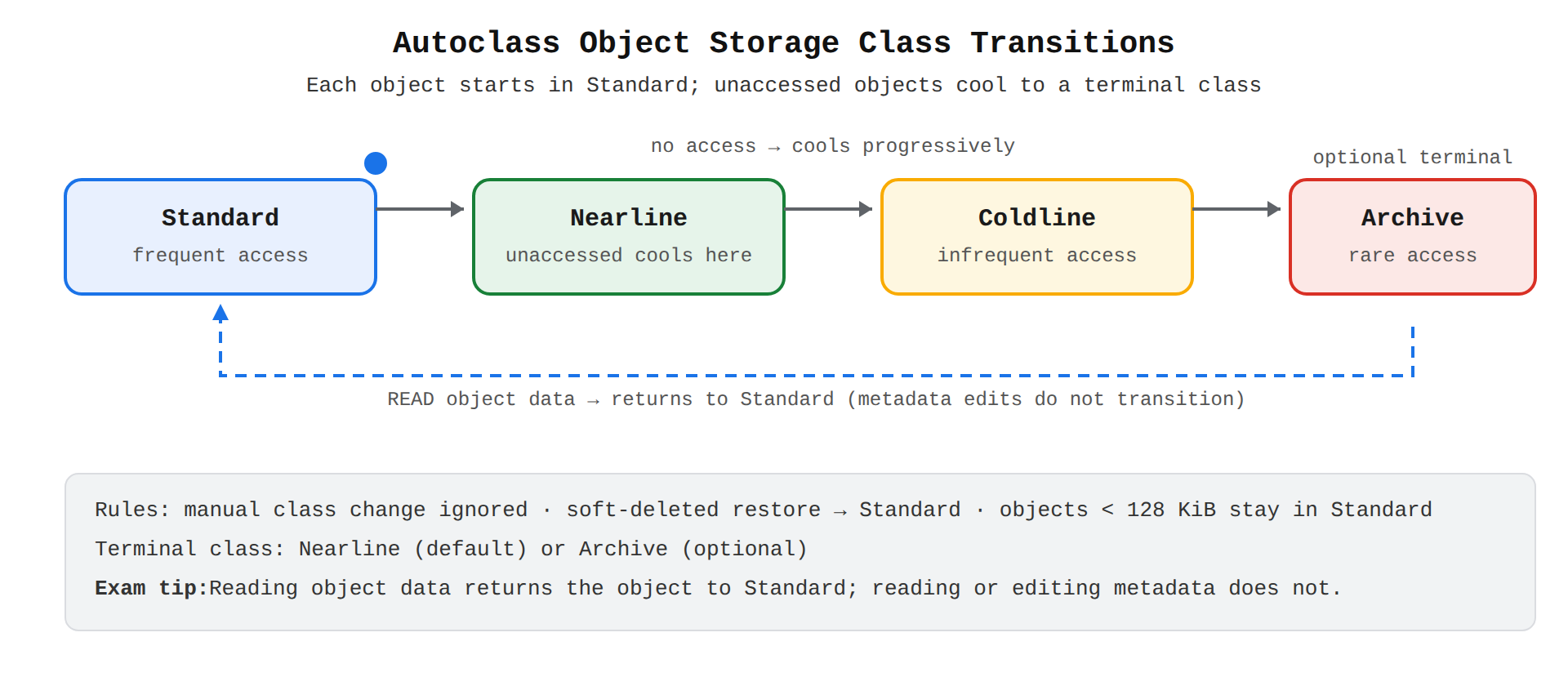
A state diagram showing an object starting in Standard storage, cooling through Nearline, Coldline, and Archive when unaccessed, and returning to Standard when its data is read.
- Start in Standard storage: Every new object begins in Standard storage, even if the write request specifies a different class, and a manual class change during rewrite or copy is ignored.
- Cool to colder classes if unaccessed: Most objects transition to progressively colder classes while they remain unread, ending at the terminal storage class.
- Return to Standard storage when data is read: Reading object data moves the object to Standard storage if it is not already there, while reading or editing only object metadata does not cause a transition.
Autoclass applies special rules for small and protected objects. Objects smaller than 128 KiB stay permanently in Standard storage, counting only object data and not metadata toward the size. Soft-deleted objects retain their existing storage classes until the end of their retention duration, and a restored soft-deleted object begins again in Standard storage regardless of its prior class. By default the terminal storage class is Nearline storage, and it can optionally be configured to Archive storage for longer-retained, rarely accessed data.
Exam tip: In Autoclass, reading object data returns the object to Standard storage, but reading or editing object metadata does not trigger a transition.
How Object Lifecycle Management and Monitoring Optimize Cost
Object Lifecycle Management is a bucket policy that automatically deletes objects or moves them to colder storage classes without manual rewrites. A common use is removing cost from version history, such as deleting noncurrent object versions that accumulate after new uploads or moving those versions to colder storage. Autoclass provides an alternative automation that follows per-object access patterns instead of fixed policy rules.
Storage Intelligence advisor and usage charts make the need for these automations visible across projects, folders, or organizations. A Total bytes stored increased above trend over the last 30 days finding signals growth beyond history, often from indefinite retention of noncurrent versions, and points to Object Lifecycle Management or Autoclass as the fix. The Key charts section tracks cumulative object count and storage volume over time across locations and storage classes, so growth in colder or warmer classes can be aligned with access needs.
Key Facts
- Filestore provides managed shared file storage on a VPC network through private services access, while Google Cloud NetApp Volumes provides enterprise file storage in storage pools for large datasets and intensive metadata operations.
- Basic-tier Filestore requires a /29 peering prefix and zonal-tier Filestore requires a /26 prefix, with a larger prefix such as /20 recommended when the range is shared.
- Standard storage and Nearline storage are intended for frequent access, while Coldline storage and Archive storage are intended for infrequent access, and frequent operations on cold data signal a mismatch.
- In Autoclass, every new object starts in Standard storage, unaccessed objects cool toward a terminal class of Nearline storage or optionally Archive storage, and reading object data returns the object to Standard storage.
- Placing a Cloud Storage bucket in a different region than the compute that uses it creates cross-region egress charges and latency, which is fixed by relocating the bucket to the same region.
Frequently Asked Questions
When should I use Filestore instead of Google Cloud NetApp Volumes?
Choose Filestore for a straightforward shared network file system on a Virtual Private Cloud (VPC) network with simple capacity and access settings, and choose Google Cloud NetApp Volumes for enterprise scale and performance with large datasets, numerous files and intensive metadata operations. Filestore provides managed shared file storage through private services access, while NetApp Volumes organizes large-capacity volumes in storage pools with resilience and performance tuned for demanding workloads such as electronic design automation (EDA), high-performance computing and legacy migrations.
How do I set up Filestore on a Shared VPC network?
Filestore on a Shared VPC network requires private services access for Google managed services to be enabled in the host project before an instance can be created from a service project. Setup follows an ordered workflow of creating a global address named google-service-range with purpose VPC_PEERING in the host project and Shared VPC network, then connecting the network to servicenetworking.googleapis.com using that range, then describing the operation name to confirm success before creating instances. After private services access is enabled, you can optionally enable VPC Service Controls to place the peering under a service perimeter.
What does a spike in Class A or B operations on Coldline storage or Archive storage mean?
It means data stored in Coldline storage or Archive storage is being read or written frequently and is too hot for its class. Standard storage and Nearline storage are intended for frequent access while Coldline storage and Archive storage are intended for infrequent or rare access, so frequent operations on cold data increase operation costs and the data should be moved to Standard storage or Nearline storage.
How does Autoclass manage objects in Cloud Storage buckets?
Autoclass starts every new object in Standard storage even if the write request specifies a different class, cools unaccessed objects toward a terminal class of Nearline storage by default or optionally Archive storage, and returns an object to Standard storage when its data is read. Reading or editing only object metadata does not cause a transition, objects smaller than 128 KiB stay permanently in Standard storage, and soft-deleted objects retain their class until retention ends while a restored object begins again in Standard storage.
Sample Question
An organization is migrating legacy enterprise applications from an on-premises data center to Google Cloud. The workload has the following technical and operational requirements:
- Provide shared network-attached storage accessible concurrently via both SMB (Server Message Block) and NFS (Network File System) protocols.
- Support enterprise storage capabilities such as auto-tiering of cold data, rapid cloning, and volume user/group quotas.
- Deliver a fully managed service with minimal operational overhead and no need to re-architect existing application file paths.
Which Google Cloud storage service should the organization select?
Cloud Storage
Google Cloud NetApp Volumes
Filestore
Compute Engine Persistent Disk
How learners score on this domain
Last updated