Fundamental
Prepare and test your skills

Fundamental
Prepare and test your skills
Recursive Uploads with gcloud storage cp
Free sample question with answers and detailed explanation below. The Associate Cloud Engineer practice bank has an additional 2,014 practice questions.Try 10 free realistic questions: instant score, no credit card, and no account required.
Your team has an on-premises server containing thousands of log files organized across multiple nested folders in a local directory named log-data. You need to upload the entire directory structure into a Cloud Storage bucket named gs://corporate-log-archive.
You want to follow Google Cloud recommended practices by using the modern command-line tool that automatically optimizes transfer speeds with multi-threaded parallel processing.
Which command should you execute?
Explanations
gsutil cp log-data gs://corporate-log-archive
gsutil cp log-data gs://corporate-log-archive
What gsutil cp Is
gsutil cp is the legacy Python-based command-line tool historically used for uploading, downloading, and copying objects within Google Cloud Storage.
Why It Doesn't Meet the Requirement
- Missing Recursive Flag: Without the
-r(recursive) flag,gsutil cpwill fail when given a directory path because it does not traverse subdirectories by default. - No Automatic Parallelization: In
gsutil, operations run sequentially unless the top-level-mmulti-threading/multi-processing flag is explicitly provided (e.g.,gsutil -m cp -r ...). - Legacy Tooling:
gsutilis no longer the recommended CLI tool for Cloud Storage operations and lacks support for newer Cloud Storage platform features.
Key Characteristics and Limitations
- Sequential by Default:
gsutilrequires explicit-mconfiguration to enable multi-threaded transfers. - Higher Operational Overhead: Requires manual tuning and local Python environment management.
- Deprecation Timeline: Google recommends migrating all scripts and workflows away from
gsutiltogcloud storage.
This Answer Would Be Correct If
You were maintaining an older legacy environment running existing gsutil automation where modifying the base tool was restricted, and the command included both -m and -r (gsutil -m cp -r log-data gs://corporate-log-archive).
gcloud storage rsync gs://corporate-log-archive log-data --recursive
gcloud storage rsync gs://corporate-log-archive log-data --recursive
What gcloud storage rsync Does
The gcloud storage rsync command synchronizes the contents between two directories or buckets by comparing file sizes and modification timestamps.
Why It Doesn't Meet the Requirement
- Reversed Source and Destination: In this command syntax, the source is specified as
gs://corporate-log-archiveand the destination islog-data. This would attempt to download objects from the cloud bucket down to the local file system instead of uploading local files to the bucket. - Not Optimized for Initial Bulk Upload: While
rsyncis ideal for delta synchronization of changed files, standard initial bulk directory ingestion is typically handled directly viacp.
Key Characteristics and Limitations
- Strict Positional Ordering: The first positional argument is always the source and the second argument is the destination.
- Synchronization Logic: Checks timestamps and checksums to skip identical files, which adds comparison overhead when uploading a completely new dataset.
- Potential Data Overwrite: Reversing source and destination in synchronization workflows can lead to unintended local overwrites.
This Answer Would Be Correct If
The arguments were flipped (gcloud storage rsync log-data gs://corporate-log-archive --recursive) and the scenario specifically called for synchronizing only modified or newly created files as part of an ongoing recurring sync routine.
gcloud storage cp log-data gs://corporate-log-archive --recursive
gcloud storage cp log-data gs://corporate-log-archive --recursive
What gcloud storage cp Is
The gcloud storage cp command is the primary Google Cloud CLI utility used to copy data between local file systems and Cloud Storage buckets, as well as between different cloud storage locations.
How It Meets the Requirements
- Recommended Tooling: The Google Cloud CLI (
gcloud storage) is Google's recommended command-line interface for Cloud Storage, replacing the legacygsutilutility. - Recursive Ingestion: The
--recursive(or-r) flag instructs the CLI to traverse all nested subdirectories insidelog-dataand upload the full folder tree structure. - Automatic Parallel Processing: Unlike legacy tools that required manual parallelization flags,
gcloud storage cpautomatically performs multi-threaded and multi-processing parallel transfers by default to maximize throughput.
Recursive Parallel Upload to Cloud Storage
Process Flow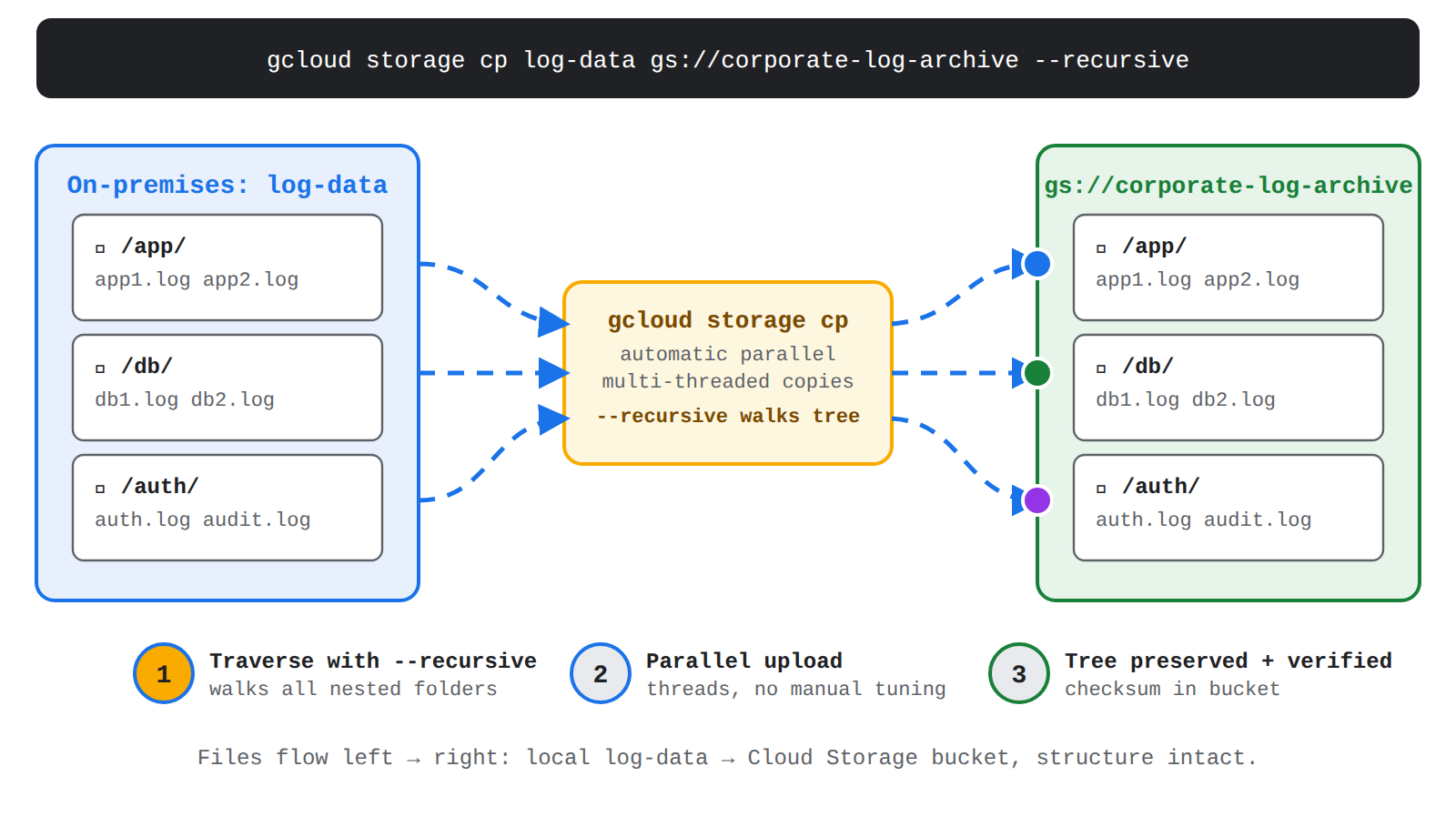
Key Advantages and Capabilities
- High Performance: Native parallelism distributes the workload across multiple threads and processes without requiring complex tuning.
- Built-in Validation: Performs automatic checksum verification (using CRC32c or MD5) to guarantee data integrity between local files and uploaded objects.
- Resumable Transfers: Manages upload sessions automatically, allowing large file transfers to resume seamlessly if interrupted.
- Broad Cloud Compatibility: Works across standard Cloud Storage buckets as well as buckets configured with hierarchical namespace enabled.
Why This Is Optimal
This approach adheres directly to Google Cloud best practices by utilizing gcloud storage rather than deprecated or specialized tools, providing maximum transfer performance out of the box with minimal syntax complexity.
gcloud storage objects compose log-data gs://corporate-log-archive
gcloud storage objects compose log-data gs://corporate-log-archive
What gcloud storage objects compose Does
The gcloud storage objects compose command is used to concatenate multiple existing Cloud Storage objects within a bucket into a single composite object without downloading the data locally.
Why It Doesn't Meet the Requirement
- Not an Ingestion Utility:
composeoperates on objects already located in Cloud Storage; it cannot be used to upload local files or directories from an on-premises workstation. - Different Purpose: Instead of copying files as individual objects,
composestitches multiple source blobs together into a single combined file. - Syntax Mismatch: It does not accept a local directory path as an input source.
Key Characteristics and Limitations
- Cloud-Only Operation: Operates purely on objects already stored in a Cloud Storage bucket.
- Composite Object Creation: Generates composite objects (up to 32 component objects per compose request).
- No Local File Handling: Cannot read local disk paths or replicate on-premises directory structures.
This Answer Would Be Correct If
You had already uploaded multiple split chunk files into Cloud Storage and needed to combine them into a single unified archive file directly within the bucket.
Try 10 interactive questions like this one, free
Answer them yourself and get your score the moment you finish. No account needed.
Full access includes
- 2,014 practice questions across all 4 exam domains
- Every answer explained: why it is right, and why the others are not
- Scout, an AI tutor that answers your follow-up questions
- Readiness tracking by domain, so you know when to book the exam
Related free sample questions
Keep the momentum going with these hand-picked practice scenarios
FundamentalAssociate Cloud Engineer
Cloud SQL Service Account Storage Permissions
Loading data (e.g., command-line upload, load data from Cloud Storage, Storage Transfer Service)
FundamentalAssociate Cloud Engineer
Storage Transfer Service for File Systems
Loading data (e.g., command-line upload, load data from Cloud Storage, Storage Transfer Service)
FundamentalAssociate Cloud Engineer
Cloud Billing Actual vs Forecasted Budget Alerts
Establishing billing budgets and alerts
FundamentalAssociate Cloud Engineer
Billing Account Creator and Payments Profile
Creating one or more billing accounts
FundamentalAssociate Cloud Engineer
Cloud Storage Lifecycle Class Transitions
Choosing and deploying storage products (e.g., Cloud Storage, Filestore, Google Cloud NetApp Volumes) and Cloud Storage options (e.g., Standard, Nearline, Coldline, Archive)
IntermediateProfessional Cloud Developer
Error Reporting Resolution Status Lifecycle
Managing application issues using Error Reporting
Last updated