Fundamental
Prepare and test your skills

Fundamental
Prepare and test your skills
Granting Cloud SQL Access to Storage Buckets
Free sample question with answers and detailed explanation below. The Associate Cloud Engineer practice bank has an additional 2,014 practice questions.Try 10 free realistic questions: instant score, no credit card, and no account required.
Your team needs to import a large dataset from a CSV file stored in a Cloud Storage bucket into an existing MySQL database hosted on Cloud SQL. When initiating the import job from the Google Cloud console, the operation fails with an access permission error.
Which configuration should you perform to enable the Cloud SQL instance to access and load the file from the Cloud Storage bucket?
Explanations
Assign the BigQuery Admin (roles/bigquery.admin) role to the Cloud SQL instance service account.
Assign the BigQuery Admin (roles/bigquery.admin) role to the Cloud SQL instance service account.
What the BigQuery Admin Role Is
The BigQuery Admin (roles/bigquery.admin) role provides administrative access to all BigQuery datasets, tables, jobs, and reservations within a Google Cloud project.
Why It Doesn't Meet the Requirement
- Unrelated service: The scenario requires loading data from Cloud Storage into Cloud SQL. BigQuery is an enterprise analytics data warehouse and is not involved in a direct Cloud Storage-to-Cloud SQL data import pipeline.
- No storage permissions granted: BigQuery administrative privileges do not confer read access to Cloud Storage objects (
storage.objects.get). - Over-privileged and ineffective: Granting analytical warehouse administrative rights does not resolve permission errors on Cloud Storage buckets.
Key Characteristics and Limitations
- Scoped to BigQuery: Manages datasets, tables, SQL queries, and BigQuery jobs.
- No cross-service effect on MySQL: Does not configure Cloud SQL instances or their data import engines.
- Violates least privilege: Provides unnecessary broad administrative capabilities over unrelated analytical resources.
This Answer Would Be Correct If
You were configuring an automated service account to manage BigQuery datasets, table schemas, and query execution pipelines within an enterprise data warehouse environment.
Grant the Cloud SQL Client (roles/cloudsql.client) role to the default Cloud Storage service account.
Grant the Cloud SQL Client (roles/cloudsql.client) role to the default Cloud Storage service account.
What the Cloud SQL Client Role Is
The Cloud SQL Client (roles/cloudsql.client) role provides permissions to connect to a Cloud SQL database instance (such as via the Cloud SQL Auth Proxy or authorized serverless environments like App Engine and Cloud Run).
Why It Doesn't Meet the Requirement
- Wrong direction of access: In an import operation, the Cloud SQL instance is the reader that needs access to Cloud Storage, not the other way around. Cloud Storage does not initiate connections into the Cloud SQL instance.
- Missing object read permissions: Granting database client connectivity does not provide read access (
storage.objects.get) to the bucket holding the CSV file. - Mismatched identities: Assigning permissions to the Google Cloud Storage default service account does nothing to authorize the Cloud SQL instance's dedicated service account.
Key Characteristics and Limitations
- Client connectivity only: Controls connection authorization to the database proxy, not object storage management.
- Does not grant storage access: Has zero Cloud Storage IAM permissions (
storage.objects.*). - Intended for applications: Primarily assigned to application service accounts connecting to SQL instances.
This Answer Would Be Correct If
You were configuring an external compute workload (such as an application running on Compute Engine or Cloud Run) that needed permission to establish an authorized database connection to Cloud SQL.
Grant the user initiating the import the Storage Object Creator (roles/storage.objectCreator) role on the Cloud SQL instance.
Grant the user initiating the import the Storage Object Creator (roles/storage.objectCreator) role on the Cloud SQL instance.
What the Storage Object Creator Role Is
The Storage Object Creator (roles/storage.objectCreator) role is a Cloud Storage IAM role that allows principals to write new objects into a bucket. It does not allow reading existing objects, nor does it apply to Cloud SQL resources.
Why It Doesn't Meet the Requirement
- Insufficient permissions: The import process requires read permissions (
storage.objects.get), not object creation permissions (storage.objects.create). - Invalid resource target: Cloud Storage IAM roles cannot be bound to a Cloud SQL database instance; they must be granted on Cloud Storage buckets or projects.
- Wrong identity executing data transfer: While the initiating user needs
cloudsql.instances.importto start the job, the actual retrieval of the file is performed under the identity of the Cloud SQL instance's service account.
Key Characteristics and Limitations
- Write-only for Cloud Storage: Only grants write capabilities for objects in GCS buckets.
- Does not grant data read access: Cannot read or download existing CSV files for ingestion.
- Cannot be applied to database tables: IAM does not grant table-level DDL or DML rights in Cloud SQL.
This Answer Would Be Correct If
A user needed write-only access to upload raw CSV files into an ingestion bucket in Cloud Storage without being able to view or overwrite existing files.
Identify the Cloud SQL instance service account email address and grant it the Storage Object Admin (roles/storage.objectAdmin) role on the Cloud Storage bucket.
Identify the Cloud SQL instance service account email address and grant it the Storage Object Admin (roles/storage.objectAdmin) role on the Cloud Storage bucket.
What the Cloud SQL Service Account Integration Is
When Cloud SQL performs data import or export operations directly against Google Cloud Storage, it acts as an autonomous service using its own managed service account. Each Cloud SQL instance has a unique service account email address generated by Google Cloud upon instance creation.
How It Meets the Permission Requirements
To successfully read the CSV file stored in the Cloud Storage bucket:
- Identity verification: Finding the instance's service account via the Google Cloud console or running
gcloud sql instances describe INSTANCE_NAMElocates theserviceAccountEmailAddressattribute. - Granting access: Granting the Storage Object Admin (
roles/storage.objectAdmin) role or a custom role containing thestorage.objects.getpermission on the specific Cloud Storage bucket gives the database instance the authority to fetch and read the CSV object. - Resolving the failure: Once the IAM policy binding is attached to the bucket, the import process can authenticate against Cloud Storage and stream the data directly into the target database table.
Cloud SQL CSV Import Access Flow
Process Flow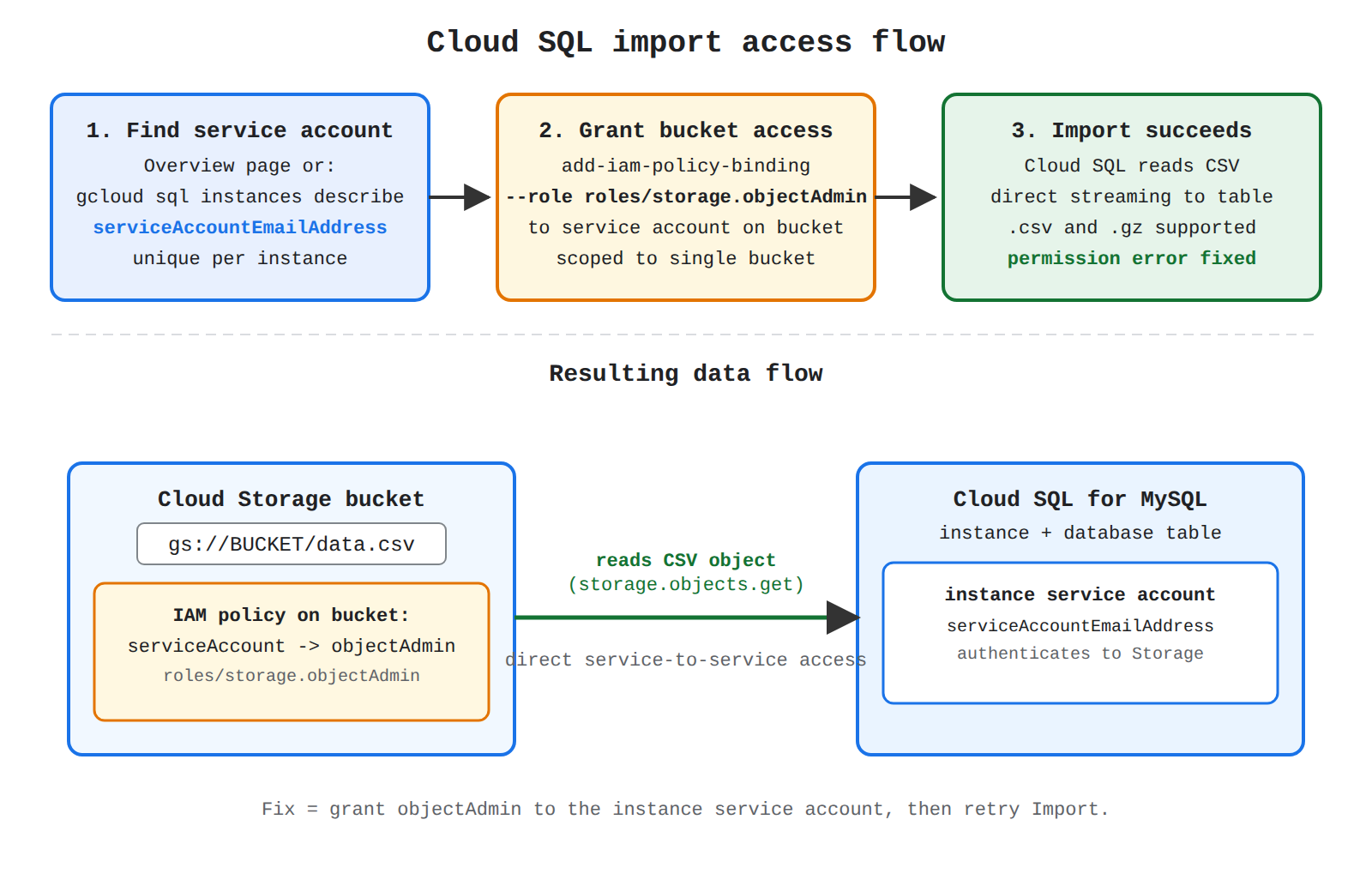
Key Advantages and Capabilities
- Principle of least privilege: Access can be scoped specifically to the single bucket housing the import data rather than across the whole project.
- Native cross-service authentication: No long-lived user credentials, database passwords, or private keys need to be stored inside configuration files.
- Direct streaming: The database engine reads directly from Cloud Storage without needing an intermediary VM or local workstation download.
- Support for compressed files: Allows importing both uncompressed
.csvand gzip-compressed (.gz) files efficiently.
Why This Is Optimal
Granting the required Cloud Storage permissions directly to the Cloud SQL service account directly addresses the root cause of the permission denial without exposing the bucket to unnecessary broad access or requiring complex intermediary networking configurations.
Try 10 interactive questions like this one, free
Answer them yourself and get your score the moment you finish. No account needed.
Full access includes
- 2,014 practice questions across all 4 exam domains
- Every answer explained: why it is right, and why the others are not
- Scout, an AI tutor that answers your follow-up questions
- Readiness tracking by domain, so you know when to book the exam
Related free sample questions
Keep the momentum going with these hand-picked practice scenarios
FundamentalAssociate Cloud Engineer
Storage Transfer Service for File Systems
Loading data (e.g., command-line upload, load data from Cloud Storage, Storage Transfer Service)
FundamentalAssociate Cloud Engineer
gcloud storage cp Recursive Upload
Loading data (e.g., command-line upload, load data from Cloud Storage, Storage Transfer Service)
FundamentalAssociate Cloud Engineer
Database Center Fleet Security Posture
Using Database Center to manage the Google Cloud database fleet
FundamentalAssociate Cloud Engineer
VM Manager Patch Deployments
Configuring VM Manager
FundamentalAssociate Cloud Engineer
BigQuery Multi-Region Location Redundancy
Maintaining multi-region redundancy across data solutions
IntermediateProfessional Cloud Architect
Application Integration
Identifying functional and non-functional requirements
Last updated