Fundamental
Prepare and test your skills

Fundamental
Prepare and test your skills
Least Privilege Bucket Access from Compute Engine
Free sample question with answers and detailed explanation below. The Associate Cloud Engineer practice bank has an additional 2,014 practice questions.Try 10 free realistic questions: instant score, no credit card, and no account required.
An automated batch processing application runs on a Google Compute Engine virtual machine (VM). The application needs to read log files from a specific Cloud Storage bucket without human intervention. You want to follow Google Cloud recommended practices by adhering to the principle of least privilege and minimizing security risks.
Which configuration should you implement to provide the application with the appropriate identity and access?
Explanations
Attach the Compute Engine default service account to the VM and rely on its default project-level Editor role.
Attach the Compute Engine default service account to the VM and rely on its default project-level Editor role.
What the Compute Engine Default Service Account Is
The Compute Engine default service account is a user-managed service account automatically created when the Compute Engine API is enabled in a project. It is identified by the format PROJECT_NUMBER-compute@developer.gserviceaccount.com and is automatically attached to new VMs created via the console or CLI unless specified otherwise.
Why It Doesn't Meet the Requirement
- Violates least privilege: In many existing projects and organizations, the default service account is automatically granted the broad Editor (
roles/editor) role across the entire project. This gives the VM permission to deploy, modify, and delete resources across almost all Google Cloud services, far exceeding the read-only bucket access required. - Shared risk across workloads: Using the default service account for multiple VMs pools permissions together. If one VM or application is compromised, an attacker gains project-wide Editor access.
- Broad blast radius: The application only requires read access to one specific bucket; granting broad project-level permissions introduces unnecessary security exposure.
Key Characteristics and Limitations
- Excessive permissions: Basic roles like Editor contain thousands of individual permissions across numerous Google Cloud APIs.
- Audit ambiguity: Because multiple compute instances often share the default service account, pinpointing which specific workload performed an action in Cloud Audit Logs becomes difficult.
- Best practice discouragement: Google explicitly recommends creating dedicated, single-purpose user-managed service accounts and disabling automatic role grants for default service accounts.
This Answer Would Be Correct If
This option might be acceptable for rapid, short-lived proof-of-concept testing in an isolated sandbox project where security posture and least privilege are not concerns.
Additional Context
To improve security, organizations should enforce the constraints/iam.automaticIamGrantsForDefaultServiceAccounts policy constraint, which prevents newly created default service accounts from being granted the Editor role automatically.
Create a dedicated user-managed service account, grant it the Storage Object Viewer (roles/storage.objectViewer) role on the specific bucket, and attach it to the VM with the cloud-platform access scope.
Create a dedicated user-managed service account, grant it the Storage Object Viewer (roles/storage.objectViewer) role on the specific bucket, and attach it to the VM with the cloud-platform access scope.
What User-Managed Service Accounts with Cloud-Platform Scope Are
A user-managed service account is an IAM identity created specifically for applications and automated workloads to authenticate and interact with Google Cloud APIs securely without requiring human user credentials or long-lived secret keys. In Compute Engine, attaching a service account to a virtual machine (VM) provides short-lived tokens via the instance metadata service using Application Default Credentials (ADC). When the VM is configured with the https://www.googleapis.com/auth/cloud-platform access scope, the instance permits access across all Google Cloud API methods, delegating full authorization control to Cloud Identity and Access Management (IAM) roles.
How It Meets the Requirements
- Workload identity without human intervention: The service account serves as a non-human identity attached directly to the VM instance, allowing the application to authenticate automatically.
- Adherence to least privilege: Granting the
roles/storage.objectViewerrole specifically on the target Cloud Storage bucket limits the application to reading objects only within that single bucket, preventing unnecessary project-wide access or modification rights. - Correct access scope configuration: Setting the access scope to
cloud-platformensures the VM does not artificially bottleneck or restrict the service account's API calls. Effective access is the intersection of the access scope and IAM permissions; configuringcloud-platformallows the IAM role to determine access directly.
Effective Access = Access Scope ∩ IAM Roles
Set Relationship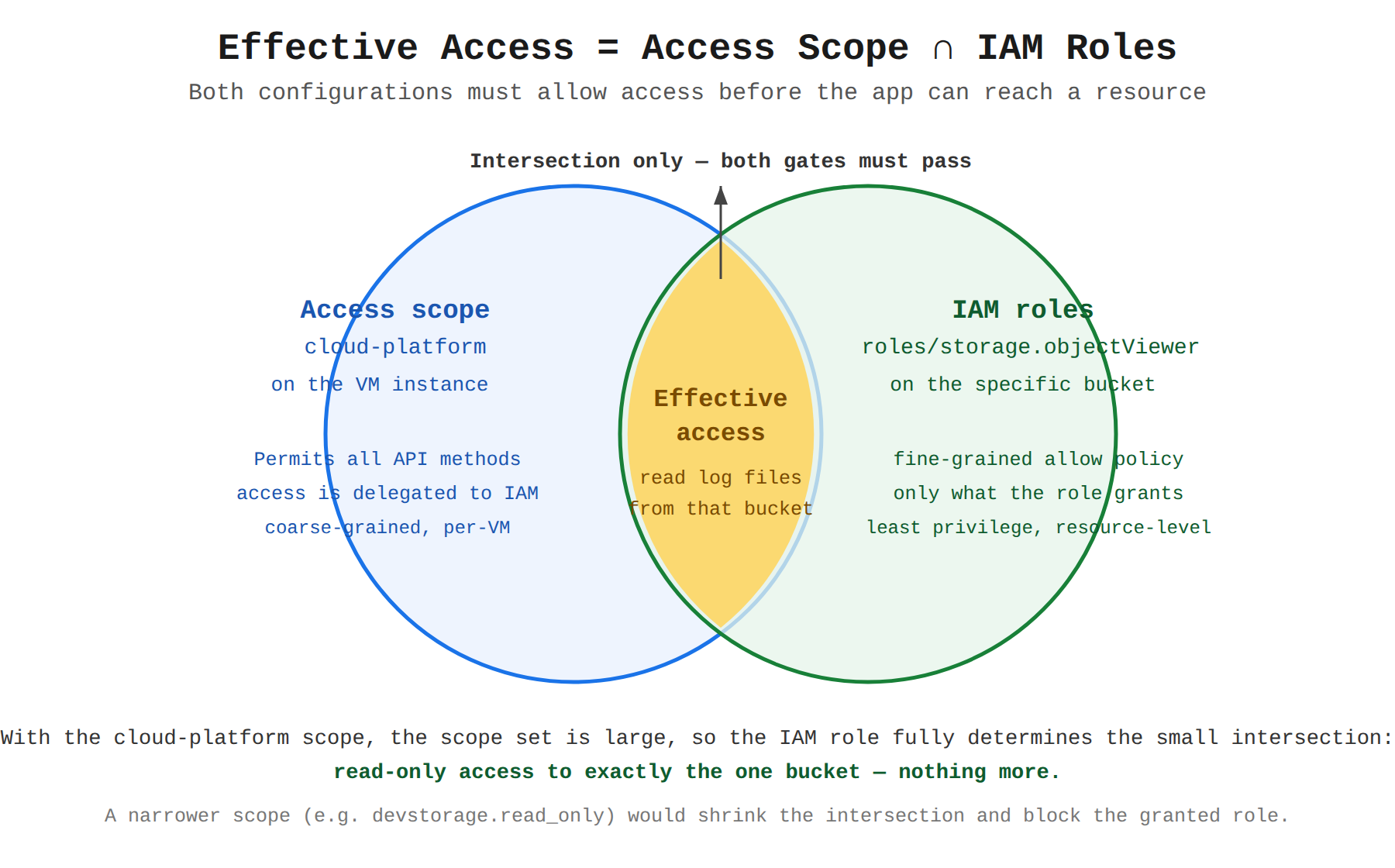
Key Advantages and Capabilities
- No hardcoded secrets: Applications authenticate seamlessly through the metadata server using ephemeral tokens without storing passwords or private keys on disk.
- Granular resource-level binding: User-managed service accounts can be granted roles at the resource level (such as an individual bucket) rather than project-wide.
- Simplified permission management: Using the
cloud-platformscope allows administrators to adjust IAM permissions centrally without restarting or reconfiguring the VM. - Auditability and tracking: Calls made by the workload appear in Cloud Audit Logs with the service account's unique email address.
Why This Is Optimal
This approach strictly aligns with the principle of least privilege and Google Cloud security best practices. By combining a dedicated user-managed service account, resource-level role assignment, and the recommended cloud-platform scope, security administrators retain full, centralized control over permissions exclusively through IAM.
Embed a Cloud Identity user account's credentials in a local configuration file on the VM and grant that user account the Storage Object Viewer role on the bucket.
Embed a Cloud Identity user account's credentials in a local configuration file on the VM and grant that user account the Storage Object Viewer role on the bucket.
What Cloud Identity User Accounts Are
User accounts in Google Cloud represent human individuals—such as developers, operators, or administrators—and are managed in Cloud Identity or Google Workspace. They are designed for interactive authentication, browser-based sign-in, and multi-factor authentication (MFA).
Why It Doesn't Meet the Requirement
- Misaligned identity type: Automated background processes and compute workloads should not authenticate using human user identities. Service accounts exist specifically to represent non-human workloads.
- Severe security risk: Storing human user credentials or long-lived authentication secrets in plaintext or configuration files on a VM exposes those credentials to theft, unauthorized exposure, and lateral movement.
- Lifecycle coupling: User accounts are tied to an employee's employment lifecycle. If the employee changes roles, has their password rotated, or leaves the company, the background application will fail unexpectedly.
Key Characteristics and Limitations
- Human-centric management: User accounts undergo joiner-mover-leaver processes and require interactive login verification.
- Lack of automated token refreshment: Long-lived user credentials on a server cannot safely leverage instance metadata service features like automatic short-lived token rotation.
- Reduced accountability: Blurring the line between automated actions and personal employee actions complicates auditing in Cloud Audit Logs.
This Answer Would Be Correct If
Using user credentials would be appropriate if an individual developer were interacting directly with Google Cloud services during local development on their personal workstation using gcloud auth application-default login.
Additional Context
Workloads running on Google Cloud infrastructure should always use attached service accounts rather than user credentials. This eliminates credential management overhead and ensures workload authorization is isolated from human access policies.
Create a user-managed service account granted the Storage Object Viewer role on the bucket, and attach it to the VM configured with the Compute Read-Only (https://www.googleapis.com/auth/compute.readonly) access scope.
Create a user-managed service account granted the Storage Object Viewer role on the bucket, and attach it to the VM configured with the Compute Read-Only (https://www.googleapis.com/auth/compute.readonly) access scope.
What Access Scopes Are and How They Function
Access scopes are a legacy mechanism used by Compute Engine instances to specify default OAuth 2.0 scopes for requests made by the attached service account. They act as a coarse-grained perimeter filter on the instance level, defining the maximum permissions that applications running on that specific VM can exercise.
Why It Doesn't Meet the Requirement
- Authorization failure: Effective access from a Compute Engine VM is determined by the intersection of the instance's access scopes and the service account's IAM roles. Both must permit the action.
- Blocks Cloud Storage API calls: The
https://www.googleapis.com/auth/compute.readonlyscope only authorizes read-only access to Compute Engine API methods. Because this scope excludes Cloud Storage APIs entirely, any attempt by the application to read objects from the bucket will be denied with an authorization error, despite the service account having theroles/storage.objectViewerIAM role. - Fails the functional requirement: The application will not be able to read the required files from the storage bucket.
Key Characteristics and Limitations
- Restrictive filter: Access scopes cannot grant permissions by themselves; they can only restrict or limit the permissions granted by IAM roles.
- Static configuration: Modifying access scopes typically requires stopping the VM instance, making fine-grained security adjustments operationally disruptive.
- Modern best practice: The recommended approach is to configure the VM with the comprehensive
cloud-platformaccess scope and enforce precise access control exclusively using IAM roles.
This Answer Would Be Correct If
This configuration would be appropriate if the VM only needed to inspect Compute Engine instances and metadata without interacting with Cloud Storage or other Google Cloud services.
Additional Context
When debugging permission issues on Compute Engine, administrators must check both IAM policies and instance access scopes. An IAM role alone is insufficient if the access scope restricts the target API.
Try 10 interactive questions like this one, free
Answer them yourself and get your score the moment you finish. No account needed.
Full access includes
- 2,014 practice questions across all 4 exam domains
- Every answer explained: why it is right, and why the others are not
- Scout, an AI tutor that answers your follow-up questions
- Readiness tracking by domain, so you know when to book the exam
Related free sample questions
Keep the momentum going with these hand-picked practice scenarios
FundamentalAssociate Cloud Engineer
Service Account Impersonation Keyless Access
Using service accounts in IAM policies with minimum permissions
FundamentalAssociate Cloud Engineer
Cloud Run Scale to Zero
Selecting appropriate compute choices for a given workload (e.g., Compute Engine, Google Kubernetes Engine [GKE], Cloud Run, Cloud Run functions, Knative serving)
FundamentalAssociate Cloud Engineer
Static Internal IP Primary CIDR Requirement
Reserving static external or internal IP addresses
FundamentalAssociate Cloud Engineer
Compute Engine VM Instances Page
Viewing current running Compute Engine instances
FundamentalAssociate Cloud Engineer
Cloud SQL Preemptive Storage Resizing
Executing queries to retrieve data from data instances (e.g., Cloud SQL, BigQuery, Bigtable, Spanner, Firestore, AlloyDB)
AdvancedProfessional Data Engineer
Cloud Spanner Multi-Region Consistency
Choosing managed services (e.g., BigQuery, BigLake, AlloyDB, Bigtable, Spanner, Cloud SQL, Cloud Storage, Firestore, Memorystore)
Last updated