Fundamental
Prepare and test your skills

Fundamental
Prepare and test your skills
Inspecting Pod Details With kubectl describe
Free sample question with answers and detailed explanation below. The Associate Cloud Engineer practice bank has an additional 2,014 practice questions.Try 10 free realistic questions: instant score, no credit card, and no account required.
An administrator is troubleshooting an application running on a Google Kubernetes Engine (GKE) cluster. A Pod named payment-processor in the backend namespace has failed to start properly and is reporting a status of CrashLoopBackOff.
The administrator needs to view the Pod's detailed lifecycle events, container exit codes, volume mount statuses, and environmental configurations using the command-line interface.
Which command should the administrator execute to inspect these comprehensive resource details?
Explanations
kubectl logs payment-processor -n backend
kubectl logs payment-processor -n backend
What kubectl logs Does
The kubectl logs command streams or prints the standard output (stdout) and standard error (stderr) streams generated by the application running inside a container.
Why It Doesn't Meet the Requirement
- No Kubernetes Lifecycle Events:
kubectl logsonly displays output generated by the application code itself. It does not display Kubernetes-level lifecycle events, such as container crash schedules, probe execution failures, or node binding issues. - Omits Cluster-Level Metadata: It does not provide resource configurations, volume mount statuses, CPU/memory requests, or environment variables assigned by the Pod specification.
- Fails on Non-Starting Containers: If a container fails before executing its entrypoint binary (such as an invalid command path or failing init-container), logs may be empty or unavailable.
Key Characteristics and Limitations
- Focuses strictly on application-level execution logs.
- Requires specifying
-cif the Pod has multiple containers. - Cannot diagnose cluster-level scheduling, mounting, or network configuration failures.
This Answer Would Be Correct If
The Pod had successfully passed Kubernetes initialization and startup checks, and the administrator needed to read an internal application stack trace or uncaught software exception.
gcloud container clusters describe payment-processor --zone backend
gcloud container clusters describe payment-processor --zone backend
What gcloud container clusters describe Does
The gcloud container clusters describe command is a Google Cloud SDK tool used to inspect the control plane and infrastructure configuration of an entire GKE cluster, rather than in-cluster Kubernetes workloads.
Why It Doesn't Meet the Requirement
- Wrong Target Resource: This command queries the Google Cloud Compute Engine / GKE control plane API to describe a GKE cluster entity, not individual Pods or workloads inside Kubernetes.
- Invalid Syntax and Context: The argument
payment-processorrefers to a workload Pod, not a cluster name, and--zone backendassumes an invalid compute zone name rather than a Kubernetes namespace. - No Workload-Level Visibility: Cloud-level cluster descriptions detail cluster versioning, network policies, node pool specifications, and endpoint settings, but have no visibility into individual Pod lifecycles or container exit statuses.
Key Characteristics and Limitations
- Operates at the Google Cloud resource management layer rather than the Kubernetes API layer.
- Manages and inspects infrastructure properties (e.g., node autoscaling, master authorized networks, VPC-native routing).
- Requires Google Cloud IAM permissions rather than in-cluster Kubernetes RBAC roles.
This Answer Would Be Correct If
The objective was to check the status, master version, or node pool configuration of the physical or virtual GKE cluster infrastructure itself.
kubectl describe pod payment-processor -n backend
kubectl describe pod payment-processor -n backend
What kubectl describe Is
The kubectl describe command is a core Kubernetes CLI diagnostic tool used to generate a detailed, human-readable summary of one or more cluster resources. It queries the Kubernetes API server for the current state, runtime configuration, and associated controller events related to the target object.
How It Meets the Requirements
- Inspects Detailed Lifecycle Events: Running
kubectl describe pod payment-processor -n backendaggregates recent cluster events directly associated with the specified Pod. This includes image pull attempts, scheduling decisions, container startup failures, and restart histories. - Container Exit Codes and Termination Reasons: The output explicitly breaks down each container within the Pod, displaying the current state (
Waiting,Running, orTerminated), exit codes, restart counts, and reasons such asOOMKilledorError. - Configuration and Volume Metadata: It formats all configured environment variables, mounted secrets, config maps, and resource requests/limits into organized, readable sections.
- Targets the Correct Namespace: The
-n backendflag ensures that the command targets thebackendnamespace where thepayment-processorPod resides.
kubectl describe Output — What to Read
Annotated Structure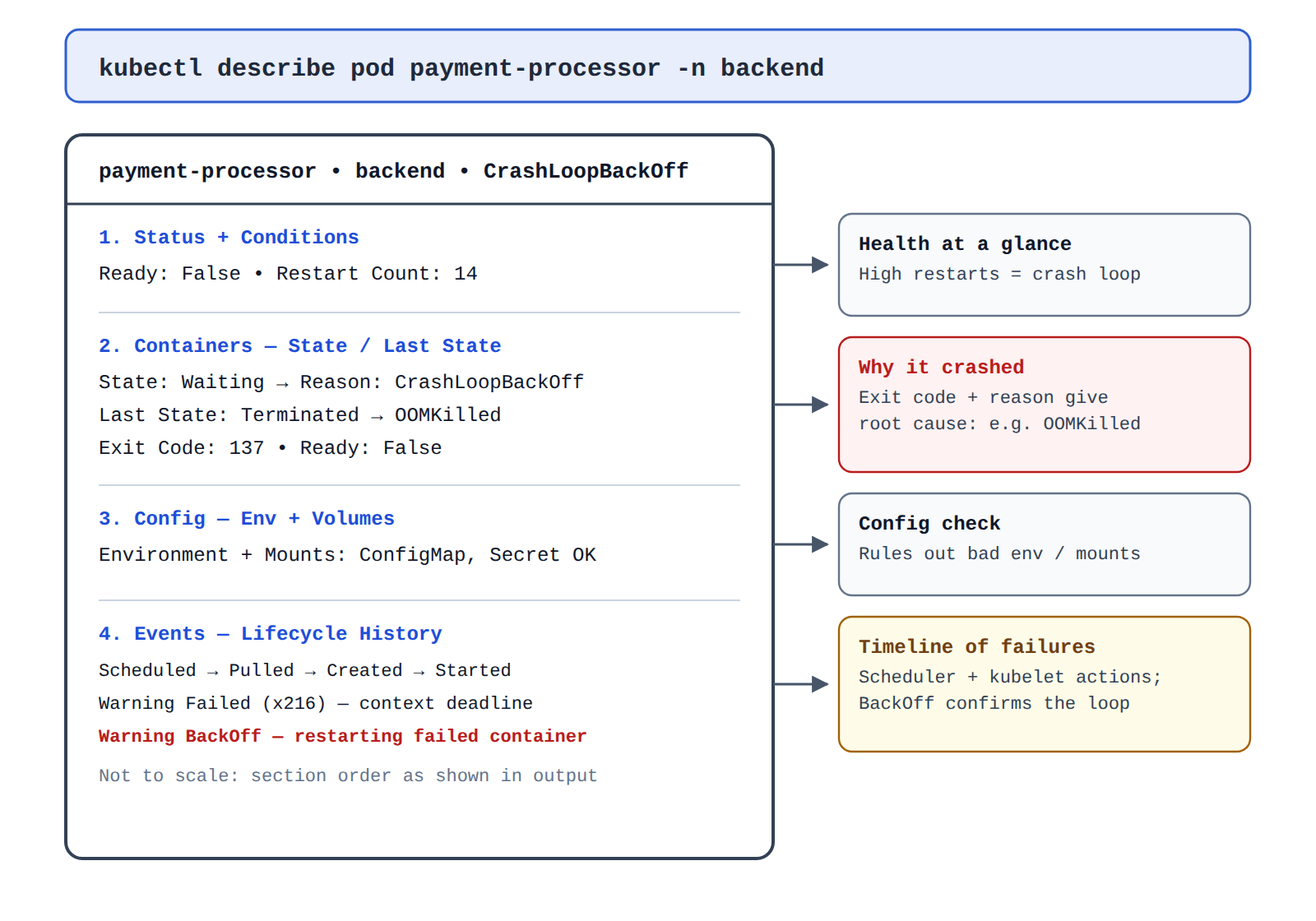
Key Advantages and Capabilities
- Aggregated Event Stream: Captures low-level Kubernetes events that occur outside application container logs, such as failed probes, volume mounting errors, or scheduling issues.
- Human-Readable Formatting: Formats complex JSON/YAML API responses into clean, labeled sections designed specifically for administrator diagnosis.
- Multi-Container Visibility: Shows the status and metadata of init containers, sidecars, and primary app containers in a unified output.
- Zero Log Overhead: Provides immediate root-cause visibility even if the container crashed before emitting standard application logs.
Why This Is Optimal
While other commands like kubectl get list basic status columns and kubectl logs retrieve stdout/stderr application output, only kubectl describe compiles lifecycle events, container health states, and resource parameters into a single diagnostic view required to resolve pod startup issues.
kubectl get pod payment-processor -n backend
kubectl get pod payment-processor -n backend
What kubectl get Does
The kubectl get command retrieves a high-level summary of one or more Kubernetes resources from the API server and displays the information in a concise, tabular format.
Why It Doesn't Meet the Requirement
- Lacks Lifecycle Events:
kubectl getdoes not display the cluster event log associated with the Pod. It will show that the Pod is inCrashLoopBackOff, but it will not indicate why (such as missing environment variables, liveness probe failures, or node-level evictions). - Omits Container Metadata: The tabular output displays high-level columns such as
NAME,READY,STATUS,RESTARTS, andAGE. It does not output container exit codes, mounted volumes, or environment variables.
Key Characteristics and Limitations
- Provides quick status overviews for listing multiple resources at once across a namespace or cluster.
- Supports format extensions like
-o wide,-o json, or-o yamlto inspect raw declarations, but still does not include live cluster event streams. - Ideal for inventory tracking rather than in-depth troubleshooting.
This Answer Would Be Correct If
The administrator only needed to check whether the Pod was running, view its restart count, or verify its assigned IP address without needing diagnostic lifecycle events.
Additional Context
Administrators typically run kubectl get pods -n backend first to identify failing Pods, followed by kubectl describe on the problematic Pod to diagnose the failure.
Try 10 interactive questions like this one, free
Answer them yourself and get your score the moment you finish. No account needed.
Full access includes
- 2,014 practice questions across all 4 exam domains
- Every answer explained: why it is right, and why the others are not
- Scout, an AI tutor that answers your follow-up questions
- Readiness tracking by domain, so you know when to book the exam
Related free sample questions
Keep the momentum going with these hand-picked practice scenarios
FundamentalAssociate Cloud Engineer
GKE Workloads Console Page
Viewing current running GKE cluster inventory (e.g., nodes, Pods, Services)
FundamentalAssociate Cloud Engineer
Namespace-Scoped vs Cluster-Scoped Resources
Viewing current running GKE cluster inventory (e.g., nodes, Pods, Services)
FundamentalAssociate Cloud Engineer
Dataflow Autoscaling Rationale Chart
Reviewing job status (e.g., Dataflow, BigQuery)
FundamentalAssociate Cloud Engineer
Helm Templates and Values Files
Infrastructure as code tooling (e.g., Fabric FAST, Config Connector, Terraform, Helm)
FundamentalAssociate Cloud Engineer
Cloud Billing Budget Scope Filters
Establishing billing budgets and alerts
FundamentalGenerative AI Leader
Gemma Open-Weight Local Deployment
Gemma
Last updated