Fundamental
Prepare and test your skills

Fundamental
Prepare and test your skills
Cloud Run Developer Role Permissions and Limits
Free sample question with answers and detailed explanation below. The Associate Cloud Engineer practice bank has an additional 2,014 practice questions.Try 10 free realistic questions: instant score, no credit card, and no account required.
Your organization has a production Google Cloud project named prod-backend. A software developer, dev-lead@example.com, needs to deploy, configure, and manage Cloud Run services within this project.
Company security policy mandates strict adherence to the principle of least privilege in production environments, specifically requiring:
- The developer must have permissions to create, update, and delete Cloud Run services.
- The developer must not be able to modify IAM allow policies.
- The developer must not receive permissions across unrelated Google Cloud services.
Which gcloud command should you run to grant the appropriate access?
Explanations
gcloud projects add-iam-policy-binding prod-backend --member="user:dev-lead@example.com" --role="roles/editor"
gcloud projects add-iam-policy-binding prod-backend --member="user:dev-lead@example.com" --role="roles/editor"
What the Editor Role Does
The Editor role (roles/editor) is a basic (primitive) role that predates fine-grained IAM. It provides expansive modify access across virtually all Google Cloud services in the project, including Compute Engine, BigQuery, VPCs, and Cloud Storage.
Why It Doesn't Meet the Requirement
Assigning roles/editor violates the core principle of least privilege and fails two explicit requirements: it grants permissions to thousands of non-Cloud Run resources and provides excessive permissions across the entire project. Best practices explicitly forbid granting basic roles in production environments when predefined roles are available.
Key Characteristics and Limitations
- Overly broad blast radius: Grants write and delete permissions across nearly all Google Cloud services within the project.
- Violates production security standards: Documentation recommends avoiding basic roles (Owner, Editor, Viewer) in production environments because of the security risks they introduce.
- Coarse governance: Obscures specific audit boundaries because permissions cannot be customized or limited to a single domain of responsibility.
This Answer Would Be Correct If
The assignment were made in an isolated sandbox or testing project where rapid prototyping is required and establishing fine-grained access boundaries is not necessary.
gcloud projects add-iam-policy-binding prod-backend --member="user:dev-lead@example.com" --role="roles/run.viewer"
gcloud projects add-iam-policy-binding prod-backend --member="user:dev-lead@example.com" --role="roles/run.viewer"
What the Cloud Run Viewer Role Does
The Cloud Run Viewer role (roles/run.viewer) is a read-only role designed for monitoring and inspecting Cloud Run resources, such as viewing services, configuration specifications, and job execution logs.
Why It Doesn't Meet the Requirement
Although this role complies with security restrictions by preventing IAM changes and denying access to other services, it fails the primary business requirement. A user with roles/run.viewer has read-only access and cannot create, modify, deploy, or delete Cloud Run services.
Key Characteristics and Limitations
- Read-only permissions: Does not include
run.services.create,run.services.update, orrun.services.deletepermissions. - Restricts deployments: Any attempt by the developer to deploy new revisions or update environment variables will fail with authorization errors.
- Intended for observation: Designed for monitoring dashboards, auditing, and observability tools.
This Answer Would Be Correct If
The developer only required read-only access to view logs, monitor service health, and inspect existing configurations without performing deployments or altering configurations.
gcloud projects add-iam-policy-binding prod-backend --member="user:dev-lead@example.com" --role="roles/run.admin"
gcloud projects add-iam-policy-binding prod-backend --member="user:dev-lead@example.com" --role="roles/run.admin"
What the Cloud Run Admin Role Does
The Cloud Run Admin role (roles/run.admin) is the complete administrative role for Cloud Run. It confers full control over all Cloud Run resources, including services, revisions, jobs, and access policies.
Why It Doesn't Meet the Requirement
While this role allows the developer to deploy and manage services, it violates the constraint that developers must not be allowed to modify access control policies. Cloud Run Admin explicitly includes run.services.setIamPolicy, which would allow the developer to grant access to other users, change service security settings, or make services publicly accessible.
Key Characteristics and Limitations
- Includes IAM write capabilities: Allows modifying allow policies directly on Cloud Run resources.
- Enables public access configuration: Possesses permissions to disable invoker authentication checks or grant
roles/run.invokertoallUsers. - Administrative scope: Intended for cloud administrators and automated deployment pipelines rather than individual application developers in production.
This Answer Would Be Correct If
The developer were a designated platform administrator responsible for configuring access policies, managing service-to-service authorization, and modifying IAM role bindings for the application.
gcloud projects add-iam-policy-binding prod-backend --member="user:dev-lead@example.com" --role="roles/run.developer"
gcloud projects add-iam-policy-binding prod-backend --member="user:dev-lead@example.com" --role="roles/run.developer"
What the Cloud Run Developer Role Is
The Cloud Run Developer role (roles/run.developer) is a specialized predefined IAM role tailored for software engineers. It grants the permissions required to deploy, update, manage, and delete Cloud Run services, jobs, and worker pools without conferring unnecessary administrative or cross-service privileges.
How It Meets the Requirements
- Service lifecycle management: The
roles/run.developerrole provides full operational permissions to create, update, and delete services, as well as inspect execution logs and revisions. - Prevents IAM policy modification: Unlike administrative roles, the Cloud Run Developer role permits users to view (
getIamPolicy) but not modify (setIamPolicy) IAM policies, satisfying the requirement that the developer cannot alter security policies. - Restricts cross-service privileges: Predefined roles are service-specific. Granting
roles/run.developerscopes access strictly to Cloud Run and does not grant access to Compute Engine, Cloud Storage, Cloud SQL, or other unrelated project services. - Accurate syntax: The command uses
gcloud projects add-iam-policy-bindingwith the properuser:identity prefix and role name to update the project's allow policy.
Least Privilege: What roles/run.developer Covers
Set Relationship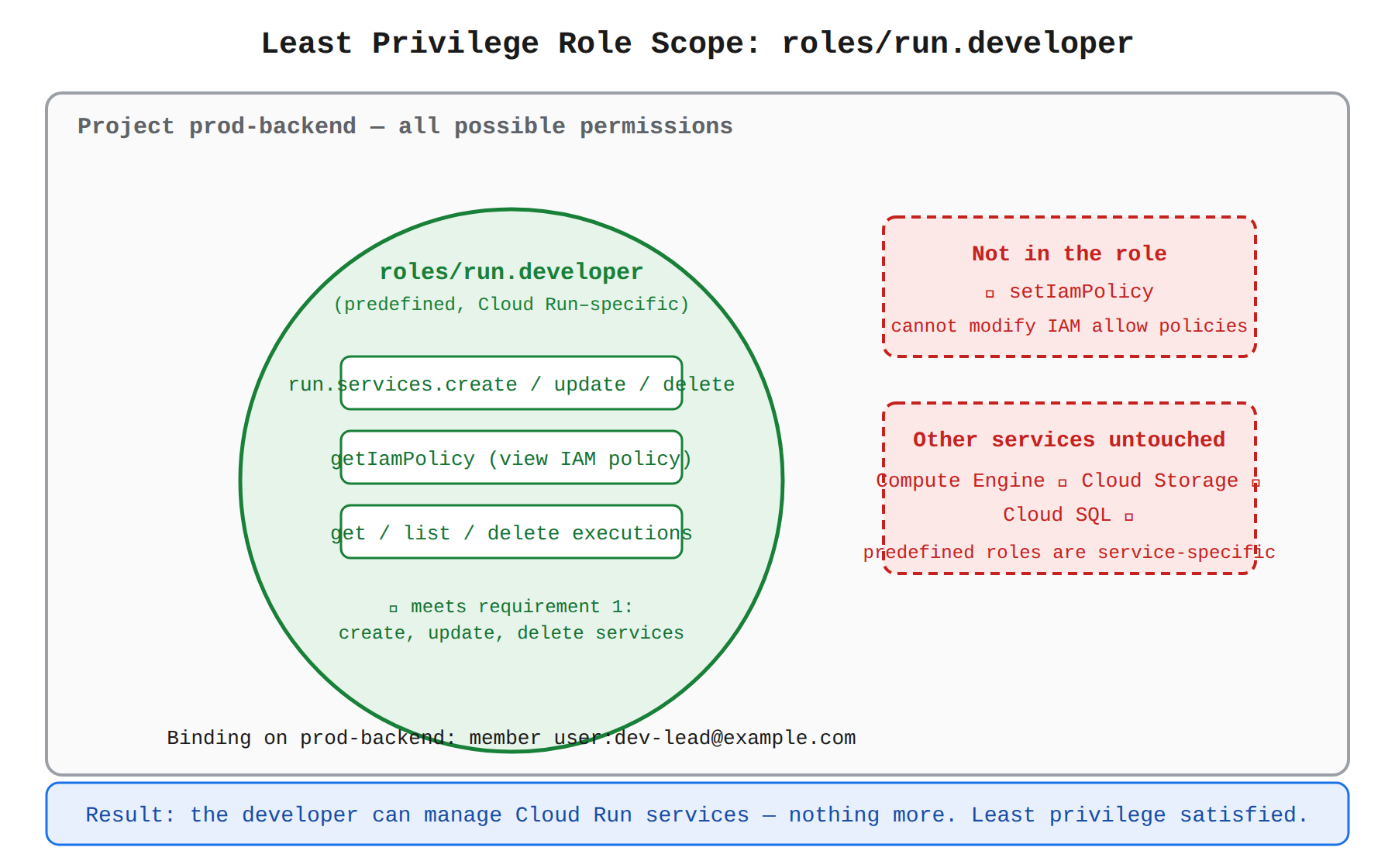
Key Advantages and Capabilities
- Strict adherence to least privilege: Empowers developers to carry out their daily application deployment tasks while denying unnecessary access.
- Separation of duties: Keeps access control administration in the hands of security and cloud operations administrators.
- Maintained by Google: As new non-administrative Cloud Run capabilities are released, Google automatically updates the predefined role without requiring manual policy maintenance.
- Direct debugging support: Permits listing and viewing service executions, which is essential for diagnosing application issues in production.
Why This Is Optimal
Granting roles/run.developer perfectly matches the stated requirements by giving the developer the tools needed to build and manage services without introducing security risks associated with broader roles such as Cloud Run Admin or project-wide Editor.
Try 10 interactive questions like this one, free
Answer them yourself and get your score the moment you finish. No account needed.
Full access includes
- 2,014 practice questions across all 4 exam domains
- Every answer explained: why it is right, and why the others are not
- Scout, an AI tutor that answers your follow-up questions
- Readiness tracking by domain, so you know when to book the exam
Related free sample questions
Keep the momentum going with these hand-picked practice scenarios
FundamentalAssociate Cloud Engineer
ClusterPodMonitoring vs PodMonitoring
Deploying Google Cloud Managed Service for Prometheus
FundamentalAssociate Cloud Engineer
_Required vs _Default Log Buckets
Configuring log buckets, log analytics, and log routers
FundamentalAssociate Cloud Engineer
Organization Policy Service Constraints
Using Active Assist to optimize resource utilization
FundamentalAssociate Cloud Engineer
Dataflow Spanner Bigtable Export Formats
Backing up and restoring database instances (e.g., Cloud SQL, Firestore, Spanner, AlloyDB, Bigtable)
FundamentalAssociate Cloud Engineer
Predefined vs Basic IAM Roles
Managing IAM permissions of a service account
AdvancedProfessional Cloud DevOps Engineer
Ops Agent Logging Pipeline Configuration
Collecting and importing logs (e.g., Ops Agent, OpenTelemetry, Cloud Audit Logs, VPC Flow Logs, Cloud Service Mesh)
Last updated