Fundamental
Prepare and test your skills

Fundamental
Prepare and test your skills
Billing Export Permissions for BigQuery Datasets
Free sample question with answers and detailed explanation below. The Associate Cloud Engineer practice bank has an additional 2,014 practice questions.Try 10 free realistic questions: instant score, no credit card, and no account required.
Your company wants to establish automated daily exports of Google Cloud billing data to BigQuery to enable granular cost tracking, custom reporting, and financial auditing.
You are tasked with setting up the billing export to a dedicated BigQuery dataset in a centralized analytics project.
Which combination of Identity and Access Management (IAM) permissions and destination configurations is required to successfully enable this billing export?
Explanations
Possess the Billing Account Administrator role on the Cloud Billing account, have dataset edit permissions (such as BigQuery Data Editor or BigQuery Admin) in the destination project, and target a pre-created BigQuery dataset that restricts unauthorized access.
Possess the Billing Account Administrator role on the Cloud Billing account, have dataset edit permissions (such as BigQuery Data Editor or BigQuery Admin) in the destination project, and target a pre-created BigQuery dataset that restricts unauthorized access.
What Cloud Billing BigQuery Export Is
Cloud Billing export to BigQuery is a native Google Cloud feature that enables continuous, automated streaming of detailed financial and resource usage data directly into a BigQuery dataset. This allows finance teams and cloud architects to run SQL-based cost analytics, aggregate spending by resource labels, and build automated visualization dashboards in tools like Looker Studio.
How It Meets Permission and Destination Requirements
- Billing Account Administrator (
roles/billing.admin): Configuring billing exports at the billing account level requires administrative authority over the billing account itself. The administrator role grants the permissions necessary to link billing streams to external destination projects. - Destination Dataset Permissions (
roles/bigquery.dataEditororroles/bigquery.admin): The administrator configuring the export must hold permissions in the target project to create tables, update metadata, and modify datasets (such asbigquery.tables.createandbigquery.tables.updateData). - Secured Destination Dataset: A destination BigQuery dataset must be created within an active Google Cloud project with the BigQuery API enabled. The dataset access policy must restrict access to authorized analysts and explicitly prevent public exposure.
Dual-Side Access for Billing Export
System Architecture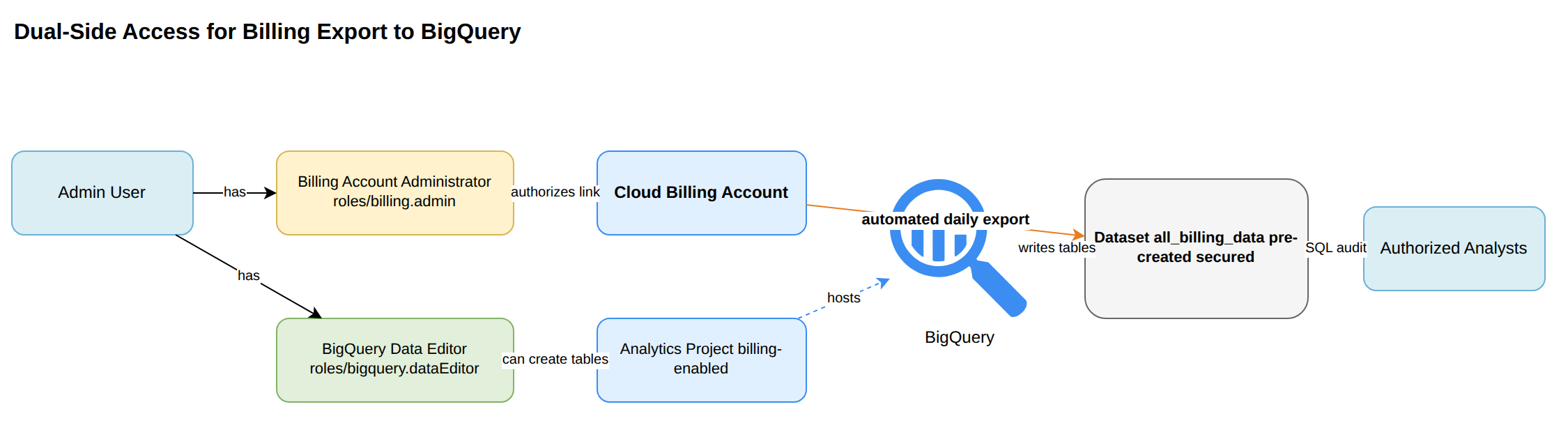
Key Advantages of Proper Export Configuration
- Automated Data Delivery: Eliminates manual CSV/JSON downloads by continuously loading cost metrics directly into BigQuery.
- Granular Financial Analysis: Delivers detailed cost breakdowns, SKU pricing, project IDs, and resource labels.
- Strong Governance: Ensures sensitive enterprise cost data remains protected through robust dataset-level and project-level IAM controls.
- Scalable Querying: Enables high-performance analytical queries across multi-year spending trends without degrading operational systems.
Why This Is Optimal
This setup follows standard Google Cloud security principles by pairing administrative control on the billing entity with appropriate write permissions on a properly secured, dedicated destination repository.
Possess the Billing Account Viewer role on the Cloud Billing account, assign the Storage Admin role to the destination dataset, and configure a Cloud Storage bucket as an external BigQuery table source.
Possess the Billing Account Viewer role on the Cloud Billing account, assign the Storage Admin role to the destination dataset, and configure a Cloud Storage bucket as an external BigQuery table source.
What Billing Account Viewer and Storage Admin Do
The Billing Account Viewer (roles/billing.viewer) role grants read-only visibility into billing account balances, invoices, and transaction history. The Storage Admin (roles/storage.admin) role provides full administrative control over Cloud Storage buckets and objects, such as creating, listing, and deleting files.
Why It Doesn't Meet the Requirement
- Lack of Export Management Rights: A Billing Account Viewer has read-only access and cannot alter settings, activate automated exports, or select destination datasets.
- Mismatched Service Permissions: Assigning Storage Admin permissions applies to Cloud Storage buckets, not BigQuery datasets or tables.
- Incorrect Architecture: Native BigQuery billing export writes directly to managed BigQuery tables; it does not require configuring an external table over Cloud Storage bucket files.
Key Characteristics and Limitations
- Viewers cannot initiate configuration changes within Google Cloud Billing.
- Storage-level roles cannot manage BigQuery job executions or native table creations.
- Direct BigQuery billing export does not use Cloud Storage as an intermediate external table layer.
This Answer Would Be Correct If
A user needed read-only financial visibility while maintaining storage buckets for unstructured object backups.
Possess the Project Viewer role across all organizational projects, assign the BigQuery Job User role to the billing account, and rely on BigQuery to automatically generate the destination dataset on export initiation.
Possess the Project Viewer role across all organizational projects, assign the BigQuery Job User role to the billing account, and rely on BigQuery to automatically generate the destination dataset on export initiation.
What Project Viewer and BigQuery Job User Do
The Project Viewer (roles/viewer) role provides read-only access to standard project resources across Google Cloud. The BigQuery Job User (roles/bigquery.jobUser) role grants permission to run queries and execute BigQuery processing jobs within a specific project.
Why It Doesn't Meet the Requirement
- Absence of Billing Administration: Project-level viewer permissions do not confer any administrative rights over the Cloud Billing account.
- Invalid Role Assignment Target: IAM roles are granted to human identities, service accounts, or Google Groups, not assigned directly to billing account resource objects.
- Missing Destination Configuration: BigQuery billing exports require an existing destination dataset in a project where the administrator has permissions; the export process will not automatically provision new datasets on the fly.
Key Characteristics and Limitations
roles/viewerlacks the necessary rights to modify cloud infrastructure or configure billing settings.- Destination BigQuery datasets must be pre-created before linking them in the billing export settings.
- IAM policies must be assigned to valid identity principals, not billing resource identifiers.
This Answer Would Be Correct If
An auditor required broad read-only visibility across projects to inspect configurations and execute analytical SQL queries in an existing BigQuery environment.
Possess the Billing Account User role on the Cloud Billing account, have the BigQuery Data Viewer role in the destination project, and configure a public BigQuery dataset accessible to allAuthenticatedUsers.
Possess the Billing Account User role on the Cloud Billing account, have the BigQuery Data Viewer role in the destination project, and configure a public BigQuery dataset accessible to allAuthenticatedUsers.
What Billing Account User and BigQuery Data Viewer Do
The Billing Account User (roles/billing.user) role allows users to link new or existing projects to a Cloud Billing account. The BigQuery Data Viewer (roles/bigquery.dataViewer) role grants read-only access to datasets, allowing principals to inspect dataset metadata and query existing tables.
Why It Doesn't Meet the Requirement
- Insufficient Billing Privileges: The Billing Account User role cannot modify billing account configurations or enable billing export pipelines; only a Billing Account Administrator can establish billing exports.
- Insufficient Destination Privileges: Read-only viewer access (
roles/bigquery.dataViewer) does not permit creating tables, updating schemas, or writing incoming export streams into BigQuery. - Severe Security Violation: Exposing internal enterprise billing information to
allAuthenticatedUsersmakes confidential corporate financial data publicly readable by any authenticated Google Cloud identity.
Key Characteristics and Limitations
roles/billing.useris intended strictly for project association, not billing administration.roles/bigquery.dataViewerlacks essential write permissions such asbigquery.tables.createandbigquery.tables.updateData.- Public datasets violate cloud security standards and expose sensitive corporate accounting metrics.
This Answer Would Be Correct If
This combination would be relevant if a developer only needed to attach a project to a billing account and read data from an existing public demonstration dataset.
Try 10 interactive questions like this one, free
Answer them yourself and get your score the moment you finish. No account needed.
Full access includes
- 2,014 practice questions across all 4 exam domains
- Every answer explained: why it is right, and why the others are not
- Scout, an AI tutor that answers your follow-up questions
- Readiness tracking by domain, so you know when to book the exam
Related free sample questions
Keep the momentum going with these hand-picked practice scenarios
FundamentalAssociate Cloud Engineer
Detailed Usage Cost Data Export
Setting up billing exports
FundamentalAssociate Cloud Engineer
Service Account-Based Firewall Filtering
Using Tags (e.g., secure Tags) and service accounts in Cloud NGFW policy rules
FundamentalAssociate Cloud Engineer
Compute Engine SSH Key Expiration Metadata
Configuring OS Login
FundamentalAssociate Cloud Engineer
Google Cloud Ops Agent
Provisioning and setting up products in Google Cloud Observability
FundamentalAssociate Cloud Engineer
Cloud Monitoring Metrics Explorer PromQL
Deploying Google Cloud Managed Service for Prometheus
IntermediateProfessional Cloud Database Engineer
Cloud SQL Vertex AI Integration
Leverage database technologies to support generative AI and LLM use cases
Last updated