Simulation
Assured Workloads: how folder policy, region choice, and data field shape residency
Change the folder policy, target region, and where you put the data to see provisioning succeed, get blocked, or leak.
Try the scenario
Assured Workloads: how folder policy, region choice, and data field shape residency
Change the inputs and watch how the outcome changes.
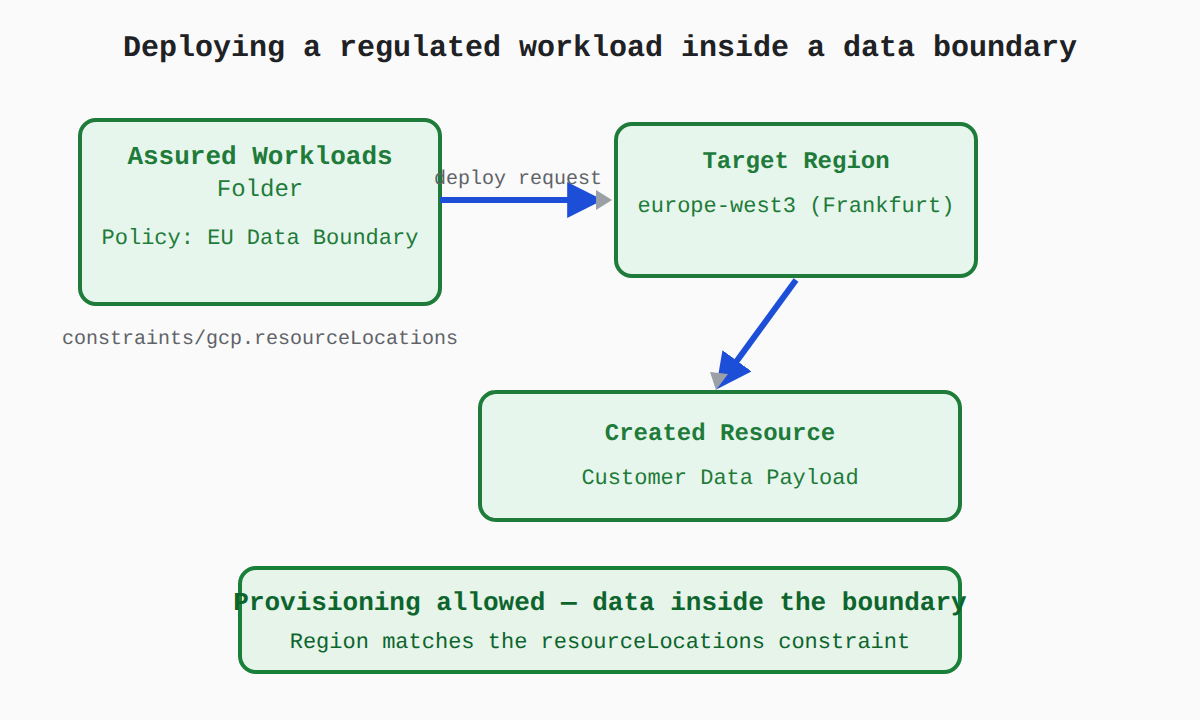
Change the folder policy, target region, and where you put the data to see provisioning succeed, get blocked, or leak.
Every outcome
Succeeds
2 outcomesCompliant regional deployment
The region is inside the folder's data boundary, so the gcp.resourceLocations constraint allows the deploy request and the resource is created. The Customer Data payload stays within the selected region's boundary at rest, in use, and in transit.
Starting scenarioEvery input at its default
Unconstrained deployment without guardrails
Because this condition changed — the folder has no Assured Workloads control package — no gcp.resourceLocations constraint applies, and the resource deploys successfully. However, nothing prevents resources or data from being placed in other regions later, so residency depends entirely on manual care.
What changed
- Folder control packageEU Data BoundarytoNone (Unconstrained)
Fails
1 outcomeProvisioning blocked by location policy
The target region is outside the folder's data boundary, so the gcp.resourceLocations constraint detects the mismatch and denies resource creation. Assured Workloads control packages restrict which regions can be selected for resources in the folder.
What changed
- Target regioneurope-west3 (Frankfurt)tous-central1 (Iowa)
Mixed
2 outcomesResidency leak through metadata
The region matches the folder's data boundary, so provisioning succeeds. But regulated data placed in a resource name or label bypasses the protections: those fields are treated as Service Data (metadata) that sits outside the Assured Workloads residency boundary.
What changed
- Where the regulated data goesCustomer Data payloadtoResource name / labels
Unconstrained deployment with metadata exposure
With no Assured Workloads control package, no location policy checks the deploy request, and regulated data placed in a resource name or label is treated as Service Data handled globally — outside the residency boundary. Neither layer protects the sensitive information here.
What changed
- Folder control packageEU Data BoundarytoNone (Unconstrained)
- Where the regulated data goesCustomer Data payloadtoResource name / labels
In the Domain
Organization Policies and Service Controls That Enforce Boundaries
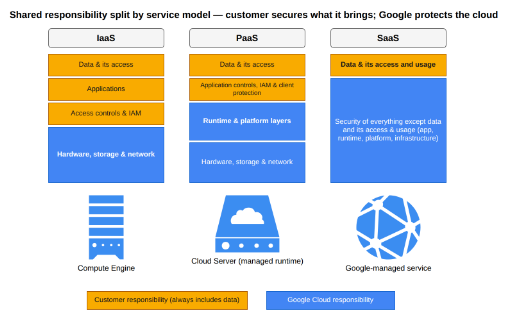
Shared duties keep data in place. Google provides default encryption, infrastructure security, and enforcement of customer IAM and Assured Workloads controls. The customer must place regulated data in the correct folder, configure IAM, and avoid putting sensitive data in resource names, IDs, labels, or description fields, because those identifiers sit outside the residency boundary.
Domain 3 of 3
Google Cloud’s trust principles and compliance
Read the Domain summaryPractice this Domain
137 practice questions
Practice this DomainMore from this Domain
Last updated