Fundamental
Prepare and test your skills

Fundamental
Prepare and test your skills
How Cloud Revolutionizes Business Capabilities
Evaluating the operational and organizational impacts of cloud migration means assessing how moving to the cloud changes daily operations, team roles, and business practices. Google Cloud (opens in a new tab) shifts work away from managing physical servers toward automation, managed services, and global infrastructure. Organizations must also build new skills, adopt governance practices, and align leadership around cloud goals.
The Four Phases of a Cloud Migration
The four phases of a cloud migration are the ordered steps that move workloads from assessment to ongoing improvement. Each phase builds on the one before it:
Cloud Migration in Four Phases
Process FlowA left-to-right process flow showing Assess, Plan, Deploy, and Optimize phases of migration with key tasks for each phase in order.
- Assess: Inventory applications and dependencies, calculate total cost of ownership, and set performance benchmarks.
- Plan: Build the basic cloud foundation (opens in a new tab) with identity management, organization and project structure, and networking, and develop a prioritized migration strategy.
- Deploy: Design and execute the deployment process (opens in a new tab) to move workloads and data to Google Cloud.
- Optimize: Use cloud-optimized capabilities to improve performance, scalability, disaster recovery, and cost, and to open the door to machine learning and AI.
A weak foundation in the Plan phase can cause delays, confusion, and downtime that put the whole migration at risk.
Operational Impacts: Automation, Scaling, and Managed Services
Operational impacts are the changes to daily IT work when manual, fixed-capacity tasks are replaced by automation and services that scale on demand. Autoscaling adjusts capacity based on workload so resources are available without over-provisioning:
- Compute Engine managed instance groups (MIGs) scale groups of virtual machines (VMs) as a single entity using policies that define minimum and maximum counts and scaling triggers.
- Google Kubernetes Engine (GKE) autoscaling adjusts container clusters using Cluster Autoscaler to add or remove nodes, Horizontal Pod Autoscaler to change Pod replicas, Vertical Pod Autoscaler to tune resource requests, and Node Auto-Provisioning to create optimized node pools.
- Cloud Run is a serverless platform with built-in autoscaling that adds instances when traffic rises and removes them when traffic falls.
Right-sizing keeps resources matched to actual demand. Cloud Monitoring gives real-time visibility into utilization, Recommender suggests optimizations, and custom metrics with alerts can trigger automated actions. Deployment also becomes faster through CI/CD pipelines built with Cloud Build and Cloud Deploy, where automated unit, integration, and end-to-end tests validate changes before production and reduce errors.
Organizational Impacts: Skills, Culture, and Governance
Organizational impacts are the changes to who does what work and how teams collaborate after migration. Shared responsibilities between the organization and Google differ from on-premises work, so teams must learn which tasks Google manages and which they still own. A Cloud Center of Excellence (COE) helps internal teams adopt the cloud faster, drive standardization, and align cloud investments with business strategy.
Continuous improvement depends on culture. Regular retrospectives, often using a start-stop-continue model, help teams reflect after milestones or incidents and refine processes. A learning culture encourages safe experimentation, blameless handling of failures, and knowledge sharing through training and certifications. Governance prevents sprawl and supports compliance through consistent naming, security marks for classification, labels for cost tracking, and tags for firewall rules.
Exam tip: In a public cloud environment, Google manages physical security, power and network cabling, hardware, and the virtualization platform, while your organization remains responsible for its app resources.
Choosing a Migration Strategy
Choosing a migration strategy means selecting how much to change each workload and how much effort to invest:
| Strategy | What changes | When to choose |
|---|---|---|
| Rehost | Move workloads as-is to cloud VMs | You want to move quickly with minimal changes |
| Refactor | Modify workloads to use cloud capabilities | You want better performance, features, cost, or user experience |
| Re-architect | Change how code functions, such as splitting a monolith into microservices | You need cloud-optimized scalability, security, and agility |
| Rebuild | Decommission and rewrite as a cloud-optimized app | The current app is not meeting goals or is too costly to migrate |
| Repurchase | Move to a cloud-hosted SaaS equivalent | You want to replace on-premises software with a hosted service |
Zero-downtime strategies are usually more costly and complex than strategies that allow downtime. Refactor, re-architect, and rebuild also take longer and require new skills compared with rehost.
Assessing Readiness With the Google Cloud Adoption Framework
The Google Cloud Adoption Framework measures where an organization's cloud capabilities are today and where they need to go. The framework assesses four themes:
- Learn: Quality and scale of learning programs.
- Lead: How strongly leadership supports migration.
- Scale: How much the organization uses cloud-optimized services and automation.
- Secure: Ability to protect the environment from unauthorized access.
For each theme, an organization sits in one of three phases: Tactical with no coherent plan and focus on quick returns, Strategic with plans for individual workloads and future scaling in mind, or Transformational where cloud operations run smoothly and data drives improvement. Moving toward transformational work requires deeper, more consistent training.
Analyzing the economic advantages of cloud adoption means examining how consumption-based pricing changes IT spending and flexibility. Instead of buying hardware and data center capacity as fixed capital expenditures, organizations pay for Google Cloud resources as they use them. This shift lowers upfront costs and lets spending rise and fall with demand.
Consumption-Based Pricing Replaces Upfront Capital Costs
Consumption-based pricing means an organization pays for the Google Cloud resources it actually consumes rather than paying for fixed capacity in advance. In an on-premises data center, routers, switches, cabling, power, cooling, maintenance, and support require large upfront and ongoing costs. In Google Cloud, many costs become usage-based, so organizations can avoid paying for idle capacity and adjust spending when demand changes.
Try the scenario
Fixed CapEx vs Cloud Consumption: Match Capacity to Demand
Change the inputs and watch how the outcome changes.
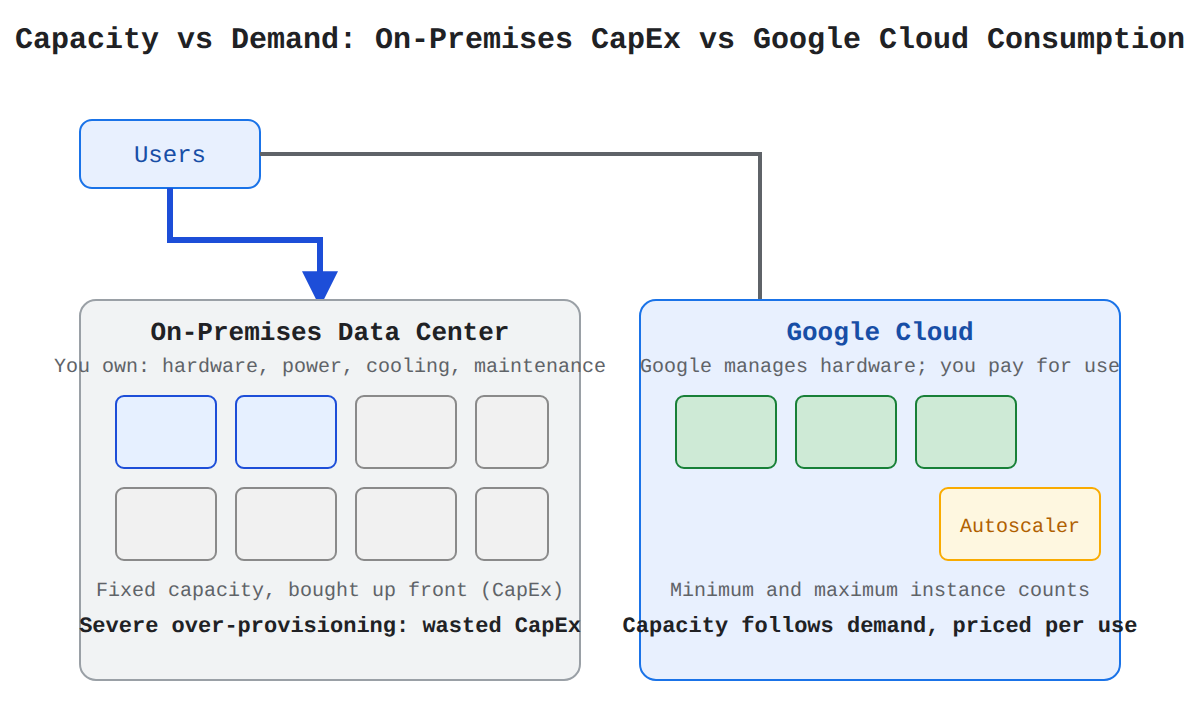
Move the demand slider and switch hosting models to see how fixed on-premises capacity compares with autoscaling on Google Cloud.
Right-Sizing Matches Resources to Actual Demand
Right-sizing is the practice of continuously monitoring utilization and adjusting allocation to match actual demand. Over-provisioning wastes money, while under-provisioning causes bottlenecks that hurt performance and user experience. Cloud Monitoring (opens in a new tab) provides real-time visibility into utilization metrics, and Recommender analyzes usage to suggest optimized allocation. Custom metrics and alerts can trigger automated right-sizing when thresholds are met. Right-sizing can happen during migration with Migrate for Compute Engine (opens in a new tab), after VMs are running, or through autoscaling groups.
Autoscaling Scales Capacity With Workload Fluctuations
Autoscaling is the automatic adjustment of capacity based on workload fluctuations so applications have resources without over-provisioning. Google Cloud offers several autoscaling options:
- Compute Engine managed instance groups (MIGs) are groups of VMs managed as a single entity, where policies set minimum and maximum VM counts and add VMs when CPU is high and remove them when CPU is low.
- Google Kubernetes Engine (GKE) autoscaling dynamically adjusts clusters, where Cluster Autoscaler adds or removes nodes, Horizontal Pod Autoscaler changes Pod replicas, Vertical Pod Autoscaler tunes requests and limits, and Node Auto-Provisioning creates optimized node pools.
- Cloud Run is a serverless platform that scales instances up when traffic increases and down when traffic decreases to reduce costs.
Autoscaling improves performance while avoiding unnecessary costs from idle resources.
Cost Optimization Strategies and Discounts
Cost optimization strategies lower the billing rate for Google Cloud resources through commitments and flexible capacity:
| Option | How it lowers cost | Commitment or condition | Best for |
|---|---|---|---|
| Committed use discounts (CUDs) | Discounts for committing to usage or spend for one or three years | Resource-based CUDs commit to Compute Engine quantity in a region; spend-based CUDs commit to spend at the billing account level | Predictable, steady usage |
| Sustained use discounts | Automatic credits for consistent Compute Engine and GKE usage past duration thresholds | No upfront commitment; applies to continuous usage | Workloads that run continuously |
| Spot VMs | Access to unused VM capacity at much lower cost | Compute Engine can preemptively stop or delete Spot VMs to reclaim capacity | Fault-tolerant batch jobs that tolerate interruption |
Enterprise discounts (opens in a new tab) are negotiated for a minimum total spend at a reduced rate and can be combined with CUDs. Other options include BigQuery capacity pricing, Cloud Storage lifecycle management, and custom machine types. Pricing models can change, so organizations should regularly review pricing.
Exam tip: Spot VMs are more than 80% cheaper than regular VMs, but Compute Engine can preemptively stop or delete them, so use them only for fault-tolerant workloads that can tolerate interruption.
Tracking and Allocating Costs
Tracking and allocating costs means categorizing resources and analyzing spending to understand who spends money and why. Tagging and labeling by project, department, or cost center lets teams monitor specific resources and find high usage. Cloud Billing and Cost Management (opens in a new tab) provide detailed usage insights, while budgets and alerts notify users when spending exceeds limits. Each Google Cloud project links to one billing account, and multiple projects can bill to the same account. Billing data can be exported to BigQuery (opens in a new tab) and visualized with dashboards and reports, which helps teams take ownership of spending.
Total Cost of Ownership and Network Costs
Total cost of ownership (TCO) compares the full cost of running workloads on Google Cloud with the current environment. A complete TCO model includes hardware and software plus power, cooling, maintenance, and support. Managed services can reduce overhead for patching, scaling, security, and disaster recovery, which offsets infrastructure costs. The price calculator helps estimate total costs.
Network pricing is a commonly overlooked part of TCO. In a data center, network hardware is a one-time capital cost for full capacity, while in Google Cloud organizations are billed for data transfer. There are three main traffic charges:
- Ingress traffic enters Google Cloud and is free for most services, though Cloud Load Balancing, Cloud CDN, and Google Cloud Armor charge based on ingress handled.
- Egress traffic leaves Google Cloud and applies to services including Compute Engine, Cloud Storage, Cloud SQL, and Cloud Interconnect.
- Regional and zonal traffic that crosses region or zone boundaries can incur bandwidth charges, which affects disaster recovery and high availability design.
Data-intensive workloads may need new architectures and flows to lower networking costs, such as using Cloud CDN to reduce transfer costs for external load balancers.
Explaining how cloud technology accelerates innovation means describing how Google Cloud helps teams test ideas quickly, decide with data, and build new products. Modern development tools handle building and releasing software, analytics turns raw data into decisions, and artificial intelligence (AI) and machine learning (ML) add smart features. Together these capabilities shorten the path from idea to a service that can grow.
Rapid Experimentation With Modern Development Tools
Rapid experimentation lets teams build, test, and release ideas without waiting for new hardware. Cloud Build and Cloud Deploy (opens in a new tab) create continuous integration and continuous delivery (CI/CD) pipelines where code flows from development through automated testing to production. Automated testing validates each change before deployment, which reduces errors and regressions and builds a more stable system.
Proofs of concept (PoCs) are small, low-risk tests that validate assumptions before full commitment. A strong PoC defines scope, expected outputs, and measurable business impact, and it covers the use cases including corner cases, requirements such as performance, scalability, consistency, failover, and network needs, and the technologies to test such as Cloud SQL, Spanner, Firestore, or Bigtable. For example, a team can test creating many virtual CPUs for a peak or run the same logic on different managed databases to compare performance and cost.
Real-Time Decision-Making With Data Analytics
Real-time decision-making with data analytics turns operational data into business intelligence that leaders can act on quickly. Data flows from source systems through load and transformation steps into analysis tools, and results flow to dashboards and decision makers. BigQuery (opens in a new tab) provides large-scale data analysis and Looker provides business intelligence views, so teams can make informed choices instead of guessing.
This capability depends on flexible storage and databases that keep enterprise data secure, reliable, and highly available. Teams can store and back up data with Cloud Storage, then use analytics and pipeline services to load, transform, and analyze it. Staying current with new analytics features helps automate processes and improve performance and scalability.
New Digital Products With AI and ML
New digital products with AI and ML use trained models inside applications to solve real problems and create new customer experiences. AI features flow from models into applications where they power services such as fraud detection and personalized financial advice. Because the cloud provides specialized compute for ML and high-performance computing, teams can try advanced models without buying their own hardware.
Application development and hosting services support creation from idea to running service. Development support includes common languages and frameworks, infrastructure as code with tools such as Terraform, and container orchestration with Google Kubernetes Engine (GKE) (opens in a new tab). Once code is ready, the hosting platform runs and manages the application on a secure platform, so teams focus on customer experience while the platform handles scaling and operations.
Exam tip: Use BigQuery and Looker when the goal is analyzing data to make better decisions, and use AI and ML capabilities when the goal is adding smart features like fraud detection or personalization.
Continuous Improvement That Sustains Innovation
Continuous improvement sustains innovation after the first move to the cloud by helping teams adapt quickly and remove inefficiencies. Migration is only the initial step, and the Optimize phase expands potential for performance, scalability, disaster recovery, and new ML and AI integrations. Ongoing enhancement lets a business respond to market and regulatory changes while reducing costs and improving decisions.
Two practices sustain this cycle. Retrospectives give teams a structured way to reflect after milestones, incidents, or testing cycles, identify what went well, and turn lessons into action. A culture of learning encourages safe exploration of new Google Cloud technologies, where teams share knowledge, treat failures as growth opportunities, and work in a psychologically safe environment that supports risk-taking.
Key Facts
- Cloud migration follows four ordered phases: Assess, Plan, Deploy, and Optimize, where a weak foundation in Plan can cause delays and downtime.
- Consumption-based pricing replaces upfront capital expenditures for hardware, power, cooling, and maintenance with usage-based spending that rises and falls with demand.
- Spot VMs cost more than 80% less than regular VMs but can be preemptively stopped by Compute Engine, so they fit only fault-tolerant workloads.
- BigQuery and Looker support data analysis and business intelligence for decision-making, while AI and ML add smart features such as fraud detection and personalization.
Frequently Asked Questions
What are the four phases of cloud migration to Google Cloud?
The four ordered phases are Assess, Plan, Deploy, and Optimize. Assess inventories applications and dependencies, calculates total cost of ownership, and sets performance benchmarks, Plan builds the cloud foundation with identity management, organization and project structure, and networking and develops a prioritized migration strategy, and Deploy moves workloads and data to Google Cloud while Optimize improves performance, scalability, disaster recovery, and cost and opens the door to machine learning and AI. A weak foundation in the Plan phase can cause delays, confusion, and downtime that put the whole migration at risk.
When should I use rehost, refactor, re-architect, rebuild, or repurchase to migrate a workload to the cloud?
Rehost moves workloads as-is to cloud virtual machines when you want to move quickly with minimal changes, while repurchase moves to a cloud-hosted SaaS equivalent to replace on-premises software. Refactor modifies workloads to use cloud capabilities for better performance, features, cost, or user experience, re-architect changes how code functions such as splitting a monolith into microservices for cloud-optimized scalability, security, and agility, and rebuild decommissions and rewrites as a cloud-optimized app when the current app is not meeting goals or is too costly to migrate. Refactor, re-architect, and rebuild take longer and require new skills compared with rehost, and zero-downtime strategies are usually more costly and complex than strategies that allow downtime.
How do Committed use discounts (CUDs), sustained use discounts, and Spot VMs lower Google Cloud costs?
Committed use discounts (CUDs) give discounts for committing to usage or spend for one or three years and fit predictable steady usage, sustained use discounts give automatic credits for consistent Compute Engine and Google Kubernetes Engine (GKE) usage past duration thresholds with no upfront commitment, and Spot VMs provide unused virtual machine capacity at much lower cost for fault-tolerant batch jobs that tolerate interruption. Spot VMs cost more than 80 percent less than regular VMs but Compute Engine can preemptively stop or delete them, so they fit only fault-tolerant workloads. Enterprise discounts are negotiated for a minimum total spend at a reduced rate and can be combined with Committed use discounts (CUDs).
Sample Question
An enterprise is migrating its legacy applications to Google Cloud to modernize its operations. In their traditional on-premises environment, provisioning infrastructure and releasing software updates required manual configuration by IT engineers, frequently causing human errors, long release cycles, and service instability.
Which operational strategy should the organization implement to streamline deployments and enhance workload reliability?
How learners score on this domain
Last updated