Fundamental
Prepare and test your skills

Fundamental
Prepare and test your skills
Business Value of APIs on Google Cloud
Reusable services and streamlined integration describe how application programming interfaces (APIs) let applications share data and logic through standard, reusable entry points. A team builds a capability once behind an API, and many other applications reuse it the same way without rebuilding it. This modular design creates consistent connections between systems and reduces development time.
What an API Is and Why Its Contract Matters
An application programming interface (API) is an interface that lets one application consume capabilities or data from another application. The API defines stable entry points, data formats, and response codes, so a developer can reuse logic built by someone else. For example, a book API can accept a GET request with an isbn query parameter and return a JSON object with title, author, and publish date plus a 200 code for success. The consuming developer does not need to know how the backend service is implemented.
The API also acts as a contract between the API provider and the API consumer. The provider agrees to change the API in a predictable way, and consumer applications depend on that stability. For example, the book API can later add title or author query parameters or add fields to the JSON response without breaking the existing isbn behavior. This predictable contract is what makes reuse safe across many teams and systems.
What a Standardized API Definition Contains
A standardized API definition on API Gateway (opens in a new tab) describes exactly how clients connect to a backend service. The definition is written as an OpenAPI 2.0 spec and uploaded to Google Cloud as an API config using the gcloud command-line interface. A consistent definition lets every consumer integrate the same way.
The key components of an API definition are:
- The URL, or entry point, of the backend service
- The data format of any data passed on a request to the API
- The data format of any data returned by the service in the response from the API
- The authentication mechanism used to control access to the service
These four parts tell a developer everything needed to call the service: where to send traffic, what to send, what to expect back, and how to prove identity.
How Reusable Services Move From Definition to Use
A reusable service on API Gateway moves through an ordered lifecycle from definition to deployment to management. First, the team defines the OpenAPI spec and uploads it with gcloud to create an API config. Then, the team deploys that API config on API Gateway, after which client applications can make REST calls to the API. Only after deployment can traffic flow from client apps through API Gateway to the backend service, with responses flowing back through the gateway.
API Gateway is natively integrated with Google Cloud and handles concurrent API calls, including traffic management, authorization, and monitoring. When a client makes a request, API Gateway logs information about the request and response and tracks latency, traffic, and errors. Over time, the team updates the service by updating the OpenAPI spec, then uploading and redeploying the API config, so improvements reach all consumers through the same entry point.
Exam tip: Reusing an API does not require knowing how the backend service is built — integration only requires the defined URL, request and response formats, and authentication method.
Why Reuse Shortens Development Time
Reusable APIs shorten development time because teams discover, enable, and call existing services instead of writing duplicate logic. Teams browse the API Library in the Google Cloud console to find APIs that meet business needs, enable them for a Google Cloud project (opens in a new tab), and then build with Google Cloud client libraries (opens in a new tab) that handle common work such as authentication, error handling, retry, and payload validation. The project acts as the resource container and isolation boundary, with the client project owning the application credentials and the resource project owning the target resource.
Long-term reuse depends on stability and support, which is the purpose of Google Enterprise APIs (opens in a new tab). Google Enterprise APIs are labeled in the API Library and Marketplace and are managed with careful control of deprecation and breaking changes, with notice, migration tools, and alternatives. Dedicated support is available for Google Cloud, Google Workspace, and Google Maps Platform APIs, so organizations can build lasting integrations on the same reusable interfaces.
API management and governance explain how organizations expose APIs through controlled entry points so use stays secure, reliable, and scalable as demand grows. An API acts as a contract between providers and consumers, while governance adds policies, catalogs, roles, and lifecycle controls for discovery, security, monitoring, and updates. Google Cloud provides API Gateway for defining and deploying APIs and Apigee for full management, analytics, developer access, and governance.
API Gateway Definition, Deployment, and Control
API Gateway (opens in a new tab) is natively integrated with Google Cloud and handles concurrent API calls, including traffic management, authorization, and monitoring. An API deployed on API Gateway is defined as an OpenAPI 2.0 spec that includes the backend service URL, request data format, response data format, and authentication mechanism. The lifecycle is ordered:
- Define the API as an OpenAPI 2.0 spec.
- Upload the spec to an API config on Google Cloud using the
gcloudcommand-line interface. - Deploy the API config on API Gateway.
- After deployment, clients can make REST calls to the API.
- To update the API, update the OpenAPI spec, upload it, and redeploy.
Once running, API Gateway logs request and response information and tracks latency, traffic, and errors. API Gateway can require authentication before a client accesses the API and supports the same mechanisms as Cloud Endpoints, including API keys (opens in a new tab), authentication methods at Google, and Google ID tokens. After authentication, the API must still decide what the authenticated user is allowed to do.
Apigee Platform for Traffic, Security, and Scale
Apigee (opens in a new tab) is an API management platform made of API runtime, monitoring and analytics, and developer services. The API runtime provides tools for adding and configuring API proxies, setting up API products, and managing app developers and client apps. An API proxy is the interface between incoming requests and backend services, and it contains the instructions and policies Apigee executes while processing client requests and backend responses.
The three parts of Apigee work together to offload common work from backend services:
| Apigee component | What it provides | Management value |
|---|---|---|
| API runtime | API proxies, API products, app developer and client app management, policies | Adds security, rate-limiting, mediation, and caching without changing backend services |
| Apigee API Monitoring and Apigee API Analytics | Real-time and historical API usage data | Helps teams find issues, understand trends, and plan capacity |
| Apigee developer ecosystem | Developer management, onboarding, developer portals | Lets internal and external developers discover APIs and manage API keys |
Policies applied to an API proxy can add security, rate-limiting, mediation, and caching, and custom scripts can call third-party APIs. Apigee also supports monetization: a provider can add a rate plan to an API product to charge developers and share revenue, using policies such as VerifyAPIKey, VerifyAccessToken, MonetizationLimitsCheck, Quota, and DataCapture.
API Products and Access Control in Apigee
An API product in Apigee is a bundle of API proxies that is published to developers, and it is the central mechanism Apigee uses for authorization and access control. Multiple API products can share the same API proxy, and each product can have different properties. For example, one product might allow 1,000 requests per day at a low price while another allows the same proxy with a higher limit at a higher price. A free product might allow read-only access while a paid product allows read and write access.
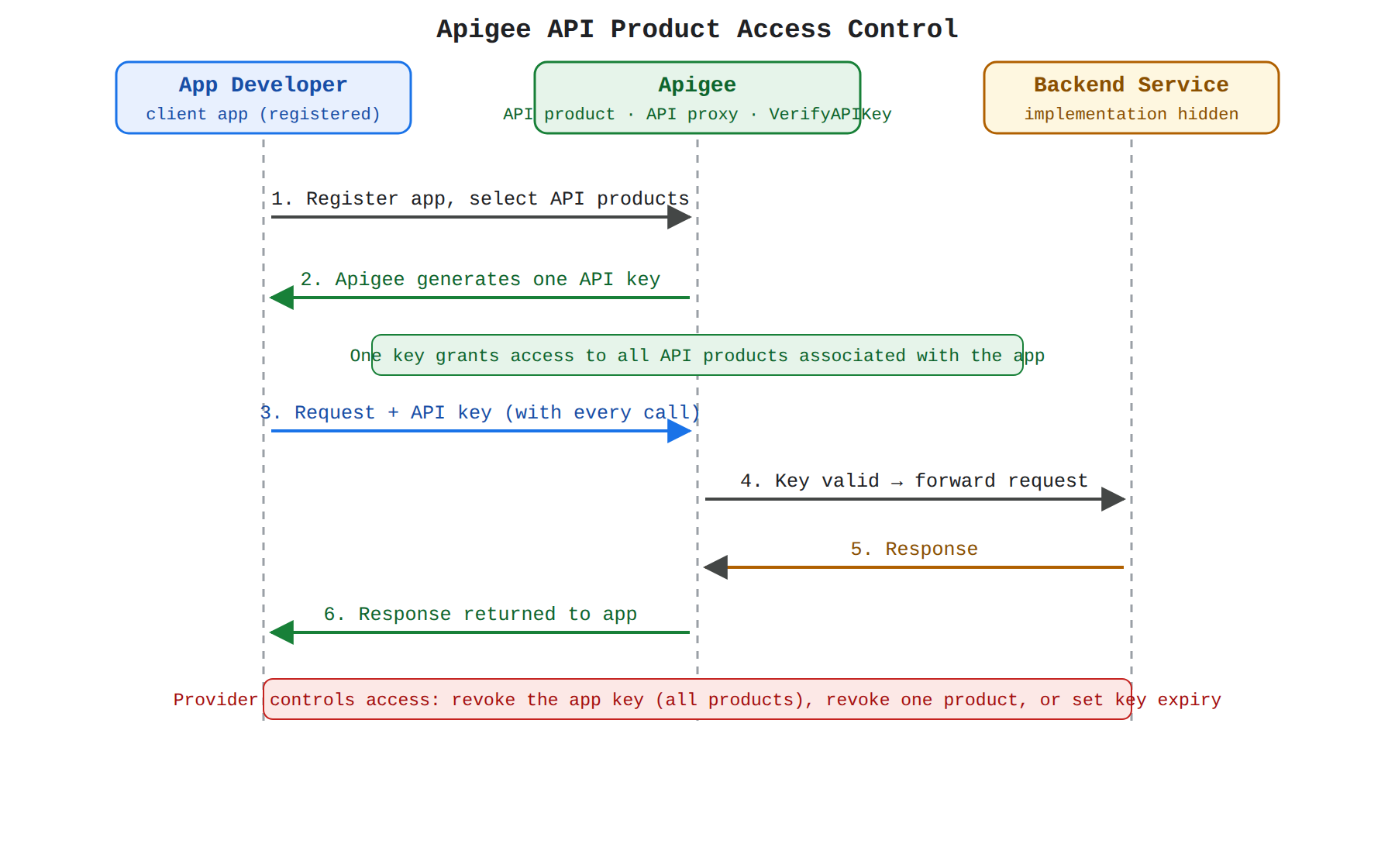
A sequence diagram showing a developer registering an app with Apigee API products, receiving a single API key, and calling the API proxy with that key; Apigee verifies the key, forwards the request to the backend service, and returns the response to the app.
The provider and developer steps are ordered:
- The API provider creates one or more API proxies that map public URLs to backend services.
- The API provider creates an API product that bundles those proxies.
- The API provider deploys the API proxies and API product.
- The API provider tells developers the API product is available.
- A developer registers a client app with the API product.
- The developer receives an API key for the API product.
- The developer makes requests through the API proxies and passes the API key with each request.
When a developer registers an app, the developer selects the API products to associate with the app, and Apigee generates an API key. Each app has a single API key that provides access to all API products associated with that app. The provider can revoke an app's key to block all its products, revoke access to a single product, or set an expiry so the developer must refresh the key.
Exam tip: In Apigee, API products are the central mechanism for authorization and access control; an app's single API key grants access to all API products associated with that app.
Monitoring, Analytics, and Observability in Apigee
Apigee observability uses three tools: Apigee API Monitoring, Apigee API Analytics, and Apigee access logs. API Monitoring gives real-time, minute-by-minute aggregated data from API proxies so teams can watch API health, configure near-real-time alerts, use Apigee fault codes to diagnose issues, and isolate performance or latency problems. It does not record every individual latency measurement; it uses distribution buckets with predefined ranges to group latency values.
Apigee API Analytics provides historical trend analysis and detailed reporting for API call metadata. It offers about 50 dimensions for choosing what data to capture per API call, and teams can build custom reports to see how metrics change over time. Analytics data is stored in BigQuery, and teams can create custom reports in Data Studio, set up asynchronous custom report jobs, or export data to their own Google Cloud storage. Default data collected as traffic passes through Apigee includes URL, IP, user ID, latency, and error data, and policies can add headers, query parameters, and portions of XML or JSON requests or responses. This collection happens asynchronously from the request and response flow, so it does not affect API performance.
Governance and Centralized Management with API Hub
Apigee API hub (opens in a new tab) provides a centralized catalog, governance, and lifecycle management layer for all of an organization's APIs, regardless of where they are deployed. Connecting API Gateway to API hub creates a secure, automated channel for API metadata to flow from the API Gateway project to API hub. API Gateway continuously monitors for changes such as new deployments or modifications and automatically pushes those updates to API hub. This gives centralized discovery, enhanced visibility into the API landscape, and streamlined governance across different gateways.
Programmatic governance is supported through the Apigee API (opens in a new tab), a set of RESTful operations for developing and managing APIs. Teams can use it to integrate proxy management into the software development lifecycle, such as writing scripts that deploy proxies or migrate them from one environment to another as part of automation. The Apigee API uses OAuth 2.0 for user authentication: a caller exchanges Google Cloud credentials for an access token and passes it in the Authorization header. Short-lived service account credentials reduce risk compared with long-lived credentials such as service account keys.
Apigee Organization Structure and Roles
An Apigee organization is the root of an Apigee deployment. Every Apigee organization belongs to exactly one Google Cloud project, and a project can contain at most one organization. An organization contains environments, API proxies, API products, API packages, apps, and users. An environment is an isolated software environment where API proxies are deployed, while an environment group is a group of environments with one or more hostnames, where the hostname is part of the URL used to call proxies in that group.
Apigee roles separate who builds APIs from who consumes them. An API provider creates and manages proxies and products. An app developer builds apps that consume published APIs but cannot create APIs or perform other actions in the organization; developers can be internal, partners, or external, and they may or may not pay. Apigee users make up the API team, such as administrators, proxy and product creators, and people monitoring analytics. End-users are people who use the apps developers build.
Security and Authentication Choices
Authentication verifies a user's or app's identity, while authorization decides what that authenticated identity can do. API Gateway can require authentication before client access and supports API keys, authentication methods at Google, and Google ID tokens. Apigee supports several authentication types, including a simple API key, two-legged OAuth, three-legged OAuth, and custom schemes. If API key verification is used, the client must pass an API key with every request, and Apigee allows the request only if the key is valid. If OAuth verification is used, the client first obtains an OAuth token and passes it with every request, and Apigee allows the request only if the token is valid.
API products remain the central authorization mechanism in Apigee, with revocation and expiry controlling access over time. The Apigee API itself uses OAuth 2.0, and short-lived service account credentials are safer than long-lived keys because they grant limited access for trusted service accounts and reduce risk. For data residency, Apigee must be provisioned and used with a regional endpoint.
Scalability, Entitlements, and Pricing Models
Apigee is built to scale as API demand grows, with billing based on environments, API calls, and proxy deployments. Under Pay-as-you-go pricing, Apigee auto-scales and continues to serve API calls even as load rises, with no API call limit. A Pay-as-you-go organization can create up to 85 environments in a single organization, and multi-region environments are billed for each region where the environment is available. Google bills for environments attached to an organization, for the number of API calls processed, and for the number of deployed proxies.
The two pricing models differ in how limits are handled:
| Pricing model | Payment style | API call limit behavior | Environment limit behavior |
|---|---|---|---|
| Subscription | Pre-pay for entitlements, with significant discounts at higher volumes | Google does not enforce the API call entitlement; Apigee continues serving calls and bills usage over entitlement | Google enforces the environment entitlement; you cannot exceed it, but you can buy Environment Packs |
| Pay-as-you-go | Pay only for resources used, without volume discounts | No API call limit; Apigee auto-scales and continues serving calls as load rises | Up to 85 environments in a single organization; multi-region environments bill per region |
Under Subscription pricing, proxy deployments are also not limited to the entitlement; Apigee continues to allow new deployments and bills usage over entitlement. Subscription plans make sense at higher consumption volumes, such as many environments, high API call volume, or many proxies under management.
Innovation and digital ecosystems describe how APIs help organizations build products faster, grow partner networks, and create new revenue by exposing core capabilities in controlled ways. APIs turn stable, well-documented entry points into reusable building blocks that developers, partners, and external developers can all use. On Google Cloud, API Gateway, Apigee, and Google Enterprise APIs provide the control, monitoring, and stability that make this safe at scale.
How APIs Create Business Value
APIs create business value by defining stable and well-documented entry points that developers use to access and reuse application logic built by others. Because an API describes data formats and HTTP response codes, an app developer does not need to know the backend implementation. APIs also act as a contract between providers and consumers, so changes stay predictable over time. For example, a book API might add title or author query parameters or add fields to its JSON response while keeping the contract understandable.
This predictability supports rapid product development because teams can build on APIs without fearing sudden breaks. Controlled exposure through authentication and monitoring lets organizations share capabilities with partners and developers safely. That controlled sharing expands digital ecosystems and can create new revenue streams from the same core capabilities.
API Gateway Lifecycle and Ongoing Management
API Gateway (opens in a new tab) is a Google Cloud service that is natively integrated with Google Cloud and handles tasks for processing concurrent API calls, including traffic management, authorization, and monitoring. An API deployed on API Gateway is defined as an OpenAPI 2.0 spec. The key components of that definition are:
- The URL, or entry point, of the backend service
- The data format of data passed in a request to the API
- The data format of data returned in the response from the API
- The authentication mechanism used to control access to the service
After the API is defined, the lifecycle is:
- Upload the OpenAPI spec to an API config on Google Cloud using the gcloud command-line interface (gcloud CLI).
- Deploy the API config on API Gateway using gcloud.
- Clients make REST calls to the API.
- Monitor activity, including usage metrics and logs; API Gateway logs request and response information and tracks latency, traffic, and errors.
- To update a deployed API, update the OpenAPI spec, then upload and redeploy the API.
This lifecycle lets teams add capabilities, improve performance, or fix issues while keeping the API available to consumers. The monitoring data helps operators see how the API is used and whether it is healthy.
Controlling Access and Expanding Developer Ecosystems
Controlling access to APIs on Google Cloud uses authentication and API products to expand developer ecosystems safely. API Gateway can require authentication before a client can access an API and supports the same mechanisms as Cloud Endpoints, including API keys, authentication methods at Google, and Google ID tokens. Defining authentication verifies identity, but the API also needs to decide what the authenticated user can do. The Google Cloud console can share an API so others can enable it and generate API keys to call it.
Apigee and Apigee hybrid manage access through apps and API products. When a developer registers an app, the developer selects the API products to associate with the app, and Apigee generates an API key (opens in a new tab). Each app has a single API key that provides access to all API products associated with that app. Apps control who can access APIs: revoking an app's key blocks all its products, while revoking a single product removes only that product. Developer portals should include instructions for registering apps, which helps partners join the ecosystem.
Exam tip: An API key identifies an app and grants access to its associated API products; authentication verifies identity, while authorization decides what that identity can do.
Google Enterprise APIs and Long-Term Stability
Google Enterprise APIs (opens in a new tab) are high-stability APIs ready for enterprise use, with support options available. They are based on three properties: enterprise trust, stability, and support. Enterprise means the APIs aim to build mutual trust for long-term investments, so customers can build creative applications on Google Cloud infrastructure, services, and tools. Stability means the APIs provide high stability for critical systems and follow a rigorous process for long-term dependencies.
Changes to Google Enterprise APIs are managed sparingly and thoughtfully, with careful deprecation and breaking changes, sufficient notice, and migration tools and alternatives for affected customers. Support options are available for Google Cloud Platform, Google Workspace, and Google Maps Platform customers. The Google Enterprise API label appears in the API Library and Marketplace and distinguishes these APIs from other Google APIs, such as those supplied by teams outside Google Cloud. This stability matters because partners can invest in an API when they trust it will not change unpredictably.
Enabling APIs in Google Cloud Projects
An API must be enabled in a Google Cloud project before it can be used there, and billing must be enabled for the project. If an API requires an API key and is associated with a project the user cannot access, the user has three options:
- Ask a security admin to create an API key.
- Ask a security admin to grant access to the project so the user can create an API key in the same project as the API.
- Ask a security admin to grant access to enable the API in the user's own Google Cloud project so the user can create an API key.
Once access is granted, an API can be enabled through the Google Cloud console (opens in a new tab) or the gcloud CLI. In the console, the user goes to APIs and Services, opens the Library, clicks Private APIs, selects the API, and clicks Enable. If the API is not listed, the user has not been granted access to enable it. With gcloud, the user lists projects, sets the default project, lists available services, and enables the service (opens in a new tab). Some services depend on other APIs; for example, Blockchain Analytics offers indexed blockchain data through BigQuery, so the BigQuery API must be enabled.
Development Tools for API Builders
API Gateway provides three basic ways to interact with the services and resources needed to build APIs: the Google Cloud console, the gcloud CLI, and client libraries. The Google Cloud console is a web-based graphical interface for managing projects and resources. The gcloud CLI works in a terminal and can manage both development workflows and Google Cloud resources. Cloud Shell is a browser-based interactive shell that provides a temporary Compute Engine virtual machine, command-line access from a browser, a built-in code editor, 5 GB of persistent disk storage, pre-installed Google Cloud CLI tools, language support for Java, Go, Python, Node.js, PHP, Ruby, and .NET, web preview, and built-in authorization for Google Cloud projects.
Client libraries expose APIs for two main purposes:
| API type | Purpose | Details |
|---|---|---|
| App APIs | Provide access to services | Optimized for supported languages such as Node.js and Python; designed around service metaphors; include helpers for authentication and authorization. |
| Admin APIs | Offer resource management functionality | Can be used to build automated tools. |
These tools reduce the effort needed to create, deploy, and manage APIs. That lower effort supports rapid product development and lets teams focus on new capabilities rather than infrastructure.
Key Facts
- An application programming interface (API) lets one application consume data or logic from another application through defined URLs, request and response formats, and authentication, without requiring knowledge of the backend implementation.
- A reusable service on API Gateway follows an ordered lifecycle: define the OpenAPI 2.0 spec, upload it with gcloud to create an API config, deploy the config, allow client REST calls, and redeploy to update.
- In Apigee, an API product bundles API proxies and is the central mechanism for authorization, where each app has a single API key that grants access to all its associated API products.
- Apigee API Monitoring provides real-time aggregated health data using latency distribution buckets, while Apigee API Analytics provides historical trend data stored in BigQuery.
- Google Enterprise APIs provide high stability with careful deprecation, notice, migration tools, and support so organizations can build long-term integrations and digital ecosystems.
Frequently Asked Questions
What is an application programming interface (API) and why does its contract matter for reusable services?
An application programming interface (API) is an interface that lets one application consume capabilities or data from another application through stable entry points, data formats, and response codes without knowing the backend implementation. It acts as a contract where the provider agrees to change the API in a predictable way so many consumer applications can safely reuse the same capability.
What is included in an application programming interface (API) definition on API Gateway and how is it deployed?
A standardized API definition on API Gateway is an OpenAPI 2.0 spec that includes the backend service URL, request data format, response data format, and authentication mechanism. The lifecycle is to define the spec, upload it with gcloud to create an API config, deploy the config on API Gateway for client REST calls, and update the spec and redeploy to reach all consumers through the same entry point.
What is an application programming interface (API) product in Apigee and how does it control access?
An API product in Apigee is a bundle of API proxies published to developers and is the central mechanism for authorization and access control. When a developer registers a client app with an API product, Apigee generates a single API key for the app that grants access to all associated API products, and the provider can revoke a key, revoke a single product, or set an expiry.
What is the difference between Apigee API Monitoring and Apigee API Analytics?
Apigee API Monitoring provides real-time minute-by-minute aggregated data from API proxies to watch API health and diagnose issues using latency distribution buckets with predefined ranges. Apigee API Analytics provides historical trend analysis and detailed reporting with about 50 dimensions, with data stored in BigQuery and collection happening asynchronously so it does not affect API performance.
Sample Question
An enterprise is exposing several internal backend services to external business partners through APIs. The organization needs a centralized solution to enforce security authentication, apply traffic management policies like rate limiting and spike arrest to protect backend infrastructure from overload, and monitor API performance analytics.
Which Google Cloud platform should the enterprise implement?
Apigee
Cloud Logging
Cloud Spanner
Cloud Storage
How learners score on this domain
Last updated