Fundamental
Prepare and test your skills

Fundamental
Prepare and test your skills
Continuous PostgreSQL Replication With Database Migration Service
Free sample question with answers and detailed explanation below. The Cloud Digital Leader practice bank has an additional 3,070 practice questions.Try 10 free realistic questions: instant score, no credit card, and no account required.
An e-commerce company plans to migrate its on-premises PostgreSQL database to Cloud SQL for PostgreSQL. Because the database supports a 24/7 online storefront, the company has the following migration requirements:
- Minimal downtime: The source database must remain operational while data is migrated.
- Continuous replication: The tool must take an initial snapshot and then replicate ongoing insertions, updates, and deletions in real time using Change Data Capture (CDC).
- Secure, managed networking: The service must encrypt network connections using SSL/TLS and streamline the migration workflow without requiring the team to manage replication servers.
Which Google Cloud service or tool should the company use?
Explanations
Google Cloud Migration Center
Google Cloud Migration Center
What Google Cloud Migration Center is
Google Cloud Migration Center is a unified discovery, assessment, and planning platform that helps organizations evaluate their existing on-premises or cloud environments before beginning a migration. It collects inventory data across servers, applications, and databases to provide technical fit analysis, target sizing recommendations, and Total Cost of Ownership (TCO) reports.
Why it doesn't meet the requirement
- Assessment tool rather than a replication engine: Migration Center is used during the pre-migration discovery and planning phase, not the execution phase where live database records are extracted and replicated.
- Does not perform Change Data Capture (CDC): It does not take database snapshots, stream real-time transactional updates, or synchronize a source PostgreSQL database with a target Cloud SQL instance.
- Cannot execute database cutovers: While it recommends which Google Cloud database service and instance size to choose, it relies on execution tools like Database Migration Service to actually move the data.
Key characteristics and limitations
- Landscape discovery: Builds a comprehensive inventory of existing servers, virtual machines, and database deployments.
- Technical fit and sizing: Evaluates source database workloads and recommends appropriate Cloud SQL or AlloyDB configurations, including vCPU and memory sizing.
- Financial planning: Generates detailed TCO reports and cost estimates comparing current infrastructure expenses with projected Google Cloud operating budgets.
- Complementary tooling: Works alongside specialized assessment utilities like Database Migration Assessment Tool (DMA) and migVisor to evaluate schema complexity.
This answer would be correct if
The company was in the initial discovery and assessment phase and wanted to build an inventory of its on-premises servers and databases, evaluate technical compatibility with Google Cloud, and generate a Total Cost of Ownership (TCO) report.
Additional context
A successful cloud migration journey typically pairs Google Cloud Migration Center with Database Migration Service. Organizations first use Migration Center to discover assets and right-size their target Cloud SQL instances, and then use Database Migration Service to execute the low-downtime continuous data transfer.
Transfer Appliance
Transfer Appliance
What Transfer Appliance is
Transfer Appliance is a high-capacity, rackable physical hardware storage device provided by Google Cloud. Organizations request the appliance, connect it to their local network in their data center, copy large volumes of data onto it, and securely ship it back to a Google upload facility, where the data is uploaded directly into Cloud Storage.
Why it doesn't meet the requirement
- No real-time continuous replication: Because Transfer Appliance relies on physically capturing data and shipping hardware through a courier, it cannot perform real-time Change Data Capture (CDC) or stream live
INSERT,UPDATE, andDELETEtransactions over a network. - Wrong target destination: Transfer Appliance uploads unstructured files and backups to Cloud Storage buckets rather than directly managing live relational database replication into a Cloud SQL for PostgreSQL instance.
- Cannot synchronize a 24/7 transactional database: Any database changes occurring while the physical appliance is in transit would be missing upon arrival, requiring either prolonged write downtime or a separate network-based synchronization tool.
Key characteristics and limitations
- Designed for massive datasets: Recommended when migrating large data volumes that exceed 20 TB (and up to 1 petabyte) where network bandwidth is limited or slow.
- Offline physical transport: Bypasses public internet bandwidth constraints by moving data physically rather than over a network connection.
- Security in transit: Encrypts data stored on the hardware appliance so it remains protected during physical shipping.
- Batch-oriented workflow: Suited for static archival data, media libraries, or cold backups rather than active, high-velocity transactional databases.
This answer would be correct if
The scenario asked for a solution to move hundreds of terabytes of static archival files or offline data from an on-premises facility with limited internet bandwidth into Cloud Storage without saturating the corporate network.
Additional context
Students sometimes confuse Transfer Appliance with online migration services because both minimize disruption to day-to-day business operations. However, Transfer Appliance minimizes network bandwidth disruption during bulk offline transfers, whereas Database Migration Service minimizes application downtime during live database cutovers.
Storage Transfer Service
Storage Transfer Service
What Storage Transfer Service does
Storage Transfer Service is a managed data movement tool designed to transfer object and file data into Cloud Storage. It automates the copying of files from external cloud storage providers (such as Amazon S3 or Azure Blob Storage), on-premises file systems, or other Cloud Storage buckets over the network.
Why it doesn't meet the requirement
- Operates on files and objects, not relational tables: Storage Transfer Service moves unstructured objects and files rather than managing relational database schemas, transactional logs, and active SQL connections.
- Lacks Change Data Capture (CDC) for databases: It does not connect to a running PostgreSQL engine to capture row-level
INSERT,UPDATE, orDELETEstatements, nor can it promote a Cloud SQL replica to a standalone primary database. - Does not target Cloud SQL directly: Its primary destination is Cloud Storage (or file storage systems), meaning it cannot orchestrate an end-to-end online relational database cutover.
Key characteristics and limitations
- Object and file focus: Ideal for migrating data lakes, multimedia assets, website content, and file shares.
- Scheduled and incremental file syncs: Can run one-time transfers or recurring scheduled jobs to copy newly added or modified files from source storage systems.
- Multi-cloud and hybrid support: Connects seamlessly to external object stores like Amazon S3, Azure Blob Storage, and local on-premises file systems.
- Managed network transfer: Handles retries, bandwidth management, and data verification automatically during file transfers.
This answer would be correct if
The company needed to automate the transfer of unstructured files and objects from an on-premises file server or an external cloud provider's object storage bucket into Cloud Storage.
Additional context
While an administrator could export a static database dump file and move that file to Cloud Storage using Storage Transfer Service, doing so represents a one-time dump-and-load approach. That method would require stopping database writes to prevent data loss, failing the 24/7 minimal-downtime requirement that Database Migration Service solves natively.
Database Migration Service
Database Migration Service
What Database Migration Service is
Database Migration Service (DMS) is a fully managed, serverless Google Cloud service designed to help organizations migrate relational databases from on-premises environments or other cloud providers into Cloud SQL and AlloyDB for PostgreSQL. It supports both homogeneous migrations (such as PostgreSQL to Cloud SQL for PostgreSQL) and heterogeneous migrations (such as Oracle or SQL Server to Cloud SQL for PostgreSQL).
How it meets the requirements
- Minimal downtime: DMS supports continuous migrations (also known as online or ongoing migrations) that allow the source database to remain fully operational and serve live storefront traffic while the data migration is in progress.
- Continuous replication: DMS automates an initial full dump and load by taking a point-in-time snapshot of the source database and loading it into the target instance. Once complete, it uses Change Data Capture (CDC) to continuously track and copy real-time modifications—such as
INSERT,UPDATE, andDELETEoperations—until the target database is in sync and ready to be promoted to the primary instance. - Secure, managed networking: Because DMS uses a serverless architecture, teams do not need to provision or manage dedicated replication servers. Furthermore, it protects data in transit using SSL/TLS certificates and supports Customer-Managed Encryption Keys (CMEK) for continuous migrations.
Snapshot First, Then CDC Replication
Timeline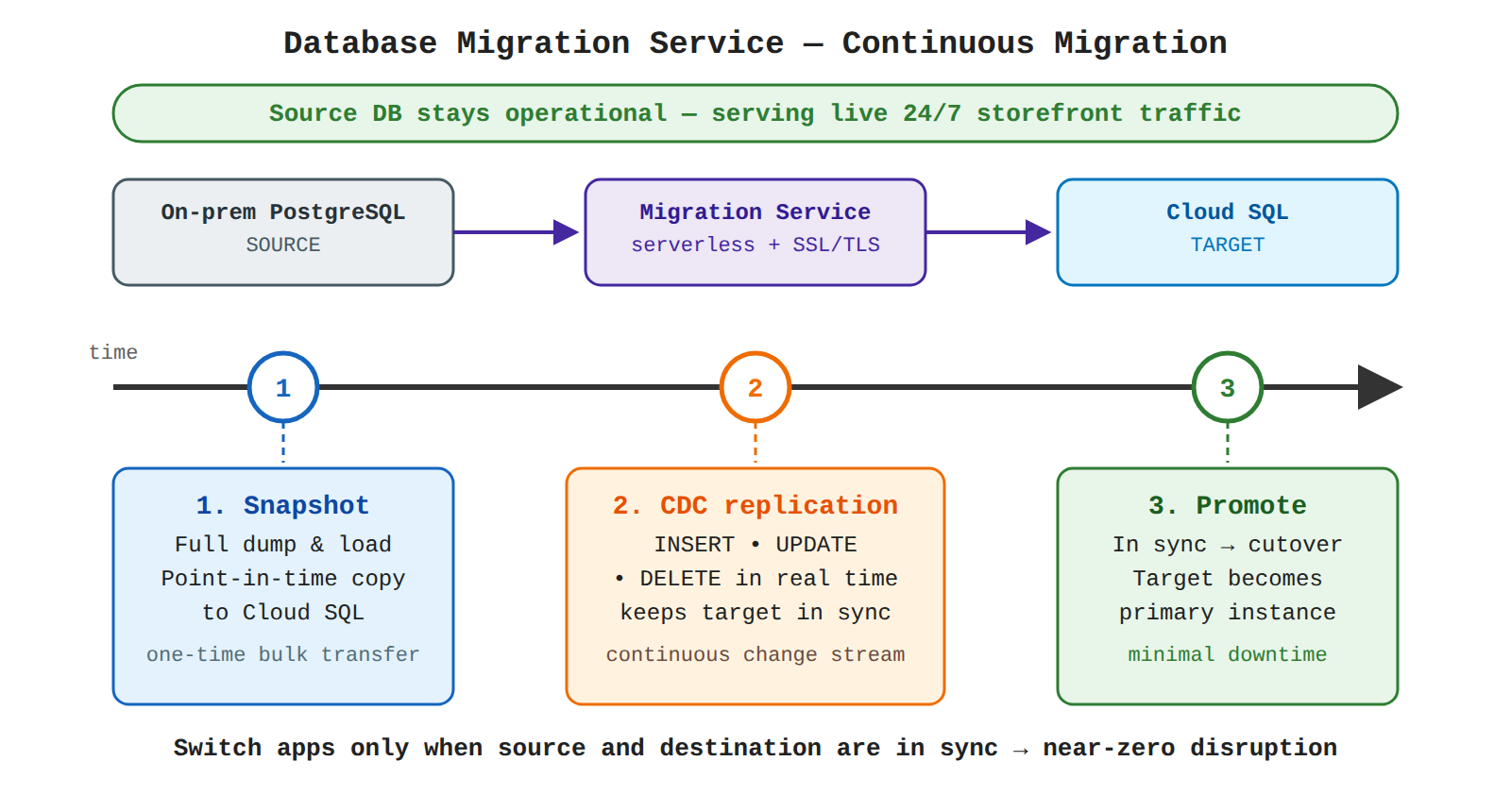
Key advantages and capabilities
- Serverless scaling: Automatically scales to handle large database workloads without manual infrastructure management.
- Built-in observability: Provides real-time status updates and monitoring charts to track replication lag and migration progress.
- Streamlined networking: Simplifies secure connectivity workflows between source environments and Google Cloud.
- AI-assisted schema conversion: Offers Gemini-powered conversion workspaces to automate code and schema translations during heterogeneous migrations.
Why this is optimal
Unlike manual backup-and-restore methods that require halting application writes for extended periods, Database Migration Service encapsulates complex replication logic into a unified, serverless workflow. Switching applications over only after the source and destination databases are synchronized ensures near-zero operational disruption.
Try 10 interactive questions like this one, free
Answer them yourself and get your score the moment you finish. No account needed.
Full access includes
- 3,070 practice questions across all 6 exam domains
- Every answer explained: why it is right, and why the others are not
- Scout, an AI tutor that answers your follow-up questions
- Readiness tracking by domain, so you know when to book the exam
Related free sample questions
Keep the momentum going with these hand-picked practice scenarios
FundamentalCloud Digital Leader
OLTP vs OLAP Workload Separation
Describe the ways that an organization can migrate or modernize their current database in the cloud.
FundamentalCloud Digital Leader
Replatforming to Cloud SQL for MySQL
Describe the ways that an organization can migrate or modernize their current database in the cloud.
FundamentalCloud Digital Leader
Compute Engine Live Migration
Discuss the business value of using Compute Engine to create and run virtual machines on Google’s infrastructure.
FundamentalCloud Digital Leader
Open-Source Compatibility and Standardized Toolchains
Describe the main business transformation benefits of Google Cloud: intelligence, freedom, collaboration, trust, and sustainability.
FundamentalCloud Digital Leader
IAM Policy Inheritance in Resource Hierarchy
Discuss the benefits of using the resource hierarchy to control access.
AdvancedProfessional Cloud DevOps Engineer
IAM Policy Intelligence for Least Privilege
IAM policies based on environment
Last updated