Fundamental
Prepare and test your skills
Fundamental
Prepare and test your skills
Selecting Archive Storage for Business Needs
Object Lifecycle Management policies in Cloud Storage (opens in a new tab) are automatic rules that manage stored objects over time to lower cost and meet retention needs. A policy watches the objects in a bucket and takes an action when its conditions are met. The two main actions are transitioning an object to a colder storage class and deleting an object. Conditions based on age and current storage class let data start in active storage and move to cheaper archive storage as it gets older.
Storage Classes Used for Archiving
Storage classes in Cloud Storage are options for storing data based on how often it is accessed. Standard storage is for high-frequency access, Nearline and Coldline storage are for low-frequency access, and Archive storage is for lowest-frequency access. A lifecycle policy uses these classes as both a condition and a destination, so an object stored as Standard can later move to Nearline, Coldline, or Archive for long-term archiving.
| Storage class | Access pattern | Cost tradeoff |
|---|---|---|
| Standard | High-frequency access | Higher storage cost, suited for active data |
| Nearline | Low-frequency access, at most about once a month | Lower storage cost than Standard, with retrieval costs and minimum storage durations |
| Coldline | Low-frequency access | Lower storage cost than Standard, with retrieval costs and minimum storage durations |
| Archive | Lowest-frequency access | Lowest storage cost, with retrieval costs and minimum storage durations |
Nearline storage fits backup scenarios where data is read at most about once a month, such as regular recovery testing. Coldline and Archive storage extend the same idea to data that is read even less often. Choosing a colder class lowers the ongoing storage charge but adds charges for retrieving data or metadata.
Exam tip: Nearline, Coldline, and Archive storage have lower storage rates but add retrieval charges and minimum storage duration charges, so early retrieval or deletion still incurs a cost.
How Lifecycle Rules Support Retention and Cost Optimization
A lifecycle rule pairs conditions with actions to enforce retention and cost goals without manual moves. The age condition selects objects that have reached a certain age, while the matches-storage-class condition selects only objects currently in a specific class. For example, a rule can move 90-day-old Standard objects to Nearline and later move older Nearline objects to Archive. A deletion action removes objects after their required retention period ends, which stops storage charges for data that no longer needs to be kept. Because colder classes have minimum storage durations, transitions and deletions should align with how long data must be retained to avoid early-deletion charges.
Cloud Storage Lifecycle: Hot to Archive
State / Lifecycle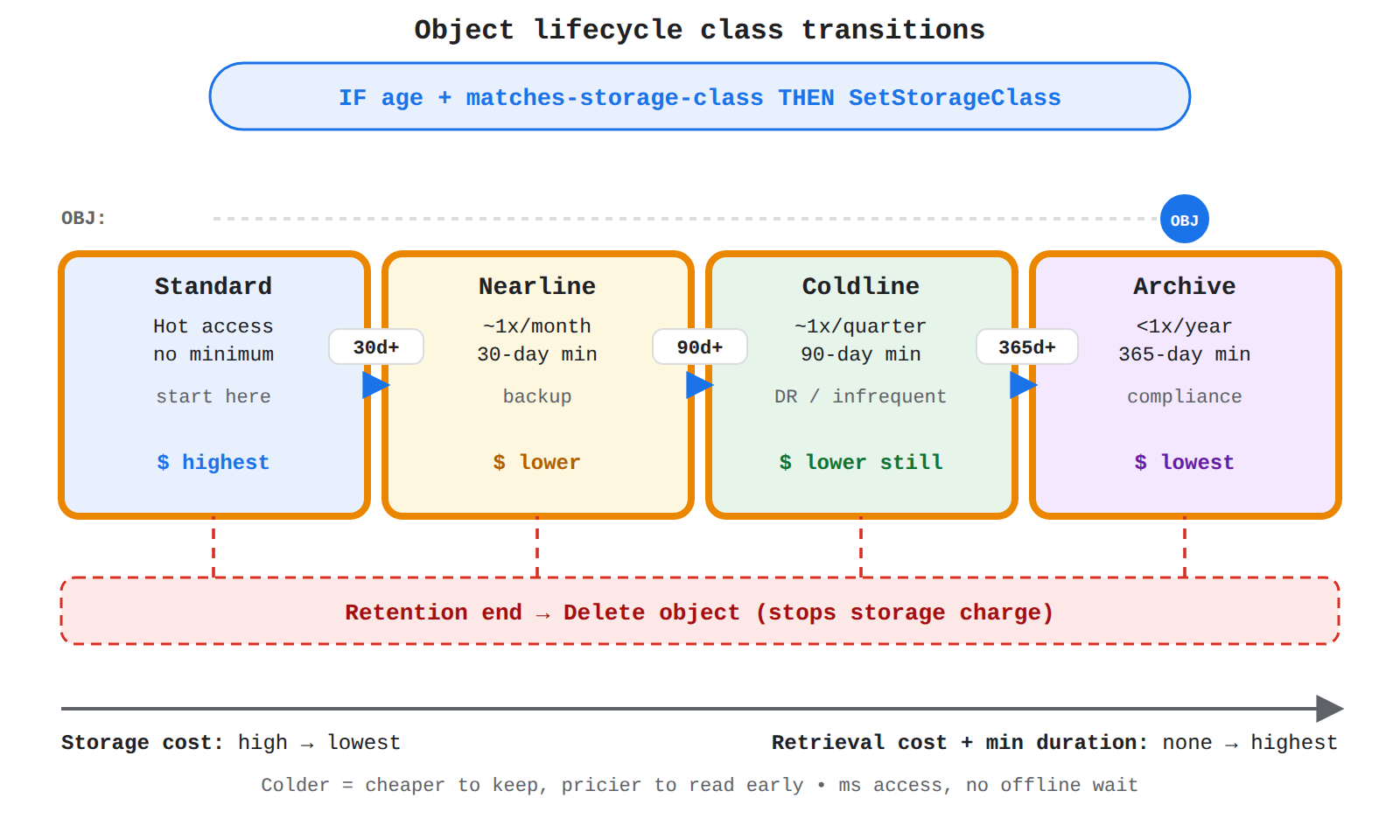
Four storage class states left to right: Standard, Nearline, Coldline, Archive with age gates 30d+, 90d+, 365d+ and a Delete branch; an OBJ dot travels the sequence showing automatic colder transitions.
Protecting Data Governed by Lifecycle Policies
Protection features in Cloud Storage control what happens when lifecycle actions, users, or errors delete or overwrite objects. The Soft Delete feature preserves deleted and overwritten objects for a specified period, so data remains recoverable after accidental or malicious deletion. The Object holds feature prevents deletion or updates to an object while a hold is in place, which supports strict retention and regulatory compliance needs. Together, these controls let archiving rules reduce cost while retained data stays protected from premature loss.
Analyzing storage solutions for archiving means matching business needs for cost, access frequency, and compliance to the right storage class and lifecycle approach. Google Cloud Storage (opens in a new tab) is a robust, high-performance service for storing and preserving data, including long-term archival data. Different classes such as Nearline, Coldline, and Archive give choices for different archival scenarios.
Google Cloud Storage for Archiving
Google Cloud Storage for archiving is the durable repository where archived content is retained and retrieved when needed. The service grew from earlier platform storage into a standalone object storage product. As an archive repository, Google Cloud Storage holds content that must be kept over time, such as SAP archival data where Cloud Storage serves as the content repository for SAP archival content.
Evaluating Business Requirements for Archive Storage
Evaluating business requirements for archive storage means checking what archived data needs before selecting a storage class and lifecycle policy. This evaluation connects the business need to the storage choice, so infrequently accessed or regulated data is kept in a suitable and cost-effective place.
- Cost: how storage cost and retrieval cost affect long-term retention
- Access frequency: how often archived data must be read back
- Regulatory compliance: where data must reside and how long it must be preserved
When these three requirements are understood together, the archive design can select the right class and policy. Data that is rarely accessed and kept mainly for compliance fits a lower-cost archival choice, while data that must be accessed more often fits a choice that balances retention cost with retrieval needs.
Key Google Cloud archiving services preserve data for long periods on infrastructure that is designed to prevent loss and keep data available. Google Cloud Storage (opens in a new tab) is the central service for storing archived objects, and it runs on a highly redundant platform spread across geographically distributed data centers. Location, encryption, and access controls work with storage to meet business needs for cost control, durability, and regulatory compliance.
Google Cloud Storage as the Archiving Foundation
Google Cloud Storage as the archiving foundation is the object storage service used to keep backup and archive data in Google Cloud. Requests to the service originate from the Google Cloud console, APIs, or client libraries through the Cloud Storage API at storage.googleapis.com. The service supports organization restrictions, so administrators can apply central policies to how storage requests are made. Archived data can be placed in chosen regions, which keeps data at rest only in those regions under the Service Specific Terms.
Redundant Infrastructure That Protects Archives
Redundant infrastructure is the platform design that keeps archived data safe from hardware, software, and network failures. Redundancy applies across every layer of the platform:
- Server design provides backup capacity so a single server failure does not stop platform services.
- Data storage keeps copies of data so loss of one copy does not mean loss of the data.
- Network and internet connectivity provides alternate paths so traffic can continue when a connection fails.
- Software services include exception handling so platform services and control planes shift swiftly from one facility to another.
Data centers are geographically distributed to reduce the impact of natural disasters or local outages on global products. Customers can also deploy resources across multiple regions and zones to build resilient and highly available systems with minimal downtime for maintenance or upgrades.
Location and Boundary Controls for Archived Data
Location and boundary controls for archived data are policies and perimeters that determine where data can be stored and moved. Customers select the region when they create a resource, such as us-east1 or europe-west1, or use multi-regions such as asia and europe. The resource locations constraint can allow or deny those locations at the organization, project, or folder level, which enforces data residency requirements. VPC Service Controls creates a service perimeter that defines the virtual boundaries from which a service can be accessed, and it can restrict import and export through storage APIs so data stays within selected network locations even when a user is authorized by Identity and Access Management policy.
Encryption and Access Protection for Archives
Encryption and access protection for archives are the controls that keep archived data confidential and visible only to approved users. Google Cloud services encrypt customer content at rest and in transit automatically, with no customer action required. Organizations with sensitive or regulated data can add customer-managed encryption keys (CMEK) and manage those keys with Cloud Key Management Service (Cloud KMS), store them in a hardware security module with Cloud HSM, or keep them outside Google infrastructure with Cloud External Key Manager (Cloud EKM). Access Approval requires Google support and engineering personnel to get explicit approval before accessing data, while Access Transparency creates near-real-time audit logs that record the administrator office location and reason for access.
Key Facts
- Object Lifecycle Management policies in Cloud Storage automatically transition objects to colder classes or delete them when age and storage-class conditions are met.
- Standard storage is for high-frequency access, Nearline and Coldline storage are for low-frequency access, and Archive storage is for lowest-frequency access.
- Nearline, Coldline, and Archive storage have lower storage costs but add retrieval charges and minimum storage duration charges.
- The Soft Delete feature preserves deleted objects for recovery, while Object holds prevent deletion or updates to support retention and compliance.
- VPC Service Controls creates a service perimeter that restricts storage API access and data movement to selected network locations.
Frequently Asked Questions
How do Object Lifecycle Management policies in Cloud Storage reduce archiving costs?
Object Lifecycle Management policies in Cloud Storage reduce archiving costs by automatically transitioning objects to colder storage classes or deleting them when age and storage-class conditions are met. For example, a rule can move 90-day-old Standard objects to Nearline and later move older Nearline objects to Archive, while deletion after the required retention period ends stops storage charges for data that no longer needs to be kept.
What is the difference between Standard, Nearline, Coldline, and Archive storage classes in Cloud Storage?
Standard storage in Cloud Storage is for high-frequency access, Nearline and Coldline storage are for low-frequency access, and Archive storage is for lowest-frequency access. Nearline fits backup scenarios where data is read at most about once a month, while Coldline and Archive extend the same idea to data that is read even less often, with lower storage costs but added retrieval charges and minimum storage duration charges.
How do Soft Delete and Object holds in Cloud Storage protect archived data?
Soft Delete and Object holds in Cloud Storage protect archived data by preserving recoverable copies and blocking premature deletion or updates. Soft Delete preserves deleted and overwritten objects for a specified period so data remains recoverable after accidental or malicious deletion, while Object holds prevent deletion or updates to an object while a hold is in place to support strict retention and regulatory compliance needs.
Sample Question
A financial services organization is establishing a regulatory data retention policy. The compliance team requires transaction records and financial audits to be preserved for at least seven years to meet legal mandates.
These records will be retained solely for long-term disaster recovery and compliance audits, with expected data access occurring less than once a year. The organization needs to minimize ongoing data storage costs while maintaining high durability.
Which Google Cloud Storage class is the most cost-effective choice for this archival workload?
How learners score on this domain
Last updated