Fundamental
Prepare and test your skills
Fundamental
Prepare and test your skills
Storage Object Viewer for Bucket Read Access
Free sample question, answered and explained below. The Associate Data Practitioner practice bank has 1,156 more like it. Try 10 free: instant score, no account.
A data analytics team needs to allow a junior data analyst to view and read files within a specific Cloud Storage bucket named sales-reporting-data.
The solution must enforce the principle of least privilege by meeting the following constraints:
- The analyst must only have read access to objects in
sales-reporting-data. - The analyst must not be able to modify or delete any files or bucket settings.
- The analyst must not have access to any other buckets or services in the project.
Which Identity and Access Management (IAM) configuration should you implement?
Explanations
Grant the predefined Storage Admin (roles/storage.admin) role on the sales-reporting-data bucket.
Grant the predefined Storage Admin (roles/storage.admin) role on the sales-reporting-data bucket.
What the Storage Admin Role Is
The Storage Admin (roles/storage.admin) role is a predefined role that grants complete administrative control over Cloud Storage resources, including buckets and objects.
Why It Doesn't Meet the Requirement
- Excessive privileges (✗): The role grants full control to create, modify, overwrite, and delete objects within the bucket, violating the requirement that the analyst must not modify or delete files.
- Bucket configuration control (✗): It permits updating bucket lifecycle rules, permissions, encryption keys, and even deleting the bucket itself.
Key Characteristics and Limitations
- Full administrative scope: Contains broad permissions including
storage.objects.*andstorage.buckets.*. - Exceeds read-only needs: Grants write, delete, and security management capabilities.
- Intended for storage administrators: Reserved for cloud administrators managing bucket lifecycles and IAM policies.
This Answer Would Be Correct If
This option would be correct if the scenario required a lead data architect to manage bucket metadata, set up retention policies, configure object lifecycle management, and control user access on the specific bucket.
Grant the basic Viewer (roles/viewer) role at the Google Cloud project level.
Grant the basic Viewer (roles/viewer) role at the Google Cloud project level.
What the Basic Viewer Role Is
The basic Viewer (roles/viewer) role is a legacy IAM role that grants read-only permissions across all Google Cloud services and resources within an entire project.
Why It Doesn't Meet the Requirement
- Violates least privilege (✗): Granting
roles/viewerat the project level gives the analyst read access across BigQuery datasets, Compute Engine instances, Cloud SQL databases, and all other Cloud Storage buckets in the project. - Overly broad resource scope (✗): The requirement states the analyst must not have access to any other buckets or services in the project, but basic roles apply to all project resources.
Key Characteristics and Limitations
- Broad, coarse-grained access: Basic roles (Owner, Editor, Viewer) predate fine-grained IAM and encompass hundreds of permissions across almost every service.
- Cannot be scoped to specific resources: Basic roles cannot be applied narrowly to individual Cloud Storage buckets or BigQuery datasets.
- Security risk: Granting project-wide viewer access can expose sensitive production data and architectural configurations.
This Answer Would Be Correct If
This option would be appropriate if the user were a project auditor who genuinely required read-only visibility into every resource, service configuration, and data asset across the entire Google Cloud project.
Grant the predefined Storage Object Viewer (roles/storage.objectViewer) role on the sales-reporting-data bucket.
Grant the predefined Storage Object Viewer (roles/storage.objectViewer) role on the sales-reporting-data bucket.
What the Predefined Storage Object Viewer Role Is
The Storage Object Viewer (roles/storage.objectViewer) role is a Google Cloud predefined role designed specifically for read-only access to objects within Cloud Storage. It bundles essential permissions such as storage.objects.get (to read object data and metadata) and storage.objects.list (to list objects within a bucket) without including any administrative or modification permissions.
Storage Object Viewer: What's Inside the Role
Set Relationship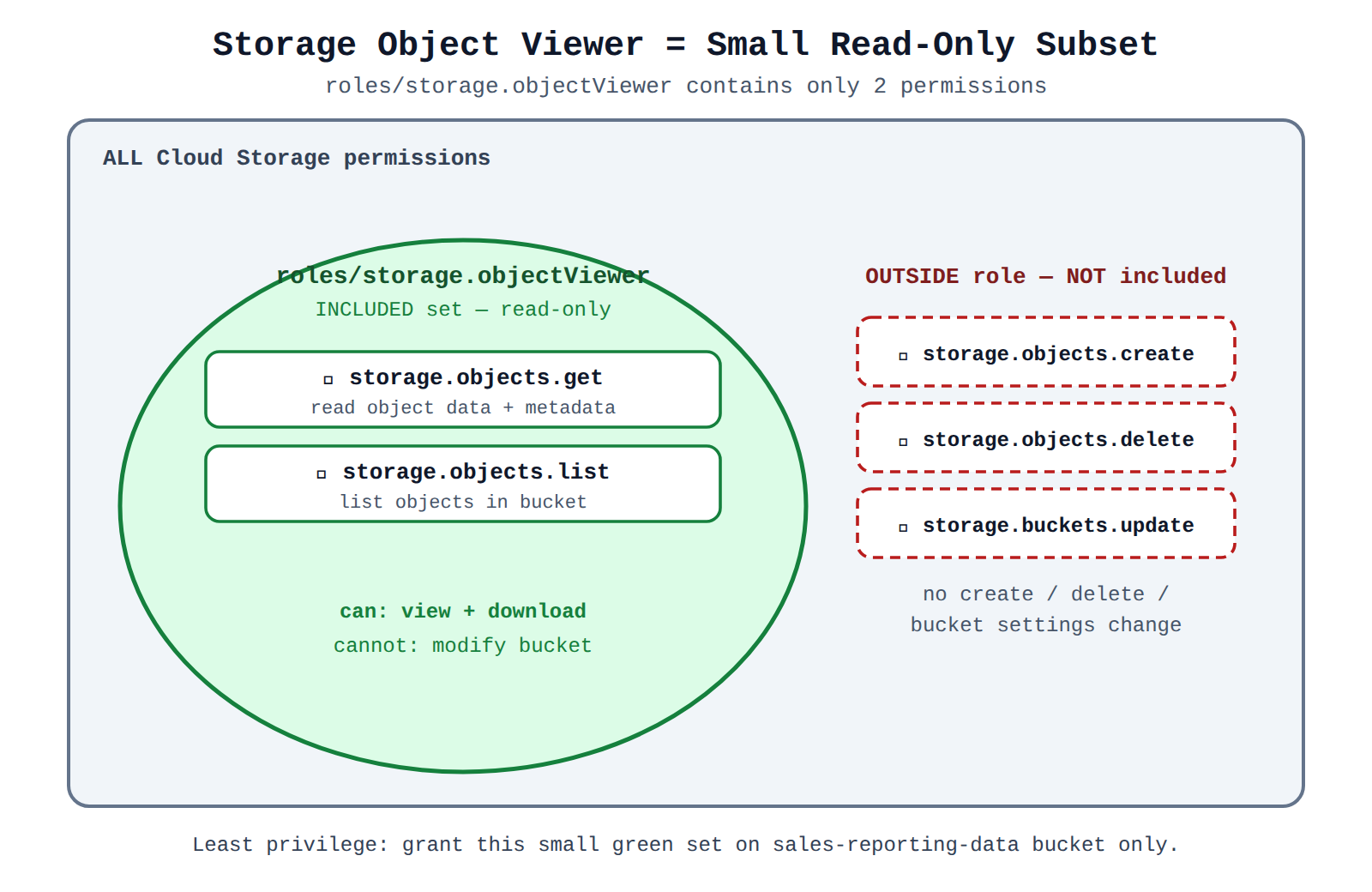
How It Meets the Requirements
- Read-only object access (✓): Granting
roles/storage.objectViewerallows the analyst to list and download data files without providing create, edit, or delete capabilities. - No modification permissions (✓): The role does not contain
storage.objects.create,storage.objects.delete, orstorage.buckets.updatepermissions, ensuring files and configurations cannot be altered. - Scoped to a single bucket (✓): Applying the role directly at the bucket resource level ensures the analyst cannot view or access any other buckets in the project.
- Principle of least privilege (✓): The analyst receives only the exact permissions needed on the exact resource required, minimizing potential security exposure.
Key Advantages and Capabilities
- Granular resource binding: IAM allows policies to be applied directly to individual storage buckets rather than globally at the project level.
- Predefined role curation: Predefined roles are managed and maintained by Google Cloud, following security best practices.
- Separation of duties: Separates object viewing from bucket configuration and object management.
- Audit compliance: Integrates cleanly with Cloud Audit Logs for tracking object-level read operations.
Why This Is Optimal
Applying a focused predefined role at the bucket level directly aligns with Google Cloud security best practices. Unlike basic roles or project-wide assignments, resource-level predefined roles restrict both the scope of permissions and the scope of resources, fulfilling all security constraints seamlessly.
Assign the individual storage.objects.get and storage.objects.list permissions directly to the user account on the bucket.
Assign the individual storage.objects.get and storage.objects.list permissions directly to the user account on the bucket.
What IAM Permissions Are
In Google Cloud IAM, permissions (such as storage.objects.get) represent discrete, atomic authorization checks that allow a user or service account to perform specific API operations.
Why It Doesn't Meet the Requirement
- IAM architecture limitation (✗): Google Cloud IAM does not allow you to assign raw permissions directly to principals (users, groups, or service accounts).
- Requires role bundling (✗): Permissions must always be grouped into either predefined roles or custom roles, and the role is what gets granted to a principal via an IAM policy binding.
Key Characteristics and Limitations
- Permissions are building blocks: Individual permissions describe API operations (e.g.,
service.resource.verb). - Roles are collections: Roles bundle multiple related permissions together for manageable administration.
- Policy bindings bind principals to roles: IAM policies only bind identities (
user:email) to roles (roles/roleName), never directly to permissions.
This Answer Would Be Correct If
This choice would only be conceptually valid if you were defining a Custom IAM Role by selecting specific individual permissions, which you would then assign to the user on the resource.
Try 10 interactive questions like this one, free
Answer them yourself and get your score the moment you finish. No account needed.
Full access includes
- 1,156 practice questions across all 4 exam domains
- Every answer explained: why it is right, and why the others are not
- Scout, an AI tutor that answers your follow-up questions
- Readiness tracking by domain, so you know when to book the exam
Related questions
Keep the momentum going with these hand-picked practice scenarios
FundamentalAssociate Data Practitioner
IAM Predefined Roles vs Basic Roles
Differentiate between basic roles, predefined roles, and permissions for data services (e.g., BigQuery, Cloud Storage)
FundamentalAssociate Data Practitioner
IAM Permissions Bundled into Roles
Differentiate between basic roles, predefined roles, and permissions for data services (e.g., BigQuery, Cloud Storage)
FundamentalAssociate Data Practitioner
Customer-Managed Encryption Keys
Understand the role of Cloud Key Management Service (Cloud KMS) to manage encryption keys
FundamentalAssociate Data Practitioner
LookML Measure Filters Parameter
Manipulate simple LookML parameters to modify a data model
FundamentalAssociate Data Practitioner
BigQuery ML K-means Clustering
Execute SQL to create, train, and evaluate models using BigQuery ML
AdvancedProfessional Data Engineer
Google Cloud Data Platform Architecture
Building a data platform based on requirements by using Google Cloud tools (e.g., Dataplex, Dataplex Catalog, BigQuery, Cloud Storage)
Last updated