Fundamental
Prepare and test your skills
Fundamental
Prepare and test your skills
BigQuery ML Lifecycle for Regression Predictions
Free sample question, answered and explained below. The Associate Data Practitioner practice bank has 1,156 more like it. Try 10 free: instant score, no account.
A data analyst at an e-commerce company wants to build a machine learning model to predict customer lifetime spending using tabular transaction data stored in BigQuery. The analyst needs to follow the standard machine learning lifecycle directly within the data warehouse using SQL statements.
Which sequence of BigQuery ML SQL statements correctly follows the end-to-end lifecycle to train the model, assess its regression performance metrics (such as Mean Squared Error), and generate predictions on new customer records?
Explanations
Execute CREATE MODEL to train the model, run ML.EVALUATE to analyze evaluation metrics, and run ML.PREDICT to generate predictions on new data.
Execute CREATE MODEL to train the model, run ML.EVALUATE to analyze evaluation metrics, and run ML.PREDICT to generate predictions on new data.
What the standard BigQuery ML workflow is
BigQuery ML (BQML) allows data professionals to build, operationalize, and manage machine learning models directly inside Google BigQuery using standard SQL queries. This avoids the latency and complexity of exporting large datasets to external machine learning frameworks.
How it meets all requirements:
- Model Training (
CREATE MODEL): Defines the model type (such aslinear_regorboosted_tree_regressor), target label, and feature columns to train the model on data stored in BigQuery tables. - Performance Evaluation (
ML.EVALUATE): Evaluates the trained model against test data to calculate statistical metrics such as Mean Squared Error (MSE), Root Mean Squared Error (RMSE), Mean Absolute Error (MAE), and R-squared for regression tasks. - Prediction Generation (
ML.PREDICT): Applies the trained model to new or unseen feature data to generate predicted values directly in SQL query results.
BigQuery ML Lifecycle: Train, Evaluate, Predict
Process Flow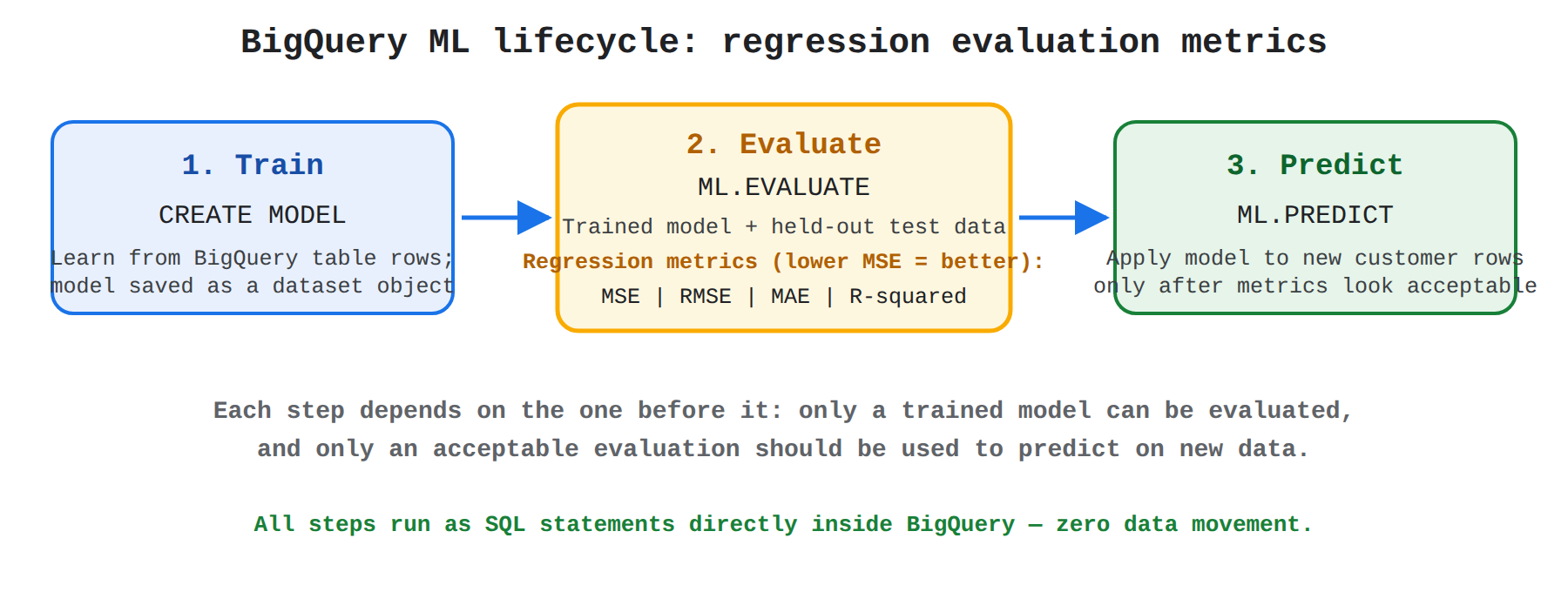
Key advantages of BigQuery ML:
- SQL Familiarity: Data analysts can train and use machine learning models using standard SQL syntax without deep Python or specialized ML library knowledge.
- Zero Data Movement: Training and inference execute directly within BigQuery's scalable, distributed infrastructure, improving security and performance.
- Automated Preprocessing: Automatically handles one-hot encoding for categorical variables and feature scaling for numerical inputs.
- Built-in Model Evaluation: Standardized evaluation functions (
ML.EVALUATE) automatically compute appropriate metrics based on model type.
Why this is optimal:
Following the sequence of CREATE MODEL → ML.EVALUATE → ML.PREDICT represents the canonical, Google-recommended pattern for executing the standard ML project lifecycle inside BigQuery ML.
Execute CREATE MODEL to train the model, run ML.CONFUSION_MATRIX to assess regression error metrics, and run ML.CLASSIFY to generate predictions on new data.
Execute CREATE MODEL to train the model, run ML.CONFUSION_MATRIX to assess regression error metrics, and run ML.CLASSIFY to generate predictions on new data.
What this option describes
This option proposes using CREATE MODEL followed by ML.CONFUSION_MATRIX for evaluation and ML.CLASSIFY for inference.
Why it doesn't meet the requirement:
- Incompatible evaluation metric tool:
ML.CONFUSION_MATRIXis designed exclusively for classification models (such as logistic regression or multi-class boosted trees) to evaluate true positives, false positives, true negatives, and false negatives. It cannot evaluate numerical regression models or produce Mean Squared Error (MSE). - Nonexistent inference function: BigQuery ML uses
ML.PREDICTas the universal inference function for both regression and classification models;ML.CLASSIFYis not a valid SQL function in BigQuery ML.
Key characteristics of classification evaluation:
ML.CONFUSION_MATRIXassesses classification thresholds and class distribution errors.- Regression tasks require
ML.EVALUATEto produce error metrics like MSE, RMSE, and R-squared.
This answer would be correct if:
The task required evaluating a binary or multiclass classification model (e.g., predicting customer churn or product category) and BigQuery ML had a dedicated ML.CLASSIFY function.
Execute ML.TRAIN to train the model, run ML.VALIDATE to assess performance metrics, and run ML.FORECAST to generate predictions on new data.
Execute ML.TRAIN to train the model, run ML.VALIDATE to assess performance metrics, and run ML.FORECAST to generate predictions on new data.
What this option describes
This option suggests using ML.TRAIN to train the model, ML.VALIDATE to check metrics, and ML.FORECAST for generating general tabular predictions.
Why it doesn't meet the requirement:
- Nonexistent training syntax: In BigQuery ML, model training is defined using Data Definition Language (DDL) syntax with
CREATE MODEL(orCREATE OR REPLACE MODEL), notML.TRAIN. - Nonexistent evaluation function: BigQuery ML provides
ML.EVALUATEto compute statistical metrics;ML.VALIDATEis not a valid BigQuery ML SQL function. - Incorrect prediction function: While
ML.FORECASTis a valid BigQuery ML function, it is specifically reserved for time-series forecasting models (such asARIMA_PLUS), rather than standard supervised regression or classification on tabular customer data.
Key characteristics of time-series functions:
ML.FORECASTgenerates multi-horizon time-based projections.- Standard tabular feature predictions require
ML.PREDICT.
This answer would be correct if:
The requirement specifically involved generating sequential time-series forecasts using an ARIMA model and standard SQL supported ML.TRAIN syntax.
Execute INSERT MODEL to train the model, run ML.SCORE to assess performance metrics, and run ML.EXTRACT to generate predictions on new data.
Execute INSERT MODEL to train the model, run ML.SCORE to assess performance metrics, and run ML.EXTRACT to generate predictions on new data.
What this option describes
This option proposes using Data Manipulation Language (DML) style INSERT MODEL, ML.SCORE, and ML.EXTRACT to perform training, evaluation, and inference.
Why it doesn't meet the requirement:
- Invalid DDL/DML syntax: BigQuery does not recognize
INSERT MODELfor machine learning creation; model training requires theCREATE MODELstatement. - Nonexistent evaluation function:
ML.SCOREis not a valid BigQuery ML function for computing model performance metrics. - Misused extraction function:
ML.EXTRACTdoes not exist as an inference function in BigQuery ML;ML.PREDICTis required to generate predictions on feature datasets.
Key characteristics of BigQuery ML DDL:
- Models in BigQuery are top-level dataset objects created via
CREATE MODEL. - Standard ML operations use specialized table functions prefixed with
ML.(e.g.,ML.EVALUATE,ML.PREDICT,ML.EXPLAIN_PREDICT).
This answer would be correct if:
BigQuery ML utilized standard database row insertion syntax (INSERT) and scoring commands for model orchestration rather than native SQL DDL and ML evaluation functions.
Try 10 interactive questions like this one, free
Answer them yourself and get your score the moment you finish. No account needed.
Full access includes
- 1,156 practice questions across all 4 exam domains
- Every answer explained: why it is right, and why the others are not
- Scout, an AI tutor that answers your follow-up questions
- Readiness tracking by domain, so you know when to book the exam
Related questions
Keep the momentum going with these hand-picked practice scenarios
FundamentalAssociate Data Practitioner
BigQuery Dataset Prerequisite
Plan a standard ML project (e.g., data collection, model training, model evaluation, prediction)
FundamentalAssociate Data Practitioner
Dataflow BigQuery Cloud Storage ML Pipeline
Plan a standard ML project (e.g., data collection, model training, model evaluation, prediction)
FundamentalAssociate Data Practitioner
Structured Data Cloud SQL BigQuery
Classify use cases into having structured, unstructured, or semi-structured data requirements
FundamentalAssociate Data Practitioner
Cloud Composer DAG Task Dependencies
Create and manage scheduled queries (e.g., BigQuery, Cloud Scheduler, Cloud Composer)
FundamentalAssociate Data Practitioner
Cloud Data Fusion
Choose products required to implement basic transformation pipelines
FundamentalGenerative AI Leader
CCAI Platform vs Conversational Insights
Recognizing the functionality, use cases, and business value of Google's Customer Engagement Suite (e.g., Conversational Agents, Agent Assist, Conversational Insights, Google Cloud Contact Center as a Service)
Last updated