Fundamental
Prepare and test your skills

Fundamental
Prepare and test your skills
Infrastructure as Code on Google Cloud
Infrastructure as code tooling is the set of tools that define Google Cloud infrastructure and applications in versioned files instead of manual clicks. Infrastructure as Code (IaC) stores the desired end state in code, so the same files can create matching development, test, and production environments. Different tools cover different layers, from platform resources to Kubernetes applications.
Terraform Lifecycle Through Infrastructure Manager
The Terraform lifecycle through Infrastructure Manager (Infra Manager) is the ordered path from configuration code to running Google Cloud resources. Infrastructure Manager is the managed Google Cloud service that runs Terraform configurations, also called blueprints, without requiring a separate automation server. It provisions infrastructure resources only and does not deploy applications onto those resources.
Configuration data flows from a storage location to an automated build job and then to live resources. Logs flow from the build job to a managed storage bucket, and deployment metadata flows to storage for later queries. The workflow runs in fixed order:
- Define configuration: Define resources declaratively in a Terraform configuration whose entry point must be a Terraform root module.
- Store configuration: Store the configuration in a Cloud Storage bucket, a Git repository, or a local directory.
- Create deployment: Create an Infrastructure Manager deployment, which validates the request including the configuration location.
- Run automated build: Infrastructure Manager starts a Cloud Build job in an ephemeral environment using a Google-owned container image.
- Initialize and validate: The job downloads the module, then runs
terraform initto install providers and modules andterraform validateto check syntax. - Preview or actuate: The job runs a preview to show proposed changes, runs
terraform applyto create resources, and runsterraform destroywhen deleting a deployment. - Store results: Infrastructure Manager streams logs to storage and stores deployment metadata for later queries.
Only after the apply step succeeds do the Google Cloud resources exist as described by the configuration. The completed deployment can then be queried for its status, its list of deployed resources, and details about individual resources.
Terraform Initialization, Preview, and Managed State
Terraform initialization, preview, and managed state control how changes are prepared, reviewed, and tracked. Initialization with terraform init prepares the working directory by installing providers and modules, while terraform validate checks syntax and preview shows what would change before anything is applied. A GitOps flow can run terraform plan on feature branches without applying anything, then apply only after code is merged to development or production branches.
Infrastructure Manager stores Terraform state automatically as the central source of truth for each deployment. For each deployment and each revision, Infrastructure Manager stores related records together:
- Logs from the Cloud Build job that ran the operation
- The configuration used for the revision
- The list of Google Cloud resources created by the revision
- The state file created as part of the deployment and revision
Because Infrastructure Manager handles state, configurations that use it follow specific constraints. Backend blocks should not be defined, templating or generation of Terraform is not supported, and provisioners are not recommended because the runtime environment can change at any time. Configuration values must not include personal or sensitive information, and the configuration must work with a supported Terraform version.
Exam tip: Do not define a backend block when deploying with Infrastructure Manager, because Infrastructure Manager stores the state file for each deployment and revision itself.
Fabric FAST Blueprints for Standardized Landing Zones
Fabric FAST blueprints are standardized Terraform packages for building landing zones and foundations the same way every time. A Terraform module is a reusable set of configuration files that creates a logical abstraction for one area, such as networking, storage, or identity. A blueprint is a larger package of deployable, reusable modules plus policy and documentation that implements an opinionated solution.
Modules and blueprints differ in scope and reuse, so teams choose the package that matches the size of the problem:
| Option | What it contains | Use it when |
|---|---|---|
| Module | Reusable configuration files for a logical group of resources | A single capability needs to be reused consistently across environments |
| Blueprint | Deployable modules plus policy and documentation for an opinionated solution | A full landing zone or foundation needs to be deployed the same way every time |
The catalog shows this pattern in practice. The fabric collection provides advanced examples designed for prototyping, while the example-foundation blueprint shows how Cloud Foundations Toolkit modules can be composed into a secure cloud foundation. The bootstrap module helps start Terraform usage and related CI/CD in a new Google Cloud organization, so new environments begin from versioned, reviewed, and auditable code.
Config Connector Desired State and Reconciliation
Config Connector is a Kubernetes extension that manages Google Cloud resources through Kubernetes configuration files. Config Connector provides Kubernetes Custom Resource Definitions (CRDs) where each CRD configures one type of Google Cloud resource from Kubernetes using declarative YAML. The YAML can be versioned, reused, and stored in source control, so teams can use standard Kubernetes tools and CI/CD pipelines for both workloads and infrastructure.
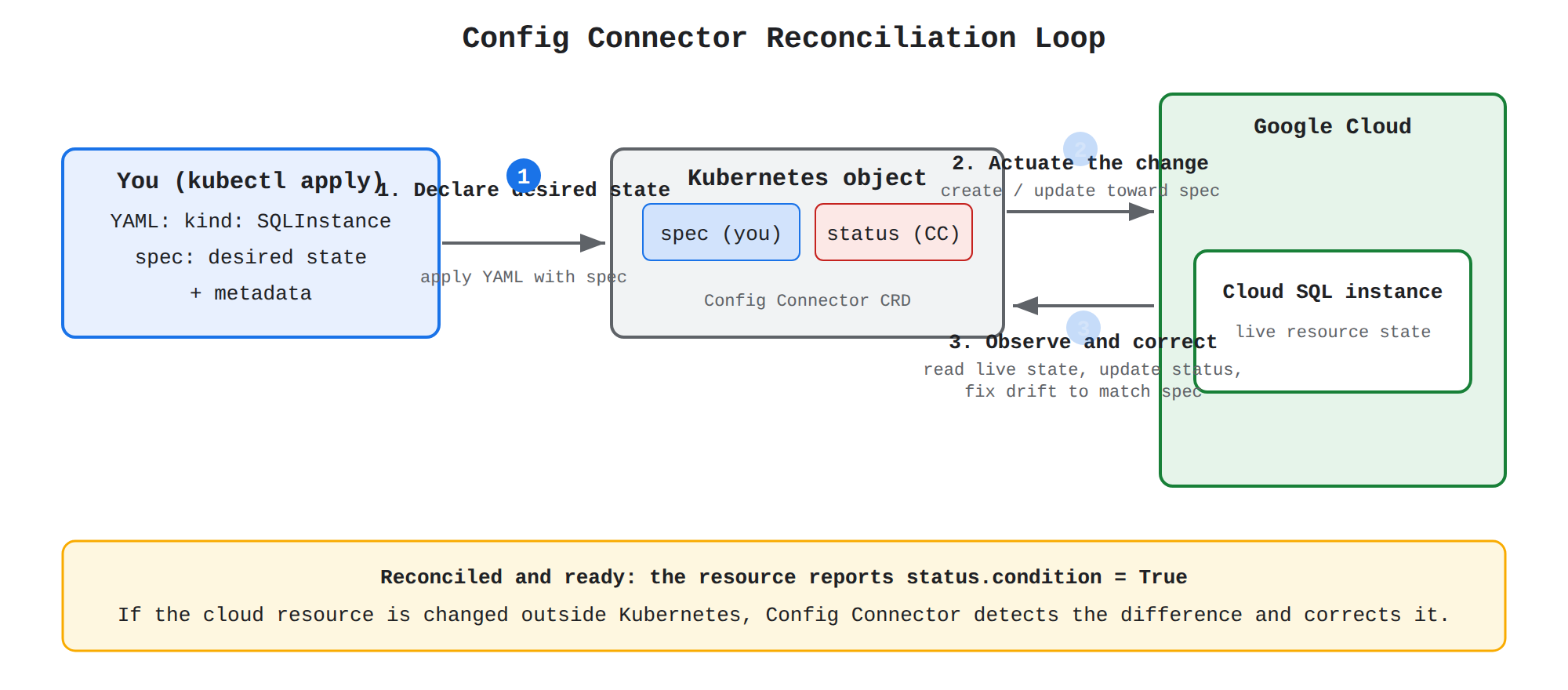
A sequence diagram showing the Config Connector reconciliation loop: you apply YAML with a spec to the Kubernetes object, Config Connector actuates the change to create or update the Cloud SQL resource in Google Cloud, then observes the live resource, updates status, and corrects drift until status.condition reports True.
Each Config Connector resource is a Kubernetes object that creates and manages a matching Google Cloud resource. For example, a Kubernetes object of kind: SQLInstance creates a Cloud SQL instance in Google Cloud. The Kubernetes object remains the single source of truth for the desired configuration of the cloud resource. If someone changes the cloud resource outside Kubernetes, Config Connector detects the difference and corrects it.
Each Config Connector resource separates user intent from system feedback with distinct spec and status fields. The separation keeps reported state from being overwritten by user edits and lets users check readiness and errors in one place.
| Field | Purpose | Who writes it |
|---|---|---|
spec | Defines the desired state of the Google Cloud resource, such as databaseVersion | You declare it in YAML |
status | Reports the current state, readiness, and error messages, such as connectionName | Config Connector updates it after reading Google Cloud |
The continuous reconciliation loop keeps the live Google Cloud resource aligned with the declared object. Data flows from the applied YAML to Config Connector and then to Google Cloud, while observations flow back from Google Cloud into status. The loop runs in order:
- Declare desired state: You apply YAML containing
specand metadata to the cluster. - Actuate the change: Config Connector creates the Google Cloud resource or updates it toward the declared
spec. - Observe and correct: Config Connector periodically reads the Google Cloud resource, updates
status, and corrects drift so the live value becomes eventually consistent withspec.
This loop provides consistency without manual checks because later observations drive the resource back toward the declared state. A reconciled and ready resource reports its ready condition as True in status.condition.
Kubernetes Metadata Mapping and Access Control
Object metadata in Config Connector controls how each Kubernetes object maps to its Google Cloud resource. Metadata connects Kubernetes organization concepts to Google Cloud organization concepts, so existing Kubernetes practices for organizing, selecting, and auditing objects apply directly to cloud resources.
- Name: The Kubernetes object name is used by default as the Google Cloud resource name. If the resource supports
spec.resourceID, you can specify a different Google Cloud name that follows Google Cloud naming rules. - Namespace: The Kubernetes namespace where you create the resource determines the Google Cloud project that contains the resource.
- Labels: Labels in the metadata field are also added to the associated Google Cloud resource. Config Connector also adds a system label named
managed-by-cnrmwith a value oftrue. - Annotations: Annotations define additional actions that are not part of
spec, such as lifecycle controls. Annotation values must be strings.
Name and resourceID preserve the boundary between Kubernetes naming rules and Google Cloud naming rules. Namespace maps the Kubernetes boundary to the Google Cloud project boundary, and labels propagate from Kubernetes to Google Cloud for selection and cost tracking. Access is controlled by Kubernetes Role Based Access Control (RBAC), where permission to create a Config Connector object grants the ability to create the corresponding cloud resource. Config Connector also supports resources in Google Cloud folders and organizations, so one Kubernetes-native workflow can manage both workload resources and their hierarchical containers.
Helm Charts, Templates, and Layered Tool Choice
Helm packaging is the use of IaC to package, version, and deploy Kubernetes applications in a repeatable way. A Helm chart is a versioned package that bundles all Kubernetes resources needed for an application into one reusable unit. The chart declares the desired state of the application, so Helm and Kubernetes work to make the live environment match that declared state.
Templates and values files separate reusable structure from per-environment settings. Templates define the common Kubernetes manifests with placeholders for image names, replica counts, resource limits, and connection settings. Data flows from the values file into the templates, and Helm renders the templates into final manifests that are applied to the cluster. A team keeps one shared chart and maintains a different values file for development, test, and production, so only the values change while the chart structure stays consistent. Charts and values files live in source control and move through CI/CD pipelines with review and validation, which reduces manual effort and supports audit and revert.
Helm fills the application layer, while Terraform-based tools provision the underlying platform including Google Kubernetes Engine (GKE) (opens in a new tab) clusters. The tools depend on different inputs and produce different outputs:
| Tool | What it manages | Choose when |
|---|---|---|
| HashiCorp Terraform | Google Cloud infrastructure including VMs, networks, storage, and GKE clusters | The need is to provision and manage platform resources with versioned, reusable configuration |
| Infrastructure Manager | Deployment of Terraform configurations on Google Cloud | The need is to deploy Terraform programmatically using a Google Cloud service |
| Helm | Kubernetes applications packaged as charts with templates and values files | The need is to package, version, and deploy workloads inside a Kubernetes cluster across environments |
Use Terraform to create the cluster and Helm to deploy applications onto it, so platform provisioning and application orchestration stay in separate, reusable layers. This separation lets infrastructure teams and application teams work from their own versioned packages while sharing the same review and pipeline practices.
Planning and executing infrastructure as code deployments, including versioning, state management, and updates
Planning and executing IaC deployments is the discipline of storing infrastructure logic as code and applying it through automated, repeatable workflows. Versioning provides history and review, state management tracks what was deployed, and updates move live resources to a new desired state. Together they improve consistency and reduce human error across environments.
Versioned Configurations and Immutable Redeploys
Versioned configurations and immutable redeploys keep infrastructure changes safe and predictable over time. Versioning means storing infrastructure provisioning and configuration logic in source control where every change can be tracked, reviewed, and audited. Because the configuration lives in a repository, a CI/CD pipeline can automatically test and deploy every change before it reaches production.
Immutable infrastructure is the rule that a virtual machine, Kubernetes cluster, or firewall rule is never tweaked after deployment. The update is made to the configuration in the source repository instead, which avoids configuration drift and snowflake servers that become unique and hard to reproduce. The update follows a fixed order from source code to live environment:
- Update configuration: Change the resource configuration in the source repository.
- Test and validate: Run the changed configuration through testing and validation, often with a CI/CD pipeline.
- Redeploy resource: Fully redeploy the resource using the new, validated configuration.
This sequence makes deployments and rollbacks more predictable because every environment is re-created from the same versioned source. Data flows from the repository through testing and deployment to the live Google Cloud environment.
Purposes for Updating a Deployment
A deployment update in Infrastructure Manager (opens in a new tab) is a new revision of an existing deployment that either corrects drift or implements intended change. Drift happens when live resources change outside Terraform, such as when someone edits a resource in the console. Intended change happens when the desired infrastructure itself needs to be different.
The configuration used for the update depends on the goal:
| Goal | Configuration used for the update | Example |
|---|---|---|
| Return infrastructure to a chosen state | The original Terraform configuration is applied again | Reapply the deployed configuration after a manual console change |
| Implement changes to infrastructure | A new or edited Terraform configuration is applied | Add a new virtual machine or change a bucket setting |
Choose the first option when the configuration is still correct but the live environment has drifted. Choose the second option when the desired infrastructure has changed and the configuration must describe the new state.
Prerequisites Before Executing an Update
Prerequisites before executing an update ensure that Infrastructure Manager has the identity, permissions, configuration, and capacity needed to apply changes safely. The update depends on both the calling identity and the service account that acts on Google Cloud resources. Missing permissions, quota, or continuity planning causes deployment errors or service interruption.
- Enable Infrastructure Manager in the project before creating or updating any deployment.
- Grant the caller the Identity and Access Management role
roles/config.adminto manage deployments. - Provide a service account with permissions to use Infrastructure Manager plus permissions for the Google Cloud resources defined in the configuration.
- Identify the existing Infrastructure Manager deployment to update and the Terraform configuration to use for the revision.
- Use a Terraform configuration that meets Infrastructure Manager constraints and does not contain sensitive data.
- Confirm organization quota for the products used by the intended infrastructure to avoid quota-related failures.
- Complete any data migration or service continuity steps for resources that will be modified, and preview the update when you want to review changes before applying them.
If the revision defines different resources than the original deployment, the service account needs permissions for resources defined in both configurations. Previewing the update lets teams review proposed changes before they are applied.
How Infrastructure Manager Applies Configuration Changes
The Infrastructure Manager execution workflow applies configuration changes through an automated Cloud Build job that moves from source code to live resources in a fixed order. Data flows from the Cloud Storage bucket or Git repository that holds the Terraform module to the Cloud Build job, and then from the Cloud Build job to the target Google Cloud resources. Logs flow from the Cloud Build job to a Cloud Storage bucket created by Infrastructure Manager, and deployment metadata flows from the job to Cloud Storage for later queries.
- Download source: The Cloud Build job downloads the Terraform module from the storage bucket or Git repository.
- Initialize: The job runs
terraform initto prepare the working directory and providers. - Validate: The job runs
terraform validateto check that the configuration is syntactically correct. - Apply: The job runs
terraform applyto provision or modify resources, orterraform destroywhen the deployment is being deleted. - Stream logs: The job streams Cloud Build logs into the Storage bucket created by Infrastructure Manager.
- Retry on transient failure: If
terraform initorterraform applyfails from causes such as intermittent network outages, Infrastructure Manager automatically retries those operations a limited number of times.
Only after the apply step succeeds are the Google Cloud resources provisioned as described by the configuration. When the deployment is complete, you can query Infrastructure Manager for the status of the deployment, the list of resources deployed as part of the deployment, and details about individual resources in the deployment.
Runtime Environment, Metadata, and Consistency
The runtime environment for Infrastructure Manager is an ephemeral Cloud Build environment that exists only for the duration of the Terraform run. You select which supported version of Terraform to use for each deployment, while the operating system and installed software inside the environment are managed by Google Cloud and can change at any time. The environment is discarded after the run, so no state or software persists between runs, while deployment metadata is retained in Cloud Storage.
State management and consistency keep deployed cloud resources matched to versioned configuration so every environment is reproducible. Google Cloud resources managed this way live inside projects, which contain service resources such as Compute Engine virtual machines, Pub/Sub topics, Cloud Storage buckets, and Cloud VPN endpoints. Automation creates those resources from the same tested configuration rather than by separate manual steps, so development, testing, and production environments stay aligned. Tools that support this model include Infrastructure Manager for automated creation and management, Config Connector for Kubernetes-native workflows, Terraform for defining and deploying infrastructure, and Chef and Puppet for configuration management. Do not include personal or sensitive information in Terraform configuration values, because configuration values are handled as part of this automated workflow and stored with deployment data.
Exam tip: Immutable infrastructure means never modify a deployed resource — update the configuration in source control and fully redeploy the resource.
Key Facts
- Infrastructure Manager runs Terraform through an ordered lifecycle of define, store, validate, initialize with
terraform init, preview or apply withterraform apply, and stores logs, configuration, resource lists, and state per deployment revision. - Do not define a backend block when deploying with Infrastructure Manager because Infrastructure Manager stores the Terraform state file itself.
- Config Connector uses
specfor desired state written by the user andstatusfor observed state reported by the controller, with Kubernetes namespace mapping to the Google Cloud project. - A blueprint packages deployable modules plus policy for a full landing zone, while a module packages reusable configuration for a single capability.
- Immutable infrastructure requires updating the configuration in the source repository and fully redeploying the resource instead of editing the live resource.
Frequently Asked Questions
What is the difference between a Terraform module and a Fabric FAST blueprint?
A Terraform module is a reusable set of configuration files that creates a logical abstraction for one area such as networking, storage, or identity and is used when a single capability needs to be reused consistently across environments. A Fabric FAST blueprint is a larger package of deployable, reusable modules plus policy and documentation that implements an opinionated solution and is used when a full landing zone or foundation needs to be deployed the same way every time.
Why should I not define a backend block when deploying Terraform configurations with Infrastructure Manager (Infra Manager)?
You should not define a backend block because Infrastructure Manager (Infra Manager) stores Terraform state automatically as the central source of truth for each deployment and each revision. For each deployment and revision it stores the logs from the Cloud Build job, the configuration used, the list of Google Cloud resources created, and the state file together.
How does Config Connector keep Google Cloud resources aligned with the desired state declared in Kubernetes?
Config Connector uses the spec field declared by you in YAML to define the desired state and updates the status field itself to report current state, readiness, and errors. It runs a continuous reconciliation loop where you apply YAML, Config Connector creates or updates the Google Cloud resource toward spec, then periodically reads the resource, updates status, and corrects drift so the live value becomes eventually consistent with spec.
When should I use HashiCorp Terraform, Infrastructure Manager (Infra Manager), and Helm for Google Cloud deployments?
Use HashiCorp Terraform to provision and manage platform resources including virtual machines, networks, storage, and Google Kubernetes Engine (GKE) clusters with versioned reusable configuration. Use Infrastructure Manager (Infra Manager) when you need to deploy Terraform configurations programmatically using a Google Cloud service, and use Helm when you need to package, version, and deploy Kubernetes applications as charts with templates and values files inside a cluster. In practice use Terraform to create the cluster and Helm to deploy applications onto it so platform provisioning and application orchestration stay in separate reusable layers.
Subdomains
Versioning and incremental updates are the practices that keep infrastructure as code (IaC) safe and predictable over time. Versioning means storing infrastructure provisioning and configuration logic…
Terraform lifecycle and Fabric FAST deployment describe how to automate Google Cloud infrastructure in a safe and repeatable way. Infrastructure as Code (IaC) defines infrastructure in versioned c…
How learners score on this domain
Last updated