Fundamental
Prepare and test your skills

Fundamental
Prepare and test your skills
Cloud Run Autoscaling Concurrency and Instance Limits
Request concurrency and resource allocation in Cloud Run (opens in a new tab) control how many simultaneous requests one instance handles and when that instance receives CPU. Concurrency sets the request capacity per instance, while CPU allocation determines whether CPU is available only during requests or for the full life of the instance. Together they decide when the autoscaler adds instances, how efficiently instances are used, and how much the service costs.
Request Concurrency and Instance Scaling
Request concurrency is the maximum number of simultaneous requests a single Cloud Run instance can process. The default maximum is 80 concurrent requests per instance, and incoming requests flow from the load balancer to the ingress container in each instance until that limit is reached. When average load approaches the configured limit, the autoscaler starts new instances to absorb additional traffic, and when traffic falls, it scales back toward the configured minimum, which is zero by default.
A lower concurrency value causes faster scale-out because each instance fills up sooner, which can reduce latency but creates more instances and higher cost. A higher concurrency value packs more requests onto fewer instances, which can lower cost but may increase latency or overload the container if the application cannot handle parallel work. The best practice is to start at 80, load-test the application under realistic traffic, and then lower the value until latency and error rate stay stable at peak load.
Cloud Run scaling is controlled by a small set of related settings:
- Maximum concurrency: the hard cap on simultaneous requests per instance.
- Maximum and minimum instances: the upper limit for cost and downstream protection and the lower limit for warm baseline capacity.
- Custom scaling controls: the target utilization for CPU and concurrency that triggers scale-up before limits are hit.
Custom Scaling Controls for CPU and Concurrency
Custom scaling controls in Cloud Run define the utilization thresholds that cause the autoscaler to add instances. By default, the autoscaler tries to keep active instances at about 60% CPU utilization and at 60% of the maximum concurrency value. For example, with a maximum concurrency of 80, the autoscaler targets about 48 concurrent requests per instance and adds instances before requests begin to queue.
The concurrency target is configured with template.scaling.concurrencyUtilization or the --scaling-concurrency-target flag, and the CPU target is configured with template.scaling.cpuUtilization or the --scaling-cpu-target flag. When you set a lower target, the autoscaler scales out earlier, which improves responsiveness to spikes but runs more instances. When you set a higher target, instances run hotter and fewer instances are used, which can save cost but risks latency spikes if traffic grows suddenly.
CPU Allocation Models and Billing Settings
CPU allocation in Cloud Run follows two billing-based models that decide when containers receive CPU. Under request-based billing, which is the default, CPU is allocated to all containers in an instance, including sidecars, only while the instance is processing at least one request, and CPU is throttled to zero when the instance becomes idle. Under instance-based billing, CPU is allocated for the entire life of the instance, including idle time between requests and the 10-second shutdown period after a SIGTERM signal.
An idle instance is one that is not processing any requests, and unless a minimum-instance setting keeps it warm, Cloud Run will not keep it idle for longer than 15 minutes. The choice between models depends on what the container must do outside of requests. The following comparison shows when to use each model:
| Allocation model | When CPU is allocated | Choose when |
|---|---|---|
| Request-based billing | CPU flows to all containers only while at least one request is being processed; CPU is throttled during idle time | The workload only does work during requests and can scale to zero for lowest cost |
| Instance-based billing | CPU flows to all containers for the full instance lifecycle, including idle time between requests | The workload does background work between requests or uses minimum instances that must stay warm and ready |
Use instance-based billing when the application runs background threads, handles startup tasks, or configures minimum instances, because request-based billing would suspend that background work when no request is active.
Exam tip: Request-based billing throttles CPU to zero when no request is active, so any background work between requests requires instance-based billing.
CPU Limits, Sizing, and Burst Behavior
CPU limits in Cloud Run set the number of virtual CPUs (vCPUs) available to each instance, with a default of 2 vCPU and 2 GiB of memory. A vCPU is an abstraction of CPU time roughly equal to one hardware hyper-thread, and a container can execute across multiple cores at once. The allowed sizes pair vCPU and memory together, from 1 vCPU with 512 MiB to 4 GiB up to 8 vCPU with 4 GiB to 32 GiB, and the sum of all containers in an instance must be at least 1 vCPU.
If the application is single-threaded, it may fully use only one vCPU even when more are configured, so match the limit to the threading model and test under load. To right-size the limit, follow an ordered tuning cycle:
- Establish a baseline: start with a CPU limit that balances expected utilization and cost.
- Monitor under load: observe CPU utilization metrics in Cloud Monitoring during realistic peak traffic.
- Adjust the limit: reduce vCPU if utilization stays consistently low, or increase vCPU if latency is high.
Cloud Run instances also use a shared CPU model with a continuous baseline and burst capacity. Each instance can run indefinitely within a baseline of 6.25%, or 1/16th, per configured vCPU, and when the instance runs below that baseline it accrues unused CPU time into a burst balance of up to 500 seconds for short spikes above the baseline.
Cloud Run (opens in a new tab) automatic scaling uses two instance limits to balance speed against cost. Minimum instances keep warm capacity ready for immediate traffic, while maximum instances set a hard ceiling on how far the service can scale out. Together they control cold start latency, spending, and pressure on downstream systems.
Minimum Instances Keep Warm Capacity Ready
Minimum instances in Cloud Run define how many container instances stay running and ready to receive requests, even with no traffic. The setting is scaling.min_instance_count at the service level and template.scaling.min_instance_count at the revision level. Setting the minimum above zero means baseline traffic is handled without waiting for a new container to start, which improves responsiveness but adds cost because warm instances are billed while they are reserved.
Scaling from zero can only be triggered by an incoming request, so a service with minimum instances set to 0 must start a new instance after the request arrives. Setting minimum instances greater than zero avoids that wait by keeping the specified number of containers always running. Use a minimum above zero when low latency matters more than saving cost, and use zero when saving cost matters more than startup delay.
Maximum Instances Cap Cost and Protect Dependencies
Maximum instances in Cloud Run set an upper limit per revision on how many instances can run in parallel. The setting is scaling.max_instance_count at the service level and template.scaling.max_instance_count at the revision level. This limit controls cost and protects dependencies that cannot handle unlimited load, such as a database that supports only a certain number of open connections. All services have a default maximum limit of 100 even when no custom value is configured.
When traffic needs more instances than the maximum allows, incoming requests wait in a pending queue for up to 3.5 times the average container startup time or 10 seconds, whichever is greater. During that window, a request starts as soon as an existing instance finishes its current work and becomes available. If no instance becomes available in time, the request fails with a 429 error code.
Exam tip: The maximum instances limit applies per revision, so traffic splits across revisions and new-revision deployments can temporarily make the service total exceed the per-revision maximum.
How Warm Instances Reduce Cold Starts
A cold start in Cloud Run is the delay that occurs when a request must wait for a new container instance to start and initialize. Warm instances mitigate cold starts because the container is already running, so traffic flows directly from the request to the ready instance without startup work. Cloud Run does not offer a separate idle-instance pool, so keeping scaling.min_instance_count above zero is the way to guarantee that warm containers are always available.
Idle behavior after the last request also affects latency and cost. An instance can remain alive for up to 15 minutes after it stops processing requests. With request-based billing, CPU is allocated only during request processing and is throttled while the instance is idle. With instance-based billing, CPU stays allocated outside request processing, which supports background work but costs more.
How Service-Level and Revision-Level Limits Combine
Service-level and revision-level limits in Cloud Run combine under fixed resolution rules. A service-level minimum sets the default for the whole service, while a revision-level minimum can override it for traffic directed to that revision. Cloud Run enforces the lower of the service-level and revision-level maximum values, and maximum limits always cap minimum limits.
| Service setting | Revision setting | Resolution rule | Resulting behavior |
|---|---|---|---|
| Min 10 | Min 5 | Highest minimum wins | The revision runs 10 instances to satisfy the larger global minimum |
| Min 10 | Max 5 | Revision maximum overrides service minimum | The revision is strictly capped at 5 instances |
This combination means a new revision can be tested with a different minimum before it serves production traffic. It also means a low maximum can block a higher minimum, so the two values must be checked together. During rapid traffic surges, maintenance replacements, traffic splits, and deployments, Cloud Run may briefly create extra instances above the maximum for a grace period of up to 15 minutes or the request timeout value, then destroy those extra instances within 15 minutes after they become idle.
Cloud Run (opens in a new tab) automatic scaling adds container instances when traffic increases and removes them when traffic decreases, including scaling all the way to zero. A Cloud Run service scales out in response to incoming requests and scales in when instances are no longer processing requests. This traffic-driven behavior improves cost efficiency because no instances run or are billed for idle capacity when minimum instances is set to 0.
Automatic Scale-to-Zero Mechanism
Automatic scale-to-zero in Cloud Run means a service with scaling.min_instance_count: 0 can drop to zero running instances after a period of inactivity. Scaling from zero to one can only be triggered by an incoming request, so a service that is not receiving requests cannot create a new instance on its own. For background work that must continue without requests, either set minimum instances greater than 0 or include a wake-up request in the design to restart processing after scaling to zero.
The decision to scale from one instance to zero is based on whether the instance is processing a request, not on reaching 0% CPU. No instance is ever at 0% CPU, so checking total CPU usage would prevent scale-to-zero from ever happening. Once the last request finishes and the idle period passes, Cloud Run can terminate the final instance and return the service to zero.
Traffic-Driven Scaling Triggers
Scaling triggers in Cloud Run are utilization targets that tell the autoscaler when to add instances to handle load. Cloud Run supports a streamlined set of scaling controls:
Cloud Run Concurrency Autoscaling Flow
Process Flow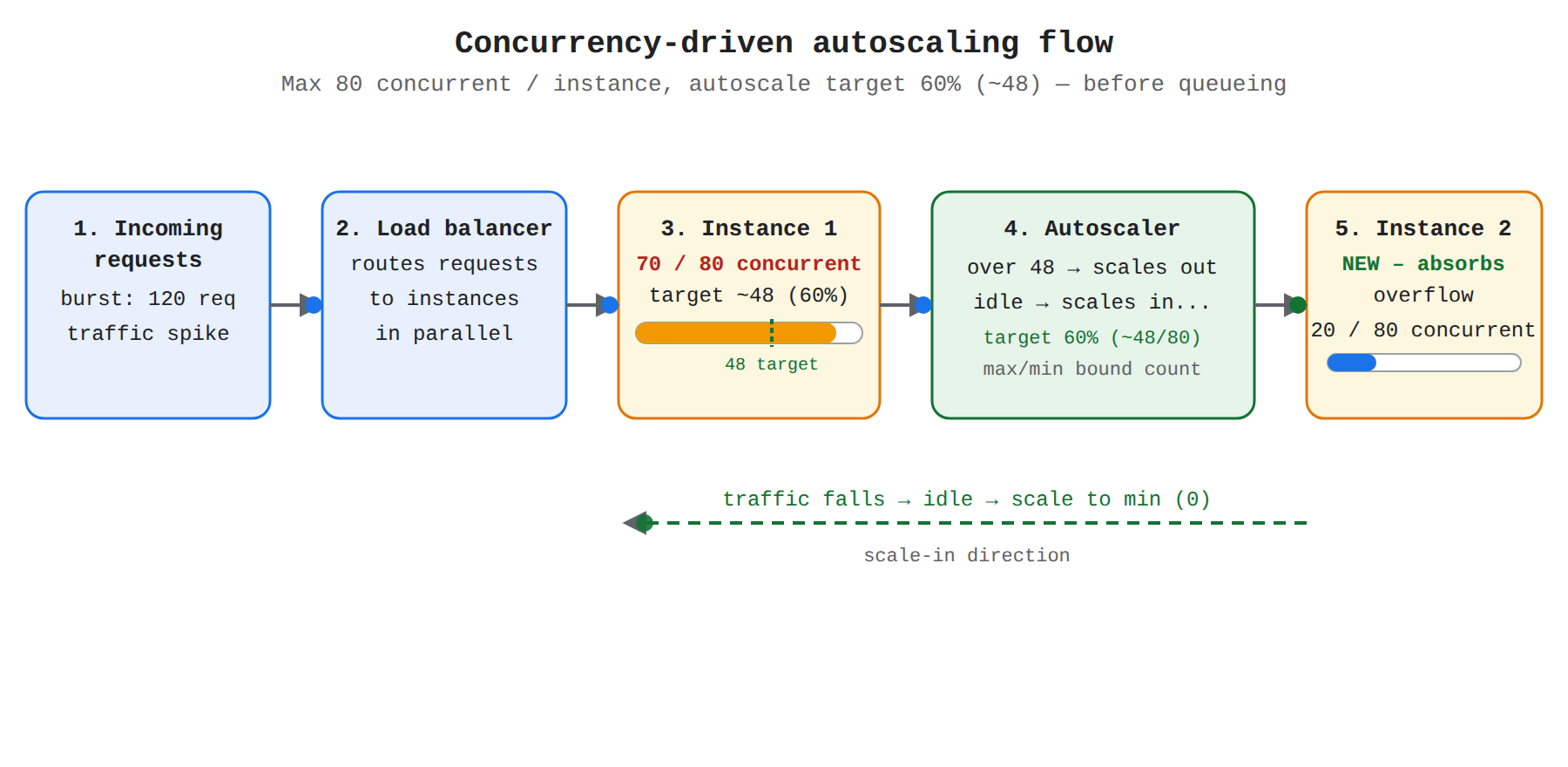
A left-to-right process flow from incoming requests through the load balancer to Cloud Run instances; when Instance 1 exceeds the 60 percent concurrency target of about 48 of 80 requests, the autoscaler starts Instance 2, and idle instances scale back in.
- Maximum concurrent requests per instance (
template.maxInstanceRequestConcurrency) - Maximum and minimum instance counts (
scaling.max_instance_countandscaling.min_instance_count) - Custom target utilization for CPU and concurrency (
template.scaling.cpuUtilizationandtemplate.scaling.concurrencyUtilization)
When concurrent requests or CPU load approach the configured target, traffic flows from the load balancer to existing instances and the autoscaler provisions new instances in parallel. Cloud Run autoscales before requests start queueing, so latency spikes are avoided when capacity is sufficient. If latency still spikes, lowering maximum concurrency causes faster scale-out because each instance accepts fewer simultaneous requests.
| Trigger | What it measures | Default target |
|---|---|---|
| CPU utilization | Average CPU load on active instances during request processing | About 60% CPU utilization |
| Concurrency utilization | Concurrent requests per instance as a share of maximum concurrency | About 60% of maximum concurrent requests per instance |
The default maximum concurrency in Cloud Run is 80 simultaneous requests per instance. By default the autoscaler tries to keep each instance at about 60% of that limit, which is about 48 concurrent requests for the default setting. Setting a custom concurrency utilization value defines the target throughput that triggers a scale-up event.
Exam tip: Scaling from zero requires an incoming request, and scaling to zero requires that no instance is processing a request — CPU falling to low levels alone does not trigger scale-to-zero.
Idle Instances, Cold Starts, and Billing
An idle instance in Cloud Run is an instance that remains alive after its last request but is not currently processing traffic. Under request-based billing, CPU is allocated only during request processing and is throttled during idle time, although the instance can remain alive for up to 15 minutes after the last request. Under instance-based billing, CPU remains allocated outside of request processing, which supports background threads and work between requests.
Cloud Run has no separate minimum or maximum idle-instance pool. To keep containers warm and ready for immediate traffic and reduce cold starts, use scaling.min_instance_count to keep a specified number of instances always running. A new request that arrives when no instances are running experiences a cold start while Cloud Run provisions an instance, so services sensitive to startup delay often keep minimum instances greater than zero.
Monitoring Scaling and Instance Limits
Instance provisioning in Cloud Run is observed through the Cloud Monitoring Instance Count metric, which shows how many container instances are running for each revision. When traffic rises, the instance count rises as new instances are created; when traffic falls, the count falls as idle instances are terminated. Traffic splits across multiple revisions and new revision deployments can make the total service instance count temporarily exceed the per-revision maximum, which is also visible in Instance Count.
The maximum instances setting caps how many instances a revision can create in parallel for cost control and to protect downstream dependencies such as databases. When demand exceeds that cap, incoming requests pend in a queue for up to 3.5 times the average container startup time or 10 seconds, whichever is greater. During that window the queued request waits for an instance to finish processing and become available, and if no instance becomes available the request fails with a 429 error code.
Key Facts
- Cloud Run defaults to a maximum concurrency of 80 requests per instance and autoscales to keep instances at about 60% CPU utilization and about 60% of maximum concurrency.
- Request-based billing throttles CPU to zero when no request is active, while instance-based billing keeps CPU allocated for the full instance lifecycle including idle time.
- Cloud Run minimum instances default to 0 for scale-to-zero and maximum instances default to 100 per revision to cap cost and protect downstream dependencies.
- When demand exceeds the maximum instances cap, requests wait in a pending queue for up to 3.5 times the average startup time or 10 seconds, then fail with a 429 error if no instance becomes available.
Frequently Asked Questions
What is the difference between request-based billing and instance-based billing in Cloud Run?
Request-based billing allocates CPU to all containers in an instance only while at least one request is being processed and throttles CPU to zero when the instance is idle, while instance-based billing allocates CPU for the entire life of the instance including idle time between requests and the 10-second shutdown period after a SIGTERM signal. Use request-based billing when the workload only does work during requests and can scale to zero for lowest cost, and use instance-based billing when the workload does background work between requests or uses minimum instances that must stay warm and ready.
When should I configure minimum instances greater than zero for a Cloud Run service?
Configure minimum instances greater than zero when low latency matters more than saving cost because the specified number of containers stays running and ready to receive requests without waiting for a new container to start. The default minimum is zero, which allows scale-to-zero for lowest cost but requires a new instance to start after an incoming request arrives, causing a cold start delay.
What happens to incoming requests in Cloud Run when demand exceeds the maximum instances limit?
Incoming requests wait in a pending queue for up to 3.5 times the average container startup time or 10 seconds, whichever is greater, while waiting for an existing instance to finish its current work and become available. If no instance becomes available in time, the request fails with a 429 error code. The default maximum is 100 instances per revision and the limit also protects downstream dependencies such as a database from unlimited load.
How does the maximum concurrency setting affect scaling, latency, and cost in Cloud Run?
Maximum concurrency is the hard cap on simultaneous requests per instance with a default of 80, and the autoscaler by default tries to keep instances at about 60 percent of that limit, or about 48 concurrent requests, adding instances before requests begin to queue. A lower concurrency value causes faster scale-out because each instance fills up sooner, which can reduce latency but creates more instances and higher cost, while a higher value packs more requests onto fewer instances, which can lower cost but may increase latency or overload the container.
Sample Question
An organization is hosting a latency-sensitive API on Cloud Run. During periods of zero incoming traffic, the service currently scales down to zero instances. As a result, the first incoming requests experience noticeable delay due to cold start initialization. At the same time, the finance team requires strict guardrails to prevent runaway compute costs during unexpected traffic surges.
Which autoscaling configuration should you implement to meet these requirements?
How learners score on this domain
Last updated