Fundamental
Prepare and test your skills

Fundamental
Prepare and test your skills
Switching Kubeconfig Contexts and Checking Node Health
Free sample question with answers and detailed explanation below. The Associate Cloud Engineer practice bank has an additional 2,014 practice questions.Try 10 free realistic questions: instant score, no credit card, and no account required.
You manage two Google Kubernetes Engine (GKE) clusters within your project: staging-cluster and prod-cluster. Your local kubeconfig file contains the credentials and contexts for both clusters. You are currently targeting staging-cluster, but you must switch your active CLI environment to prod-cluster and verify cluster connectivity and authorization by inspecting the health and status of all worker nodes.
Which sequence of kubectl commands should you run?
Explanations
Run kubectl config get-contexts to switch the active context, and then run kubectl describe cluster to check node readiness and status.
Run kubectl config get-contexts to switch the active context, and then run kubectl describe cluster to check node readiness and status.
What kubectl config get-contexts and kubectl describe cluster do
The command kubectl config get-contexts lists all configured contexts recorded in the kubeconfig file, displaying their cluster, user, and namespace associations. When supplied with a context name, it filters the display to that single entry. The command kubectl describe cluster is invalid syntax because cluster is not a standard Kubernetes resource type recognized by kubectl describe.
Why it doesn't meet the requirement
- Fails to activate the context:
kubectl config get-contextsonly prints configuration metadata to standard output; it does not set or modify the active context. - Invalid diagnostic command: Running
kubectl describe clusterresults in an error (error: the server doesn't have a resource type "cluster"). To inspect GKE cluster-level infrastructure, one must usegcloud container clusters describeor inspect individual nodes viakubectl describe nodes.
Key characteristics and limitations
- Read-only metadata inspection:
get-contextshelps administrators view available connection endpoints and identify the active context marked with an asterisk (*). - Kubernetes resource hierarchy: In Kubernetes, worker machines are represented as
Nodeobjects (nodesorno), notclusterobjects.
This answer would be correct if
You wanted to review the configuration details of a specific context in your local kubeconfig file without altering your active session.
Run kubectl config current-context to switch the active context, and then run kubectl get namespaces to check node readiness and status.
Run kubectl config current-context to switch the active context, and then run kubectl get namespaces to check node readiness and status.
What kubectl config current-context and kubectl get namespaces do
The command kubectl config current-context is a read-only command that displays the name of the currently active context from your kubeconfig file. It does not accept a context name as an argument to switch targets. The command kubectl get namespaces queries the cluster API server for virtual cluster partitions (namespaces).
Why it doesn't meet the requirement
- Invalid context switching syntax: Passing an argument to
kubectl config current-contextdoes not change the context; it either ignores the argument or returns an error depending on the CLI version. - Fails to inspect node status:
kubectl get namespaceslists logical namespace boundaries (e.g.,default,kube-system). It provides zero information regarding underlying worker node health, readiness, or infrastructure capacity.
Key characteristics and limitations
- Display-only utility:
current-contextis used strictly to check which cluster context is currently active. - Resource mismatch: Inspecting namespaces verifies general cluster connectivity and namespace-level authorization, but completely bypasses node-level inspection.
This answer would be correct if
You needed to print the name of your current active cluster to the terminal and list the logical workload partitions configured in that cluster.
Run kubectl config set-cluster to switch the active context, and then run kubectl top nodes to check node readiness and status.
Run kubectl config set-cluster to switch the active context, and then run kubectl top nodes to check node readiness and status.
What kubectl config set-cluster and kubectl top nodes do
The command kubectl config set-cluster is used to create or modify the endpoint URL and certificate authority data of a specific cluster entry inside the kubeconfig file. It does not select or switch the active target context. The command kubectl top nodes queries the Kubernetes Metrics Server to display real-time CPU and memory resource consumption across nodes.
Why it doesn't meet the requirement
- Fails to switch context:
kubectl config set-clusteredits cluster attributes rather than changing the current-context pointer. The active target remains set tostaging-cluster. - Fails to show node readiness:
kubectl top nodesreports resource utilization (cores and bytes), not node lifecycle states or conditions (such asReadyorDiskPressure). Furthermore, if Metrics Server is not installed or initializing,kubectl top nodeswill return an error even if the cluster and nodes are fully operational.
Key characteristics and limitations
- Modifies definitions:
set-clusterexpects parameters like--serveror--certificate-authorityto configure connection endpoints. - Metric dependency:
kubectl toprelies strictly on the aggregated Metrics API (metrics.k8s.io), making it a performance monitoring tool rather than a connectivity and node readiness diagnostic.
This answer would be correct if
The goal were to update the control plane API server IP address in the configuration file and then monitor the CPU and memory utilization of existing nodes rather than verify context switching and basic node health.
Run kubectl config use-context to switch the active context, and then run kubectl get nodes to check node readiness and status.
Run kubectl config use-context to switch the active context, and then run kubectl get nodes to check node readiness and status.
What kubectl config use-context and kubectl get nodes are
The command kubectl config use-context updates the current-context entry in your local kubeconfig file (~/.kube/config). A context in Kubernetes bundles a specific cluster definition, user credential, and optional default namespace into a single named target. The command kubectl get nodes queries the Kubernetes API server for the list of registered worker nodes in the active cluster, returning their operational state, roles, age, and Kubernetes version.
Switch Context to prod-cluster, Then Verify Nodes
Process Flow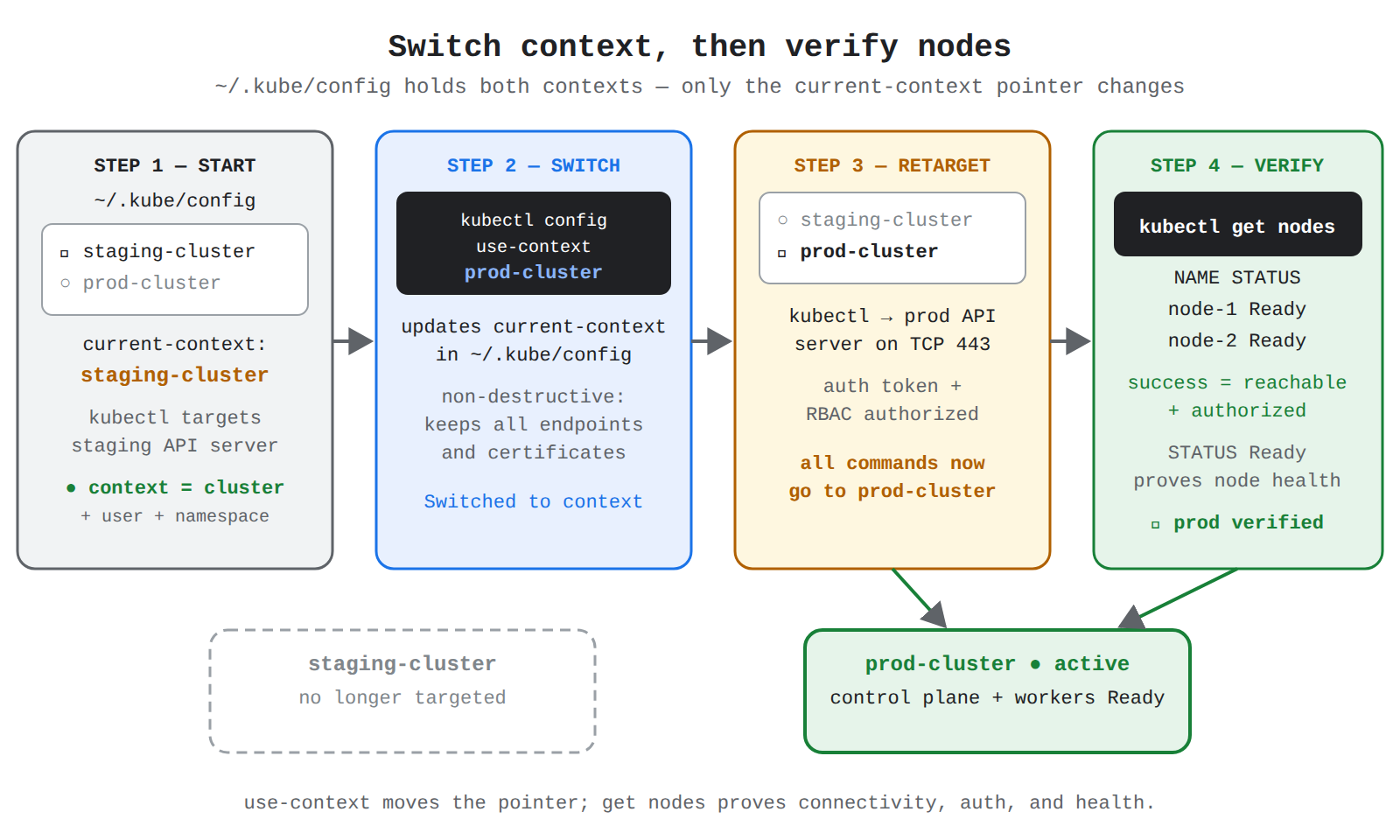
How it meets the requirements
- Switching contexts: Executing
kubectl config use-contextimmediately changes the target cluster without modifying or deleting credentials for other clusters. - Verifying connectivity and authorization: Running
kubectl get nodesmakes an authenticated API call to the cluster control plane. A successful response confirms network connectivity, valid authentication tokens, and sufficient Role-Based Access Control (RBAC) permissions to read cluster-level infrastructure resources. - Inspecting node status: The output explicitly displays the STATUS column (such as
ReadyorNotReady), fulfilling the verification requirement.
Key advantages and capabilities
- Seamless multi-cluster switching: Allows quick transitions between environments (e.g., development, staging, production) within a single CLI terminal session.
- End-to-end connectivity check: Verifies the full authentication lifecycle, including the GCP authentication plugin (
gke-gcloud-auth-plugin) refreshing OAuth tokens. - Diagnostic validation: Identifies unreachable API endpoints, expired credentials, or missing IAM permissions immediately before deploying workloads.
- Non-destructive configuration: Changes only the local pointer (
current-context), preserving all existing cluster endpoints and certificates.
Why this is optimal
This sequence directly uses native kubectl configuration subcommands to select the desired target and executes the standard diagnostic resource query to inspect node-level health in a single, standard operational workflow.
Try 10 interactive questions like this one, free
Answer them yourself and get your score the moment you finish. No account needed.
Full access includes
- 2,014 practice questions across all 4 exam domains
- Every answer explained: why it is right, and why the others are not
- Scout, an AI tutor that answers your follow-up questions
- Readiness tracking by domain, so you know when to book the exam
Related free sample questions
Keep the momentum going with these hand-picked practice scenarios
FundamentalAssociate Cloud Engineer
gcloud Container Clusters Get-Credentials
Installing and configuring the command-line interface (CLI) for Kubernetes (kubectl)
FundamentalAssociate Cloud Engineer
gcloud Components Install Kubectl
Installing and configuring the command-line interface (CLI) for Kubernetes (kubectl)
FundamentalAssociate Cloud Engineer
OS Login Ignores Metadata SSH Keys
Configuring OS Login
FundamentalAssociate Cloud Engineer
Spot VMs with Custom Machine Types
Using Spot VM instances and custom machine types
FundamentalAssociate Cloud Engineer
Ops Agent Startup Script Automation
Configuring and deploying Ops Agent
AdvancedProfessional Cloud Network Engineer
CDN-Cache-Control vs Cache-Control TTL
Setting up Cloud CDN for supported origins (e.g., managed instance groups, Cloud Storage buckets, and Cloud Run).
Last updated