Fundamental
Prepare and test your skills

Fundamental
Prepare and test your skills
Least Privilege Roles for Log Based Alerts
Free sample question with answers and detailed explanation below. The Associate Cloud Engineer practice bank has an additional 2,014 practice questions.Try 10 free realistic questions: instant score, no credit card, and no account required.
Your organization wants to monitor service-impacting health events and disruptions across its Google Cloud projects. A site reliability engineer has already been granted the Logs Viewer (roles/logging.viewer) role to view incoming log events, but they must now configure proactive notifications. Specifically, the engineer needs to:
- Create log-based alerting policies for health and disruption events
- Define the associated notification rules to match relevant log entries
- Configure new email notification channels in Cloud Monitoring
Which set of predefined Identity and Access Management (IAM) roles should you grant to the engineer to meet these requirements using the principle of least privilege?
Explanations
Monitoring AlertPolicy Editor (roles/monitoring.alertPolicyEditor), Monitoring NotificationChannel Editor (roles/monitoring.notificationChannelEditor), and Logs Configuration Writer (roles/logging.configWriter)
Monitoring AlertPolicy Editor (roles/monitoring.alertPolicyEditor), Monitoring NotificationChannel Editor (roles/monitoring.notificationChannelEditor), and Logs Configuration Writer (roles/logging.configWriter)
What the Predefined Alerting and Monitoring Roles Are
In Google Cloud, receiving real-time proactive notifications for service disruptions and logged system events requires combining capabilities across Cloud Logging and Cloud Monitoring. Predefined Identity and Access Management (IAM) roles provide targeted sets of permissions that allow engineers to create and manage alerting pipelines while adhering to the principle of least privilege.
How It Meets the Requirements
To establish end-to-end proactive alerting for service-impacting events, three distinct operational actions must be performed:
- Creating alerting policies: The Monitoring AlertPolicy Editor (
roles/monitoring.alertPolicyEditor) role grants themonitoring.alertPolicies.createpermission, allowing the engineer to define alert conditions, thresholds, and triggers. - Configuring delivery targets: The Monitoring NotificationChannel Editor (
roles/monitoring.notificationChannelEditor) role grants themonitoring.notificationChannels.createpermission, enabling the creation and updating of notification endpoints such as email, SMS, PagerDuty, or Webhooks. - Matching incoming log entries: The Logs Configuration Writer (
roles/logging.configWriter) role grants thelogging.notificationRules.createpermission, allowing the engineer to write the necessary notification rules that intercept log entries generated during service incidents.
Least-Privilege Roles for Log-Based Alerts
Comparison Matrix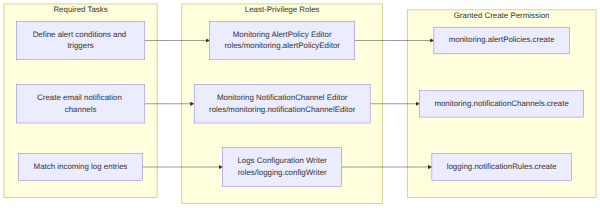
Key Advantages and Capabilities
- Strict Least Privilege: Provides only the essential permissions needed to create alert policies and channels without exposing broader administrative privileges.
- Granular Control: Isolates alerting configuration from metric creation and general log management.
- Seamless Cloud Monitoring Integration: Pairs alerting rules directly with notification channels to guarantee real-time delivery.
- Audit Compliance: Enforces role separation between viewing log events and altering operational monitoring rules.
Why This Is Optimal
Granting these three specific predefined roles is the optimal strategy because it directly supplies the required permissions (monitoring.alertPolicies.create, monitoring.notificationChannels.create, and logging.notificationRules.create) without granting broad, over-privileged roles such as Project Editor or Logging Admin. This ensures that the site reliability engineer can configure alerting policies while protecting the cloud environment against unintended configuration changes.
Data Processing Controls Resource Admin (roles/dataprocessing.admin), Monitoring NotificationChannel Viewer (roles/monitoring.notificationChannelViewer), and Monitoring AlertPolicy Viewer (roles/monitoring.alertPolicyViewer)
Data Processing Controls Resource Admin (roles/dataprocessing.admin), Monitoring NotificationChannel Viewer (roles/monitoring.notificationChannelViewer), and Monitoring AlertPolicy Viewer (roles/monitoring.alertPolicyViewer)
What These Roles Do
The Data Processing Controls Resource Admin (roles/dataprocessing.admin) role administers controls within the Transparency and Control Center. The Monitoring NotificationChannel Viewer (roles/monitoring.notificationChannelViewer) and Monitoring AlertPolicy Viewer (roles/monitoring.alertPolicyViewer) roles grant read-only visibility into existing notification channels and alerting policies in Cloud Monitoring.
Why It Doesn't Meet the Requirement
- Irrelevant Domain: Data Processing Controls Resource Admin manages data processing settings and compliance controls, which are completely unrelated to system health monitoring or alerting.
- Viewer-Only Privileges: Monitoring AlertPolicy Viewer and Monitoring NotificationChannel Viewer only permit reading existing configurations; they cannot create new alerting policies or channels.
- Missing Log Rule Permissions: None of these roles include
logging.notificationRules.createorlogging.configWriterpermissions necessary to connect log events to alerts.
Key Characteristics and Limitations
- Focused on Governance: Data processing roles govern regulatory data processing controls rather than infrastructure health.
- Lacks Write Capabilities: Read-only monitoring roles prevent the creation of new alert policies or communication channels.
- Inability to Trigger Alerts: Without editor permissions, automated notifications for real-time incidents cannot be configured.
This Answer Would Be Correct If
This selection would be correct if an organization required a data governance compliance officer to audit data processing settings while simultaneously auditing existing alerting policies and notification channel configurations.
Additional Context
When configuring proactive alerting, viewing channels is insufficient; the principal must possess editor-level roles such as Monitoring NotificationChannel Editor to configure new notification endpoints.
Monitoring Viewer (roles/monitoring.viewer), Logs Viewer (roles/logging.viewer), and Maintenance API Viewer (roles/maintenance.viewer)
Monitoring Viewer (roles/monitoring.viewer), Logs Viewer (roles/logging.viewer), and Maintenance API Viewer (roles/maintenance.viewer)
What the Viewer Roles Do
The Monitoring Viewer (roles/monitoring.viewer), Logs Viewer (roles/logging.viewer), and Maintenance API Viewer (roles/maintenance.viewer) roles are read-only predefined IAM roles. Monitoring Viewer grants permissions such as monitoring.timeSeries.list to view dashboards and metrics, Logs Viewer allows reading log records, and Maintenance API Viewer allows inspecting scheduled or ongoing infrastructure maintenance events.
Why It Doesn't Meet the Requirement
- No Create Permissions: These roles are strictly view-only and lack the
monitoring.alertPolicies.createpermission needed to build alerting policies. - Cannot Configure Notification Endpoints: None of these roles grant
monitoring.notificationChannels.create, preventing the engineer from specifying where alerts should be sent. - Cannot Write Notification Rules: These roles lack
logging.notificationRules.create, making it impossible to match incoming service health event logs to alerting policies.
Key Characteristics and Limitations
- Read-Only Scope: Designed exclusively for viewing existing metrics, time series data, and maintenance schedules.
- Prevents Configuration Changes: Blocks any creation or modification of alerting rules or dashboards.
- Duplicate Permissions: The engineer was already granted Logs Viewer, so re-granting it provides no new operational capability.
This Answer Would Be Correct If
This set of roles would be appropriate for an auditor or tier-1 support analyst whose sole responsibility is to view real-time system dashboards, inspect maintenance events, and review incoming logs without modifying any alerting rules.
Additional Context
While the Logs Viewer and Maintenance API Viewer roles are helpful for viewing health data and service disruptions, configuring proactive alerts requires editor-level privileges within Cloud Monitoring and Cloud Logging.
Logging Admin (roles/logging.admin), Project Editor (roles/editor), and Service Usage Consumer (roles/serviceusage.serviceUsageConsumer)
Logging Admin (roles/logging.admin), Project Editor (roles/editor), and Service Usage Consumer (roles/serviceusage.serviceUsageConsumer)
What the Logging Admin and Project Editor Roles Do
The Logging Admin (roles/logging.admin) role grants full control over all Cloud Logging features, including deleting log buckets, modifying log sinks, and managing access permissions. The Project Editor (roles/editor) role is a primitive role that provides broad read-write access to virtually all Google Cloud resources in the project, while Service Usage Consumer (roles/serviceusage.serviceUsageConsumer) allows accounts to consume project APIs.
Why It Doesn't Meet the Requirement
- Violates Least Privilege: Assigning Project Editor and Logging Admin grants extensive, unnecessary administrative authority over the entire project, creating severe security risks.
- Fails Operational Best Practices: Primitive roles like Editor do not clearly define functional job boundaries and can bypass critical change governance controls.
- Over-Scattered Permissions: While these broad roles encompass many permissions, they are unnecessarily broad for simply configuring notification rules and channels.
Key Characteristics and Limitations
- Overly permissive access: Logging Admin allows modifying and deleting audit sinks and security configurations.
- Broad project blast radius: Project Editor allows modifying compute instances, network routes, and storage data.
- Lacks fine-grained targeting: Fails to limit the engineer's scope to monitoring policies and notification endpoints.
This Answer Would Be Correct If
This combination would be appropriate if a principal needed overarching administrative rights across the entire project infrastructure, including deploying workloads, administering all logging sinks, and managing project-wide API quotas, rather than specifically setting up alerting policies.
Additional Context
Google Cloud security best practices strongly advise against granting basic roles like Project Editor for operational tasks when specialized predefined roles like Monitoring AlertPolicy Editor exist.
Try 10 interactive questions like this one, free
Answer them yourself and get your score the moment you finish. No account needed.
Full access includes
- 2,014 practice questions across all 4 exam domains
- Every answer explained: why it is right, and why the others are not
- Scout, an AI tutor that answers your follow-up questions
- Readiness tracking by domain, so you know when to book the exam
Related free sample questions
Keep the momentum going with these hand-picked practice scenarios
FundamentalAssociate Cloud Engineer
Personalized Service Health Relevance Status
Viewing the Personalized Service Health dashboard
FundamentalAssociate Cloud Engineer
Personalized Service Health Dashboard
Viewing the Personalized Service Health dashboard
FundamentalAssociate Cloud Engineer
Secret Manager Regional Secrets Data Residency
Confirming availability of products in geographical locations (e.g., regional, global)
FundamentalAssociate Cloud Engineer
Cloud Monitoring Alignment and Aggregation
Creating Cloud Monitoring alerts based on resource metrics
FundamentalAssociate Cloud Engineer
Global External Application Load Balancer
Choosing and deploying load balancers
FundamentalGenerative AI Leader
Imagen Text-to-Image Safety and Watermarking
Imagen
Last updated